Welcome Guest ( Log In | Register )

Outline · [ Standard ] · Linear+

 Maxis Mobile Data Connection Problem

views
     
TStoobad
post Jun 19 2021, 05:04 PM, updated 5y ago

Getting Started
**
Junior Member
291 posts

Joined: Oct 2008


Hello Everyone

Anyone here facing Maxis 4g mobile data shows connected but there is actually no internet?

When I'm out of WiFi coverage area, my phone will automatically switch to Maxis 4g. My line signal is full 4 bar and will also display "4g" which means I'm already connected to Maxis 4g mobile data.

But there's no internet! Can't even use WhatsApp, keep showing connecting, Can't even go into Safari and search or Google anything, can't connect to speedtest app.

I am on Hotlink postpaid and using iPhone X.

My phone is definitely not the issue, because when I was still with Digi two weeks ago there are no issues when switching between WiFi and 4g.

Recently port into Maxis and found out about this issue!
ryansxs
post Jun 19 2021, 05:07 PM

Look at all my stars!!
*******
Senior Member
2,378 posts

Joined: Dec 2005


QUOTE(toobad @ Jun 19 2021, 05:04 PM)
Hello Everyone

Anyone here facing Maxis 4g mobile data shows connected but there is actually no internet?

When I'm out of WiFi coverage area, my phone will automatically switch to Maxis 4g. My line signal is full 4 bar and will also display "4g" which means I'm already connected to Maxis 4g mobile data.

But there's no internet! Can't even use WhatsApp, keep showing connecting, Can't even go into Safari and search or Google anything, can't connect to speedtest app.

I am on Hotlink postpaid and using iPhone X.

My phone is definitely not the issue, because when I was still with Digi two weeks ago there are no issues when switching between WiFi and 4g.

Recently port into Maxis and found out about this issue!
*
restart phone.

or try from other location
TStoobad
post Jun 19 2021, 05:12 PM

Getting Started
**
Junior Member
291 posts

Joined: Oct 2008


QUOTE(ryansxs @ Jun 19 2021, 05:07 PM)
restart phone.

or try from other location
*
So every time want to connect to 4g need to restart the phone?

This is definitely not normal!

I have tried from many different locations, all the same problem....when transitioning from WiFI to mobile data, 4g is showing on my phone but no internet connection.


TStoobad
post Jun 19 2021, 05:14 PM

Getting Started
**
Junior Member
291 posts

Joined: Oct 2008


QUOTE(toobad @ Jun 19 2021, 05:04 PM)
Hello Everyone

Anyone here facing Maxis 4g mobile data shows connected but there is actually no internet?

When I'm out of WiFi coverage area, my phone will automatically switch to Maxis 4g. My line signal is full 4 bar and will also display "4g" which means I'm already connected to Maxis 4g mobile data.

But there's no internet! Can't even use WhatsApp, keep showing connecting, Can't even go into Safari and search or Google anything, can't connect to speedtest app.

I am on Hotlink postpaid and using iPhone X.

My phone is definitely not the issue, because when I was still with Digi two weeks ago there are no issues when switching between WiFi and 4g.

Recently port into Maxis and found out about this issue!
*
Maxis please respond
myeddylim
post Jun 19 2021, 05:17 PM

Getting Started
**
Junior Member
189 posts

Joined: Feb 2009
QUOTE(toobad @ Jun 19 2021, 05:04 PM)
Hello Everyone

Anyone here facing Maxis 4g mobile data shows connected but there is actually no internet?

When I'm out of WiFi coverage area, my phone will automatically switch to Maxis 4g. My line signal is full 4 bar and will also display "4g" which means I'm already connected to Maxis 4g mobile data.

But there's no internet! Can't even use WhatsApp, keep showing connecting, Can't even go into Safari and search or Google anything, can't connect to speedtest app.

I am on Hotlink postpaid and using iPhone X.

My phone is definitely not the issue, because when I was still with Digi two weeks ago there are no issues when switching between WiFi and 4g.

Recently port into Maxis and found out about this issue!
*
which area? puchong? i faced the same issue, ported out already biggrin.gif
NooBiE888
post Jun 19 2021, 05:29 PM

Casual
***
Junior Member
306 posts

Joined: Sep 2007
I also ported out from Hotlink to DIGI

My 2 cent, please port out from Maxis

Reason I ported out : same as what you are facing.

Maxis line has become very bad this year.
fireballs
post Jun 19 2021, 05:29 PM

10101
*******
Senior Member
5,647 posts

Joined: Mar 2012
Try on Android phone?
contoh
post Jun 19 2021, 05:36 PM

Getting Started
**
Junior Member
73 posts

Joined: Jan 2003
QUOTE(toobad @ Jun 19 2021, 05:12 PM)
So every time want to connect to 4g need to restart the phone?

This is definitely not normal!

I have tried from many different locations, all the same problem....when transitioning from WiFI to mobile data, 4g is showing on my phone but no internet connection.
*
No always but most of the time need restart.
Only happen to Maxis
TStoobad
post Jun 19 2021, 05:55 PM

Getting Started
**
Junior Member
291 posts

Joined: Oct 2008


I thought I'm the only one, seems like others are having this issue as well!

Anyone else?

What action can we take, besides port out of course...
terradrive
post Jun 19 2021, 06:29 PM

RRAAAWWRRRRR
******
Senior Member
1,943 posts

Joined: Apr 2005


QUOTE(toobad @ Jun 19 2021, 05:04 PM)
Hello Everyone

Anyone here facing Maxis 4g mobile data shows connected but there is actually no internet?

When I'm out of WiFi coverage area, my phone will automatically switch to Maxis 4g. My line signal is full 4 bar and will also display "4g" which means I'm already connected to Maxis 4g mobile data.

But there's no internet! Can't even use WhatsApp, keep showing connecting, Can't even go into Safari and search or Google anything, can't connect to speedtest app.

I am on Hotlink postpaid and using iPhone X.

My phone is definitely not the issue, because when I was still with Digi two weeks ago there are no issues when switching between WiFi and 4g.

Recently port into Maxis and found out about this issue!
*
i had the exact same problem. My old iphone 6S behaved like that, but recently i bought hotlink sim again to try it on my iphone X, it works fine, works fine on my old iphone 5 too, but 4G wouldn't work on my iphone 6S, turns out the 6S has hardware problems and recently cannot use hotspot via wifi on it anymore. Digi and unifi mobile sim card 4G and 3G worked fine on the iphone 6S.
emilyngsc
post Jul 18 2021, 09:29 PM

Regular
******
Senior Member
1,644 posts

Joined: Dec 2017


Mine postpaid eSim is seriously unable to use touch n go even showing 4G and also safari won’t load anything. WhatsApp also slow nearby Seri Kembangan area.

Maxis customer service asked me to use eSim and now with iPhone 12 Pro also not working. I’ve been using Maxis since I was at aged 13 years old.

This post has been edited by emilyngsc: Jul 18 2021, 09:30 PM
SUSAtlas Destroyer P
post Jul 19 2021, 12:48 AM

New Member
*
Probation
1 posts

Joined: Jul 2021
QUOTE(toobad @ Jun 19 2021, 05:12 PM)
So every time want to connect to 4g need to restart the phone?

This is definitely not normal!

I have tried from many different locations, all the same problem....when transitioning from WiFI to mobile data, 4g is showing on my phone but no internet connection.
*
You can always turn on airplane mode and off .....
And yes it's normal practice, even u call in also this is most likely they'll tell u to do.....
Instead of wasting time call in why not just try the above? Im sure save much time and energy wink.gif
CapKapak
post Jul 20 2021, 09:54 PM

Getting Started
**
Junior Member
240 posts

Joined: Oct 2005
From: Around the World


I am too facing this issue and it has been around since 2019 time frame. I've sent in my iPhone 11 in the past to the service centre thinking that it is a phone issue and to my surprise the service centre advised that they have received many of the same complaint and its no fault of the phone device itself.

There are certainly differences in the network quality especially when it comes to multiple SIMs tied to a single principle number. As an example, Maxis is unable to support VoLTE on those principle numbers that has multiple SIMs, and if you have multi-SIM they are unable to support the Apple Watch. I reckon all these are somewhat related.
TStoobad
post Jul 25 2021, 12:15 PM

Getting Started
**
Junior Member
291 posts

Joined: Oct 2008


QUOTE(Atlas Destroyer @ Jul 19 2021, 12:48 AM)
You can always turn on airplane mode and off .....
And yes it's normal practice, even u call in also this is most likely they'll tell u to do.....
Instead of wasting time call in why not just try the above? Im sure save much time and energy wink.gif
*
This is a temporary solution but is definitely not a normal thing to do, and for some weird reason, it's only happening with Maxis. Previously with Digi did not have this issue at all.

QUOTE(CapKapak @ Jul 20 2021, 09:54 PM)
I am too facing this issue and it has been around since 2019 time frame. I've sent in my iPhone 11 in the past to the service centre thinking that it is a phone issue and to my surprise the service centre advised that they have received many of the same complaint and its no fault of the phone device itself.

There are certainly differences in the network quality especially when it comes to multiple SIMs tied to a single principle number. As an example, Maxis is unable to support VoLTE on those principle numbers that has multiple SIMs, and if you have multi-SIM they are unable to support the Apple Watch. I reckon all these are somewhat related.
*
I suggest making an official complaint to Maxis, get the case ID, if it's still unresolved then make an official complaint to MCMC

https://aduan.skmm.gov.my/


terradrive
post Jul 26 2021, 06:24 PM

RRAAAWWRRRRR
******
Senior Member
1,943 posts

Joined: Apr 2005


sien i kena since 2 days ago, at first no signal at all, then after half day, got 4g+ on my poco, can't browse internet at all, thought my new phone broke. Put the sim into my iphone X, can't work too
put my digi to the poco, worked fine. maxis sien ler

edit: fixed, turns out the internet didn't work because credit expired, even though internet still valid till next mid august sleep.gif

This post has been edited by terradrive: Jul 27 2021, 11:01 PM
CapKapak
post Aug 8 2021, 04:19 PM

Getting Started
**
Junior Member
240 posts

Joined: Oct 2005
From: Around the World


QUOTE(toobad @ Jul 25 2021, 12:15 PM)
This is a temporary solution but is definitely not a normal thing to do, and for some weird reason, it's only happening with Maxis. Previously with Digi did not have this issue at all.
I suggest making an official complaint to Maxis, get the case ID, if it's still unresolved then make an official complaint to MCMC

https://aduan.skmm.gov.my/
*
I've lodged a complain with MCMC in the past for the same issue in 2019 to be exact, they did some improvements which they said it was caused by an Apple software update (can't remember which iOS version). They offered some credit to my account as a show of good will however problem still exist in 2021.

Decided I had enough of this BS and took the next cause of action this week, which was to port out 5 numbers I have under my account including one Maxis Home Fiber.

This post has been edited by CapKapak: Aug 8 2021, 04:19 PM
JobCareer
post Aug 17 2021, 01:05 AM

Getting Started
**
Junior Member
241 posts

Joined: Oct 2011
Mine same issue. Need to wait for around 10 seconds and it will back online. Everytime do online banking will be a big headache for me.
lancelot567
post Sep 14 2021, 03:11 PM

Getting Started
**
Junior Member
60 posts

Joined: Feb 2015


Thanks to this post, thinking of getting a new phone and realize it is Maxis problem.
Seems like best move to other telco

youngwolf2k
post Oct 1 2021, 12:05 PM

Getting Started
**
Junior Member
89 posts

Joined: Mar 2011


QUOTE(CapKapak @ Jul 20 2021, 09:54 PM)
I am too facing this issue and it has been around since 2019 time frame. I've sent in my iPhone 11 in the past to the service centre thinking that it is a phone issue and to my surprise the service centre advised that they have received many of the same complaint and its no fault of the phone device itself.

There are certainly differences in the network quality especially when it comes to multiple SIMs tied to a single principle number. As an example, Maxis is unable to support VoLTE on those principle numbers that has multiple SIMs, and if you have multi-SIM they are unable to support the Apple Watch. I reckon all these are somewhat related.
*
Yes I also faced this issue for quite some time since Q1 2019 (till now!) and surprisingly after starting using MultiSIM on my iPhone XS and X.

So I wonder is the MultiSIM the culprit of the inconsistent data connections to my devices? And VoLTE is still not yet activated for my devices as well sad.gif


anthonygio2077 P
post Oct 2 2021, 01:42 PM

New Member
*
Probation
6 posts

Joined: Sep 2021


Maxis 4G coverage and speed is trash now. Really terrible!!
netbeans
post Oct 3 2021, 10:57 PM

On my way
****
Junior Member
630 posts

Joined: Nov 2009


Noob question. Is eSIM singnal weaker than physical SIM?
Strike Eureka
post Oct 9 2021, 08:34 PM

Getting Started
**
Junior Member
128 posts

Joined: Aug 2021
QUOTE(netbeans @ Oct 3 2021, 10:57 PM)
Noob question. Is eSIM singnal weaker than physical SIM?
*
No, it's the same
Bigproblem
post Oct 13 2021, 09:53 AM

On my way
****
Senior Member
647 posts

Joined: Jul 2014


shit maxis, line problem again.
anyone facing the same?
ahchat
post Oct 25 2021, 02:45 PM

WISE KUCENG
*****
Senior Member
922 posts

Joined: Sep 2010
From: Alor Setar, Kuala Lumpur


already got 2 case ID with maxis, they are checking it now....i make 2 MCMC report, n suddenly they sms me to contact them etc

i gave them a piece of my mind kaw2, now they are following up the case...

checking the issue with details requested like lat/long, which building, location etc
muttly
post Oct 27 2021, 07:28 AM

Getting Started
**
Junior Member
210 posts

Joined: Jul 2006
Something worth trying as it's helped me.

In APN Settings, edit the one in use - should be unet.

Scroll down to APN Protocol and change it to just IPv4 instead of IPv4/IPv6.

Don't forget to save it.

Maxis has a terrible implementation of NAT64 which I think is causing this problem.
JZenith
post Oct 28 2021, 03:11 PM

Look at my stars. owai
*****
Junior Member
704 posts

Joined: Aug 2018
From: Shemalelism


QUOTE(muttly @ Oct 27 2021, 07:28 AM)
Something worth trying as it's helped me.

In APN Settings, edit the one in use - should be unet.

Scroll down to APN Protocol and change it to just IPv4 instead of IPv4/IPv6.

Don't forget to save it.

Maxis has a terrible implementation of NAT64 which I think is causing this problem.
*
thanks for the tips bro, i just switch to ipv4 only and lets see how these few days.
thinking to switch to other telco since maxis connection is so darn expensive and now connection is bad.
lznce2679
post Oct 30 2021, 12:42 AM

Getting Started
**
Junior Member
230 posts

Joined: Apr 2008
From: Somewhr...


QUOTE(muttly @ Oct 27 2021, 07:28 AM)
Something worth trying as it's helped me.

In APN Settings, edit the one in use - should be unet.

Scroll down to APN Protocol and change it to just IPv4 instead of IPv4/IPv6.

Don't forget to save it.

Maxis has a terrible implementation of NAT64 which I think is causing this problem.
*
thanks 4da heads up

i read your reply few days ago..now only opted for ipv4 only.. connection seems ok.

thanks

update: came across this:
https://www.maxis.com.my/en/about-maxis/max...rk-maintenance/

so be prepared..

This post has been edited by lznce2679: Oct 30 2021, 06:34 AM
mydelsol
post Nov 1 2021, 02:18 PM

Malaysian
*******
Senior Member
2,105 posts

Joined: Aug 2005
From: Malaysia


THANKS for this info, much appreciated rclxms.gif thumbup.gif

QUOTE(muttly @ Oct 27 2021, 07:28 AM)
Something worth trying as it's helped me.

In APN Settings, edit the one in use - should be unet.

Scroll down to APN Protocol and change it to just IPv4 instead of IPv4/IPv6.

Don't forget to save it.

Maxis has a terrible implementation of NAT64 which I think is causing this problem.
*
lznce2679
post Nov 1 2021, 07:24 PM

Getting Started
**
Junior Member
230 posts

Joined: Apr 2008
From: Somewhr...


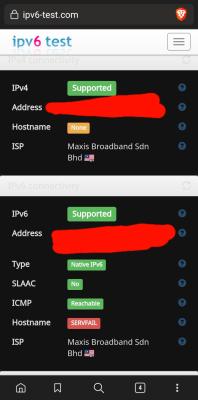
i have to agree..when set ipv4/ipv6.. shows not supported..


Attached thumbnail(s)
Attached Image
muttly
post Nov 2 2021, 02:36 PM

Getting Started
**
Junior Member
210 posts

Joined: Jul 2006
QUOTE(lznce2679 @ Nov 1 2021, 07:24 PM)
i have to agree..when set ipv4/ipv6.. shows not supported..
*
Is your connection more stable now?

I was getting it mostly with Spotify + Waze - not with IPv4 it works perfectly.

The APN option is not available in iPhone unfortunately.
lznce2679
post Nov 2 2021, 07:01 PM

Getting Started
**
Junior Member
230 posts

Joined: Apr 2008
From: Somewhr...


QUOTE(muttly @ Nov 2 2021, 02:36 PM)
Is your connection more stable now?

I was getting it mostly with Spotify + Waze - not with IPv4 it works perfectly.

The APN option is not available in iPhone unfortunately.
*
much stable on ipv4 only.. used to be more stable on ipv4/ipv6

now..dont know what to say..maxis suka hati on off for ipv6


Attached thumbnail(s)
Attached Image
brandonkl
post Nov 5 2021, 09:40 AM

-
*****
Junior Member
994 posts

Joined: May 2013
From: Kuala Lumpur


I had similar issues and then I did this and seems to be resolved now:

Add Maxis 4G (maxis4g) APN and select this APN. Previously, Maxis APN in my phone was Maxis Internet (unet).

You can google on the Maxis 4G APN settings.
tehoice
post Nov 8 2021, 09:52 AM

Look at all my stars!!
*******
Senior Member
5,529 posts

Joined: Oct 2007


i ported in from UMobile to Maxis over the weekend.

And the experience over just 2 days has been terrible so far.

UMobile is so much better in terms of line/data and network connectivity. I used to be a maxis user for many years and network or data has never been an issue, but whyyyyy now cannot even load basic stuff, fb/ig/youtube/searching webpage/google/maps/playstore/BFM radio! it just keeps spinning.

Absolutely no issue when connect to wifi at home, it loads immediately.

Luckily i did not sign up any package or tied to any contract.

Will port out back from maxshit to UM back again.

UM must be wondering why. LOL.
entire
post Nov 8 2021, 09:59 AM

Getting Started
**
Junior Member
122 posts

Joined: Nov 2006
QUOTE(muttly @ Oct 27 2021, 07:28 AM)
Something worth trying as it's helped me.

In APN Settings, edit the one in use - should be unet.

Scroll down to APN Protocol and change it to just IPv4 instead of IPv4/IPv6.

Don't forget to save it.

Maxis has a terrible implementation of NAT64 which I think is causing this problem.
*
will try this, maxis internet now sooo shit, its help me by turning air plane mode and off it back, just to get back internet stable back.
tehoice
post Nov 8 2021, 11:22 AM

Look at all my stars!!
*******
Senior Member
5,529 posts

Joined: Oct 2007


QUOTE(brandonkl @ Nov 5 2021, 09:40 AM)
I had similar issues and then I did this and seems to be resolved now:

Add Maxis 4G (maxis4g) APN and select this APN. Previously, Maxis APN in my phone was Maxis Internet (unet).

You can google on the Maxis 4G APN settings.
*
tested this so far it works well. fingers crossed.

Please add the new APN:
https://www.apnsettings.org/malaysia/maxis-...gs-for-android/


Neo_Y
post Nov 9 2021, 10:00 AM

Getting Started
**
Junior Member
219 posts

Joined: Jul 2008


QUOTE(tehoice @ Nov 8 2021, 11:22 AM)
tested this so far it works well. fingers crossed.

Please add the new APN:
https://www.apnsettings.org/malaysia/maxis-...gs-for-android/
*
What about IOS?

Ever since I change to Iphone13, my 4G data connection becoming a nightmare.

Showing full bar 4G but never deliver, absolutely cannot connect to anything, always need to wait a minute plus then it re connect again. I need to do this practice every time I unlock my phone. mad.gif
tehoice
post Nov 9 2021, 12:11 PM

Look at all my stars!!
*******
Senior Member
5,529 posts

Joined: Oct 2007


QUOTE(Neo_Y @ Nov 9 2021, 10:00 AM)
What about IOS?

Ever since I change to Iphone13, my 4G data connection becoming a nightmare.

Showing full bar 4G but never deliver, absolutely cannot connect to anything, always need to wait a minute plus then it re connect again. I need to do this practice every time I unlock my phone.  mad.gif
*
i'm not too sure about ios though......

maybe can complain to Maxis customer service and ask when can they recover the service? this has been going on for months already right....?

actually reason why i change to maxis is to be a customer first, then sign up for a device plan some time next year.

if tied down with a 24 month contract with such data service, sei lo like that.................

if this continue until the end of this year, i'm going to port back to UM already. terrible to be paying premium price for shitty service to be honest.
Angry Clerk
post Nov 9 2021, 12:42 PM

Getting Started
**
Junior Member
253 posts

Joined: Jul 2021
QUOTE(tehoice @ Nov 8 2021, 09:52 AM)
i ported in from UMobile to Maxis over the weekend.

And the experience over just 2 days has been terrible so far.

UMobile is so much better in terms of line/data and network connectivity. I used to be a maxis user for many years and network or data has never been an issue, but whyyyyy now cannot even load basic stuff, fb/ig/youtube/searching webpage/google/maps/playstore/BFM radio! it just keeps spinning.

Absolutely no issue when connect to wifi at home, it loads immediately.

Luckily i did not sign up any package or tied to any contract.

Will port out back from maxshit to UM back again.

UM must be wondering why. LOL.
*
chnGe to 3G. it helped me to improve
tehoice
post Nov 9 2021, 01:09 PM

Look at all my stars!!
*******
Senior Member
5,529 posts

Joined: Oct 2007


QUOTE(Angry Clerk @ Nov 9 2021, 12:42 PM)
chnGe to 3G. it helped me  to improve
*
didnt they phased out 3G already?
@li
post Nov 9 2021, 01:42 PM

Getting Started
**
Junior Member
64 posts

Joined: Nov 2004


i port in to maxis for just 2 weeks. encounter numerous call and internet issue. now with umobile and so far so good. seri kembangan/putrajaya area.
Angry Clerk
post Nov 9 2021, 01:44 PM

Getting Started
**
Junior Member
253 posts

Joined: Jul 2021
QUOTE(tehoice @ Nov 9 2021, 01:09 PM)
didnt they phased out 3G already?
*
until this year end.. sometimes 4G fail, I switch 3G.. still can use as normal..
incredibless
post Nov 9 2021, 04:14 PM

Casual
***
Junior Member
437 posts

Joined: Jun 2012
QUOTE(@li @ Nov 9 2021, 01:42 PM)
i port in to maxis for just 2 weeks. encounter numerous call and internet issue. now with umobile and so far so good. seri kembangan/putrajaya area.
*
same here... used maxis for 7years and port to umobile so far 5 months. Overall not bad. Suprised that umobile at certain area perform better than x2 price of Maxis where weak signal.
tehoice
post Nov 9 2021, 06:18 PM

Look at all my stars!!
*******
Senior Member
5,529 posts

Joined: Oct 2007


QUOTE(incredibless @ Nov 9 2021, 04:14 PM)
same here... used maxis for 7years and port to umobile so far 5 months. Overall not bad. Suprised that umobile at certain area perform better than x2 price of Maxis where weak signal.
*
ppl have been condemning UM like UM scam all their hard earned life savings.

If you're primarily based in Klang Valley area then i really don't think there's much you need to worry about.

in fact, I'd think UM perform better than Maxis in certain areas and it's almost as twice as cheaper than maxis.

now i really kennot justify paying so called premium telco, paying premium prices but getting sub-par service ady. sweat.gif
@li
post Nov 11 2021, 10:44 AM

Getting Started
**
Junior Member
64 posts

Joined: Nov 2004


QUOTE(incredibless @ Nov 9 2021, 04:14 PM)
same here... used maxis for 7years and port to umobile so far 5 months. Overall not bad. Suprised that umobile at certain area perform better than x2 price of Maxis where weak signal.
*
indeed. in my situation umobile perform better than digi and maxis based on my experience. and their network coverage map also very helpful and accurate.

This post has been edited by @li: Nov 11 2021, 10:47 AM
SUSEvolving Skies
post Jan 5 2022, 02:08 AM

Getting Started
**
Junior Member
57 posts

Joined: Dec 2021
Try to turn on airplane mode and off again.
SUSEvolving Skies
post Jan 5 2022, 02:14 AM

Getting Started
**
Junior Member
57 posts

Joined: Dec 2021
QUOTE(muttly @ Oct 27 2021, 07:28 AM)
Something worth trying as it's helped me.

In APN Settings, edit the one in use - should be unet.

Scroll down to APN Protocol and change it to just IPv4 instead of IPv4/IPv6.

Don't forget to save it.

Maxis has a terrible implementation of NAT64 which I think is causing this problem.
*
nice tips. Now is much smoother.
emilyngsc
post Jan 20 2022, 11:57 PM

Regular
******
Senior Member
1,644 posts

Joined: Dec 2017


QUOTE(@li @ Nov 9 2021, 01:42 PM)
i port in to maxis for just 2 weeks. encounter numerous call and internet issue. now with umobile and so far so good. seri kembangan/putrajaya area.
*
Putrajaya and Seri Kembangan Maxis internet is really not stable and sluggish.
wcchang
post Jan 28 2022, 10:51 AM

New Member
*
Junior Member
34 posts

Joined: Jan 2011


Have to admit till date, Maxis 4G is not performing stably, many times I have to turn on and off my airplane mode for my internet connection to work properly...
Is it really just a rare problem and happening to a few of us? Or is it actually getting quite common that the 4G quality is getting worse...?
Singh93
post Jan 28 2022, 01:19 PM

Getting Started
**
Junior Member
224 posts

Joined: Sep 2019


QUOTE(wcchang @ Jan 28 2022, 11:51 AM)
Have to admit till date, Maxis 4G is not performing stably, many times I have to turn on and off my airplane mode for my internet connection to work properly...
Is it really just a rare problem and happening to a few of us? Or is it actually getting quite common that the 4G quality is getting worse...?
*
I see it improved lately, but call drop issue and poor 4g stability still persist at certain areas
lwk523
post Feb 5 2022, 02:57 PM

Premium Q Trader
******
Senior Member
1,040 posts

Joined: Mar 2006


Same here ..maxis please do somethings
lwk523
post Feb 5 2022, 02:58 PM

Premium Q Trader
******
Senior Member
1,040 posts

Joined: Mar 2006


QUOTE(muttly @ Oct 27 2021, 07:28 AM)
Something worth trying as it's helped me.

In APN Settings, edit the one in use - should be unet.

Scroll down to APN Protocol and change it to just IPv4 instead of IPv4/IPv6.

Don't forget to save it.

Maxis has a terrible implementation of NAT64 which I think is causing this problem.
*
But IOS dont allowed change the APN setting.
muttly
post Feb 7 2022, 12:17 AM

Getting Started
**
Junior Member
210 posts

Joined: Jul 2006
My issue has been solved after complaining to MCMC.

They reset my profile, something abt a public IP.

It’s working fine now
bootmod3
post Feb 18 2022, 02:18 PM

Getting Started
**
Junior Member
65 posts

Joined: Feb 2022
I have this issue intermittently. Sometimes I have to turn on and off my airplane mode to just get it working again.
voc8888
post Feb 21 2022, 04:16 PM

Getting Started
**
Junior Member
124 posts

Joined: Nov 2021
Maxis service has been deteriorated day after day mad.gif ranting.gif vmad.gif
belfong
post Feb 22 2022, 09:50 PM

click clacking
*****
Senior Member
864 posts

Joined: Jan 2003
From: malaysia


I do get this connection issue around Bandar Utama. Touch N Go, Parking app inside Touch N Go and Grab Pay didn't work. Strangely WhatsApp works. Safari is slow. I had to turn on Airplane Mode and off to "renew" maxis 4G connection. Then, Touc N Go, Grab Pay and Safari works. It's almost as if there was no 4G connectivity even though my iPhone tells me there's 4G connectivity. Is this issue more prevalent to us because 3G was sunset? Perhaps, previously, our phone will switch to 3G and everything was fine (or, we did not notice anything wrong). Without 3G, this fake 4G appears confused.gif Weird.

This post has been edited by belfong: Feb 22 2022, 09:51 PM
wcchang
post Feb 23 2022, 11:01 PM

New Member
*
Junior Member
34 posts

Joined: Jan 2011


QUOTE(belfong @ Feb 22 2022, 09:50 PM)
I do get this connection issue around Bandar Utama. Touch N Go, Parking app inside Touch N Go and Grab Pay didn't work. Strangely WhatsApp works. Safari is slow. I had to turn on Airplane Mode and off to "renew" maxis 4G connection. Then, Touc N Go, Grab Pay and Safari works. It's almost as if there was no 4G connectivity even though my iPhone tells me there's 4G connectivity. Is this issue more prevalent to us because 3G was sunset? Perhaps, previously, our phone will switch to 3G and everything was fine (or, we did not notice anything wrong). Without 3G, this fake 4G appears  :confused: Weird.
*
Weird thing is this never happen to me when I was in Taiwan, Thailand, Indonesia, when there is 4G there, it’s literally good 4G. No need airplane mode etc to restart it…
kokomon
post Feb 24 2022, 02:38 PM

Getting Started
**
Junior Member
168 posts

Joined: Jan 2005
QUOTE(belfong @ Feb 22 2022, 09:50 PM)
I do get this connection issue around Bandar Utama. Touch N Go, Parking app inside Touch N Go and Grab Pay didn't work. Strangely WhatsApp works. Safari is slow. I had to turn on Airplane Mode and off to "renew" maxis 4G connection. Then, Touc N Go, Grab Pay and Safari works. It's almost as if there was no 4G connectivity even though my iPhone tells me there's 4G connectivity. Is this issue more prevalent to us because 3G was sunset? Perhaps, previously, our phone will switch to 3G and everything was fine (or, we did not notice anything wrong). Without 3G, this fake 4G appears  confused.gif Weird.
*
I have same experience at Bandar Menjalara. As usual, getting the standard troubleshooting steps from Maxis CS like reboot phone, clear network settings etc which doesn't solve the root cause. Swapping to my SIM2 using Unifi mobile then immediately all apps started working again.

I am using Note 10+ btw.
ssslayerrr
post Mar 1 2022, 11:12 AM

Enthusiast
*****
Senior Member
805 posts

Joined: Dec 2004


I have the same problem, months. I tried to tell them, they said, there is no network problem.
paanz_rulez
post Mar 15 2022, 12:48 AM

Getting Started
**
Junior Member
66 posts

Joined: Nov 2006
QUOTE(muttly @ Feb 7 2022, 12:17 AM)
My issue has been solved after complaining to MCMC.

They reset my profile, something abt a public IP.

It’s working fine now
*
how do we request them to reset our profile.
just chat to them via support will do?
muttly
post Mar 15 2022, 03:29 PM

Getting Started
**
Junior Member
210 posts

Joined: Jul 2006
QUOTE(paanz_rulez @ Mar 15 2022, 12:48 AM)
how do we request them to reset our profile.
just chat to them via support will do?
*
Yep began with support ticket - just force them to reset your profile and remove Public IP.
Mavik
post Apr 19 2022, 03:16 PM

Patience is a virtue
Group Icon
Elite
7,826 posts

Joined: Jan 2003


Damn, I facing the exact same thing as well as you all here. Really testing my patience, makes me want to move to a different telco
wdarke
post Apr 27 2022, 10:31 PM

Casual
***
Junior Member
376 posts

Joined: Jan 2003
Any tried and tested fix?
AhBoy~~
post May 16 2022, 03:07 PM

Regular
******
Senior Member
1,149 posts

Joined: Feb 2009


QUOTE(Mavik @ Apr 19 2022, 03:16 PM)
Damn, I facing the exact same thing as well as you all here. Really testing my patience, makes me want to move to a different telco
*
have you move to another telco, same issue, notice since early this year..

frus me alot when I try to pay using ewallet, order food, google stuff when on the move...

a few months now, doesn't looks to me maxis is fixing anything yet my family lines all in digi paying cheaper price with less problem
jianwei87
post May 20 2022, 09:55 PM

Casual
***
Junior Member
481 posts

Joined: Jan 2007
QUOTE(muttly @ Oct 27 2021, 07:28 AM)
Something worth trying as it's helped me.

In APN Settings, edit the one in use - should be unet.

Scroll down to APN Protocol and change it to just IPv4 instead of IPv4/IPv6.

Don't forget to save it.

Maxis has a terrible implementation of NAT64 which I think is causing this problem.
*
This fix my problem
lkoky
post Jun 10 2022, 02:42 PM

Regular
******
Senior Member
1,126 posts

Joined: Jan 2003
same problem with my Hotlink prepaid. Tried diff phone, from Samsung, Poco to iphone; all same behaviours with Hotlink sim.

stupid Maxis.
akecema
post Oct 12 2022, 11:06 AM

Casual
***
Junior Member
436 posts

Joined: Mar 2005


i got same problem
now using VPN
if normal connection, my phone cant connect to some web and apps like maybank, setel

i know APN is the problem, same happen when i use android, but i can change APN
but in iphone, maxis locked the APN setting

anyone how to fix it?
gooroojee
post Oct 30 2022, 06:52 PM

LowYee
*******
Senior Member
2,189 posts

Joined: Feb 2012
QUOTE(wcchang @ Jan 28 2022, 10:51 AM)
Have to admit till date, Maxis 4G is not performing stably, many times I have to turn on and off my airplane mode for my internet connection to work properly...
Is it really just a rare problem and happening to a few of us? Or is it actually getting quite common that the 4G quality is getting worse...?
*
All the time.. and speed is very slow.. cancelling when my contract ends, but meanwhile relying on my Digi SIM for whenever Maxis fails
p4n6
post Nov 13 2022, 12:54 PM

Look at all my stars!!
*******
Senior Member
5,968 posts

Joined: Jan 2003
From: KL, Malaysia
QUOTE(akecema @ Oct 12 2022, 11:06 AM)
i got same problem
now using VPN
if normal connection, my phone cant connect to some web and apps like maybank, setel

i know APN is the problem, same happen when i use android, but i can change APN
but in iphone, maxis locked the APN setting

anyone how to fix it?
*
How do u fix if can change APN?


akecema
post Nov 13 2022, 01:44 PM

Casual
***
Junior Member
436 posts

Joined: Mar 2005


QUOTE(p4n6 @ Nov 13 2022, 12:54 PM)
How do u fix if can change APN?
*
Google apn for maxis
Then add it


Change to:
| Lo-Fi Version
0.0565sec    0.78    6 queries    GZIP Disabled
Time is now: 4th December 2025 - 05:29 PM