Welcome Guest ( Log In | Register )

63 Pages « < 48 49 50 51 52 > » Bottom

Outline · [ Standard ] · Linear+

 Disney+Hotstar MY is AVAILABLE NOW!, On all supported platform

views
     
jimmychangas
post Jun 22 2021, 12:28 PM

Getting Started
**
Junior Member
149 posts

Joined: Jul 2012


QUOTE(evilhomura89 @ Jun 22 2021, 11:36 AM)
Any good VPN for SG D+?
D+ seems to be quite active when it comes to blocking VPN compared to Netflix
I've been using NordVPN to access Australia D+ (not all server, have to try different server/IP)
Keepsolid VPN Unlimited has a dedicated server for D+ which works all the time but it's based in US without Star content

D+ have to jaga their local partners (eg, Astro in Malaysia) due to profit sharing, whereas Netflix don't care that much since 100% of the money goes back to them
*
I'm using Surfshark currently, and it's pretty ok la.
if VPN to Canada very rare hitting problems. Smooth 4k streaming.

Singapore gateway works too, but it stutters often. If VPN to Australia, it works too but for some reason I do not get Star. If I use ExpressVPN and connect to Australia, I get Star. Pelik.
Pain4UrsinZ
post Jun 22 2021, 12:29 PM

Regular
******
Senior Member
1,856 posts

Joined: Dec 2008
From: In The HELL FIRE


gg astro
jimmychangas
post Jun 22 2021, 12:30 PM

Getting Started
**
Junior Member
149 posts

Joined: Jul 2012


QUOTE(evilhomura89 @ Jun 22 2021, 11:41 AM)
I suspect the colocation is HKG
How did you check the location?

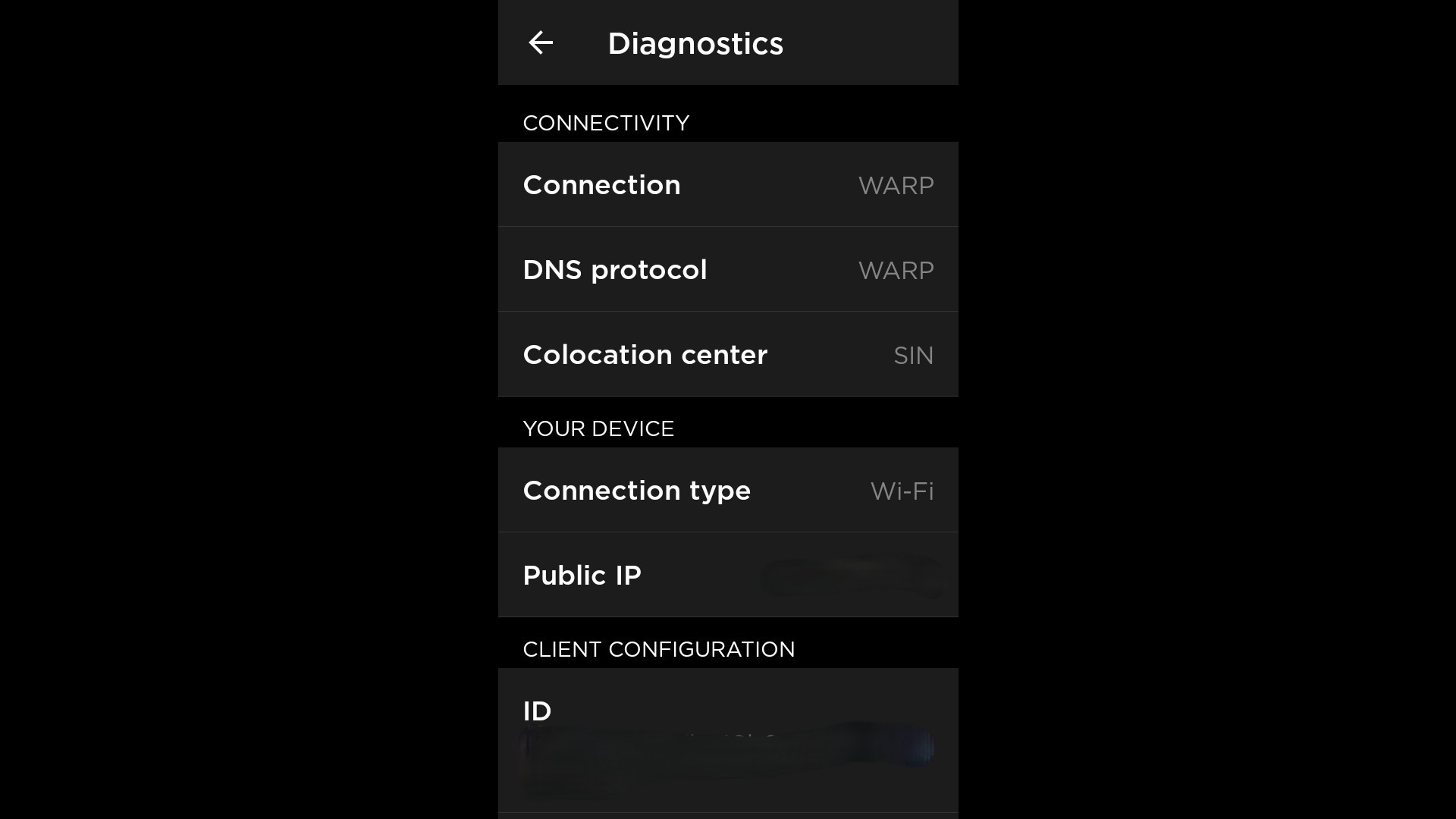
After turning on WARP, try going to https://dnsleak.com/ and do a test
Mine is showing:

ISP: Cloudfare
Country: Hong Kong
Anyway for those who has a subscription to VPN but their SG servers are blocked from D+, you can still use WARP
I have a complicated but working solution, it involves using your PC to share VPN hotspot to your mobile phone/android TV, then turning on WARP concurrently
Guide for using PC to share VPN hotspot - https://support.nordvpn.com/Connectivity/Wi...-Windows-10.htm

What i did was, have my PC connect to Singapore VPN then turn on mobile hotspot to share with my mobile phone
On my mobile phone, I turned on WARP - dnsleak.com shows that I'm now in SG. By connecting to a SG VPN beforehand, I'm forcing WARP to think that I'm in SG, essentially forcing my colocation to SG server
This will show SG content on D+  thumbup.gif
*
you are a saint. But wouldn't this cause significant speed slowdown due to VPN + hotspot?
evilhomura89
post Jun 22 2021, 12:46 PM

Look at all my stars!!
*******
Senior Member
5,886 posts

Joined: Jan 2003
From: BM


QUOTE(jimmychangas @ Jun 22 2021, 12:30 PM)
you are a saint. But wouldn't this cause significant speed slowdown due to VPN + hotspot?
*
Ya, the speed will be affected for sure. But since SG is nearby, I suppose the impact shouldn't be too bad
If the speed can be maintained above 25 Mbps, 4k streaming shouldn't be an issue with some slight buffering

Another method is to set up VPN on the router to connect to SG servers (eliminate the use of PC hotspot sharing) then use WARP on device
WARP is great for unblocking D+ SG while using SG VPN
PoisonSoul
post Jun 22 2021, 12:50 PM

Regular
******
Senior Member
1,841 posts

Joined: Feb 2018


Anyone managed to install D+ (not rubbish Hotstar) on Mi Box? I tried to download the APK, it tells me the box do no support downloads. I went directly to play store, it tells me my box is not supported.
evilhomura89
post Jun 22 2021, 01:55 PM

Look at all my stars!!
*******
Senior Member
5,886 posts

Joined: Jan 2003
From: BM


QUOTE(PoisonSoul @ Jun 22 2021, 12:50 PM)
Anyone managed to install D+ (not rubbish Hotstar) on Mi Box? I tried to download the APK, it tells me the box do no support downloads. I went directly to play store, it tells me my box is not supported.
*
You'll need a non-Malaysian Google account (can be obtained easily by signing up without entering your phone number)
Once signed in to your non-Malaysian Google account on your mi box, the app should be accessible on play store

Btw is your mibox the global version with built in Chromecast?

This post has been edited by evilhomura89: Jun 22 2021, 01:55 PM
eclectice
post Jun 22 2021, 02:37 PM

Look at all my stars!!
*******
Senior Member
2,734 posts

Joined: Mar 2008
QUOTE(nyemah_mulya @ Jun 22 2021, 12:22 PM)
I don't know if this is an isolated case, but I have audio out of sync problem especially with newer contents like Loki, WandaVision etc. The audio is faster than the video. Perhaps 1second, or less than 1 second faster but it is noticeable. I don't have this problem with Netflix. My TV is Sony Android TV.
*
Hmm, no audio sync issue on my Sony X90H Android TV. Anyway, I don't have an audio system, just using the TV speakers. Btw, what is your Sony TV model?
WickyWeeky
post Jun 22 2021, 02:40 PM

New Member
*
Junior Member
16 posts

Joined: Oct 2010
QUOTE(WickyWeeky @ Jun 19 2021, 10:18 AM)
For those using WARP, you guys can access disney+ singapore? I cannot alrdy. Colocation change to kuala lumpur hahaha.. using maxis fibre btw
*
Now my WARP back to singapore alrdy.. haha weird la
Now can access singapore d+

This post has been edited by WickyWeeky: Jun 22 2021, 02:41 PM
wildan03
post Jun 22 2021, 03:05 PM

Getting Started
**
Junior Member
230 posts

Joined: May 2010


When can i watch it in TIZEN Os?
joeblow
post Jun 22 2021, 03:07 PM

Regular
******
Senior Member
1,144 posts

Joined: Dec 2015


QUOTE(evilhomura89 @ Jun 22 2021, 11:41 AM)
I suspect the colocation is HKG
How did you check the location?

After turning on WARP, try going to https://dnsleak.com/ and do a test
Mine is showing:

ISP: Cloudfare
Country: Hong Kong
Anyway for those who has a subscription to VPN but their SG servers are blocked from D+, you can still use WARP
I have a complicated but working solution, it involves using your PC to share VPN hotspot to your mobile phone/android TV, then turning on WARP concurrently
Guide for using PC to share VPN hotspot - https://support.nordvpn.com/Connectivity/Wi...-Windows-10.htm

What i did was, have my PC connect to Singapore VPN then turn on mobile hotspot to share with my mobile phone
On my mobile phone, I turned on WARP - dnsleak.com shows that I'm now in SG. By connecting to a SG VPN beforehand, I'm forcing WARP to think that I'm in SG, essentially forcing my colocation to SG server
This will show SG content on D+  thumbup.gif
*
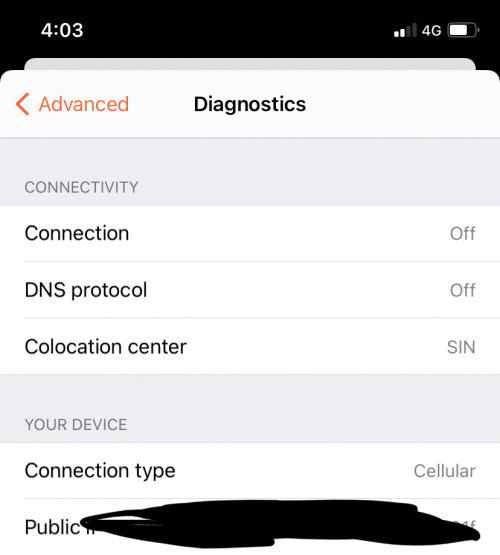
Just checked, under Settings -> Preferences, you can see the colocation. Just changed to HKG. Keeps changing.

Your method I cannot try because I don't use the phone to watch. I use my PC or LG TV to watch, if using the sharescreen from mobile to TV, my mobile phone turns too hot.

I tried to use my PC to VPN (McAfee) to Singapore Server, then on my WARP, still no go. Anyway I decided to ignore disneyplus. Easier to just download.
joeblow
post Jun 22 2021, 03:07 PM

Regular
******
Senior Member
1,144 posts

Joined: Dec 2015


QUOTE(WickyWeeky @ Jun 22 2021, 02:40 PM)
Now my WARP back to singapore alrdy.. haha weird la
Now can access singapore d+
*
You using Maxis? Me Unifi still HKG.
ahemdolah
post Jun 22 2021, 03:13 PM

Getting Started
**
Junior Member
63 posts

Joined: Jan 2020
QUOTE(joeblow @ Jun 22 2021, 03:07 PM)
Just checked, under Settings -> Preferences, you can see the colocation. Just changed to HKG. Keeps changing.

Your method I cannot try because I don't use the phone to watch. I use my PC or LG TV to watch, if using the sharescreen from mobile to TV, my mobile phone turns too hot.

I tried to use my PC to VPN (McAfee) to Singapore Server, then on my WARP, still no go. Anyway I decided to ignore disneyplus. Easier to just download.
*
You did it wrong there.

He means PC/router connects to SG VPN and then shares the connection to the device we use to stream.

On our streamer, connect the WARP and get the SG server.

A device can only be connected to 1 VPN at 1 time, WARP is a VPN, that's why your last paragraph didn't work out.

This post has been edited by ahemdolah: Jun 22 2021, 03:15 PM
WickyWeeky
post Jun 22 2021, 03:18 PM

New Member
*
Junior Member
16 posts

Joined: Oct 2010
QUOTE(joeblow @ Jun 22 2021, 03:07 PM)
You using Maxis? Me Unifi still HKG.
*
Yeah using maxis.. seems unifi still affected with HKG
joeblow
post Jun 22 2021, 03:21 PM

Regular
******
Senior Member
1,144 posts

Joined: Dec 2015


QUOTE(ahemdolah @ Jun 22 2021, 03:13 PM)
You did it wrong there.

He means PC/router connects to SG VPN and then shares the connection to the device we use to stream.

On our streamer, connect the WARP and get the SG server.

A device can only be connected to 1 VPN at 1 time, WARP is a VPN, that's why your last paragraph didn't work out.
*
Yeah I know about his method. But I don't want to try because I don't like to use my mobile phone to watch as I said.

And yeah, I tried 2 VPNs on the PC... doesn't work. lol. This McAfee VPN sucks... don't trust its marketing material on how good it is. I can get the Disneyplus Singapore login screen, but the whole screen will be black like jammed there... Not sure if any experts here know how to solve this. By doing certain configuration to the Chrome Browser? Tried Microsoft one same result.
ahemdolah
post Jun 22 2021, 03:46 PM

Getting Started
**
Junior Member
63 posts

Joined: Jan 2020
QUOTE(joeblow @ Jun 22 2021, 03:21 PM)
Yeah I know about his method. But I don't want to try because I don't like to use my mobile phone to watch as I said.

And yeah, I tried 2 VPNs on the PC... doesn't work. lol. This McAfee VPN sucks... don't trust its marketing material on how good it is. I can get the Disneyplus Singapore login screen, but the whole screen will be black like jammed there... Not sure if any experts here know how to solve this. By doing certain configuration to the Chrome Browser? Tried Microsoft one same result.
*
My mistake on your situation, after the PC connected to VPN, only left the phone as a streamer.

Most routers will have an L2TP VPN function, even the old one, might want to try that. Router with the VPN, PC with WARP.

LG TV is out of the question, no WARP or VPN.

Looks like no need for this trick anymore, back to SIN even with local IP.
» Click to show Spoiler - click again to hide... «
evilhomura89
post Jun 22 2021, 03:51 PM

Look at all my stars!!
*******
Senior Member
5,886 posts

Joined: Jan 2003
From: BM


QUOTE(joeblow @ Jun 22 2021, 03:07 PM)
You using Maxis? Me Unifi still HKG.
*
Unifi international routing sucks that's why unifi WARP end up in HKG
If HKG has Disney Plus then we might have access to HK's content instead


khainiz94
post Jun 22 2021, 04:01 PM

Look at all my stars!!
*******
Senior Member
2,856 posts

Joined: Mar 2012


QUOTE(evilhomura89 @ Jun 22 2021, 03:51 PM)
Unifi international routing sucks that's why unifi WARP end up in HKG
If HKG has Disney Plus then we might have access to HK's content instead
*
This one coming soon.
I heard within this few months.
I already saw subtitles for Chinese HK, Chinese (Simplified and Traditional) and Taiwanese and also audio already on some contents.
Also Korean on both audio and subtitles.
So that means those countries are getting D+ International compared to our lame one.
LOL.
As usual, MY is a third world country.
PoisonSoul
post Jun 22 2021, 04:02 PM

Regular
******
Senior Member
1,841 posts

Joined: Feb 2018


QUOTE(evilhomura89 @ Jun 22 2021, 01:55 PM)
You'll need a non-Malaysian Google account (can be obtained easily by signing up without entering your phone number)
Once signed in to your non-Malaysian Google account on your mi box, the app should be accessible on play store

Btw is your mibox the global version with built in Chromecast?
*
Yeap, it's global set. No signs of it from CN. Plug is 2 pin.

Yes, built in Chromecast.
khainiz94
post Jun 22 2021, 04:04 PM

Look at all my stars!!
*******
Senior Member
2,856 posts

Joined: Mar 2012


Unifi is so stupid one.
Maybe got issue with routing again.
I get HKG on WARP, whereas my Maxis, Digi and Yes 4G all get SIN.

user posted image

This post has been edited by khainiz94: Jun 22 2021, 04:05 PM
PoisonSoul
post Jun 22 2021, 04:08 PM

Regular
******
Senior Member
1,841 posts

Joined: Feb 2018


QUOTE(evilhomura89 @ Jun 22 2021, 01:55 PM)
You'll need a non-Malaysian Google account (can be obtained easily by signing up without entering your phone number)
Once signed in to your non-Malaysian Google account on your mi box, the app should be accessible on play store

Btw is your mibox the global version with built in Chromecast?
*
user posted image
This is the account signed in my MiBox, technically, it's not a Malaysian account right since I did not add a phone number?

63 Pages « < 48 49 50 51 52 > » Top
 

Change to:
| Lo-Fi Version
0.0160sec    0.68    6 queries    GZIP Disabled
Time is now: 1st December 2025 - 05:47 PM