Welcome Guest ( Log In | Register )

7 Pages < 1 2 3 4 5 > » Bottom

Outline · [ Standard ] · Linear+

 Unifi Connection Issue to International Server, Occured usually at night 9-11pm

views
     
BenYeeHua
post Dec 18 2021, 12:49 AM

Regular
******
Senior Member
1,873 posts

Joined: Nov 2010


QUOTE(heLL_bOy @ Dec 18 2021, 12:44 AM)
nobody implement based on user account for Qos
*
ok then, guess some physical link are broken for Melaka etc, so heavy packet drop happen, and they don't wanna reroute to fix it as it will bring more issues for others users at northern area and Sarawak. hmm.gif
This also explain why local CDN like Facebook are having issues for some users.

Still, why it happen during switch of Private IP is still a strange point for it, it look more like they have put together the user under some public IP, so sharing the QoS over public IP, then it happen because overloaded on the same route. doh.gif

This post has been edited by BenYeeHua: Dec 18 2021, 12:51 AM
BenYeeHua
post Dec 18 2021, 01:29 AM

Regular
******
Senior Member
1,873 posts

Joined: Nov 2010


QUOTE(heLL_bOy @ Dec 18 2021, 01:16 AM)
let TM check themselves is beyond our control know what happening.

of cos there are QoS over CGNAT but is fair share category which no need worry is the working same as public IP the only thing is port are being blocked.
*
Yes, old issues since Streamyx Private IP, but as long as it is not 65535 port/connections/half-open p2p user, then it should be fine la.
The second is getting ban by Lazada/Shopee/Taobao, this one I worry a bit la.

Now I also using IPv6 only for p2p, so far so good. tongue.gif

Anyways, I should becoming back to midnight fighter now, as International traffic will be normal during midnight. laugh.gif
BenYeeHua
post Dec 18 2021, 01:56 AM

Regular
******
Senior Member
1,873 posts

Joined: Nov 2010


QUOTE(hostingmalaya @ Dec 18 2021, 01:44 AM)
https://downdetector.my/masalah/unifi

Mostly said that they have this issue and from Johor area.
*
So who closed to SG are having issues for SG, nice. brows.gif
----
FYI, line will back to 90% quality from 1:30 AM to 8:00 AM, if you have some software preventing you to use VPN, then do it during this period, or, use mobile data la. tongue.gif

This post has been edited by BenYeeHua: Dec 18 2021, 04:22 AM
BenYeeHua
post Dec 18 2021, 11:06 AM

Regular
******
Senior Member
1,873 posts

Joined: Nov 2010


QUOTE(go626201 @ Dec 18 2021, 08:54 AM)
After 8am normal again.
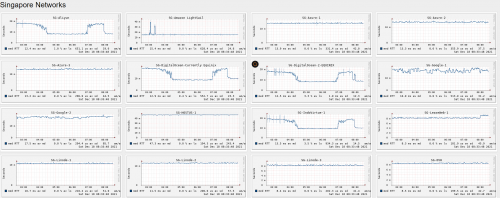
user posted image
*
And my Public IP changed from 155.132.x.x to 60.53.35.x, so, did public IP changed daily for Private IP users? hmm.gif
If yes then not related, if not, then it means something la. tongue.gif

QUOTE(Kadaj @ Dec 18 2021, 07:45 AM)
I did ipv6 ping test from router, it works so I think my router has an ipv6 address.

But all my devices on LAN can't obtain ipv6 address from router, how to i solve this?

1. router has ipv6.
2. router enabled dhcp ipv6 and dns ipv6.
3. client devices can only obtain ipv4 address from router.

IPv6 Address: fe***
Default Gateway IPv6: N/A
DNS Server IPv6: N/A

[attachmentid=11061093]
*
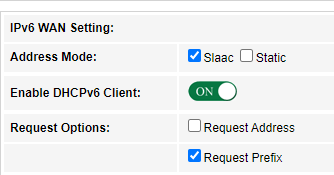
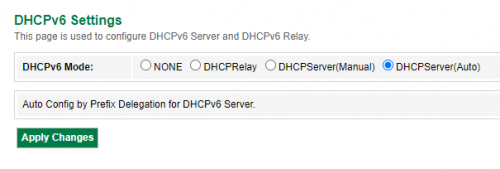
Your prefix is empty. sweat.gif

Here for your reference from my NETIS, hope it helps. icon_rolleyes.gif

» Click to show Spoiler - click again to hide... «

BenYeeHua
post Dec 18 2021, 11:23 AM

Regular
******
Senior Member
1,873 posts

Joined: Nov 2010


QUOTE(akhito @ Dec 18 2021, 11:15 AM)
Mine usually no change. the 115.x one always after they switch to private ip, maybe related to location?
*
Melaka, will see did it changed for the next 24 hours, if no change for a week, then it is related la. hmm.gif

I still think yesterday case was related to mass users switched on private IP, else you can't explain why so nicely the timing.
As today morning still got issues from 8 AM until 10:30 AM(I wake up this time), then issues solved, and my public IP changed too. doh.gif
BenYeeHua
post Dec 18 2021, 12:40 PM

Regular
******
Senior Member
1,873 posts

Joined: Nov 2010


QUOTE(go626201 @ Dec 18 2021, 11:46 AM)
There will be a IP pool for private ip user,but normally if u didn't disconnect(or reboot) the public ip will not change.
*
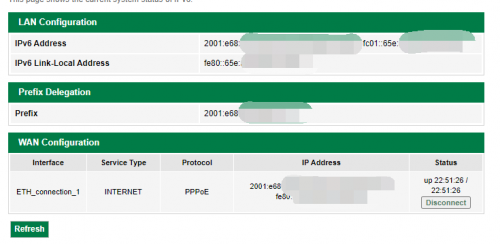
Ya, as you can see on that IPv6 configuration screenshot, I don't get disconnected, still 22 hours uptime, and my QQ still online since midnight. hmm.gif

QUOTE(go626201 @ Dec 18 2021, 12:07 PM)
And for the connection issue,it really depends on the alot of factor,
1.Between your home to your local area bandwidth exchange center.
2.The local area exchange bandwidth to your states TM exchange center.
3.your states TM exchange center to TM centralized core network.
4.TM centralized core network to out of TM network.

And normally alot of network issue that occurs on website or server outside of MY is having problem between the TM centralized core network end and worldwide network.(in this case is SG network)
(There is multiple core end edge router on this network and different ip range will on different end edge router)
And some router is congestion to specific network to SG for last 2 years of issue. (And also QoS implemented for specific time)

So it really depends which ip is better for your usage.
So try to reboot router to see which ip range is good to use is better way now.
Or else get a VPN service to overcome most routing issue on unifi.
There is some vpn service that having quite good connection with unifi, like Nordvpn. (having 3-4 different network of SG vpn server,and 1-2 and sometime maybe 3 of them is stable to unifi,but of course different time also may affect the connection)

For me i just get a singapore vps and setup my vpn service or port redirect to those commercial vpn service,to use different network of the vpn service.

And so if u have a small budget and want to alternative solving this issue,i really recommended to setup your own vpn service to overcome the problem,because commercial vpn is not always suitable for sensitive information usage.
Just get a OVH SG vps service and setup the wireguard service and setup on all your device and all good for 99.5% of time.
(There mighe be having a very short time every month or every few month that still will having problem with it but it is very stable between unifi and OVH,because of the private peering agreement for OVH and unifi)
*
Yes, I think yesterday issues only happen to Melaka, JB and certain IP range, but someone point it out QoS is fair based for whole MY, not IP range based or Private IP based, me is... sweat.gif

Anyways.
My suspect is they putting too much users under the same IP range/pool, so it went unbalanced, and all going out together the same route/gateway to SG, causing too high the packet drop as it was hitting the total bandwidth of TM internal route(traceroute show it), packet drop = more retransmit happen = more packet drop, so it start causing issues to others.
(just thinking about it, SG transfer to MY JB, but getting packet drop by TM internal route, it will get another retransmit from SG to MY JB again and again, causing much higher bandwidth used in between SG to MY JB, but it does nothing... sweat.gif )


And I don't use VPN because Taobao, they will block you from placing order when they detected VPN, even blacklist your account and disable your red money, so... sweat.gif

Anyways, except I want to gaming, so far UniFi is good after they moved most traffic from PCCW to other exchange, only those going to China Telecom and Unicom are unstable(because going via US). thumbsup.gif

QUOTE(heLL_bOy @ Dec 18 2021, 12:25 PM)
everything seem normal for now  cool2.gif
*
Yup. thumbsup.gif
BenYeeHua
post Dec 18 2021, 01:18 PM

Regular
******
Senior Member
1,873 posts

Joined: Nov 2010


QUOTE(go626201 @ Dec 18 2021, 01:01 PM)
I reroute my taobao/tmall usage with SG vpn before changing my new router for about 2-3 month,and didn't face any account issue about that.
And also i am sharing the account with my sister which is currently in Singapore for almost 2 years. (every day both of us login together with 4-5 device)
So it might be different issue about taobao.
*
Yes, depend on IP address for the VPN I think, some are getting warning about VPN some don't. hmm.gif

Sharing account is fine, for some reason, but sharing device(max 2 account 1 phone) is not fine and can get ban, based on rules. laugh.gif
BenYeeHua
post Dec 22 2021, 04:54 AM

Regular
******
Senior Member
1,873 posts

Joined: Nov 2010


Just, for adding new method to detect which CloudFlare data center you are connected to, adding /cdn-cgi/trace to end of website and it will tell you about that.

Like
https://forum.lowyat.net/cdn-cgi/trace
Will tell you it is colo=JHB. wink.gif

Yes, very old method but I keep forget about it, so better post it out for quick referring back, not just F12 and trace the IP back to know which data center like an idiot. tongue.gif
---
Also, after few days, my Public IP for my Private IP still stay the same, 60.53.35.x, so it is somehow related, but I guess only TM know why. hmm.gif
BenYeeHua
post Dec 25 2021, 11:28 PM

Regular
******
Senior Member
1,873 posts

Joined: Nov 2010


Some connection like MY to HK moved from hkix to pccw and restore normal with slower speed, after fixing HK line, then they found out others also broken. doh.gif
This will be the BEST xmas gift ever. tongue.gif

This post has been edited by BenYeeHua: Dec 25 2021, 11:29 PM
BenYeeHua
post Dec 26 2021, 12:17 AM

Regular
******
Senior Member
1,873 posts

Joined: Nov 2010


QUOTE(heLL_bOy @ Dec 26 2021, 12:00 AM)
not global fault.. only the cable between SG to HKG/JPY having issue.

He.net / NTT are affected so far.
*
Lucky repair side is on SG?
I guess if MY cable, sure will be slow on repairing... sweat.gif
BenYeeHua
post Dec 26 2021, 01:11 AM

Regular
******
Senior Member
1,873 posts

Joined: Nov 2010


QUOTE(heLL_bOy @ Dec 26 2021, 12:27 AM)
if really cable fault at least have to wait 1 to 2 month to fix.. not so fast
*
Ya, guess need to wait for knowing what's case. sweat.gif
For most people that are not using any China website, I guess their issues is on 3G network closed la.

Like me just host file easy redirection to other country CDN server for China website, so others still connect to broken one while I am fast on those China website with increased latency, but I should consider about setup a local DNS that act like a small host file for smartphone now. tongue.gif

QUOTE(failed.hashcheck @ Dec 26 2021, 01:01 AM)
Nothing will happen. DNB is just local infra. not ISP.
*
And most people depend on local CDN caching like Facebook and Twitter(lucky) with local contents, except they start browsing oversea website that only having SG or HK CDN server, those 5G traffic will only going to local CDN as local traffic.

Not including CloudFlare la, keep getting route to SG and HK only. doh.gif

This post has been edited by BenYeeHua: Dec 26 2021, 01:12 AM
BenYeeHua
post Dec 26 2021, 01:25 AM

Regular
******
Senior Member
1,873 posts

Joined: Nov 2010


QUOTE(failed.hashcheck @ Dec 26 2021, 01:16 AM)
All ther routing are at ISP level.

Its not much different than HSBB model really. Just 5g instead of fiber.
Just like right now Unifi/Digi is crippled while Celcom users didn't notice anything at all although all using the exact same infra.
*
Yes, the total bandwidth might increased a bit more, and peak bandwidth as well, that's all, most of our 4G is fast enough like fiber, so 5G is like moving to fiber with low latency.
Most users still limited by how fast they can read on each contents, 1 hour video still watching as 1 hour video, also it is not like they can uploading or downloading nonstop on 5G with 50GB plans per months. tongue.gif
BenYeeHua
post Dec 26 2021, 02:43 AM

Regular
******
Senior Member
1,873 posts

Joined: Nov 2010


QUOTE(heLL_bOy @ Dec 26 2021, 01:50 AM)
yup.. i also waiting contract end for switching over.. fed up with this TM almost every 3 month coming this kind of shit ever since MCO happening.
*
Sadly TNB Allo at Melaka they don't wanna fight with TM directly, so most of their line only available on those without fiber connection, can only jump to Maxis which crap on need TM to maintain the fiber. doh.gif

So, how's the news about this bad news oversea fiber? hmm.gif
https://www.malaymail.com/news/malaysia/202...pacific/1998304
BenYeeHua
post Jan 25 2022, 10:00 PM

Regular
******
Senior Member
1,873 posts

Joined: Nov 2010


QUOTE(heLL_bOy @ Jan 25 2022, 09:34 PM)
route announcement are back in order  dry.gif
*
Good then, but still messy connection over IPv6(for Facebook, Fast.com and CloudFlare etc), IPv4 mostly fine, expecting it will be resolved after midnight la, or just disable IPv6 like nothing happen, normal case. tongue.gif

This post has been edited by BenYeeHua: Jan 25 2022, 10:00 PM
BenYeeHua
post Feb 15 2022, 11:38 PM

Regular
******
Senior Member
1,873 posts

Joined: Nov 2010


QUOTE(coolkwc @ Feb 15 2022, 10:52 PM)
user posted image

So what it tells me?
*
Nothing, throttling can perform without affecting latency, but the highest download/upload speed you can get.
Like open a page, you can see it without any RSS loaded, but downloading those RSS/JS/Image take 1 min.

And
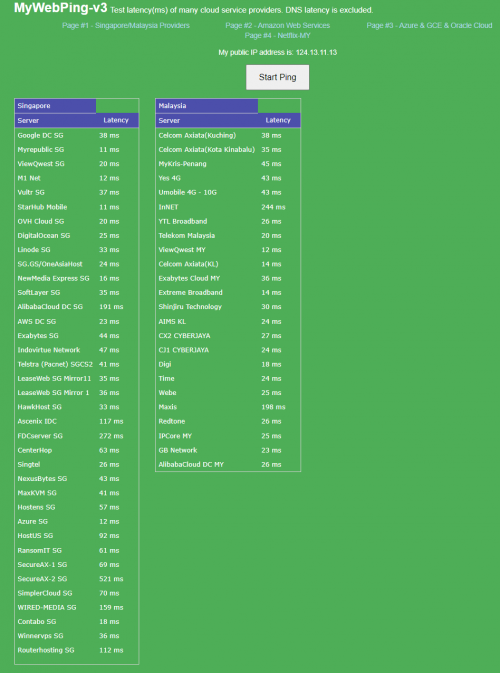
AlibabaCloud DC MY 183 ms for me tongue.gif
---
For CloudFlare SG, it is 172.67.176.186 - 115ms for me, changing it to 2606:4700:20::681a:649 which is MY gain back the speed. laugh.gif
BenYeeHua
post Feb 24 2022, 10:28 PM

Regular
******
Senior Member
1,873 posts

Joined: Nov 2010


QUOTE(mytaffeta @ Feb 24 2022, 09:09 AM)
been 3 days straight this week, my playstation could not connect to the server from 10-11PM.. anyone else facing same issue? unifi here..
*
TM QoS throttling is like this, start throttling around 7 PM, until 12PM will reach the max throttling, then reset around 1 AM.

QUOTE(eichi-sama @ Feb 24 2022, 10:05 PM)
Aw man the submarine cable issue still haven't solved? Having high packet loss to JP now.
*
Yes, start throttling around 7 PM(based on Pixiv testing, funny that website on CloudFlare but image only on JP), so... sweat.gif
BenYeeHua
post Feb 25 2022, 10:36 PM

Regular
******
Senior Member
1,873 posts

Joined: Nov 2010


QUOTE(michaelkkl @ Feb 25 2022, 02:18 PM)
Seems that you didn't enable your IPv6, that's why you get Cloudflare SG servers.
Enabling IPv6 will get local Cloudflare servers.
*
Interesting, UniFi are sending me to Johor Bahru instead of KUL via IPv6, good. thumbsup.gif
Having quick test for IPv4, still SG which is bad, very bad, 300ms latency and 50 ms jitter, max 500kb/s only. laugh.gif rclxms.gif

But I think it is intended, TM disabled IPv6 for Streamyx user(yes, enable IPv6 won't give it since 4 years ago), so it means many Streamyx user will get SG instead of JHB/KUL. rclxms.gif
Just like old time, special QoS for most normal user, special link for high grade user. doh.gif

QUOTE(Cruxs @ Feb 25 2022, 09:47 PM)
my tplink archer router all green light but no internet. zzz...
*
Try ping 8.8.8.8, IPv6 got issues and you might get a broken one, because DNS will trying to obtain via IPv6 instead of fallback to IPv4, you will get no Internet but IPv4 still works. sweat.gif

Also see which DNS they are given to you, you may connected to paywall because unpaid bill, because of no more Public IP it is hard to check for it like before, just check for it in case la.
BenYeeHua
post Feb 26 2022, 12:50 AM

Regular
******
Senior Member
1,873 posts

Joined: Nov 2010


QUOTE(michaelkkl @ Feb 25 2022, 11:34 PM)
My friends that are using streamyx still have IPv6 with them.
Is it possible that your settings have problems?
*
Quite possible, it should be depend by PPPoE server or DSLAM with location, mine is Melaka Baxxxxx got IPv6, but moving back to N.Sembilan Txxxxx got IPv6 but later 1 year, obtained intranet version of IPv6, same router, different location.

As I can recall, same, still got working IPv6 for 1 years at NS, and sometimes it disconnect with IPv4 working only, then it just given intranet IPv6 range, on that time, I tested, 2 thing changed.
PPPoE server related, for security reason not gonna post a lot about what's I testing on it la, because not my IT area already. tongue.gif
Second one is DSLAM changed to 4M, and caused frequency ADSL desync issues because of noise.
Third one unsure, because I only have 1 ADSL modem, but based on UniFi it should give 2 IPv6 range since that time?
Fourth one is change from Public IP back to Private IP, even through I asked for Public IP for CCTV before, but they change it back silently.

So, I think should be 2 IPv6 range given like now, or changing of Public IP to Private IP caused it buggy, and not supported by ADSL2+ D-Link modem(with WiFi n mode, forgot the model already. tongue.gif )which only support holding single IPv6 range. hmm.gif
---
Anyways, so why IPv4 not redirect back to KUL or JHB, but only IPv6?
This is also one interesting point. hmm.gif

My guess will be, less user on IPv6 enabled, and many are using TM own stock router, so it is a controlled testing.
By changing only IPv6 can check did TM can handle the traffic from TM to local CloudFlare, then going to SG for cache missed data, instead of SG directly.

If CloudFlare cache are working enough, this can save lot of traffic to SG, if failed, then more local traffic generated for nothing.

This post has been edited by BenYeeHua: Feb 26 2022, 01:01 AM
BenYeeHua
post Mar 5 2022, 11:01 PM

Regular
******
Senior Member
1,873 posts

Joined: Nov 2010


QUOTE(Rainings @ Mar 2 2022, 08:52 PM)
Just tested, can confirm twitch no longer buffer every few sec.
which means, the routing issue still not solve yet, but twitch update on their end to solve this issue lol?
wow after 2 months finally.
*
Good then, so they did optimize it manually. tongue.gif
---
Quite interesting on HK Zenlayer, they also start having issues to China mainland during night these weeks.
While SG CapitalOnline to China mainland smoother than HK Zenlayer now.

All testing on Bilibili API related that must going back to main server for processing.

So if you have issues and found out it is HK server, suspect it is HK side issues la. icon_rolleyes.gif
BenYeeHua
post Mar 6 2022, 01:14 AM

Regular
******
Senior Member
1,873 posts

Joined: Nov 2010


QUOTE(heLL_bOy @ Mar 6 2022, 12:24 AM)
recently most HK route for mainland have been attacked.

SG CapitalOnline not using public route they hv their own private route optimize.
*
Ya, using China mobile also unstable than SG CapitalOnline, will stick with it for now. icon_rolleyes.gif
Today Taobao also slower for HK that going for API, hope it solved in near future la. doh.gif

7 Pages < 1 2 3 4 5 > » Top
 

Change to:
| Lo-Fi Version
0.0771sec    0.18    7 queries    GZIP Disabled
Time is now: 6th December 2025 - 12:19 AM