QUOTE(go626201 @ Jan 30 2023, 03:09 PM)
Setup your own vpn server,and u will have a better internet experience.
Do you mind to share your dns servers list that currently using?
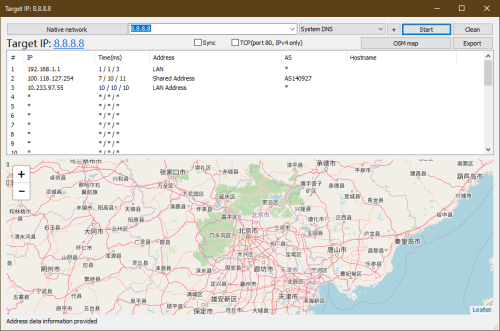
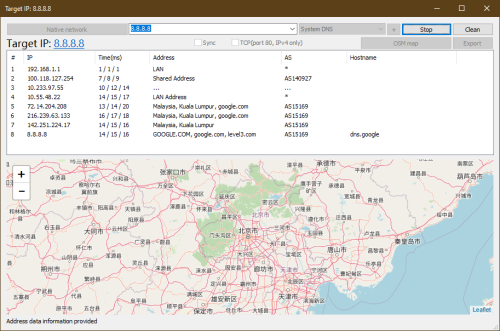
For china, I just use the ping to obtain China mobile IP address and add to host file, can use pi hole to serve custom host file too.
And yes, VPN is the final solution, but...
Paying both a bit too high cost as a B40, while Taobao etc block a lot based on IP address lol, so just using host file to solve it a bit by moving to good server.
Another is this, the JP server not giving the (server) result IP address based on your IP address, so can using it to obtain the JP country server without setup a pi hole.
But still, better setup a pi hole la, can adblock somemore.
 https://blahdns.com/
QUOTE(QuantumEdge @ Jan 30 2023, 07:29 PM)
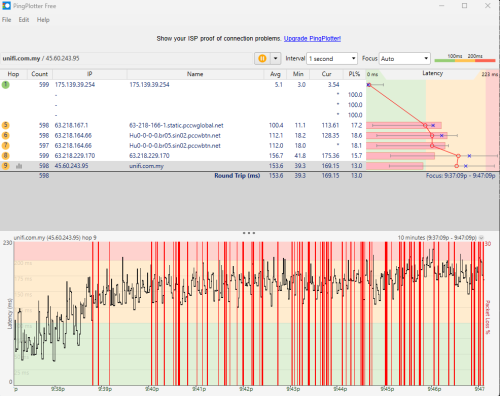
Yep it's odd, my house in JB was throttled heavily during peak hour in such twitter and telegram are unusable while gaming on NA server suffers from high ping
No such issues when I moved to KL
Different area got their own gateway, unlike old time 10 years ago, which sharing same PPPoE server too, they already split it to multiple when they start the UniFi plan.
Just like east malaysia, also different la.
So high load on your side sure gonna slow down, I guess caused by JB under load by JB and other area.
For that high QoS, it is under @tmnet account as I can recall, but after certain time UniFi become famous, it also get slowing down, unsure they set different QoS on the biz account, or too much UniFi user get in.
Sadly it is not good or bad ip range anymore after the split of gateway.

QUOTE(yenchenje @ Jan 31 2023, 01:45 AM)
Has anyone in JB area recently experienced big IP changes? Usually my PPPoE assigned IP range is either 115.134.x.x, 60.53.x.x and 175.141.x.x. After restarting I get assigned with one of these 3 IPs under CGNAT. But like yesterday or the day before I get assigned 124.13.x.x, which I have never seen before assigned to me and when I woke up today, checked my IP again and it's back to 175.141.x.x. And with the 124.13 range, everything was just BAD, games were having packet drops(Pings weren't fluctuating), speedtest couldn't be completed and would report internet connection is not available when it clearly was (Was on Twitch at the time), and just bad time in general for any content consumption in house.
Is the 124.13 range more for just testing or fallback for TM when the more "better" ranges are being tweaked or something?
And funnily enough, after connecting to my OVH SG server (OVPN VPN), it fixed packets drop issues in my games (But had ping spikes, but made the game way more playable than random packet drops)
Well, it happen to Melaka area like 2-3 days, fixed after that fault router point restarted/crashed at own.
Like I said for Melaka, some CGNAT is burst for some reason, so I guess it also happen to JB, as this affect a lot ppl, I am sure they got monitoring this issues.
Unsure how's they assign the private IP as CGNAT, in old time the public IP just increment, I don't recall it jumping back to the old IP address that I get before.
So it might be you are out of IP to be obtain from TM for your UniFi account(which I don't think it is running like this for CGNAT), or they are testing a lower QoS to create a new cheap plan to the request of MCMC, or it is just testing of new IP to handle more unifi customer la.


 Mar 6 2022, 09:49 AM


 Quote
Quote
 )
)





 0.0276sec
 0.26
0.26
 7 queries
 GZIP Disabled