Welcome Guest ( Log In | Register )

Bump Topic Topic Closed RSS Feed
413 Pages « < 67 68 69 70 71 > » Bottom

Outline · [ Standard ] · Linear+

 Official TM UniFi High Speed Broadband Thread V39, READ 1ST PAGE FOR RELEVANT WIFI INFO

views
     
XeactorZ
post Mar 4 2021, 10:31 PM

♥ PandaDog ♥
*********
All Stars
31,612 posts

Joined: Aug 2010
QUOTE(YoungMan @ Mar 4 2021, 08:31 PM)
You can retrieve the password from the old router. Of course if you call them to get the password, they will reset it because they can't know what your current password is.
*
If not mistaken my relative is using tp link router
Let me visit their house this weekend see whether can retrive the password from router or not

QUOTE(aniq8676 @ Mar 4 2021, 09:30 PM)
Yes, they (CS) dont know your password.

But you can still get the original password through TM's engineers. You can find any engineer from TM for them to help you confirm your original password. They can verify your password through your unifi id which is in the system. Here is my conversation with the TM engineer, at that time I asked for his help to confirm my original password. He can help to confirm it.

user posted image
*
So weird, few years ago I did get my password from their customer service
Maybe it already change laugh.gif

Btw how you get the TM Engineer number laugh.gif
Unless Unifi had issue, if not they won't purposely come to your premise
aniq8676
post Mar 4 2021, 11:00 PM

Regular
******
Senior Member
1,524 posts

Joined: Dec 2020
From: Perak


QUOTE(XeactorZ @ Mar 4 2021, 10:31 PM)
Btw how you get the TM Engineer number laugh.gif
Unless Unifi had issue, if not they won't purposely come to your premise
*
Unifi FB Group
oec88
post Mar 4 2021, 11:34 PM

Casual
***
Junior Member
385 posts

Joined: Sep 2007
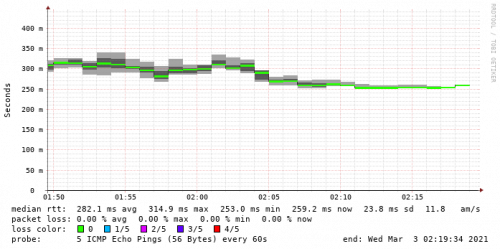
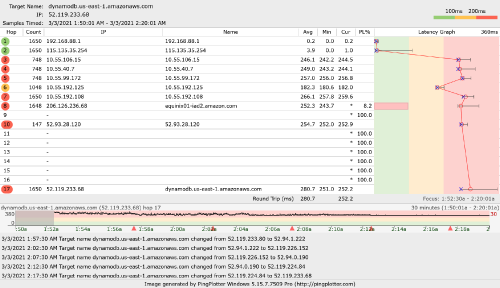
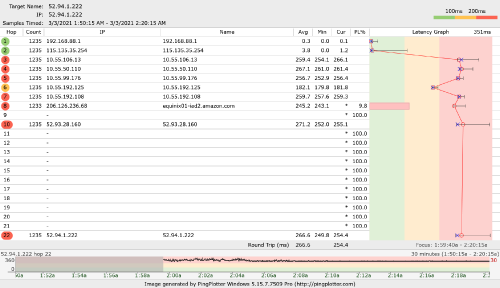
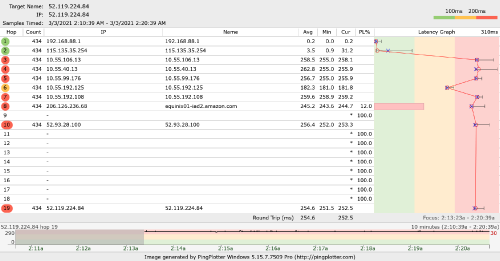
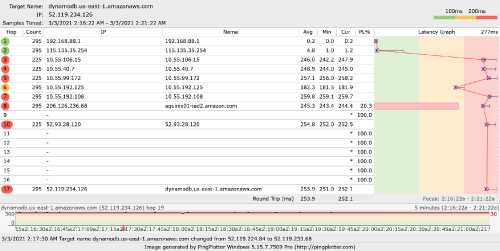
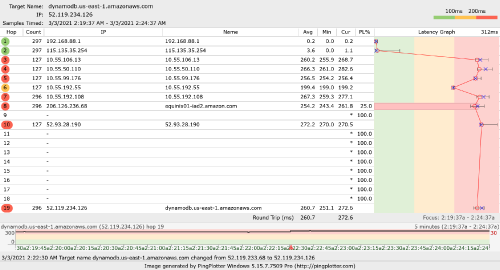
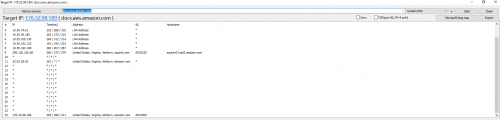
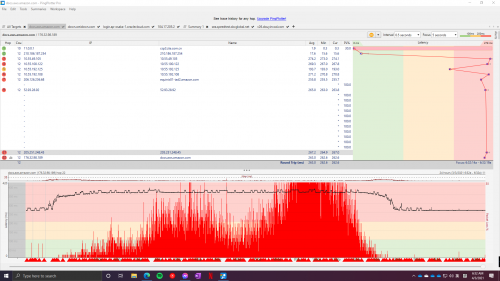
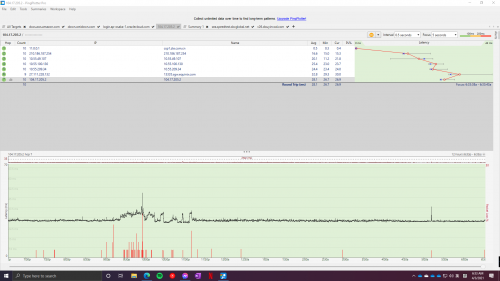
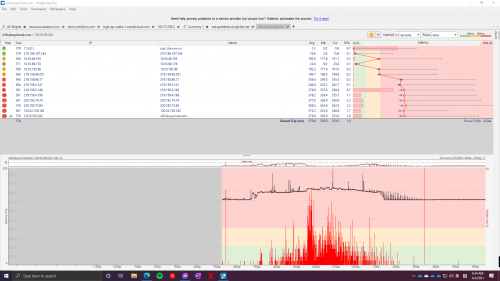
QUOTE(go626201 @ Mar 3 2021, 02:21 AM)
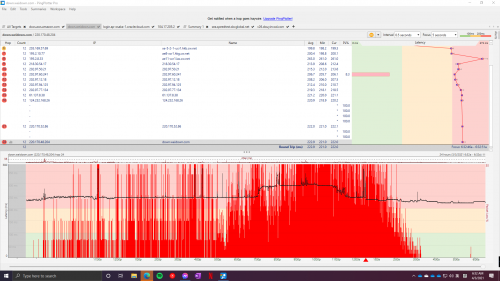
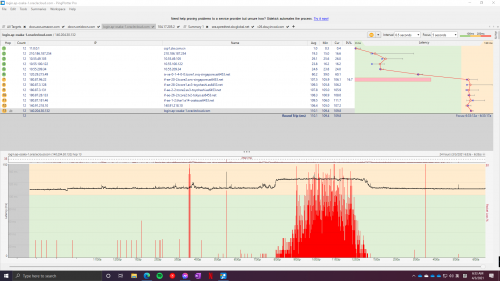
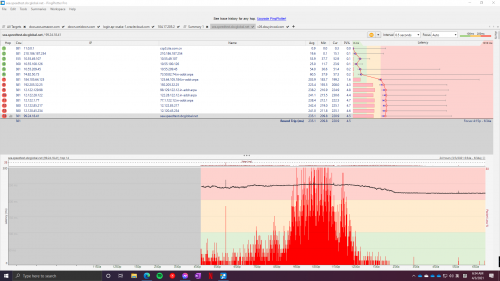
Just monitor the AWS EAST server for a while.
The Best time to access AWS East Server is from 2.10AM until about 8AM.

user posted image

user posted image

user posted image

user posted image
Edit:
change hops and suddenly latency up.
Before change hops
user posted image
After change hops
user posted image
*
This is exactly the problem I have been facing for the past 3 weeks, and it is still here.

I play a game that the server hosting is in Ashburn US, the host is Amazon Web Service. Having high packet loss and even on Mudfish VPN, certain US routing server also face problems.

And yes, from midnight to early morning there were no packet loss.

John42
post Mar 5 2021, 01:30 AM

Getting Started
**
Junior Member
256 posts

Joined: Aug 2019
Hey guys there's a new update available for the UnifiTV app on UPB. The latest version is 1.2.12 which was released on the 4th of March. Yesterday it was on the 1.2.11 version which was released on the 3rd of March. Within a day 2 updates. The improvement is minor as far as I notice. On some channels, the picture quality has improved a bit but most of the channels are not. The subtitles are still the same with visible pixels. Screw those app developers. Till now they are not able to solve the issue. They should just resign instead of being working there doing a lousy job 😡
MeowZ
post Mar 5 2021, 10:24 AM

Getting Started
**
Junior Member
219 posts

Joined: Jan 2003
From: New Johore
QUOTE(aniq8676 @ Mar 4 2021, 11:00 PM)
Unifi FB Group
*
may i know the name or site, afraid many many fb unifi groups

alucard89
post Mar 5 2021, 10:51 AM

Look at all my stars!!
*******
Senior Member
4,454 posts

Joined: Apr 2006
Hi guys, any offer for 300mbps unifi for new registration?
Sam Leong
post Mar 5 2021, 03:46 PM

On my way
****
Junior Member
685 posts

Joined: Mar 2016


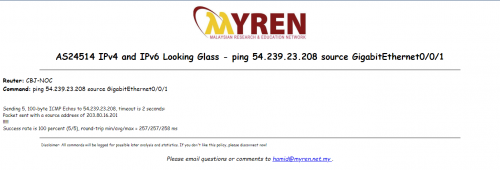
So tested today again , my friend told me maybe is only unifi home fibre is experiencing this problem.
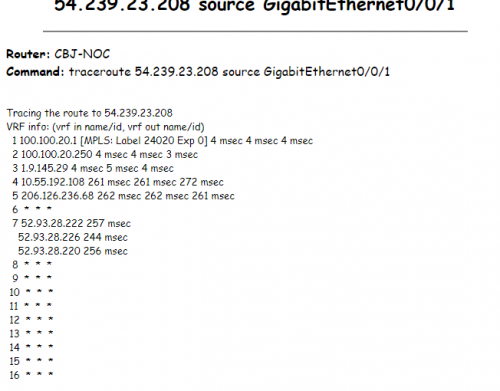
He reminded me to test for MYREN (Malaysian Research & Education Network) which have over half IPV4 peering with AS4788 TMNet
This should under TM premium network.
Guess What , tested on 3PM
Myren [Looking Glass Myren]:
<270ms which is normal
user posted image
From Traceroute result confirmed via AS4788
user posted image

unifi [home fibre] :
>350ms which continue 1 week ady
CODE
Ping statistics for 54.239.23.208:
   Packets: Sent = 40, Received = 34, Lost = 6 (15% loss),
Approximate round trip times in milli-seconds:
   Minimum = 364ms, Maximum = 447ms, Average = 389ms


unifi [Politeknik Ungku Omar Kamsis Baru]
i think is unifi business or customized plan
Source from my friend :
CODE
Ping statistics for 54.239.23.208:
   Packets: Sent = 130, Received = 103, Lost = 27 (20% loss),
Approximate round trip times in milli-seconds:
   Minimum = 372ms, Maximum = 453ms, Average = 387ms

user posted image

Conclusion : Myren route via AS4788 to the same destination but its normal , meaning premium network is not affected.
Unifi home fibre is affected , not sure PUO is business or customized , but confirmed share pipe with home fibre and affected also


QUOTE(Sam Leong @ Mar 4 2021, 07:46 AM)
Not even AWS US kena this thing
Cloudflare SG , China Unicom , China Telecom , Oracle Osaka , AT&T (Seattle , WA) Speedtest Server all kena spike ping / packet loss start at 9pm.

AWS US [docs.aws.amazon.com]
Massive packet loss start from 9pm
https://share.pingplotter.com/fH2xXp7HW3T
user posted image

Cloudflare SG
Ping spike up from 9pm
https://share.pingplotter.com/BZqHqmCWojk
user posted image

China Unicom [v26.douyinvod.com]
Massive packet loss start from 9pm
https://share.pingplotter.com/P2hrydGVRLf
user posted image

China Telecom [down.weidown.com]
Massive packet loss start from 9pm
https://share.pingplotter.com/aqPaKtZ6Ux3
user posted image

Oracle Osaka [login.ap-osaka-1.oraclecloud.com]
Ping spike up and packet loss start from 9pm
https://share.pingplotter.com/iPPGVeSCkRT
user posted image

AT&T (Seattle , WA) Speedtest Server [sea.speedtest.sbcglobal.net]
Packet Loss start from 9pm
https://share.pingplotter.com/YALc91ayjGv
user posted image

As you can see, almost all servers listed got their ping spike / packet loss problem start from 9PM  bangwall.gif  bangwall.gif  bangwall.gif

Conclusion , TM international routing sucks
Theres no way at the same time so many servers ping got spike up / packet loss
The only solution to solve this is find another peering or increase capacity!
Once again , paying for premium price , getting lousy Intl Routing
*
sampride
post Mar 5 2021, 04:11 PM

Look at all my stars!!
*******
Senior Member
2,188 posts

Joined: Jan 2003
From: KL


QUOTE(Sam Leong @ Mar 5 2021, 03:46 PM)
So tested today again , my friend told me maybe is only unifi home fibre is experiencing this problem.
He reminded me to test for MYREN (Malaysian Research & Education Network) which have over half IPV4 peering with AS4788 TMNet
This should under TM premium network.
Guess What , tested on 3PM
Myren [Looking Glass Myren]:
<270ms which is normal
user posted image
From Traceroute result confirmed via AS4788
user posted image

unifi [home fibre] :
>350ms which continue 1 week ady
CODE
Ping statistics for 54.239.23.208:
   Packets: Sent = 40, Received = 34, Lost = 6 (15% loss),
Approximate round trip times in milli-seconds:
   Minimum = 364ms, Maximum = 447ms, Average = 389ms


unifi [Politeknik Ungku Omar Kamsis Baru]
i think is unifi business or customized plan
Source from my friend :
CODE
Ping statistics for 54.239.23.208:
   Packets: Sent = 130, Received = 103, Lost = 27 (20% loss),
Approximate round trip times in milli-seconds:
   Minimum = 372ms, Maximum = 453ms, Average = 387ms

user posted image

Conclusion : Myren route via AS4788 to the same destination but its normal , meaning premium network is not affected.
Unifi home fibre is affected , not sure PUO is business or customized , but confirmed share pipe with home fibre and affected also
*
Yes, only unifi users affected. Apparently, TM can't do anything. The route that was congested is from upstream.

Sam Leong
post Mar 5 2021, 04:15 PM

On my way
****
Junior Member
685 posts

Joined: Mar 2016


QUOTE(sampride @ Mar 5 2021, 04:11 PM)
Yes, only unifi users affected. Apparently, TM can't do anything. The route that was congested is from upstream.
*
so in current situation we can only use VPN for solution right?
sampride
post Mar 5 2021, 04:17 PM

Look at all my stars!!
*******
Senior Member
2,188 posts

Joined: Jan 2003
From: KL


QUOTE(Sam Leong @ Mar 5 2021, 04:15 PM)
so in current situation we can only use VPN for solution right?
*
VPN server can setup Linode SG one. Not DO. DO very bad and congested within their network. Not TM problem. Very poor upload and download speed.
Sam Leong
post Mar 5 2021, 04:20 PM

On my way
****
Junior Member
685 posts

Joined: Mar 2016


QUOTE(sampride @ Mar 5 2021, 04:17 PM)
VPN server can setup Linode SG one. Not DO. DO very bad and congested within their network. Not TM problem. Very poor upload and download speed.
*
Thanks for the information. Currently im using GCP SG as VPN servers only , will consider Linode one , thanks.
Btw how about vultr? i know TM to vultr route go to HK first and only go to SG
but for their network isit ok?
sampride
post Mar 5 2021, 04:35 PM

Look at all my stars!!
*******
Senior Member
2,188 posts

Joined: Jan 2003
From: KL


QUOTE(Sam Leong @ Mar 5 2021, 04:20 PM)
Thanks for the information. Currently im using GCP SG as VPN servers only , will consider Linode one , thanks.
Btw how about vultr? i know TM to vultr route go to HK first and only go to SG
but  for their network isit ok?
*
For better, look for those providers got direct peering with TM. Is not a problem to route to HK first, but gotta see what route it went to.
heLL_bOy
post Mar 5 2021, 04:39 PM

Regular
******
Senior Member
1,354 posts

Joined: Nov 2004
From: HEAVEN & HELL


QUOTE(sampride @ Mar 5 2021, 04:17 PM)
VPN server can setup Linode SG one. Not DO. DO very bad and congested within their network. Not TM problem. Very poor upload and download speed.
*
Linode and Vultr routing goes to same pipe under PCCW HK via TM ping average 45ms

sometime after 8pm also got same problem like the rest.
Sam Leong
post Mar 5 2021, 04:40 PM

On my way
****
Junior Member
685 posts

Joined: Mar 2016


QUOTE(sampride @ Mar 5 2021, 04:35 PM)
For better, look for those providers got direct peering with TM. Is not a problem to route to HK first, but gotta see what route it went to.
*
it seems that only when we visit from TM side to Vultr it will route to PCCW HK and only to SG , same goes to Linode
But funny thing is From VULTR come back to TM side they just use Equinix DC in SG. laugh.gif
sampride
post Mar 5 2021, 04:41 PM

Look at all my stars!!
*******
Senior Member
2,188 posts

Joined: Jan 2003
From: KL


QUOTE(Sam Leong @ Mar 5 2021, 04:40 PM)
it seems that only when we visit from TM side to Vultr it will route to PCCW HK and only to SG , same goes to Linode
But funny thing is From VULTR come back to TM side they just use Equinix DC in SG. laugh.gif
*
incoming to your server in vultr, the route it controlled by their router. not TM. TM got no control over it.
sampride
post Mar 5 2021, 04:42 PM

Look at all my stars!!
*******
Senior Member
2,188 posts

Joined: Jan 2003
From: KL


QUOTE(heLL_bOy @ Mar 5 2021, 04:39 PM)
Linode and Vultr routing goes to same pipe under PCCW HK via TM  ping average 45ms

sometime after 8pm also got same problem like the rest.
*
my linode IP direct peering TM -> Equinix SG. 12ms.

some are through PCCW which end up 43ms.

We have muliple linode for VPN and monitoring towards our own network in Cyberjaya.

This post has been edited by sampride: Mar 5 2021, 04:44 PM
go626201
post Mar 5 2021, 04:47 PM

Regular
******
Senior Member
1,882 posts

Joined: Sep 2017
QUOTE(Sam Leong @ Mar 5 2021, 04:20 PM)
Thanks for the information. Currently im using GCP SG as VPN servers only , will consider Linode one , thanks.
Btw how about vultr? i know TM to vultr route go to HK first and only go to SG
but  for their network isit ok?
*
From my past experience with Vultr SG, DO SG and Linode SG.
The best latency rank : DO > Vultr > Linode.
i dont remember Linode SG can get lower than 40ms.
But Vultr will be depends of time,sometime will 10ms sometimes will 40ms.
For DO,choose the right ips block,and can get about 10ms.

But I currently only have OVH SG VPS for few years.
99.5% of time can get about 10ms,but recently when 9.30pm-10.30pm will having congestion causing latency spikes- 100ms++ for about 5-20mins.)

This post has been edited by go626201: Mar 5 2021, 04:52 PM
hizad
post Mar 5 2021, 04:48 PM

Getting Started
**
Junior Member
184 posts

Joined: Sep 2010
Aargh. No Unifi in my area till tomorrow morning. No Wanda tonight
amir.asyraf
post Mar 5 2021, 10:12 PM

On my way
****
Junior Member
504 posts

Joined: Oct 2012
From: It's all relative


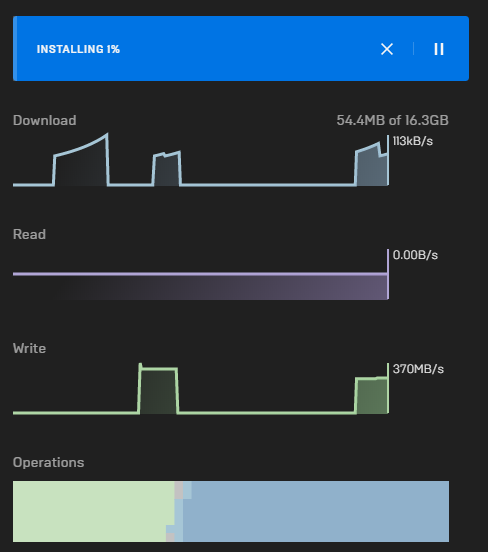
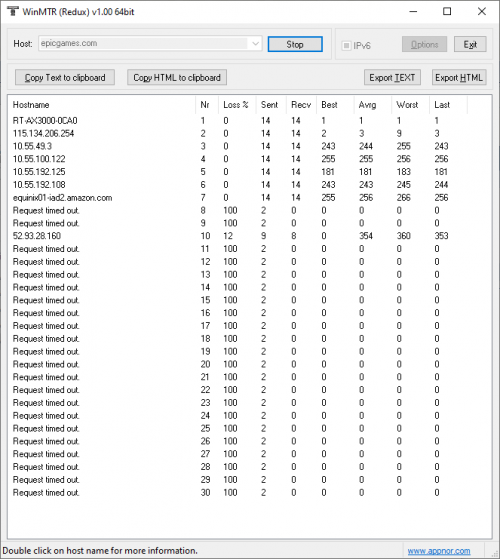
Anyone else having issues with Epic? As in Epic Games (epicgames.com). Website is extremely slow, launcher can't even open. But once I connect to my VPN or use my mobile data, it's fast. Routing issue? Has been happening since last week for me.

user posted image

user posted image

not a networking guy so I have no idea what's going on, but it's definitely something fucky on Unifi/TM side

This post has been edited by amir.asyraf: Mar 5 2021, 10:17 PM
Sam Leong
post Mar 5 2021, 10:16 PM

On my way
****
Junior Member
685 posts

Joined: Mar 2016


QUOTE(amir.asyraf @ Mar 5 2021, 10:12 PM)
Anyone else having issues with Epic? As in Epic Games (epicgames.com). Website is extremely slow, launcher can't even open. But once I connect to my VPN or use my mobile data, it's fast. Routing issue? Has been happening since last week for me.
*
u can refer to the post before
https://forum.lowyat.net/index.php?showtopi...#entry100197190

epicgames host on AWS US
and unifi to AWS US having problem , according to "sampride" he mention that is upstream problem , TM can't do anything.
QUOTE(sampride @ Mar 5 2021, 04:11 PM)
Yes, only unifi users affected. Apparently, TM can't do anything. The route that was congested is from upstream.
*
Just pray this problem will be solved asap

413 Pages « < 67 68 69 70 71 > » Top
Topic ClosedOptions
 

Change to:
| Lo-Fi Version
0.0380sec    0.58    6 queries    GZIP Disabled
Time is now: 25th December 2025 - 02:06 AM