Welcome Guest ( Log In | Register )

10 Pages « < 4 5 6 7 > » Bottom

Outline · [ Standard ] · Linear+

 DIR-868L to ASUS RT-AC66U with AiMesh, Latest DIR-868L Migration Options

views
     
fisherman10
post Apr 2 2021, 08:12 PM

Regular
******
Senior Member
1,372 posts

Joined: Dec 2007


At present, DIR-868L can only be converted to RT-AC66U_B1 or to RT-AC68U.

Besides the problems mentioned in the opening post such as LAN/WAN ports rearranged and LED not working normally,
1) If converted to RT-AC66U_B1, everything works fine except 2.4G WiFi very slow
2) If converted to RT-AC68U, everything works fine except 2.4G WiFi very slow and WiFi is disabled/off after every restart.


Here's the guide to fix both 2.4G WiFi speed and WiFi disabled after restart. It will be converted to AC68U. AC68U has slightly more info when viewing connected clients list compared to AC66U_B1.

Only do this after you're already fully converted and running Asus firmware.

1) Download attached file. newcfe68u.bin and newcfe66ub1.bin and mtd-write and CFEEdit
https://drive.google.com/file/d/1s6ooa6M8ZF...iew?usp=sharing

2) Use CFEEdit and change 3 macaddresses and WPS Pin according to your own router in the CFE file.

3) Turn on the SSH from router page. Administration > System > Enable SSH > Apply

4) Open WINSCP. Choose SCP protocol, enter router IP address, username and password

5) Now decide if you want your router to be Asus AC68U or AC66U_B1. Drag and drop both newcfe68u.bin OR newcfe66ub1.bin together with mtd-write file to the right side of WINSCP

6) Use Putty and connect to router. Enter username and password

7) Enter these commands in Putty to flash new CFE

CODE
chmod u+x mtd-write

./mtd-write newcfe68u.bin boot

OR

./mtd-write newcfe66ub1.bin boot


8) Enter this command into Putty to clear NVRAM and reboot

CODE
nvram erase

reboot


And it should startup as AC68U or AC66U_B1.

This post has been edited by fisherman10: Apr 4 2021, 09:45 PM
BTS1501
post Apr 2 2021, 08:47 PM

Getting Started
**
Junior Member
250 posts

Joined: May 2019
Yes, the steps are correct. Will not brick the router. Just some redundant steps.

Step 5, rename the cfe 2.4fix to just cfe.bin so that when you flash easier,no need to check so many characters.

Step 7,8 ,9 not needed. Mtd write has 3 versions,one version need -i ,and one version no need (like step 10).

Step 11 optional. You can just power off, then wps + power on until internet led flashes.

Using hp you should get around 50mbps (unless yours is high end hp. Using another 868l as repeater will be higher.
fisherman10
post Apr 2 2021, 09:09 PM

Regular
******
Senior Member
1,372 posts

Joined: Dec 2007


QUOTE(BTS1501 @ Apr 2 2021, 08:47 PM)
Yes, the steps are correct. Will not brick the router.  Just some redundant steps. 

Step 5, rename the cfe 2.4fix to just cfe.bin so that when you flash easier,no need to check so many characters.

Step 7,8 ,9 not needed. Mtd write has 3 versions,one version need -i ,and one version no need (like step 10).

Step 11 optional.  You can just power off, then wps + power on until internet led flashes.

Using hp you should get around 50mbps (unless yours is high end hp. Using another 868l as repeater will be higher.
*
Good tips. Lemme edit. Can you tell which version is my mtd-write? Should use step 9 or step 10?
takumaki67
post Apr 2 2021, 10:03 PM

New Member
*
Newbie
13 posts

Joined: Feb 2011
QUOTE(fisherman10 @ Apr 2 2021, 08:12 PM)
At present, DIR-868L can only be converted to RT-AC66U_B1 or to RT-AC68U.

Besides the problems mentioned in the opening post such as LAN/WAN ports rearranged and LED not working normally,
1) If converted to RT-AC66U_B1, everything works fine except 2.4G WiFi very slow
2) If converted to RT-AC68U, everything works fine except 2.4G WiFi very slow and WiFi is disabled/off after every restart.
Here's the guide to fix both 2.4G WiFi speed and WiFi disabled after restart. It will be converted to AC68U. AC68U has slightly more info when viewing connected clients list compared to AC66U_B1.

Only do this after you're already fully converted and running Asus firmware.

1) Download attached file. CFE_868L_2.4Gfix_68u.bin and mtd-write and CFEEdit
https://drive.google.com/file/d/14uUNxKWLzb...iew?usp=sharing

2) Use CFEEdit and change 3 macaddresses and WPS Pin according to your own router.

3) Turn on the SSH from router page. Administration > System > Enable SSH > Apply

4) Open WINSCP. Choose SCP protocol, enter router IP address, username and password

5) Drag and drop both CFE_868L_2.4Gfix_68u.bin and mtd-write files to the right side of WINSCP

6) Use Putty and connect to router. Enter username and password

7) Enter this common into Putty to backup current CFE

CODE
dd if=/dev/mtd0 of=/tmp/home/root/cfe_bac.bin


8) Drag cfe_bac.bin file from right window of WINSCP to left window.

9) Enter these commands in Putty to flash new CFE

CODE
chmod 755 mtd-write

./mtd-write -i CFE_868L_2.4Gfix_68u.bin -d boot


10) Just to be safe, enter this additional commands into Putty also

CODE
chmod u+x mtd-write

./mtd-write  CFE_868L_2.4Gfix_68u.bin boot


11) Enter this command into Putty to clear NVRAM and reboot

CODE
nvram erase

reboot


And it should startup as AC68U. Please don't blame me if anything goes wrong. It worked for 3 of my units.
*
Awesome! It works! Thank you fisherman10!
A cosmetic question, so the INTERNET LED and POWER LED no light after connected to Internet?

fisherman10
post Apr 2 2021, 10:11 PM

Regular
******
Senior Member
1,372 posts

Joined: Dec 2007


QUOTE(takumaki67 @ Apr 2 2021, 10:03 PM)
Awesome! It works! Thank you fisherman10!
A cosmetic question, so the INTERNET LED and POWER LED no light after connected to Internet?
*
I notice that on my 868L acting as wireless access point, both LED no light.

On my other 868L acting as mesh node, the bottom light lights up green. Top light is Off.
takumaki67
post Apr 2 2021, 10:18 PM

New Member
*
Newbie
13 posts

Joined: Feb 2011
QUOTE(fisherman10 @ Apr 2 2021, 10:11 PM)
I notice that on my 868L acting as wireless access point, both LED no light.

On my other 868L acting as mesh node, the bottom light lights up green. Top light is Off.
*
Coool!
Again appreciate your effort and the details steps fisherman10!
BTS1501
post Apr 3 2021, 02:24 PM

Getting Started
**
Junior Member
250 posts

Joined: May 2019
QUOTE(fisherman10 @ Apr 2 2021, 09:09 PM)
Good tips. Lemme edit. Can you tell which version is my mtd-write? Should use step 9 or step 10?
*
Yours is v2, as its 717kb, so must use step 9. Step 10 is for v1 and v3.

https://www.snbforums.com/threads/how-to-fl...-cfe-abc.20641/

Since you are using 68u in the cfe, that is why only 1 led will light up. If you want both leds to light up, then you need to change it to ac66u b1, and also bl_version.

The 2 lines below are also redundant, as there is no line in the cfe that specify pci/1/1 or pci/2/1 (these 2 are for older cfe generation/routers), but you can just leave it there if you want.

devpath0=pci/1/1
devpath1=pci/2/1
fisherman10
post Apr 3 2021, 02:34 PM

Regular
******
Senior Member
1,372 posts

Joined: Dec 2007


QUOTE(takumaki67 @ Apr 2 2021, 10:18 PM)
Coool!
Again appreciate your effort and the details steps fisherman10!
*
At first both LED is off but after a few days, yesterday I went to look at it, bottom LED lights up green. Anyway I can't be bothered about the LED.
fisherman10
post Apr 3 2021, 02:35 PM

Regular
******
Senior Member
1,372 posts

Joined: Dec 2007


QUOTE(BTS1501 @ Apr 3 2021, 02:24 PM)
Yours is v2, as its 717kb, so must use step 9. Step 10 is for v1 and v3.

https://www.snbforums.com/threads/how-to-fl...-cfe-abc.20641/

Since you are using 68u in the cfe, that is why only 1 led will light up. If you want both leds to light up, then you need to change it to ac66u b1, and also bl_version.

The 2 lines below are also redundant, as there is no line in the cfe that specify pci/1/1 or pci/2/1 (these 2 are for older cfe generation/routers), but you can just leave it there if you want.

devpath0=pci/1/1
devpath1=pci/2/1
*
Okay I will edit it later when I get back home.

When I was doing on my side here, I must've use a different MTD-Write from different guides. Either Step 9 or 10 which I tried didn't work. So I just used both to be sure.
TSmisk94
post Apr 3 2021, 10:05 PM

Getting Started
**
Junior Member
72 posts

Joined: May 2014


QUOTE(fisherman10 @ Apr 2 2021, 08:12 PM)
At present, DIR-868L can only be converted to RT-AC66U_B1 or to RT-AC68U.

Besides the problems mentioned in the opening post such as LAN/WAN ports rearranged and LED not working normally,
1) If converted to RT-AC66U_B1, everything works fine except 2.4G WiFi very slow
2) If converted to RT-AC68U, everything works fine except 2.4G WiFi very slow and WiFi is disabled/off after every restart.
Here's the guide to fix both 2.4G WiFi speed and WiFi disabled after restart. It will be converted to AC68U. AC68U has slightly more info when viewing connected clients list compared to AC66U_B1.

Only do this after you're already fully converted and running Asus firmware.

1) Download attached file. CFE_868L_2.4Gfix_68u.bin and mtd-write and CFEEdit
https://drive.google.com/file/d/14uUNxKWLzb...iew?usp=sharing

2) Use CFEEdit and change 3 macaddresses and WPS Pin according to your own router.

3) Turn on the SSH from router page. Administration > System > Enable SSH > Apply

4) Open WINSCP. Choose SCP protocol, enter router IP address, username and password

5) Drag and drop both CFE_868L_2.4Gfix_68u.bin and mtd-write files to the right side of WINSCP

6) Use Putty and connect to router. Enter username and password

7) Enter this common into Putty to backup current CFE

CODE
dd if=/dev/mtd0 of=/tmp/home/root/cfe_bac.bin


8) Drag cfe_bac.bin file from right window of WINSCP to left window.

9) Enter these commands in Putty to flash new CFE

CODE
chmod 755 mtd-write

./mtd-write -i CFE_868L_2.4Gfix_68u.bin -d boot


10) Just to be safe, enter this additional commands into Putty also

CODE
chmod u+x mtd-write

./mtd-write  CFE_868L_2.4Gfix_68u.bin boot


11) Enter this command into Putty to clear NVRAM and reboot

CODE
nvram erase

reboot


And it should startup as AC68U. Please don't blame me if anything goes wrong. It worked for 3 of my units.
*
Dear fisherman10,

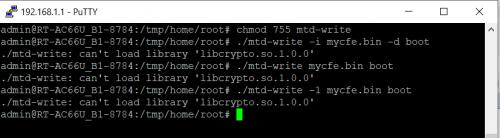
Stumble on the following error message.

user posted image

Still cannot figure out yet the cause of the problem.

Any ideas what's wrong?

Regards,
TSmisk94
post Apr 3 2021, 10:13 PM

Getting Started
**
Junior Member
72 posts

Joined: May 2014


QUOTE(misk94 @ Mar 31 2021, 03:31 PM)
Dear members,

I am thinking of selling my DIR-868L AiMesh router and node.

Both are already migrated to Asuswrt-Merlin firmware.

These are the units that I have been showing you the guide and performance benchmark.

So they are tested and having reasonably good performance.

The units are still having balance of the three year D-Link warranty. i.e. until mid Nov. 2022.

I am asking RM300 for the set (one router and one node) - AC1750 AiMesh system. Complete with original box and power supply.

I think it is a reasonable price and comes with more than 1 year and 6 months remaining warranty.

Other sellers are selling used DIR-868L around the same price with no warranty at all.

Anyone interested please let me know.

Thank you.

Regards,
*
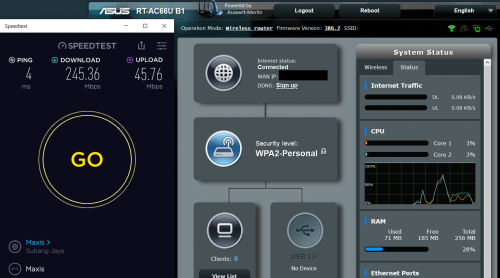
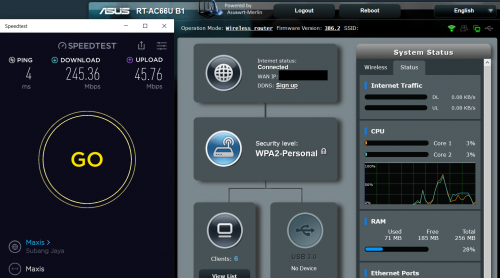
OOKla speedtest from PC on second floor. Testing a 3-node AiMesh. Internet is 300Mbps DL/50Mbps UL.

Running latest Asuswrt-Merlin firmware 386.2.

user posted image

user posted image

This post has been edited by misk94: Apr 4 2021, 08:46 AM
TSmisk94
post Apr 4 2021, 08:29 AM

Getting Started
**
Junior Member
72 posts

Joined: May 2014


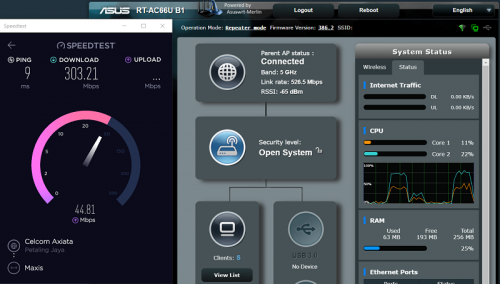
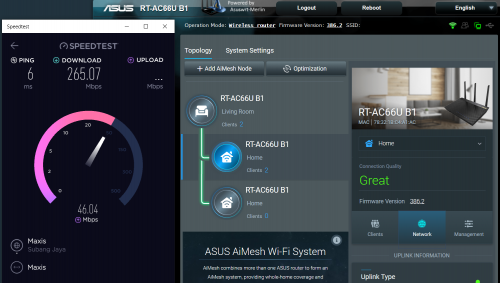
AiMesh versus Repeater Performance: A quick comparison

Although AiMesh is generally giving good performance seems that having WiFi4 and WiFi5 together may limit overall performance.

At least in the case of DIR-868L, which is having a weak WiFi4 performance.

I am bit surprise with the outcome. blink.gif

It seems I can reach higher performance using Repeater mode.

I am connecting from PC at second floor. Main router is in ground floor.

Setting:

1. WiFI4 disabled. I don't need it on the second floor.
2. Roaming assistant on for 5 GHz at -60 dB.
3. Latest Asuswrt-Merlin firmware 386.2

Note: For 1 and 2, need to set after node remove from AiMesh and before change to Repeater mode.

Test conducted in Sunday morning. Less traffic and interference in house.

user posted image

user posted image

user posted image

Wow. I can actually hit 300 Mbps from the second floor rclxm9.gif

I could only reach max 265 Mbps with AiMesh setup before.

user posted image

user posted image

Additional bonus Administration function could be used.

For example, I could check my repeater temperature.

user posted image

5 GHz 47 C and CPU 62 C. 2.4 GHz is off.

I will let you know how this setting work in comparison to AiMesh setup.

I would expect that the AiMesh setup would be better in roaming but we shall see.

Regards,

This post has been edited by misk94: Apr 4 2021, 02:41 PM
BTS1501
post Apr 4 2021, 02:35 PM

Getting Started
**
Junior Member
250 posts

Joined: May 2019
QUOTE(misk94 @ Apr 4 2021, 08:29 AM)
AiMesh versus Repeater Performance: A quick comparison

Although AiMesh is generally giving good performance seems that having WiFi4 and WiFi5 together may limit overall performance.

At least in the case of DIR-868L, which is having a weak WiFi4 performance.

I am bit surprise with the outcome.  blink.gif

It seems I can reach higher performance using Repeater mode.


*
Ye, repeater mode the speedtest results are a lot better, around 10-20% higher when compared to mesh mode. Most likely some bandwidth of the cpu is reserved for mesh purpose, hence lower results.

If you want to reflash, you can download the mtd write from below. I tried it and it can work (using ./mtd-write cfe.bin boot)

https://github.com/RMerl/asuswrt-merlin.ng/...m/cfe/mtd-write

Also, two cons after flashing to ac68u :
1. no led
2. mesh node 2.4ghz speedtest is half of the main router when backhaul is wireless, ie, when test at main router, speedtest is 50/50 Mbps, while at node its 20/40Mbps. defeat the purpose of fixing the 2.4ghz. Set as repeater mode (using 5ghz as backhaul) might be better.

I also notice that the cpu utilisation is higher when doing speed test, maybe will monitor the stability of this for a few days and then flash back to ac66u and see the utilisation again.


fisherman10
post Apr 4 2021, 08:12 PM

Regular
******
Senior Member
1,372 posts

Joined: Dec 2007


QUOTE(misk94 @ Apr 3 2021, 10:05 PM)
Dear fisherman10,

Stumble on the following error message.

user posted image

Still cannot figure out yet the cause of the problem.

Any ideas what's wrong?

Regards,
*
I've edited my post with new links and instructions. Please try again.

QUOTE(BTS1501 @ Apr 4 2021, 02:35 PM)
Ye, repeater mode the speedtest results are a lot better, around 10-20% higher when compared to mesh mode. Most likely some bandwidth of the cpu is reserved for mesh purpose, hence lower results.

If you want to reflash, you can download the mtd write from below. I tried it and it can work (using ./mtd-write cfe.bin boot)

https://github.com/RMerl/asuswrt-merlin.ng/...m/cfe/mtd-write

Also, two cons after flashing to ac68u :
1. no led
2. mesh node 2.4ghz speedtest is half of the main router when backhaul is wireless, ie, when test at main router, speedtest is 50/50 Mbps, while at node its 20/40Mbps. defeat the purpose of fixing the 2.4ghz. Set as repeater mode (using 5ghz as backhaul) might be better.

I also notice that the cpu utilisation is higher when doing speed test, maybe will monitor the stability of this for a few days and then flash back to ac66u and see the utilisation again.
*
Weirdly enough, now my Internet LED lights up green eventhough it's on AC68u. Seems to have fixed itself.
geep
post Apr 4 2021, 08:42 PM

New Member
*
Junior Member
45 posts

Joined: Jun 2011
QUOTE(fisherman10 @ Apr 4 2021, 08:12 PM)
I've edited my post with new links and instructions. Please try again.
Weirdly enough, now my Internet LED lights up green eventhough it's on AC68u. Seems to have fixed itself.
*
After like more than a week moving back and forth from 68U to 66U, Here some glitch and instability i've notice on 68U.
-The LED will on and off randomly (it will light up when i make a change on setting/nvram)
-2.4G throughput remain high but inconsistent
-Temperature 5-10% high (Maybe cause by 68U vs 66U wattage)
-Some stats are missing, like my clients connected to guest network not shown.
fisherman10
post Apr 4 2021, 09:40 PM

Regular
******
Senior Member
1,372 posts

Joined: Dec 2007


New firmware update for Asus Merlin. Now version 386.2.

https://sourceforge.net/projects/asuswrt-me...-AC68U/Release/
fisherman10
post Apr 4 2021, 09:47 PM

Regular
******
Senior Member
1,372 posts

Joined: Dec 2007


I've updated my guide to include both CFEs for 2.4g WiFi fix. OP, please test and you may add a link to it at the front page.

1 file for converting to AC68U, 1 file for remaining on AC66U_B1.

As for my usage, I don't find any much real life difference between both models.

https://forum.lowyat.net/index.php?act=ST&f...=5079525&st=80#
TSmisk94
post Apr 5 2021, 01:28 PM

Getting Started
**
Junior Member
72 posts

Joined: May 2014


2.4 GHz WiFi performance Tenda 6 and Tenda 11.

In the past, I did not pay much attention to 2.4 GHz WiFi performance because I will always choose 5 GHz in my phone.

Based on what DIR-868L users saying about the 2.4 GHz mediocre performance, I decide to check other brand routers at my disposal in my workplace.

The results could be use as comparison with DIR-868L 2.4 GHz performance.

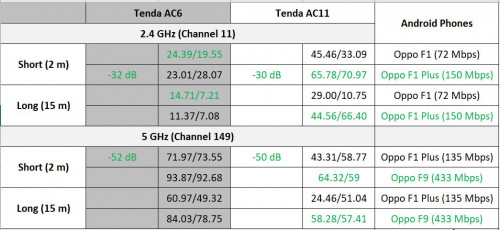
We are having Tenda AC6 and AC11. Both are AC1200 class budget routers. biggrin.gif

Internet connection is capped to 100 Mbps DL/100 Mbps UL.

Attached performance table of my short testing.

user posted image

First value is DL and second value is UL in Mbps. dB is signal strength from 2 m from Oppo F1 Plus phone.

2 m reading is inside same room. 15 m reading from outside room with 2 gypsum board walls.

Interestingly, Tenda AC11 are delivering better 2.4 GHz speeds at 2 m and 15 m.

Tenda AC6 2.4 GHz performance almost same like DIR-868L.

However, Tenda AC6 is better at 5 GHz.

DIR-868L 2.4 Ghz performance definitely mediocre. sad.gif

Regards,

This post has been edited by misk94: Apr 19 2021, 02:41 PM
fisherman10
post Apr 5 2021, 02:45 PM

Regular
******
Senior Member
1,372 posts

Joined: Dec 2007


QUOTE(misk94 @ Apr 5 2021, 01:28 PM)
2.4 GHz WiFi performance Tenda 6 and Tenda 11.

In the past, I did not pay much attention to 2.4 GHz WiFi performance because I will always choose 5 GHz in my phone.

Based on what DIR-868L users saying about the 2.4 GHz mediocre performance, I decide to check other brand routers at my disposal in my workplace.

The results could be use as comparison with DIR-868L 2.4 GHz performance.

» Click to show Spoiler - click again to hide... «


Interestingly, Tenda AC11 are delivering better 2.4 GHz speeds at 2 m and 15 m.

Tenda AC6 2.4 GHz performance almost same like DIR-868L.

However, Tenda AC6 is better at 5 GHz.

DIR-868L 2.4 Ghz performance definitely mediocre.  sad.gif

Regards,
*
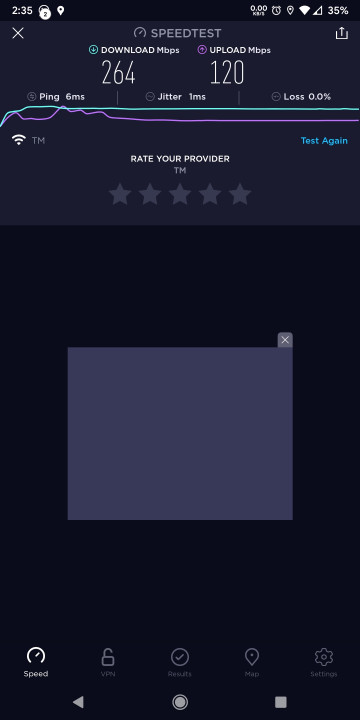
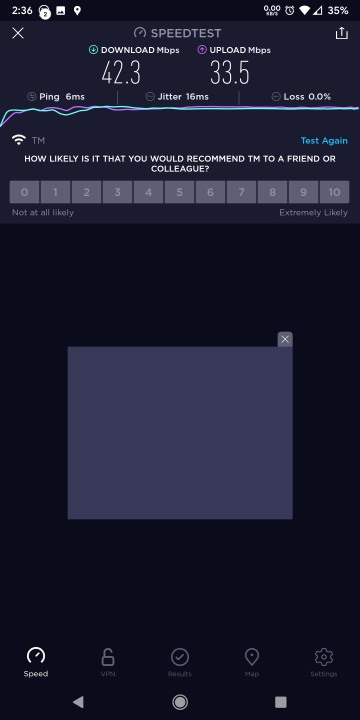
Seems like DIR-868L after the 2.4ghz fix is on par with the Tenda units. On the other hand, something is really wrong with the Tenda AC11 5ghz. It's like you're getting 2.4ghz speeds.


Here's my speedtests. I'm on Unifi 500down / 100 up. Test done 5m away from router. Direct line of sight.

» Click to show Spoiler - click again to hide... «


This post has been edited by fisherman10: Apr 5 2021, 02:46 PM
TSmisk94
post Apr 5 2021, 03:15 PM

Getting Started
**
Junior Member
72 posts

Joined: May 2014


QUOTE(fisherman10 @ Apr 5 2021, 02:45 PM)
Seems like DIR-868L after the 2.4ghz fix is on par with the Tenda units. On the other hand, something is really wrong with the Tenda AC11 5ghz. It's like you're getting 2.4ghz speeds.
Here's my speedtests. I'm on Unifi 500down / 100 up. Test done 5m away from router. Direct line of sight.

» Click to show Spoiler - click again to hide... «

*
Thank you for the feedback.

Please disregard my earlier comments.

Just realized I was using the wrong speed test. The servers are in India. So the speed not reflective of Malaysian traffic.

I will update the results with OOKLA Speedtest.

Monday blues. doh.gif

Regards,

This post has been edited by misk94: Apr 5 2021, 03:33 PM

10 Pages « < 4 5 6 7 > » Top
 

Change to:
| Lo-Fi Version
0.0419sec    0.69    6 queries    GZIP Disabled
Time is now: 11th December 2025 - 02:48 PM