Welcome Guest ( Log In | Register )

44 Pages « < 32 33 34 35 36 > » Bottom

Outline · [ Standard ] · Linear+

 [2020] MacBook Pro with M1 Discussion Thread

views
     
submergedx
post Apr 30 2021, 12:14 PM

Regular
******
Senior Member
1,134 posts

Joined: Jun 2015
QUOTE(victorr @ Apr 26 2021, 02:15 PM)
What is the reason you guys got the MBP instead of MPA?

I'm currently using MBP provided by company. I wanna buy one myself, I cant decide between MBA or MBP. MBA seems good enough already.
*
Depend on your purpose
For paperwork, web-based office work, go for MBA.
For multimedia, design, web development, go for MBP.
victorr
post Apr 30 2021, 10:33 PM

Casual
***
Junior Member
431 posts

Joined: Feb 2010


QUOTE(submergedx @ Apr 30 2021, 12:14 PM)
Depend on your purpose
For paperwork, web-based office work, go for MBA.
For multimedia, design, web development, go for MBP.
*
Actually my workload only requires MBA. I do feel a bit overkill using MBP now. Except for the Touch Bar, I don't think there's much to miss
spideysam
post Apr 30 2021, 11:02 PM

Enthusiast
*****
Senior Member
937 posts

Joined: Dec 2004


QUOTE(rickyro @ Apr 30 2021, 09:34 AM)
Sometimes the mouse cursor disappears on the desktop, do you guys face such problem?

I'm using a logitech pebble bluetooth mouse
*
there is a bit of lag for me sometimes for the pointer
for the 2.4ghz frequency
using corsair harpoon rgb wireless and plug the usb receiver to my ugreen dongle.


bluetooth I think ok for me...

rickyro
post May 1 2021, 12:14 AM

Enthusiast
*****
Junior Member
914 posts

Joined: Mar 2011
QUOTE(spideysam @ Apr 30 2021, 11:02 PM)
there is a bit of lag for me sometimes for the pointer
for the 2.4ghz frequency
using corsair harpoon rgb wireless and plug the usb receiver to my ugreen dongle.
bluetooth I think ok for me...
*
My case was... The cursor was just gone.... biggrin.gif
spideysam
post May 1 2021, 12:56 AM

Enthusiast
*****
Senior Member
937 posts

Joined: Dec 2004


QUOTE(rickyro @ May 1 2021, 12:14 AM)
My case was... The cursor was just gone.... biggrin.gif
*
-____-!!!
Deskihaoz
post May 2 2021, 11:29 PM

Getting Started
**
Junior Member
61 posts

Joined: Jun 2011
Hi Guys..Goin to get my MBP soon time ...Have some questions here to ask you guys as it's my first time to use MAc OS~

1. Is it good to get the PD from usb c Monitor to charge up the MBP and display on the same time?
2. If above method is good to go, do you guys can recommend Any 2k or 4k monitor around budget 2k-3k wit hthe USB C PD option?
3. I saw some of you guys here mentioned that we are actually could buy the MBP with student price even tho we are not student anymore with no verification from buying at APPLE website?
4. Is it actually practical to purchase Apple Care plan? As in we actually will make use of it? We can just bring in to Switch, Machine and etc Apple authorized shop for repairing if "Touch Wood" anything rosak?

Many thanks in advanced!

This post has been edited by Deskihaoz: May 2 2021, 11:33 PM
andrewtho
post May 3 2021, 01:48 PM

Hooded Knight
*******
Senior Member
5,936 posts

Joined: Dec 2009
From: City of Subang Jaya
QUOTE(Deskihaoz @ May 2 2021, 11:29 PM)
Hi Guys..Goin to get my MBP soon time ...Have some questions here to ask you guys as it's my first time to use MAc OS~

1. Is it good to get the PD from usb c Monitor to charge up the MBP and display on the same time?
2. If above method is good to go, do you guys can recommend Any 2k or 4k monitor around budget 2k-3k wit hthe USB C PD option?
3. I saw some of you guys here mentioned that we are actually could buy the MBP with student price even tho we are not student anymore with no verification from buying at APPLE website?
4. Is it actually practical to purchase Apple Care plan? As in we actually will make use of it? We can just bring in to Switch, Machine and etc Apple authorized shop for repairing if "Touch Wood" anything rosak? 

Many thanks in advanced!
*
I believe that the current MBP 13’ is using a 60w charger, so any monitor that delivers above 60w should be fine.

Depending on your work, some LG and Dell monitors are 4K IPS panels with 60/90w PD, can use your Mac in clamshell mode.

As for the Education discount, its totally up to you - based on your conscience. No right or wrong, but no they wont need to check / background screen. Previously they do on random basis but now barely.
spideysam
post May 4 2021, 11:21 PM

Enthusiast
*****
Senior Member
937 posts

Joined: Dec 2004


Guys u also have problem connecting wit AirPods Pro for MacBook Pro M1


always disconnecting and reconnecting

Latest update 11.3.1 still same for me
quadcube
post May 5 2021, 11:56 AM

Regular
******
Senior Member
1,924 posts

Joined: May 2009
From: Yokohama, JP


QUOTE(spideysam @ May 4 2021, 11:21 PM)
Guys u also have problem connecting wit AirPods Pro for MacBook Pro M1
always disconnecting and reconnecting

Latest update 11.3.1 still same for me
*
nope, stable for me, rarely lose connection on 2 hours meetings. for my 2018 Mac mini, connection (ble for both mx master 3 and AirPods Pro) isn't great but that's a common problem for most Mac mini
quadcube
post May 5 2021, 11:59 AM

Regular
******
Senior Member
1,924 posts

Joined: May 2009
From: Yokohama, JP


QUOTE(Deskihaoz @ May 2 2021, 11:29 PM)
Hi Guys..Goin to get my MBP soon time ...Have some questions here to ask you guys as it's my first time to use MAc OS~

1. Is it good to get the PD from usb c Monitor to charge up the MBP and display on the same time?
2. If above method is good to go, do you guys can recommend Any 2k or 4k monitor around budget 2k-3k wit hthe USB C PD option?
3. I saw some of you guys here mentioned that we are actually could buy the MBP with student price even tho we are not student anymore with no verification from buying at APPLE website?
4. Is it actually practical to purchase Apple Care plan? As in we actually will make use of it? We can just bring in to Switch, Machine and etc Apple authorized shop for repairing if "Touch Wood" anything rosak? 

Many thanks in advanced!
*
4. If it was me, I would purchase it when it is approaching the end of the default warranty..but from owning 5 Macs that I still use everyday, only my first Mac I purchased apple care, didn't bother with the rest as if they were to breakdown, they would do within a year biggrin.gif
The~Joker
post May 7 2021, 02:52 PM

Casual
***
Junior Member
456 posts

Joined: Jan 2012
wrong post

This post has been edited by The~Joker: Jun 18 2021, 05:38 PM
Charizard
post May 8 2021, 04:09 PM

Casual
***
Junior Member
373 posts

Joined: May 2007


QUOTE(The~Joker @ May 7 2021, 02:52 PM)
[attachmentid=10872681]

Been using the MBP M1 for a week. First Mac!

Overall very good experience especially the way it syncs with the iPhone. (Safari, Photos, Messages, reminders, notes etc)

I have been using alongside my Surface Pro 7, both of these devices paired up makes an excellent portable productivity setup especially for a Uni student!

Although these devices are not competing against each other here are some thoughts (though the price for both devices are similar, 6k-ish)

Battery Life: MBP takes the cake , I feel it lasts 3x as long as SP7
Lapability: MBP again. The removable keyboard on SP7 is horrendous.
Display: SP7 is slightly better in terms of resolution and pixel density but I do prefer the colors on the MBP.
Performance: MBP just obliterates the SP7, better RAM management.
Notetaking: SP7, duh. it has pen support.
Design: MBP hands down, feels super premium. SP7 feels kinda standard, and the material scratches quite easily sad.gif

Overall I think MBP M1 provides more value compared to Microsoft laptops. both laptops are priced quite similarly.

Anyone else here has a similar setup?
*
Replace SP7 with ipad and pen. Then can sync everything flawlessly brows.gif

quadcube
post May 9 2021, 10:11 AM

Regular
******
Senior Member
1,924 posts

Joined: May 2009
From: Yokohama, JP


QUOTE(The~Joker @ May 7 2021, 02:52 PM)
[attachmentid=10872681]

Been using the MBP M1 for a week. First Mac!

Overall very good experience especially the way it syncs with the iPhone. (Safari, Photos, Messages, reminders, notes etc)

I have been using alongside my Surface Pro 7, both of these devices paired up makes an excellent portable productivity setup especially for a Uni student!

Although these devices are not competing against each other here are some thoughts (though the price for both devices are similar, 6k-ish)

Battery Life: MBP takes the cake , I feel it lasts 3x as long as SP7
Lapability: MBP again. The removable keyboard on SP7 is horrendous.
Display: SP7 is slightly better in terms of resolution and pixel density but I do prefer the colors on the MBP.
Performance: MBP just obliterates the SP7, better RAM management.
Notetaking: SP7, duh. it has pen support.
Design: MBP hands down, feels super premium. SP7 feels kinda standard, and the material scratches quite easily sad.gif

Overall I think MBP M1 provides more value compared to Microsoft laptops. both laptops are priced quite similarly.

Anyone else here has a similar setup?
*
I have similar hardware but my SP7 only lives on top of my room's fridge as a calendar/picture display laugh.gif

inb4, the point on SP7 keyboard is on point, that thing is garbage
TSwestlife
post May 9 2021, 10:33 AM

10k Club
********
All Stars
14,323 posts

Joined: Jan 2011
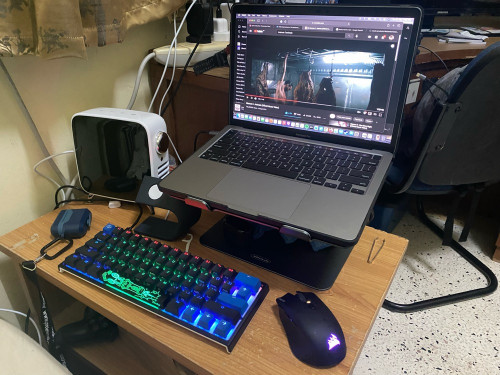
QUOTE(spideysam @ Apr 27 2021, 07:51 PM)
My bedside table setup

user posted image
*
if u are connected to AC power at all time which you somehow use ur MB as desktop replacement, do beware that the battery will get bloated quite soon, can be less than 1 year.

to reduce the chance of this, need to always discharge the battery and charge.

my MBP has this problem as i use my MBP 24x7 and it is connected to AC power at all time which the battery cycle is almost none.
now i bought a mac mini to replace it instead since it is more suitable for 24x7 and it has no battery.

This post has been edited by westlife: May 9 2021, 10:34 AM
The~Joker
post May 9 2021, 11:17 AM

Casual
***
Junior Member
456 posts

Joined: Jan 2012
QUOTE(Charizard @ May 8 2021, 04:09 PM)
Replace SP7 with ipad and pen. Then can sync everything flawlessly brows.gif
*
Yeah I might consider it hmm.gif


QUOTE(quadcube @ May 9 2021, 10:11 AM)
I have similar hardware but my SP7 only lives on top of my room's fridge as a calendar/picture display laugh.gif

inb4, the point on SP7 keyboard is on point, that thing is garbage
*
Haha that is one expensive calendar thumbup.gif

ionStorm
post May 10 2021, 09:33 PM

*nyan*
Group Icon
Elite
3,350 posts

Joined: Jan 2003
From: Petaling Jaya


QUOTE(westlife @ May 9 2021, 10:33 AM)
if u are connected to AC power at all time which you somehow use ur MB as desktop replacement, do beware that the battery will get bloated quite soon, can be less than 1 year.
*
My previous MBPR 15 2015 was almost always on AC but no bloating. I think it's not always clear whether it will potentially bloat or not.
TSwestlife
post May 11 2021, 04:35 AM

10k Club
********
All Stars
14,323 posts

Joined: Jan 2011
QUOTE(ionStorm @ May 10 2021, 09:33 PM)
My previous MBPR 15 2015 was almost always on AC but no bloating. I think it's not always clear whether it will potentially bloat or not.
*
old model no issue, previous rMBP 13-inch is quite lasting also. Since 2016 design changed MBP somehow the quality does indeed drop quite a bit. especially the battery. I had changed two times battery since i bought my 2017 MBP. use it 24 x 7 and it gets bloated after 3 years, then after replaced battery at apple, the new battery gets bloated in less than 1 year, now changed new battery again but i dun use it 24x7 anymore as i had gotten myself a mac mini for use at home instead.
victorr
post May 11 2021, 04:21 PM

Casual
***
Junior Member
431 posts

Joined: Feb 2010


QUOTE(westlife @ May 11 2021, 04:35 AM)
old model no issue, previous rMBP 13-inch is quite lasting also. Since 2016 design changed MBP somehow the quality does indeed drop quite a bit. especially the battery. I had changed two times battery since i bought my 2017 MBP. use it 24 x 7 and it gets bloated after 3 years, then after replaced battery at apple, the new battery gets bloated in less than 1 year, now changed new battery again but i dun use it 24x7 anymore as i had gotten myself a mac mini for use at home instead.
*
it's a laptop. Just use it as intended (mobile). Especially now in MCO. I'm having Zoom meeting all over the house lol
spideysam
post May 11 2021, 04:21 PM

Enthusiast
*****
Senior Member
937 posts

Joined: Dec 2004


QUOTE(westlife @ May 9 2021, 10:33 AM)
if u are connected to AC power at all time which you somehow use ur MB as desktop replacement, do beware that the battery will get bloated quite soon, can be less than 1 year.

to reduce the chance of this, need to always discharge the battery and charge.

my MBP has this problem as i use my MBP 24x7 and it is connected to AC power at all time which the battery cycle is almost none.
now i bought a mac mini to replace it instead since it is more suitable for 24x7 and it has no battery.
*
When I charged to 80% I usually unplugged it...

didn't plug the AC power for 24hours

TSwestlife
post May 11 2021, 06:35 PM

10k Club
********
All Stars
14,323 posts

Joined: Jan 2011
QUOTE(spideysam @ May 11 2021, 04:21 PM)
When I charged to 80% I usually unplugged it...

didn't plug the AC power for 24hours
*
yes, i cannot be plugged in 24x7 else it will like mine.
but my macbook pro is on 24x7. no choice i need to plug in at all time.

44 Pages « < 32 33 34 35 36 > » Top
 

Change to:
| Lo-Fi Version
0.0305sec    1.12    6 queries    GZIP Disabled
Time is now: 24th December 2025 - 09:37 PM