

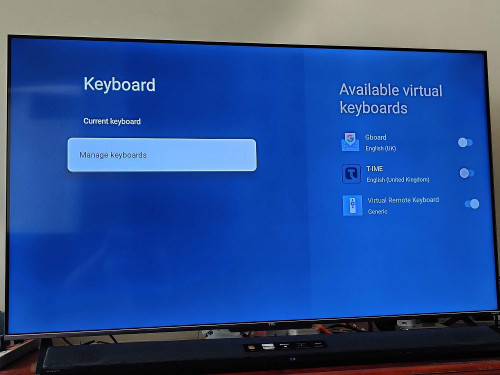
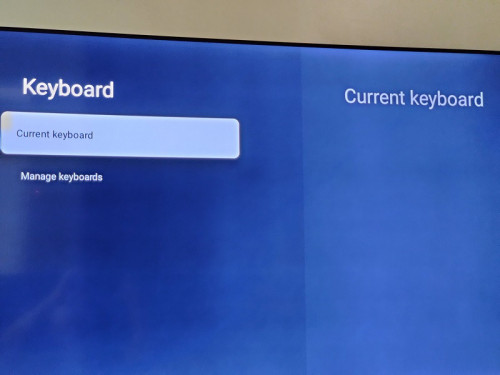
QUOTE(smaelz83 @ Apr 20 2022, 04:29 PM)
You need to disable T-IME keyboard for Gboard to be automatically enable. That's what I did on my C716 V674 firmware, Android 11.

This post has been edited by jutamind: Apr 20 2022, 04:49 PMTcl C716 QLED 4k tv
|
|
 Apr 20 2022, 04:47 PM Apr 20 2022, 04:47 PM
|
 
Senior Member
2,429 posts Joined: Jul 2007 
|
I disabled T-IME keyboard but Gboard is not auto enabled and i cant scroll to Gboard and enable it. In fact, once T-IME is disabled there's no Current Keyboard.
QUOTE(smaelz83 @ Apr 20 2022, 04:29 PM) You need to disable T-IME keyboard for Gboard to be automatically enable. That's what I did on my C716 V674 firmware, Android 11. This post has been edited by jutamind: Apr 20 2022, 04:49 PM |
|
|
|
|
|
Apr 20 2022, 04:58 PM
Show posts by this member only | IPv6 | Post
#1022
|

All Stars
18,503 posts Joined: Oct 2007 From: P.Jaya
|
QUOTE(ahpaul82 @ Apr 20 2022, 03:03 PM) Hey guys, Nice, mine share your firmware pre installed ?Managed to get 55" C725 < RM3k.. [attachmentid=11138433] May I know what is the latest firmware ? |
|
|
Apr 20 2022, 05:02 PM
Show posts by this member only | IPv6 | Post
#1023
|

Senior Member
3,795 posts Joined: Jan 2003 From: .: Old Klang Road :.  
|
QUOTE(stasio @ Apr 20 2022, 04:58 PM) Nice, mine share your firmware pre installed ? I think is V411 out of the box, After connected to Wi-Fi it prompt immediately to update firmware. After updated i think is V418.. stasio liked this post
|
|
|
Apr 20 2022, 05:04 PM
Show posts by this member only | IPv6 | Post
#1024
|
|
All Stars
18,503 posts Joined: Oct 2007 From: P.Jaya
|
QUOTE(Packer @ Apr 20 2022, 03:58 PM) We are only getting C725 old last year model…. Sad! China already shipping C735… C725 from last year model, now is (this year ) C635 (not C735 !)2022 models..... RT51M platform: P635 - DLED P735 - DLED C635 - QLED (previous C725) MT9615 platform: C735 - QLED (previous C728) C835 - MiniLED C935 - MiniLED C835 FALD (Local dimming) 55".....240 zones (1,440 diodes) 65".....288 zones (1,728 diodes) 75".....360 zones (2,160 diodes) Brightness: Peak: 1000cd/m2; Typ.:500nits C935 FALD (Local dimming) 65".....1,080 zones (8,640 diodes) 75".....1,920 zones (15,360 diodes) Brightness: Peak: 2000cd/m2; Typ.:1000nits QUOTE(ahpaul82 @ Apr 20 2022, 04:33 PM) No problem mah, QLED..not OLED.Enjoy what you have lor Apparantly C735 is OLED & 144Hz refresh rate.. This post has been edited by stasio: Apr 20 2022, 05:15 PM |
|
|
Apr 20 2022, 05:31 PM
Show posts by this member only | IPv6 | Post
#1025
|
|
Senior Member
3,795 posts Joined: Jan 2003 From: .: Old Klang Road :.
|
QUOTE(stasio @ Apr 20 2022, 05:04 PM) C725 from last year model, now is (this year ) C635 (not C735 !) So confusing.. Haha2022 models..... RT51M platform: P635 - DLED P735 - DLED C635 - QLED (previous C725) MT9615 platform: C735 - QLED (previous C728) C835 - MiniLED C935 - MiniLED C835 FALD (Local dimming) 55".....240 zones (1,440 diodes) 65".....288 zones (1,728 diodes) 75".....360 zones (2,160 diodes) Brightness: Peak: 1000cd/m2; Typ.:500nits C935 FALD (Local dimming) 65".....1,080 zones (8,640 diodes) 75".....1,920 zones (15,360 diodes) Brightness: Peak: 2000cd/m2; Typ.:1000nits QLED..not OLED. 
https://www.tcl.com/global/en/tvs/c735 |
|
|
Apr 20 2022, 05:46 PM
|

Senior Member
645 posts Joined: Jul 2007 From: Jeram, Selangor
|
QUOTE(jutamind @ Apr 20 2022, 04:47 PM) I disabled T-IME keyboard but Gboard is not auto enabled and i cant scroll to Gboard and enable it. In fact, once T-IME is disabled there's no Current Keyboard. Ohh, that is a problem. I don't know what to tell you. |
|
|
|
|
|
Apr 20 2022, 05:48 PM
|
|
Senior Member
2,429 posts Joined: Jul 2007
|
ahpaul82 do you manage to enable Gboard keyboard in your C725?
QUOTE(jutamind @ Apr 20 2022, 04:47 PM) I disabled T-IME keyboard but Gboard is not auto enabled and i cant scroll to Gboard and enable it. In fact, once T-IME is disabled there's no Current Keyboard. |
|
|
Apr 20 2022, 05:55 PM
Show posts by this member only | IPv6 | Post
#1028
|
|
Senior Member
3,795 posts Joined: Jan 2003 From: .: Old Klang Road :.
|
QUOTE(jutamind @ Apr 20 2022, 05:48 PM) ahpaul82 do you manage to enable Gboard keyboard in your C725? Yet try, I'm okay with the default keyboard oh Haha |
|
|
Apr 20 2022, 06:11 PM
|
|
Senior Member
2,429 posts Joined: Jul 2007
|
Can you check whether your T-IME keyboard can add simplified Chinese language into the keyboard as well?
Thanks QUOTE(ahpaul82 @ Apr 20 2022, 05:55 PM) Yet try, I'm okay with the default keyboard oh Haha |
|
|
Apr 20 2022, 07:37 PM
|
|
Junior Member
84 posts Joined: Mar 2009
|
QUOTE(smaelz83 @ Apr 20 2022, 05:46 PM) Ohh, that is a problem. I don't know what to tell you. Can just use MagiConnect to enter Chinese into your TV using your mobile phone or iPad. Just install MagiConnect to your mobile or iPad.This post has been edited by Packer: Apr 20 2022, 07:39 PM Attached thumbnail(s) 
|
|
|
Apr 20 2022, 07:40 PM
Show posts by this member only | IPv6 | Post
#1031
|
|
Senior Member
2,429 posts Joined: Jul 2007
|
Thanks for the solution. Will explore this. Now I'm using Google TV apps's TV Remote to solve this problem
QUOTE(Packer @ Apr 20 2022, 07:37 PM) Can just use MagiConnect to enter Chinese into your TV using your mobile phone or iPad. Just install MagiConnect to your mobile or iPad. |
|
|
Apr 21 2022, 03:46 AM
Show posts by this member only | IPv6 | Post
#1032
|
|
All Stars
18,503 posts Joined: Oct 2007 From: P.Jaya
|
QUOTE(jutamind @ Apr 20 2022, 07:40 PM) Thanks for the solution. Will explore this. Now I'm using Google TV apps's TV Remote to solve this problem T-IME keyboard language change....bottom right I can change so easy to Gboard, any time. This post has been edited by stasio: Apr 21 2022, 03:47 AM |
|
|
Apr 21 2022, 08:13 AM
|
|
Senior Member
2,429 posts Joined: Jul 2007
|
Yes I know how to switch keyboard and languages but T-IME doesn't support Simplified Chinese and my TV cannot turn on Gboard. Not sure why and don't know how to resolve.
Anyway, I've dropped TCL MY an email on this issue. Let's see whether they get back to me. Besides, there's other alternative ways to doing Simplified Chinese inputs as highlighted above QUOTE(stasio @ Apr 21 2022, 03:46 AM) T-IME keyboard language change....bottom right I can change so easy to Gboard, any time. |
|
|
|
|
|
Apr 21 2022, 02:18 PM
|
|
Senior Member
2,429 posts Joined: Jul 2007
|
How to check screen running time for C725 on Google TV? Tried to use this setting but doesnt seems to work on Google TV
TV Settings/picture/advanced/brightness/contrast and type 6425 In contrast menu, this is a slider in Google TV, how to type in 6425? |
|
|
Apr 21 2022, 03:04 PM
Show posts by this member only | IPv6 | Post
#1035
|
|
All Stars
18,503 posts Joined: Oct 2007 From: P.Jaya
|
QUOTE(jutamind @ Apr 21 2022, 02:18 PM) How to check screen running time for C725 on Google TV? Tried to use this setting but doesnt seems to work on Google TV Just stay on Contrast menu (nothing with slider) and type 6425.TV Settings/picture/advanced/brightness/contrast and type 6425 In contrast menu, this is a slider in Google TV, how to type in 6425? Use virtual keyboard on remote control, as I posted in previous page.  Infotech_0086___Running_time_information.pdf ( 797.15k )
Number of downloads: 20
Infotech_0086___Running_time_information.pdf ( 797.15k )
Number of downloads: 20 
Edit: All usefull information has been already posted in this thread (mostly on beggining), just neeed to search. What is for C716 ,also is for C725, except firmware version. This post has been edited by stasio: Apr 21 2022, 03:17 PM |
|
|
Apr 21 2022, 03:22 PM
|
|
Senior Member
2,429 posts Joined: Jul 2007
|
this is the path on Google TV for C725 that i tried:
Settings > Picture > Advanced settings > Brightness settings > Contrast Type 6425 using MagiConnect virtual keyboard but nothing happened. 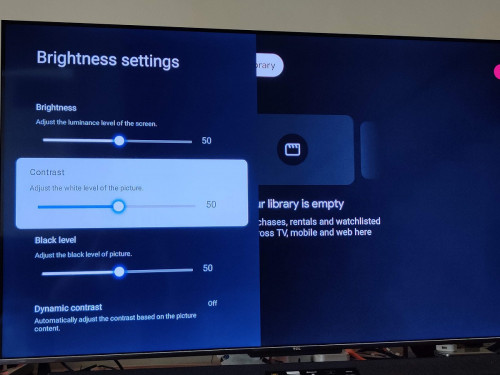 QUOTE(stasio @ Apr 21 2022, 03:04 PM) Just stay on Contrast menu (nothing with slider) and type 6425. Use virtual keyboard on remote control, as I posted in previous page.
Infotech_0086___Running_time_information.pdf ( 797.15k )
Number of downloads: 20
Edit: All usefull information has been already posted in this thread (mostly on beggining), just neeed to search. What is for C716 ,also is for C725, except firmware version. |
|
|
Apr 21 2022, 03:24 PM
Show posts by this member only | IPv6 | Post
#1037
|
|
All Stars
18,503 posts Joined: Oct 2007 From: P.Jaya
|
QUOTE(jutamind @ Apr 21 2022, 03:22 PM) this is the path on Google TV for C725 that i tried: Nothing with MagiConnect... I said with remote control. Settings > Picture > Advanced settings > Brightness settings > Contrast Type 6425 using MagiConnect virtual keyboard but nothing happened.  I using MagiConnect only to take pic from TV screen, nothing else. This post has been edited by stasio: Apr 21 2022, 03:27 PM |
|
|
Apr 21 2022, 03:28 PM
|
|
Senior Member
2,429 posts Joined: Jul 2007
|
Clicking on Virtual Keyboard button on remote doesnt prompt any virtual keyboard on screen. Not sure why. I tried with other virtual keyboard and it works. QUOTE(stasio @ Apr 21 2022, 03:24 PM) Nothing with MagiConnect... I said on remote control. stasio liked this post
|
|
|
Apr 21 2022, 03:38 PM
|
|
Senior Member
2,429 posts Joined: Jul 2007
|
So far found 2 issues in my TV: Gboard and virtual keyboard not functioning. Tried uninstalling and disabling/reenabling Gboard in the Apps settings menu but somehow still cant enable the keyboard.
QUOTE(jutamind @ Apr 21 2022, 03:28 PM) Clicking on Virtual Keyboard button on remote doesnt prompt any virtual keyboard on screen. Not sure why. I tried with other virtual keyboard and it works. |
|
|
Apr 21 2022, 03:40 PM
Show posts by this member only | IPv6 | Post
#1040
|
|
All Stars
18,503 posts Joined: Oct 2007 From: P.Jaya
|
QUOTE(jutamind @ Apr 21 2022, 03:28 PM) Clicking on Virtual Keyboard button on remote doesnt prompt any virtual keyboard on screen. Not sure why. I tried with other virtual keyboard and it works. With same button (virtual keyboard) , you can check bit rate in Netflix....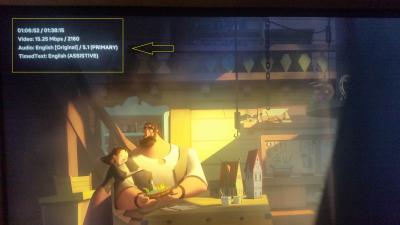
I think TCL now giving 2 different remote control... with Android TV ...RC802V with Google TV.....RC902N QUOTE(jutamind @ Apr 21 2022, 03:38 PM) So far found 2 issues in my TV: Gboard and virtual keyboard not functioning. Tried uninstalling and disabling/reenabling Gboard in the Apps settings menu but somehow still cant enable the keyboard. Since Google TV is implemented, you are first with such claim.In any others forums or telegram, I never read before. Edit: I posted in telegram (as there are most advanced users of Google TV), your claim...  https://t.me/tclupdates_discussion/31014 This post has been edited by stasio: Apr 21 2022, 04:04 PM |
| Change to: |  0.0414sec 0.0414sec
 0.34 0.34
 6 queries 6 queries
 GZIP Disabled GZIP Disabled
Time is now: 7th December 2025 - 03:24 AM |
 Quote
Quote