Welcome Guest ( Log In | Register )

8 Pages < 1 2 3 4 5 > » Bottom

Outline · [ Standard ] · Linear+

 Digi Fibre 50Mbps RM90/m. seems like on TM infra, read #1

views
     
YoungMan
post Jun 27 2021, 02:25 PM

Look at all my stars!!
*******
Senior Member
6,793 posts

Joined: Oct 2008
From: Kuala Lumpur


QUOTE(supergen3 @ Jun 27 2021, 02:47 PM)
My case, it's a new installation. My Taman just got TM fibre optic network activation early this year after CNY holiday. Only now TM allowed Digi ISP to sell their services on their infra. Strange that only Digi is available on unifi in Kulim district, at new locations. Maxis is only available in Kulim hi-tech park, Kulim golf club and at giant Kulim.
Astro broadband internet is using Allo fibre optic network in Kulim.
*
I believe Maxis will also come soon if there are request. The priority is TM Streamyx to Unifi migration >Unifi registration, then only will open to other leasing ISP.
YoungMan
post Jul 6 2021, 07:24 PM

Look at all my stars!!
*******
Senior Member
6,793 posts

Joined: Oct 2008
From: Kuala Lumpur


QUOTE(supergen3 @ Jul 5 2021, 06:30 PM)
Hi, guys.
Update on my Digi fibre registration.
Summary, my application was rejected due to no available port from TM.
I am disappointed with TM, as I can count there's only 5 fibre drop cables connection to the FDP facing my house. Looks like TM only entertaining ISP transfer request only.
Guess I have to submit to TM and pay for 2 years of bondage.
*
Too bad. This is what happen when Digi depend on competing ISP infra. I am sure if you apply to TM, confirm got port.
YoungMan
post Jul 12 2021, 09:16 PM

Look at all my stars!!
*******
Senior Member
6,793 posts

Joined: Oct 2008
From: Kuala Lumpur


QUOTE(ncool15 @ Jul 12 2021, 09:11 PM)
So my condo has TIME coverage. Wanted to switch from unifi to Digi Fiber. No options for 50m. Haihhh
*
It doesn't make sense when Digi fibre RM90 for 50mbps, while Time offer RM99 for 100mbps. That's why 50mb is not offered in area with Time infrastructure.
YoungMan
post Jul 13 2021, 02:40 PM

Look at all my stars!!
*******
Senior Member
6,793 posts

Joined: Oct 2008
From: Kuala Lumpur


QUOTE(sunnysardine @ Jul 13 2021, 02:46 PM)
Review on Digi Fiber 90

I was a 3-yo Unifi user from Unifi Lite 30Mbps (60GB limited) to Unifi lite 100Mbps Turbo Deal 2019 (Unlimited). Last payment was already end of contract, total bill RM129, comes with a free unifi playTV Lite RM30.00, which I don’t use at all, and no tvbox.

Since I am a Digi postpaid user for many years, and Digi is giving a discount of RM15 for their existing postpaid users, I sign up this Digi Fiber 90 (50Mbps), total bill RM75. Saving of 42% from original bill. I might consider to go for an upgrade to Digi Fiber 150 with the speed of 300mbps (Ori RM150, promo price RM100 as date 13 July 2021) if the overall experience is good later.

Here is a chronology is my transition for your reference:
Day 1: 18 JUN – Digi Fiber Registration with agent
Day 2: 19 JUN – Further details requested by Digi Fiber i.e. existing Unifi bill details
Day 4: 21 JUN – Digi Fiber Registration request has been approved. Transfer Request ID received.
Day 4: 21 JUN – Went to TMPoint Titiwangsa to submit transfer request. 1 month upfront is requested to pay on the spot. Unifi counter offer the same deal for RM129. Proceed to transfer.
Day 13: 30 JUN – Received notification from Digi FIber on expected installation date: 2 JUL 2021
Day 15: 2 JUL – Digi Fiber subcon came to configure. However, the configuration was not successful. Pointing possible cause on my TM modem. Contacted Unifi team to diagnose.
Day 19: 6 JUL – Tried to contact the Digi Fiber subcon. Not successful.
Day 20: 7 JUL - Lodge complaint to Digi support team
Day 25: 12 JUL – Follow up with Digi support team
Day 25: 12 JUL – Unifi team came to diagnose the TM modem and Fiber quality. No issue. Another Digi Fiber guy came after that, rectified the issue, internet is available finally! Yay! The issue was the Digi guy that came on the 2 JUL configured it wrongly.

My process is kinda long compare to how it should be, and few things I recognized from it:
1. Digi Fiber is still new in the market, subcon might not be well trained
2. The Router I received from Digi is from ZTE (ZXHN H198A V3.0) with 2 antenna vs Unifi router that has 3 (TP-LINK Archer C1200), not sure which is better.
3. I don’t have the admin login (only user login) for ZTE router! HELP!
4. The internet is smooth so far for the past 12 hours
*
Try check all the sticker on the router, maybe the password is printed there? Also, how's speed test for UL/DL?
The switching process is a pain, seeing how you have to wait so many days to have your new Internet running. Luckily they didn't terminate your Unifi yet.

YoungMan
post Jul 13 2021, 04:25 PM

Look at all my stars!!
*******
Senior Member
6,793 posts

Joined: Oct 2008
From: Kuala Lumpur


QUOTE(sunnysardine @ Jul 13 2021, 04:28 PM)
It spells out a few details at the back of the Digi modem:
1. D-SN (I think this is the serial)
2. WLAN SSID 2.4G
3. WLAN SSID 2.4G Security
2. WLAN SSID 5G
3. WLAN SSID 5G Security
6. MAC address
No admin and pw mentioned. Unfortunately, the unifi was cut off on the 9 JUL morning. Disastrous. Suddenly unable to WFH and kids cannot go online class  rclxub.gif
*
Don't know if the username and pw in this topic could help.
https://community.digi.com.my/t5/Broadband/...band/td-p/90406

YoungMan
post Jul 14 2021, 09:00 AM

Look at all my stars!!
*******
Senior Member
6,793 posts

Joined: Oct 2008
From: Kuala Lumpur


QUOTE(cskean @ Jul 13 2021, 11:51 PM)
I'm planning to switch over to Digi Fibre 90 from my current Maxis Home Fibre...

I only see that Digi Fibre 90 offer 50Mbps download speed, but how about the upload speed? Don't seem to find the info from their website??

So far any Digi Fibre user here that switch over from Maxis Home Fibre? How is the speed performance like for download and upload?

Best if from Ampang area too, so that I can decide whether to switch over or just maintain with Maxis...

Will Digi provide a brand new modem & router upon switch over? My previous switch over from Unifi to Maxis, they only provide me with their router, the modem uses back Unifi one...

Usually how long will Digi come over to do the installation once we submit the application? And is it advisable to wait for Digi to install their fibre only go & terminate Maxis one? Or can just terminate Maxis 1st and wait for Digi to install their?
*
Don't terminate your Maxis, otherwise your port taken by others, you will have to wait for years for new port. If you want to switch, just register your Digi fibre, tell them you are switching from Maxis. Digi will give you a transfer ID which you need to submit to Maxis and clear all outstanding bill.
Maxis will process your transfer request in a few days, and once approve, Digi will contact you to set installation date.
During installation Digi will only change new router, the modem still belong to TM so Digi cannot do anything. New modem will only be provided by TM tech if your old modem broken.
YoungMan
post Jul 14 2021, 03:50 PM

Look at all my stars!!
*******
Senior Member
6,793 posts

Joined: Oct 2008
From: Kuala Lumpur


QUOTE(DTorons @ Jul 14 2021, 03:45 PM)
I'm switching from Maxis to Digi. Appointment has been scheduled this Saturday. I waited for almost 2 weeks since i requested termination from Maxis and to switch port to Digi.

Question: I've been using after market Tenda wifi router. Can it be used for Digi? I don't see any default configuration for Digi in the router settings. It has Unifi and Maxis.
*
You have to set the VLAN manually. The VLAN ID for Digi is 629 (TM infra), 221 (Time infra) and 1001 (digi infra).
YoungMan
post Jul 15 2021, 09:20 AM

Look at all my stars!!
*******
Senior Member
6,793 posts

Joined: Oct 2008
From: Kuala Lumpur


QUOTE(cskean @ Jul 14 2021, 10:14 PM)
I went to Digi Velocity this evening to clarify whether my address got coverage for Digi Fibre or not...

The salesperson told me that my address have coverage but when I requested to see the support, she told me that as long as I am using Unifi/Maxis, Digi Fibre is supported. But I told her that Digi CS told me no coverage for my area, she reply me is because currently no port available in my area, thats why Digi CS told me so...

Right now I'm a bit confusing, checking coverage and port availability suppose to be 2 different thing right?

Anyone here can verify whether the Digi CS or the Digi Centre salesperson are telling the fact?
*
I don't know what exactly happen, but I would go for whichever party that can register in the system and provide transfer ID. I would like to believe that somehow something is wrong that the CS couldn't locate your address.
During the early days when Unifi is available in my area, I called CS and they inform me no coverage at my area. But I went to Tmpoint straight away can register.
YoungMan
post Jul 24 2021, 10:38 AM

Look at all my stars!!
*******
Senior Member
6,793 posts

Joined: Oct 2008
From: Kuala Lumpur


QUOTE(kenlui @ Jul 23 2021, 06:27 PM)
Just switched from unifi to Digi last week, everything was ok till today when unifi was terminated. DiGi fibre was down too.

Suspected that it was due to the unifi termination, gave a call to the installer as it took forever for someone to answer on Digi helpline. He also suspected similar issues too.

Managed to lodge a report thru Digi online chat. Just wondering if anyone had similar issues? Ady tried everything eg restarting router, modem, even switching ports from LAN 2 back to 1 and even 3.
*
Keep us updated. Want to know is it by accident or TM trying to mess with subscriber of competing ISP.

QUOTE(mostwanted82 @ Jul 23 2021, 09:32 PM)
Hi, any Digi Fibre user can confirm if Digi Fibre allow BitTorrent download?
*
Am curious to know as well. Hope someone here can test and let us know.

QUOTE(PalakOtakHang @ Jul 24 2021, 03:08 AM)
user posted image

I never have optical fiber installed on my property. I know that DiGi is utilizing TM's infra, so the installation contractor is probably hired by TM too.

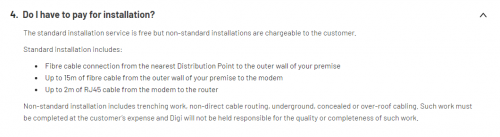
The contractor told me they charge a fixed installation fee, but when I asked him if they charge extra for extended wire as per the Standard Installation by Digi (see picture), he told me they dont charge for that.

They will be coming back tomorrow because of failed installation due to technical issue. I haven't asked Digi customer service regarding it.  sweat.gif

edit:

found
unifi installation guide by TM with fees and what not

some contexts:
- putting modem and router at living room
- i have a predrilled hole for tv axial cable at living room connecting to car porch
- so from distribution point (pole) -> 2nd floor outerwall -> car porch -> living room.
*
Standard installation, which is installation proposed by their contractor is free. Anything you want to add on during installation like routing the cable in different ways will be charge accordingly.
YoungMan
post Jul 31 2021, 10:50 AM

Look at all my stars!!
*******
Senior Member
6,793 posts

Joined: Oct 2008
From: Kuala Lumpur


QUOTE(kenlui @ Jul 31 2021, 10:39 AM)
Short update : connection still not resumed. Multiple chats/calls even visited Digi centre but issue still persist.

Yesterday finally TM contractor came, apparently he was told that this is a new subscription hence the quick visit. But upon checking, no issue from their end apparently. The Digi installer was also present, actually had the balls of blaming me for changing the router password. ( this is my parents' house ) well after rebooting the router, still no connection. According to him, have to wait for Digi HQ.

I've since lodged a report with MCMC.
*
Also claim for downtime rebate. You shouldn't pay for all those days your net is down.

QUOTE(Gregar Forte @ Jul 31 2021, 11:48 AM)
Thats really scary. Digi and TM is blaming each other while problem is still not solved. You did Transfer Request to Digi from TM isn't?
*
Scarry indeed. I was thinking it could be TM took his port away, but now they are blaming each other for the downtime.
YoungMan
post Aug 6 2021, 08:36 AM

Look at all my stars!!
*******
Senior Member
6,793 posts

Joined: Oct 2008
From: Kuala Lumpur


QUOTE(ctvtec @ Aug 5 2021, 10:54 PM)
Yup, Unifi is much more stable.

The reason I switched to Digi is because of their RM100 - 300 Mbps package.
I was on Unifi RM129 - 100 Mbps package before.

Right now can only hope Digi can continue to improve their fibre service.
Oh well…
*
Cannot only sit down and hope. Need more voices of complain to Digi and MCMC just like how people complain about their Unifi service. Months back during night time Unifi is also slow to international sites. Even Youtube can buffer.

QUOTE(heLL_bOy @ Aug 6 2021, 12:59 AM)
i am sure there is.. you can check on AS15932

Digi highest relay is on NTT and TM
*
Yes there is, just not all
YoungMan
post Aug 10 2021, 08:51 AM

Look at all my stars!!
*******
Senior Member
6,793 posts

Joined: Oct 2008
From: Kuala Lumpur


QUOTE(legendgod @ Aug 9 2021, 06:12 PM)
Digi service really sucks, no real communication between TM tech & their own techs.

TM tech came to install fibre port but I insist to not to use fibre wiring as previously I use Maxis didnt had to do any wiring.

TM tech say that I have notify digi & installation will be rearranged within next 2-3 days. Why like that? Why cannot just install same day using my previous port? Also Digi technician to do installation was MIA.

Digi respond to me after 3 days saying that was told by TM that port is full, pending reply from their side. like wtf really, I was still using maxis 2 days back before terminating.
*
Kinda blur on this. If not use fibre wiring then how should they install? Your Maxis using VDSL?
YoungMan
post Aug 10 2021, 06:11 PM

Look at all my stars!!
*******
Senior Member
6,793 posts

Joined: Oct 2008
From: Kuala Lumpur


QUOTE(legendgod @ Aug 10 2021, 04:46 PM)
I think so. Maxis installed one white TM modem and a wifi router.
*
That is already a fibre connection. What you should actually do is apply transfer to Digi. If you terminate Maxis, it will take time for Digi to be able to use back the port.
YoungMan
post Aug 11 2021, 09:33 AM

Look at all my stars!!
*******
Senior Member
6,793 posts

Joined: Oct 2008
From: Kuala Lumpur


QUOTE(LoNeLyKiRa @ Aug 11 2021, 09:07 AM)
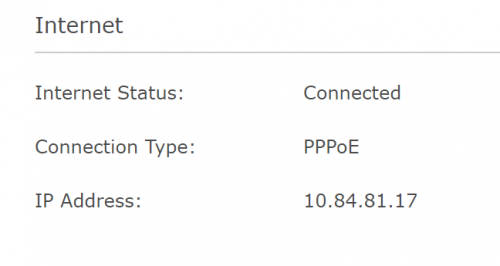
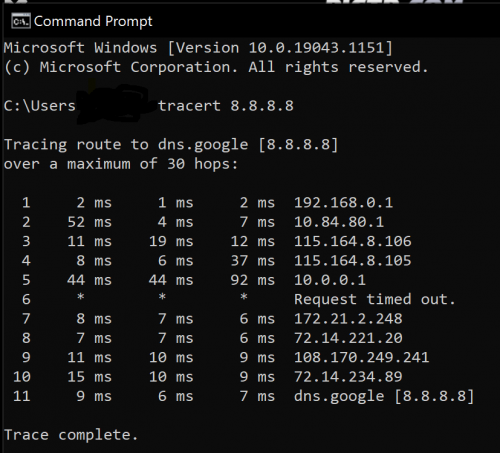
just curious any digi fibre user here not getting public ip on ur router? im getting private ip instead of public ip

looks like there is another 'router' after my digi pppoe router showing from traceroute. probably got double nated nowonder im having issue on doing port forwarding.

any network sifu can clarify is this normal. btw im on landed house

user posted image
user posted image
*
Digi fibre is not giving public IP. If port forwarding is the concern getting Maxis, Celcom or Unifi will be the choice.
YoungMan
post Aug 14 2021, 02:44 PM

Look at all my stars!!
*******
Senior Member
6,793 posts

Joined: Oct 2008
From: Kuala Lumpur


QUOTE(legendgod @ Aug 14 2021, 03:11 PM)
How can I request for transfer? Go to my old or new ISP first?
Got my unifi installation completed today with fiber wiring. Had to choose 100mbps because 30mbps still use vdsl. Hopefully can change to Digi before trial ends.
*
Transfer ISP nowadays is like MNP. You go and register with Maxis, let them know you are transferring from Unifi. After register, they will give you the transfer ID. Bring the transfer ID to TMpoint and tell them you want to port out. All process should take about 2 weeks to complete.

QUOTE(s9sa @ Aug 14 2021, 03:14 PM)
Hi All, I already made complaint regarding slow speed during peak hours on 4 August but no response from Digi until now. So I went to Digi Centre (not Digi Express or Dealer) to request the transfer ID and guess what, they will lodge a report and fiber team will call me for the termination. I told them I don't to come to Digi banyak kali just to terminate the line - waste time/petrol.

now waiting digi to call back - nak terminate pun susah
*
You terminate or switch ISP? If terminate no transfer ID. If want to change ISP to Unifi for example, then you need to register at Unifi and submit the transfer ID to Digi.
YoungMan
post Aug 14 2021, 03:47 PM

Look at all my stars!!
*******
Senior Member
6,793 posts

Joined: Oct 2008
From: Kuala Lumpur


QUOTE(s9sa @ Aug 14 2021, 04:20 PM)
i planned to switch isp. I already registered with new isp and now requesting to digi for transfer id.

yes still under contract but cannot tahan already. some more no public ip. my new isp said they can cover the penalty up to rm500
*
Wrong move bro. You will end up losing port if Digi just terminate you like that.
If you register with new ISP, you should request transfer ID from the new ISP. Tell them you are transferring from Digi. You should be the one who submit transfer ID from the new ISP to Digi center.
YoungMan
post Aug 15 2021, 10:44 AM

Look at all my stars!!
*******
Senior Member
6,793 posts

Joined: Oct 2008
From: Kuala Lumpur


QUOTE(Candy12 @ Aug 14 2021, 09:49 PM)
DiGi Home Fibre really that bad? Was thinking of switching from Maxis earlier to their 50M plan since it was cheaper and I don't really need the home phone line.

Really no public IP and technical support do not communicate well with TM Wholesale installers?
That's recipe for disaster!
*
No public IP is true. Technical support is always like that for ISP using TM's infra. Sure glitches here and there.
YoungMan
post Sep 4 2021, 05:39 PM

Look at all my stars!!
*******
Senior Member
6,793 posts

Joined: Oct 2008
From: Kuala Lumpur


QUOTE(reoz @ Sep 4 2021, 03:13 PM)
paying rm185 per month for unifi with hyptv. it was 2017 plan.

yeah the downside i dont want was 24 months contract.
*
It's expensive, even for 300mbps. In comparison, Maxis 300mbps is RM149, while Unifi 300mbps without any TV pack is RM159.
YoungMan
post Sep 6 2021, 01:47 PM

Look at all my stars!!
*******
Senior Member
6,793 posts

Joined: Oct 2008
From: Kuala Lumpur


QUOTE(reoz @ Sep 6 2021, 12:35 PM)
yeah.at first i want to change isp. been contacted maxis digi and celcom. all told me no port or not support more than 30mbps.

i am so confused now.

currently i hv 5-6 devices need to connect to internet.
*
TM will prioritise their own customer before allocating ports to other ISP. In order to avoid you missing out on the fibre upgrade, I would suggest you take up the 100mbps plan at RM129 per month. At least it is much cheaper then what you are paying now. Should you decide to upgrade later, you can request for 300mbps at RM159 without Unifi TV.
YoungMan
post Sep 11 2021, 10:08 AM

Look at all my stars!!
*******
Senior Member
6,793 posts

Joined: Oct 2008
From: Kuala Lumpur


QUOTE(omniknight86 @ Sep 10 2021, 08:14 PM)
Since yesterday the network is so bad, cannot go online at all.

The issue remain until today, anyone experience it ?
*
Time for you to call MCMC to wake up the ISP. Also each time downtime, claim for bil rebate through MCMC report.

8 Pages < 1 2 3 4 5 > » Top
 

Change to:
| Lo-Fi Version
0.0601sec    0.60    7 queries    GZIP Disabled
Time is now: 1st December 2025 - 06:28 PM