Welcome Guest ( Log In | Register )

8 Pages « < 3 4 5 6 7 > » Bottom

Outline · [ Standard ] · Linear+

 Digi Fibre 50Mbps RM90/m. seems like on TM infra, read #1

views
     
YoungMan
post Nov 29 2021, 07:40 PM

Look at all my stars!!
*******
Senior Member
6,794 posts

Joined: Oct 2008
From: Kuala Lumpur


QUOTE(mivec_blast @ Nov 29 2021, 03:57 PM)
Thank you for your Digi Fibre registration.

We are as disappointed as you are that your Digi Fibre could not be successfully installed due to infrastructure readiness at your address.

We will liaise with the Service Partner to expedite the infrastructure readiness at your address.

You may resubmit a new application on the infrastructure readiness at the Digi Outlet you applied or via Digi website @ https://web.digi.com.my/digihome/area.html if you did not hear from us within 45 days.

We hope to serve you in the future and thanks you for your wonderful support!

Thank you!

Getting this from digi....hmm
*
Maybe TM still do not open for other ISP for registration in your area. So looks like you have to register Unifi.

QUOTE(Sam Leong @ Nov 29 2021, 08:21 PM)
user posted image

Just realize Digi's API will return the infrastructure used by the location

TM means Telekom Malaysia
TDC means Time DotCom
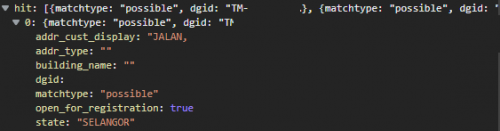
user posted image
Expand it for more info such as address / open for register
*
How did you get to the second screenshot? Would be interesting for finding if a specific address available for registration.
YoungMan
post Nov 30 2021, 04:32 PM

Look at all my stars!!
*******
Senior Member
6,794 posts

Joined: Oct 2008
From: Kuala Lumpur


QUOTE(Sam Leong @ Nov 29 2021, 10:56 PM)
https://www.samsam123.name.my/digi-check-infra/

In case you need it , i build it up , the API is public available , running on a small VPS so don't expect too much

Will return the infra + Address + State + Availability
*
That's so kind of you. I'm sure it will benefit users here who need to check their address.

QUOTE(Left4Dead2 @ Nov 30 2021, 04:51 PM)
This RM90 is tipu one, u need subscribe their telco plan together only can get this price, total around rm130
*
RM90 is for 50mbps only without bundle with postpaid. If you bundle with postpaid the RM90 can become RM75.
YoungMan
post Dec 1 2021, 07:23 PM

Look at all my stars!!
*******
Senior Member
6,794 posts

Joined: Oct 2008
From: Kuala Lumpur


QUOTE(hellfried @ Dec 1 2021, 05:25 PM)
Will this impact programs like BitTorrent etc?
*
You can still do torrenting
YoungMan
post Dec 1 2021, 09:47 PM

Look at all my stars!!
*******
Senior Member
6,794 posts

Joined: Oct 2008
From: Kuala Lumpur


Some speed test of Unifi versus Digi:

Unifi
Celcom Kuching
user posted image
HKIX
user posted image
Singapore OVH:
user posted image
OVH Sydney:
user posted image

Digi speed test:
Celcom - Kuching:
user posted image
HKIX:
user posted image
OVH Singapore:
user posted image
OVH Sydney:
user posted image
I must mention that this is from Unifi 100mbps and Digi 50mbps respectively, tested with lan cable on the same PC.


This post has been edited by YoungMan: Dec 1 2021, 09:55 PM
YoungMan
post Dec 2 2021, 08:09 AM

Look at all my stars!!
*******
Senior Member
6,794 posts

Joined: Oct 2008
From: Kuala Lumpur


QUOTE(cilimerah @ Dec 2 2021, 01:04 AM)
Is 50mbps enough for two person or should i spend extra Rm50 for the 300mbps. Not owning any digi postpaid currently.
*
Yes usually it's enough. If suddently after subscribing you feel that you need more speed, just call Digi to upgrade to 100mbps.
YoungMan
post Dec 2 2021, 08:49 AM

Look at all my stars!!
*******
Senior Member
6,794 posts

Joined: Oct 2008
From: Kuala Lumpur


QUOTE(cilimerah @ Dec 2 2021, 09:39 AM)
Will they add the remaining months to the new contract if i decided to upgrade or they will just start over?
*
Not sure if they will renew contract for change of plan, , as I am also new to Digi fibre. May have to ask their customer support.
YoungMan
post Dec 5 2021, 03:02 PM

Look at all my stars!!
*******
Senior Member
6,794 posts

Joined: Oct 2008
From: Kuala Lumpur


QUOTE(cilimerah @ Dec 5 2021, 02:12 PM)
I check my coverage via agent they say port is available. But when i register, digi whatsapp me says my application is rejected because port is full. Anyone experience this before? Any idea how to resolve?
*
If your area is using TM's Unifi infrastructure, port availability depends on TM. Nothing much you can do except to register for Unifi and switch to Digi after 2 years.
YoungMan
post Dec 6 2021, 07:48 PM

Look at all my stars!!
*******
Senior Member
6,794 posts

Joined: Oct 2008
From: Kuala Lumpur


QUOTE(skycrew @ Dec 6 2021, 07:14 PM)
installed digi this morning.

the installer took my existing router.

is it expected?
*
TM or Digi installer? Actually the router belongs to you, so the installer is not suppose to take it. Only the BTU belongs to TM so they can take it and replace with new one.
How is your speed so far?

This post has been edited by YoungMan: Dec 6 2021, 07:49 PM
YoungMan
post Dec 7 2021, 08:28 AM

Look at all my stars!!
*******
Senior Member
6,794 posts

Joined: Oct 2008
From: Kuala Lumpur


QUOTE(skycrew @ Dec 6 2021, 11:03 PM)
Digi installer.

I guess they want to make money lol

luckily I took back my ax50 and give them the tm router. will make complaint to digi cs

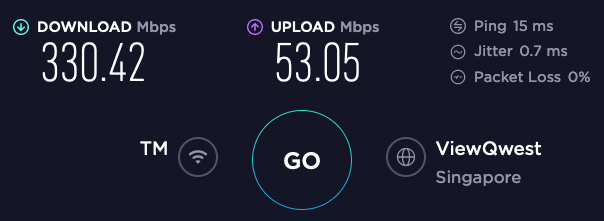
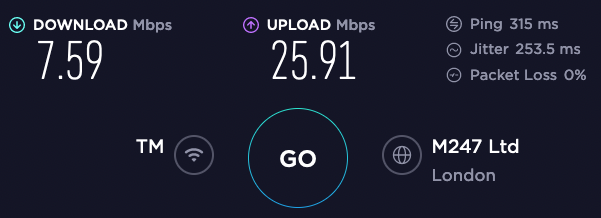
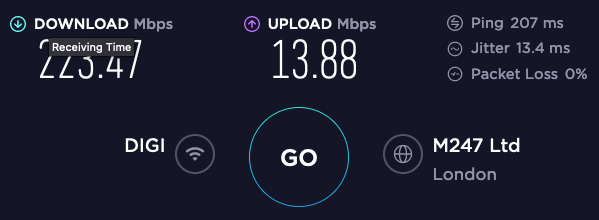
speed so far is promising.

TM

user posted image

user posted image

DIGI

user posted image

user posted image
*
Haha if it is just TM's typical router I personally won't bother. But still it is your right, the router belongs to you and should not be taken by the installer.

QUOTE(poh880 @ Dec 7 2021, 08:21 AM)
Same to my area, newly built TM fibre DP and Digi said no port available for installation. 😑
*
TM will prioritise Unifi users first, only open to other provider after few months. I bet if you tell them you want to install Unifi everything will be done in a week.
On another note, how you manage to get Celcom to install?

QUOTE(hellfried @ Dec 7 2021, 09:05 AM)
Sorry I meant transfer or port in. Should have made that clear in my post. Anyways just received a text from Digi, and am now waiting for them to set a date.
*
From my experience, TM will take about 1 week to approve the transfer request, provided you do not have outstanding bill. Digi will only proceed to set installation date after TM has approve the transfer.
Just a side note, you can still use your Unifi for about 10 days after Digi fibre is installed, by having Unifi modem on port 1 and Digi modem on port 2.
YoungMan
post Dec 7 2021, 08:53 AM

Look at all my stars!!
*******
Senior Member
6,794 posts

Joined: Oct 2008
From: Kuala Lumpur


QUOTE(hellfried @ Dec 7 2021, 09:36 AM)
When I went to inform TM about my transfer, they made me pay for another month and to show them the proof of payment on the spot. They said it will be pro-rated and the balance will be refunded to me in 2-3 months time. Is this standard practice?
*
I have no idea what's the standard practice, but I did mine at the beginning of new bill cycle because the whole process of transfer until they terminate your Unifi account will easily take more than 2 weeks.
And yes, any remaining balance after they terminate your account, will be refund through cheque.
YoungMan
post Dec 7 2021, 07:48 PM

Look at all my stars!!
*******
Senior Member
6,794 posts

Joined: Oct 2008
From: Kuala Lumpur


QUOTE(poh880 @ Dec 7 2021, 10:01 AM)
That's last time when I stay in a condo. Luckily I managed to terminate it without penalty due to my current location still don't have infra early this year. I used Maxis, Unifi and Celcom before, from my experience Unifi is still the best in term of performance like latency and speed. TM sometime will cap the port at exact bandwidth the other ISP needed. If you take 100M in Unifi, you get above the bandwidth you subscribed. Others get around 95Mbps only.
*
Very true. Some people in this forum just bashed us and refuse to believe on port cap to exact speed. I hope they won't change mine as I am currently still getting constant 50 to 51mbps.
YoungMan
post Dec 8 2021, 01:42 PM

Look at all my stars!!
*******
Senior Member
6,794 posts

Joined: Oct 2008
From: Kuala Lumpur


QUOTE(cilimerah @ Dec 8 2021, 12:34 PM)
if i have received my order number means my registration is successful and only pending installation or are they still reviewing my application?
*
I believe it is just acknowledgement of your registration. Only when they confirm your area has port then they can proceed to arrange for installation.
YoungMan
post Dec 12 2021, 06:07 PM

Look at all my stars!!
*******
Senior Member
6,794 posts

Joined: Oct 2008
From: Kuala Lumpur


QUOTE(electrosphere @ Dec 12 2021, 04:05 PM)
Just have installed Digi fiber at my home. Anyone know how/where to put the dns 1.1.1.1 or 8.8.8.8? Already set the dns on pc but it's not working
*
Assuming you are given the same Zyxel EX3300-T0, go into the router page and choose broadband.
Then click edit on the ethwan and set your DNS there.
YoungMan
post Dec 12 2021, 07:18 PM

Look at all my stars!!
*******
Senior Member
6,794 posts

Joined: Oct 2008
From: Kuala Lumpur


QUOTE(electrosphere @ Dec 12 2021, 07:30 PM)
Yes. Same router. I checked it but it was filled with Digi dns both on primary and secondary, is it safe to change it?
*
Yes it is safe to change the DNS. Just don't kacau the PPPoE username and password.

This post has been edited by YoungMan: Dec 12 2021, 07:19 PM
YoungMan
post Dec 13 2021, 09:37 AM

Look at all my stars!!
*******
Senior Member
6,794 posts

Joined: Oct 2008
From: Kuala Lumpur


QUOTE(ernestlin13 @ Dec 13 2021, 08:29 AM)
I just installed Digi Fibre, and I realised that it doesn't come with a landline. My wife insist on having a landline for our home. I've checked with a Digi Store and was told only Unifi comes with landline, and I need to Unifi if I wanted it.
Is there any way to switch to Unifi without incurring the penalty?
Or any other way to get a landline with incurring too much extra cost?
*
So far only Unifi, Maxis Fibre, and Celcom fibre will have landline.
For Digi, early termination need to pay RM500 penalty, so you have a few option to consider.

1. Subscribe landline separately, which in my opinion TM landline is very costly nowadays.
2. Buy a landline phone which can use sim card, and use prepaid.
3. Find out if Maxis/Celcom/Unifi have any promo to cover the contract penalty.
4. Lastly pay penalty and switch to your prefered provider.
YoungMan
post Dec 15 2021, 08:46 AM

Look at all my stars!!
*******
Senior Member
6,794 posts

Joined: Oct 2008
From: Kuala Lumpur


QUOTE(cilimerah @ Dec 14 2021, 11:18 PM)
Can you help to elaborate more on this. Newbie here.  biggrin.gif
*
I don't have screenshots to show since I am away from home. But what I have said before is for changing the DNS.
YoungMan
post Dec 15 2021, 07:07 PM

Look at all my stars!!
*******
Senior Member
6,794 posts

Joined: Oct 2008
From: Kuala Lumpur


QUOTE(skycrew @ Dec 15 2021, 10:58 AM)
I'm having an issue to update ios with Zyxel EX3300-T0 router.

apple blocked my update. The error I got as below

"This update requires a Wi-Fi network connection to download"

but if I enabled the guest wifi and connected to it, I'm able to update the ios.

anyone having the same problem?
*
Yes I am having the same issue. Stupid router problem, but when I configure my old Unifi router with Digi credential, I can update iOS. Thanks for the tips to enable guest wifi.

QUOTE(cilimerah @ Dec 15 2021, 12:03 PM)
Under my ethwan i have several option. Ie; ethwan tm, ethwan digi, ethwan allo and so on. Which one should i choose?
*
Which one you choose depends on your area infra. If you are using TM infra, then ethwan TM. If using Digi, ethwan Digi.

QUOTE(mydurian @ Dec 15 2021, 01:57 PM)
All,

Wondering from those currently using DiGi Fibre, how's the service so far? Any service disruption, the rectification time taken when reported, etc.
*
I am still new to Digi infra, switched from Unifi. So far no downtime problem yet.
YoungMan
post Dec 15 2021, 08:51 PM

Look at all my stars!!
*******
Senior Member
6,794 posts

Joined: Oct 2008
From: Kuala Lumpur


QUOTE(mydurian @ Dec 15 2021, 09:34 PM)
Was it straightforward in getting the DiGi? My area here has TM infra. After send in application, TM tells DiGi my area no more ports.
But new wifi SSID popping up one by one with @unifi name.  ranting.gif So kiamsap ka? Don't want competition?
*
Not so straightforward. TM will prioritise their own Unifi first, then balance only give to other provider. I bet if you go subscribe unifi now, confirm ada port.
YoungMan
post Dec 16 2021, 07:26 PM

Look at all my stars!!
*******
Senior Member
6,794 posts

Joined: Oct 2008
From: Kuala Lumpur


QUOTE(galadriel1992 @ Dec 16 2021, 06:06 PM)
How do you solve it? Mind to share? Although I updated via macbook I just want to use own router maybe needs to buy router from pc shop.
*
Well there are 2 ways as mentioned. Turn on guest Wifi and use it to update, or change router.
YoungMan
post Dec 17 2021, 08:00 PM

Look at all my stars!!
*******
Senior Member
6,794 posts

Joined: Oct 2008
From: Kuala Lumpur


QUOTE(mjhs84 @ Dec 17 2021, 07:02 PM)
Hi all, my unifi contract is ending soon. I am considering Digi Fibre. Anyone from Kuching here? How is the service?
*
I am. You can check out 1 or 2 pages before for speed test result.

8 Pages « < 3 4 5 6 7 > » Top
 

Change to:
| Lo-Fi Version
0.0776sec    0.38    7 queries    GZIP Disabled
Time is now: 3rd December 2025 - 05:34 AM