Welcome Guest ( Log In | Register )

Outline · [ Standard ] · Linear+

 Digi Fibre 50Mbps RM90/m. seems like on TM infra, read #1

views
     
YoungMan
post Sep 6 2022, 02:05 PM

Look at all my stars!!
*******
Senior Member
6,793 posts

Joined: Oct 2008
From: Kuala Lumpur


QUOTE(westlife @ Sep 6 2022, 12:48 PM)
yes. i think 100Mbps is still public ip although the tnc said otherwise.
*
Not all area though. Both my neighbours already got private IP on their Unifi 100mb plan.

QUOTE(westlife @ Sep 6 2022, 12:50 PM)
wah.. then totally not worth it...

seriously nowadays no one should spend more than rm45 per month nett for mobile line.

prepaid one can get 'unlimited' internet and calls easily at rm45 with decent speed of 6Mbps that is more than enough for full hd video streaming.
*
No need to subscribe postpaid 150. To get 300mbps for RM100, minimum is postpaid 90. So total postpaid +fibre line is RM190 before tax.
If you are not currently on postpaid 90, or not planning to get that plan, better consider Maxis/Celcom fibre for 300mbps. Way cheaper compare to Unifi.

QUOTE(rizqeenizdral @ Sep 6 2022, 02:51 PM)
Update: staying with unifi, they counter offer with 300mbps rm129 perpetual, 6 months waiver and router 6.
*
Good for you. They should actually be fair to provide that price for all 300mbps users.
YoungMan
post Sep 17 2022, 10:45 AM

Look at all my stars!!
*******
Senior Member
6,793 posts

Joined: Oct 2008
From: Kuala Lumpur


QUOTE(KHOdin @ Sep 16 2022, 10:49 PM)
is this still an issue ?
i thinking to port my maxis fiber to DiGi same price but 50mb/s
*
Haven't notice any throttling since. But sometimes when speed is slow, I just restart the router.

QUOTE(KHOdin @ Sep 17 2022, 01:53 AM)
what do u mean by symmetrical speed ? download and upload ?
maxis 30mb/s got private ip? how about celcom same speed rm9 cheaper
*
Celcom 30mbps is also symmetrical speed. 30mbps download and 30mbps upload. Digi fibre 50mbps gives you 50mbps download and 20mbps upload which is still fine if not much usage.

QUOTE(PRSXFENG @ Sep 17 2022, 10:54 AM)
Maxis 30Mbps is 30down and 30up, all Maxis plans are private IP by default but you can request public ip at no charge
*
If he never request public ip from Maxis, chances are that he doesn't actually need that.
YoungMan
post Sep 17 2022, 08:52 PM

Look at all my stars!!
*******
Senior Member
6,793 posts

Joined: Oct 2008
From: Kuala Lumpur


QUOTE(KHOdin @ Sep 17 2022, 12:41 PM)
dont really use upload that much, actually 30mbps download is fine for me might go for celcom since it is cheaper
I have no idea what's the benefit of public or private ip. did some google research but still dont have much idea of it
*
Then just go for the cheapest. I don't think you need public IP at this moment base on your description.
YoungMan
post Sep 28 2022, 09:20 PM

Look at all my stars!!
*******
Senior Member
6,793 posts

Joined: Oct 2008
From: Kuala Lumpur


QUOTE(shinjay @ Sep 28 2022, 09:53 PM)
Thanks bro, What's the Brand and model of the new router given?
*
You can expect from this few routers, depend on stock from the technician that is assign to install.
Fiberhome SR-1041Y
D-Link DIR-X1860Z
Zyxel EX3220-T0
Fiberhome SR-1041F
YoungMan
post Oct 6 2022, 11:17 AM

Look at all my stars!!
*******
Senior Member
6,793 posts

Joined: Oct 2008
From: Kuala Lumpur


QUOTE(santik @ Oct 6 2022, 11:40 AM)
I am getting only 46-47Mbps Download and 18Mbps Upload.

Just installed yesterday. Also not sure how do it login to MyDigi app without existing mobile number.
*
Check your email, use the broadband number to login Mydigi app. Verification TAC will be sent to your email for login.
With regards to speed, are you using Unifi infra? Pls call up Digi and get them to send technician to your place. When the TM technician come along, tell him to adjust the speed cap, for it is well known that TM usually capped the port slightly lower speed if you don't use their Unifi.
YoungMan
post Oct 23 2022, 10:14 AM

Look at all my stars!!
*******
Senior Member
6,793 posts

Joined: Oct 2008
From: Kuala Lumpur


QUOTE(uzaimy @ Oct 23 2022, 08:19 AM)
Hi, I need help. I'm on Digi fiber.
Router ZTE ZXHN H198A.

I just pushed the small reset button at the back due to I forgot the username & password (I changed previously) to access the website interface (192.168.1.1).

After the reset, I'm trying to setup again. I googled, to login should use "user/user" but no setting for the PPPoE username & password.

I think should login using admin account but I cannot use "admin/admin" as username & password.

Thanks in advance.
*
Try this.
Username: admin
Pw: ZTE_5g
YoungMan
post Nov 4 2022, 09:03 PM

Look at all my stars!!
*******
Senior Member
6,793 posts

Joined: Oct 2008
From: Kuala Lumpur


QUOTE(santik @ Nov 4 2022, 12:21 PM)
Do you guys get slower bandwidth at night around after 7pm?
*
This is my result.
user posted image
YoungMan
post Nov 7 2022, 09:39 AM

Look at all my stars!!
*******
Senior Member
6,793 posts

Joined: Oct 2008
From: Kuala Lumpur


QUOTE(jaydenjau @ Oct 31 2022, 03:55 AM)
*Edit: Even after i reboot the router, the speed will eventually slow down after 1-2 hours also.
*
Got another spare router to try? Maybe router from your preious provider like Unifi etc.
YoungMan
post Jan 2 2023, 09:05 PM

Look at all my stars!!
*******
Senior Member
6,793 posts

Joined: Oct 2008
From: Kuala Lumpur


QUOTE(xDjWanNabex @ Jan 2 2023, 07:13 PM)
Hi, thinking of getting digi fiber. Are there more positive or negative feedback's on using it ? I'm an existing digi user, so I can get cheaper price...but very unsure if it's reliable or not. I work from home alot, so internet stability is a must.
*
Coming from Unifi and using Digi fibre over a year now, the experience is more or less the same. Except that there is no public IP.
YoungMan
post Jan 3 2023, 08:33 PM

Look at all my stars!!
*******
Senior Member
6,793 posts

Joined: Oct 2008
From: Kuala Lumpur


QUOTE(xDjWanNabex @ Jan 2 2023, 10:40 PM)
What's the biggest drawback on this?
*
There are some use cases where you need public IP (port forwarding, hosting game server, CCTV setup). If you do not do those, chances are you do not need public IP.

QUOTE(GameSky @ Jan 3 2023, 03:17 PM)
all packages? stream/gaming everything good?
*
I cannot say for gaming. stream for my use case is good enough. But since blacktubi already mention routing slightly worst than Maxis and Unifi, perhaps you want to also check out offer from Maxis.
YoungMan
post Feb 7 2023, 11:11 AM

Look at all my stars!!
*******
Senior Member
6,793 posts

Joined: Oct 2008
From: Kuala Lumpur


QUOTE(GuyM @ Feb 7 2023, 07:55 AM)
My attempt to switch from unifi seems failed as the cs who wa keep asking same question till I got pissed off 😂😂😂
*
What question? Perhaps can do in Digi centre or look for agent to do the switching.
YoungMan
post Mar 10 2023, 09:31 PM

Look at all my stars!!
*******
Senior Member
6,793 posts

Joined: Oct 2008
From: Kuala Lumpur


QUOTE(eauyong @ Mar 10 2023, 12:22 PM)
Thinking of getting two Pakej Perpaduan as I have 2 battery operated mobile modem 4G but which 2 operators to choose.

1) Digi + Unifi
2) Maxis + Yes
3) Yes + Umobile
4) umobile + Unifi

Pls advise. Thanks.
*
Wrong thread bro. That's my only advice.
YoungMan
post May 7 2023, 12:48 PM

Look at all my stars!!
*******
Senior Member
6,793 posts

Joined: Oct 2008
From: Kuala Lumpur


QUOTE(Scissorshand @ May 7 2023, 12:14 PM)
Hi for tplink ax20 when I choose “custom” then internet vlan 629, it prompted me to update other vlan ie voip iptv etc otherwise it won’t connect? What’s the solution?
*
Try key in any random number for Voip and IPTV. Also check the option 802.1Q if available, and set all the lan port to internet.
YoungMan
post Jun 16 2023, 08:21 PM

Look at all my stars!!
*******
Senior Member
6,793 posts

Joined: Oct 2008
From: Kuala Lumpur


https://soyacincau.com/2023/06/16/celcomdig...nationwide-xrs/
YoungMan
post Aug 12 2023, 09:46 PM

Look at all my stars!!
*******
Senior Member
6,793 posts

Joined: Oct 2008
From: Kuala Lumpur


QUOTE(mayhammer @ Aug 3 2023, 06:49 PM)
seems like a lot of people using zyxel EX3300-T0
in case you are wondering to update the firmware, you can do so via link below
https://www.zyxel.com/global/en/support/dow...model=ex3301-t0
Although it says it is EX3301-T0, download & read the firmware release notes, it says this firmware is for the following:-

Date: Nov. 23, 2022
Supported Platforms:
Zyxel DX3301-T0
Zyxel EX3301-T0 (DX3301-T0 remove VD WAN)
Zyxel DX3300-T0(DX3301-T0 remove VoIP)
Zyxel EX3300-T0(DX3301-T0 remove VD WAN and VoIP)

Not to mention, there is a lot of enhancement & bugfixes. FYI, I did flash mine to the lastest version, V5.50(ABVY.3.4)C0.
So far no problems.
*
Need to sign in only can download?
YoungMan
post Aug 13 2023, 10:12 AM

Look at all my stars!!
*******
Senior Member
6,793 posts

Joined: Oct 2008
From: Kuala Lumpur


QUOTE(BenYeeHua @ Aug 12 2023, 09:53 PM)
What?

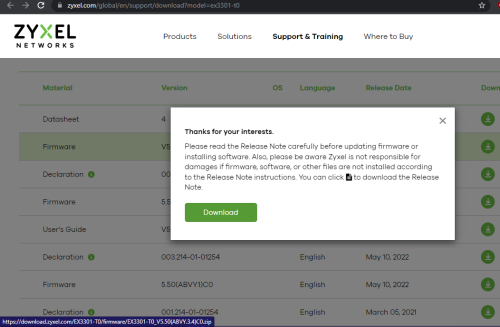
user posted image
*
QUOTE(mayhammer @ Aug 13 2023, 12:16 AM)
no need
*
Not sure if it is my connection problem, as somehow when I open the page last night, only the documentation can be download

This post has been edited by YoungMan: Aug 13 2023, 10:13 AM

8 Pages « < 6 7 8Top
 

Change to:
| Lo-Fi Version
0.0676sec    0.91    7 queries    GZIP Disabled
Time is now: 1st December 2025 - 06:12 PM