

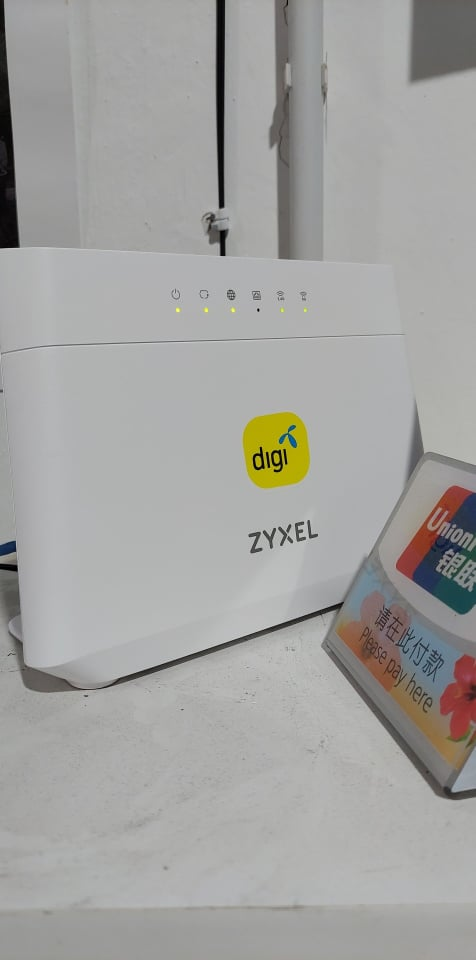
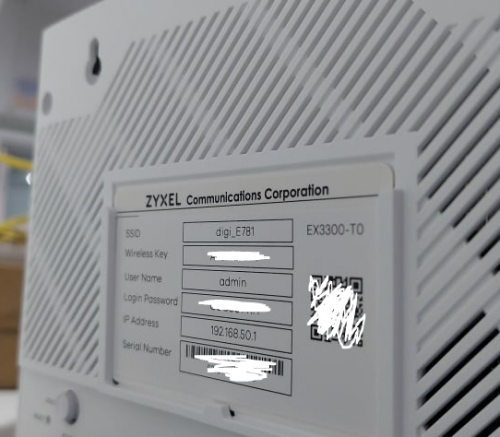
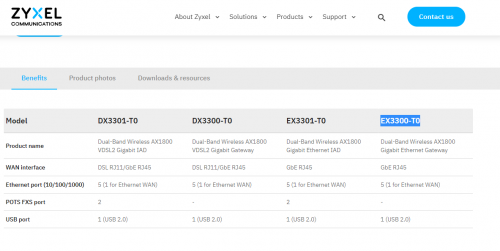
Seems to be a mesh capable wifi 6 router
This post has been edited by QuantumEdge: Jul 19 2021, 08:58 PM
Digi Fibre 50Mbps RM90/m. seems like on TM infra, read #1
|
|
 Jul 19 2021, 08:56 PM Jul 19 2021, 08:56 PM
Show posts by this member only | IPv6 | Post
#361
|
 
Senior Member
1,596 posts Joined: Jan 2016  
|
My friend's shop installed Digi Business fiber 100mbps today, he got Fiberhome ONU+ZYXEL (EX3300-T0) Router Seems to be a mesh capable wifi 6 router This post has been edited by QuantumEdge: Jul 19 2021, 08:58 PM Gregar Forte liked this post
|
|
|
|
|
|
Jul 20 2021, 04:06 PM
Show posts by this member only | IPv6 | Post
#362
|

Junior Member
124 posts Joined: Nov 2006
|
QUOTE(Auriel @ Jul 17 2021, 06:50 PM) Digi Fibre 90 for a month then upgraded to 150 for past 1.5 month here in Kuala Terengganu. I just chat with digi support via mydigi , they mentioned total bill will be RM190 (RM240 minus RM50 discount). How you get RM160 ? No issues so far not even a downtime past 2.5 months for me, just 2 or 3 times the line suddenly just dropped, maybe i kept my router on 24/7, after restarting it everything works fine again. The download speed is consistently 300mbps anytime I speedtested it. But maybe for someone who concerns about upload speed its only max out at 50mbps but it doesn't really concern with my usage. Sharing my line at home with family of 6, where everyone is basically online when not sleeping because of MCO. I'm using digi postpaid 90 combined with fibre 150, after all rebates i'm only paying rm60+100 for my internet bills. Very worth it. Very very satisfied.  Tempted upgrade to this package if really RM160. TQTQ |
|
|
Jul 20 2021, 04:10 PM
Show posts by this member only | IPv6 | Post
#363
|
|
Junior Member
124 posts Joined: Nov 2006
|
QUOTE(QuantumEdge @ Jul 19 2021, 08:56 PM) My friend's shop installed Digi Business fiber 100mbps today, he got Fiberhome ONU+ZYXEL (EX3300-T0) Router How is the performance?Seems to be a mesh capable wifi 6 router Dg website stated that wifi 6 router will be given starting 15 Jul for fibre 130 and above whereas Fibre 90 will get wifi 5 router. |
|
|
Jul 20 2021, 09:03 PM
Show posts by this member only | IPv6 | Post
#364
|
|
Senior Member
1,596 posts Joined: Jan 2016
|
QUOTE(dreaming @ Jul 20 2021, 04:10 PM) How is the performance? So far no overheating, no walls in his shop so I cant test the coverageDg website stated that wifi 6 router will be given starting 15 Jul for fibre 130 and above whereas Fibre 90 will get wifi 5 router. The router is fully locked down tho, cant change any settings Here's some ping test results if anyone is looking for it   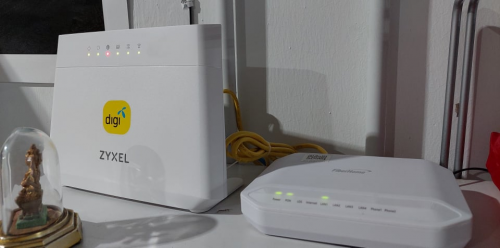 Oh yeah, just now his internet is down... |
|
|
Jul 20 2021, 10:37 PM
Show posts by this member only | IPv6 | Post
#365
|
|
Junior Member
153 posts Joined: Mar 2014
|
QUOTE(QuantumEdge @ Jul 20 2021, 09:03 PM) So far no overheating, no walls in his shop so I cant test the coverage digi at unifi infra use lan1? not use lan2 on BTU?The router is fully locked down tho, cant change any settings Here's some ping test results if anyone is looking for it Oh yeah, just now his internet is down... |
|
|
Jul 20 2021, 10:46 PM
Show posts by this member only | IPv6 | Post
#366
|
|
Senior Member
1,524 posts Joined: Dec 2020 From: Perak
|
QUOTE(QuantumEdge @ Jul 20 2021, 09:03 PM) So far no overheating, no walls in his shop so I cant test the coverage LAN1 is reserved for UNIFI users only. Unless there is a technical error.The router is fully locked down tho, cant change any settings Here's some ping test results if anyone is looking for it Oh yeah, just now his internet is down... |
|
|
|
|
|
Jul 20 2021, 11:07 PM
Show posts by this member only | IPv6 | Post
#367
|
|
Senior Member
1,596 posts Joined: Jan 2016
|
QUOTE(lowck @ Jul 20 2021, 10:37 PM) digi at unifi infra use lan1? not use lan2 on BTU? Yes, Lan 1BTW, found something weird... 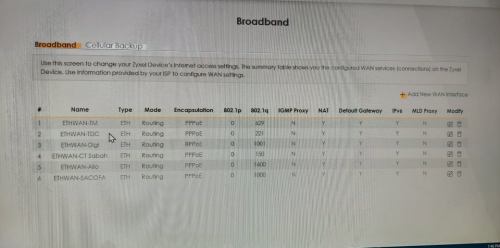 |
|
|
Jul 20 2021, 11:30 PM
Show posts by this member only | IPv6 | Post
#368
|
|
Senior Member
1,524 posts Joined: Dec 2020 From: Perak
|
QUOTE(QuantumEdge @ Jul 20 2021, 11:07 PM) Yes, Lan 1 Supposedly the VLAN ID for TNB infra is 1400.BTW, found something weird... Do they have changed the VLAN ID to 1600? This post has been edited by aniq8676: Jul 20 2021, 11:31 PM |
|
|
Jul 20 2021, 11:44 PM
Show posts by this member only | IPv6 | Post
#369
|
|
Senior Member
1,596 posts Joined: Jan 2016
|
QUOTE(aniq8676 @ Jul 20 2021, 11:30 PM) Supposedly the VLAN ID for TNB infra is 1400. I think so? These should be VLAN profiles for digi on various infra right?Do they have changed the VLAN ID to 1600? |
|
|
Jul 21 2021, 12:19 AM
Show posts by this member only | IPv6 | Post
#370
|
|
Junior Member
153 posts Joined: Mar 2014
|
QUOTE(QuantumEdge @ Jul 20 2021, 11:07 PM) Yes, Lan 1 1st time see like this using lan 1BTW, found something weird... |
|
|
Jul 21 2021, 11:26 AM
|

Senior Member
2,551 posts Joined: Jan 2003 From: Cheras / Ampang
|
QUOTE(Auriel @ Jul 17 2021, 06:50 PM) Digi Fibre 90 for a month then upgraded to 150 for past 1.5 month here in Kuala Terengganu. Hi there, care to share how did you manage to obtain such discount rate?No issues so far not even a downtime past 2.5 months for me, just 2 or 3 times the line suddenly just dropped, maybe i kept my router on 24/7, after restarting it everything works fine again. The download speed is consistently 300mbps anytime I speedtested it. But maybe for someone who concerns about upload speed its only max out at 50mbps but it doesn't really concern with my usage. Sharing my line at home with family of 6, where everyone is basically online when not sleeping because of MCO. I'm using digi postpaid 90 combined with fibre 150, after all rebates i'm only paying rm60+100 for my internet bills. Very worth it. Very very satisfied. I'm going to MNP and switch to Digi lines & Digi Fibre on next month. Hope to get the best service & discount rate from Digi  |
|
|
Jul 21 2021, 12:40 PM
|
|
Junior Member
186 posts Joined: Jan 2008
|
QUOTE(dreaming @ Jul 20 2021, 04:06 PM) I just chat with digi support via mydigi , they mentioned total bill will be RM190 (RM240 minus RM50 discount). How you get RM160 ? Same here. I have double confirmed with Digi customer care line and they confirmed is RM90+RM100 = RM190 totalTempted upgrade to this package if really RM160. TQTQ |
|
|
Jul 22 2021, 11:42 AM
Show posts by this member only | IPv6 | Post
#373
|
|
Senior Member
1,596 posts Joined: Jan 2016
|
QUOTE(aniq8676 @ Jul 20 2021, 10:46 PM) LAN1 is reserved for UNIFI users only. Unless there is a technical error. QUOTE(lowck @ Jul 21 2021, 12:19 AM) 1st time see like this using lan 1 Ok guys, my friend's internet was disconnected for 2 days after installation...Because DIGI's technician wrongly connected his WAN to LAN 1, should be using LAN 2 instead Been troubleshooting for 2 days, just now TM's technician came...just plug it into LAN 2 and boom... LAN 1 indeed worked for a few hours on the day of installation, after that it disconnected... 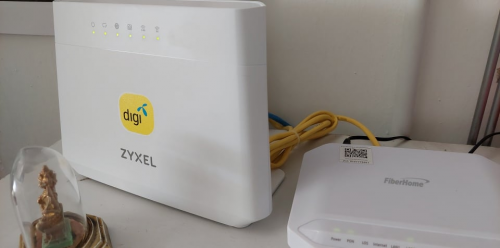 This post has been edited by QuantumEdge: Jul 22 2021, 12:05 PM |
|
|
|
|
|
Jul 22 2021, 12:13 PM
Show posts by this member only | IPv6 | Post
#374
|
|
Junior Member
153 posts Joined: Mar 2014
|
QUOTE(QuantumEdge @ Jul 22 2021, 11:42 AM) Ok guys, my friend's internet was disconnected for 2 days after installation... that technician after installation didn't make a speedtest? Because DIGI's technician wrongly connected his WAN to LAN 1, should be using LAN 2 instead Been troubleshooting for 2 days, just now TM's technician came...just plug it into LAN 2 and boom... LAN 1 indeed worked for a few hours on the day of installation, after that it disconnected...  |
|
|
Jul 22 2021, 01:24 PM
Show posts by this member only | IPv6 | Post
#375
|
|
Senior Member
1,596 posts Joined: Jan 2016
|
QUOTE(lowck @ Jul 22 2021, 12:13 PM) that technician after installation didn't make a speedtest? He did, LAN 1 worked for a few hoursThen it cut off for 2 days, till we plugged it into LAN 2... So I guess LAN 1 will work for a moment, but it'll locked few hours after installation |
|
|
Jul 22 2021, 02:33 PM
Show posts by this member only | IPv6 | Post
#376
|
|
Junior Member
153 posts Joined: Mar 2014
|
QUOTE(QuantumEdge @ Jul 22 2021, 01:24 PM) He did, LAN 1 worked for a few hours hahaha so sad like this few day no internet with this small case Then it cut off for 2 days, till we plugged it into LAN 2... So I guess LAN 1 will work for a moment, but it'll locked few hours after installation |
|
|
Jul 22 2021, 10:38 PM
Show posts by this member only | IPv6 | Post
#377
|
Junior Member
37 posts Joined: Jan 2007
|
LAN1 for unifi... LAN2/3 for mxs/celcom/dg
|
|
|
Jul 23 2021, 05:27 PM
|
|
Senior Member
2,380 posts Joined: Mar 2005
|
Just switched from unifi to Digi last week, everything was ok till today when unifi was terminated. DiGi fibre was down too. Suspected that it was due to the unifi termination, gave a call to the installer as it took forever for someone to answer on Digi helpline. He also suspected similar issues too. Managed to lodge a report thru Digi online chat. Just wondering if anyone had similar issues? Ady tried everything eg restarting router, modem, even switching ports from LAN 2 back to 1 and even 3. cOMMANDER pRASNTH liked this post
|
|
|
Jul 23 2021, 08:32 PM
|
|
Senior Member
603 posts Joined: Apr 2011
|
Hi, any Digi Fibre user can confirm if Digi Fibre allow BitTorrent download?
|
|
|
Jul 24 2021, 02:08 AM
|

Junior Member
144 posts Joined: Jul 2020 From: 5.3638° N, 100.3260° E
|
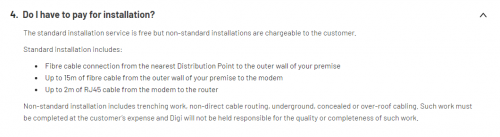 I never have optical fiber installed on my property. I know that DiGi is utilizing TM's infra, so the installation contractor is probably hired by TM too. The contractor told me they charge a fixed installation fee, but when I asked him if they charge extra for extended wire as per the Standard Installation by Digi (see picture), he told me they dont charge for that. They will be coming back tomorrow because of failed installation due to technical issue. I haven't asked Digi customer service regarding it.  edit: found unifi installation guide by TM with fees and what not some contexts: - putting modem and router at living room - i have a predrilled hole for tv axial cable at living room connecting to car porch - so from distribution point (pole) -> 2nd floor outerwall -> car porch -> living room. This post has been edited by PalakOtakHang: Jul 24 2021, 03:00 AM |
| Change to: |  0.0311sec 0.0311sec
 0.35 0.35
 6 queries 6 queries
 GZIP Disabled GZIP Disabled
Time is now: 8th December 2025 - 06:43 PM |
 Quote
Quote