

QUOTE(Avex @ Jun 23 2021, 04:09 PM)
the more people coming in, stability is getting worst. Moving to other broadband next year. And support is horrible

What router Digi supply to you? Can share picture of the equipment setup?Digi Fibre 50Mbps RM90/m. seems like on TM infra, read #1
|
|
 Jun 23 2021, 05:14 PM Jun 23 2021, 05:14 PM
|
 
Junior Member
134 posts Joined: May 2010  
|
QUOTE(Avex @ Jun 23 2021, 04:09 PM) the more people coming in, stability is getting worst. Moving to other broadband next year. And support is horrible What router Digi supply to you? Can share picture of the equipment setup? lygsl liked this post
|
|
|
|
|
|
Jun 23 2021, 05:52 PM
Show posts by this member only | IPv6 | Post
#322
|
|
Junior Member
91 posts Joined: Mar 2010
|
Just to share that I am a happy Digi fibre user since Oct-20, no issue for me so far. Previously was on Maxis fibre, no issue as well (both are riding on TM infra)
While many ppl are endorsing *nifi, I feel we should give all players equal chance so that their offerings will remain competitive. We are going to suffer if *nifi become monopoly in the fibre space |
|
|
Jun 24 2021, 10:38 PM
|
|
Junior Member
134 posts Joined: May 2010
|
I found a couple of pictures of Digi ZTE router and ONT (Huawei and fiber home) from Digi fibre sales agent FB page. My curiosity is satisfied at the moment. Planning of going to a Digi store tomorrow to apply for the 300Mbps for RM 100 promotion for postpaid customers
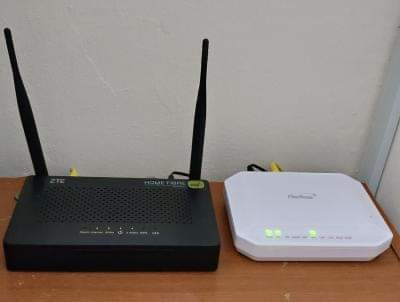 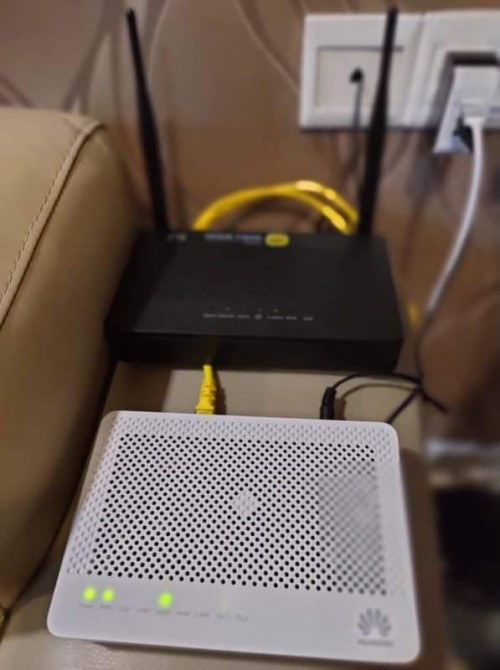 |
|
|
Jun 27 2021, 09:09 AM
|
|
Newbie
21 posts Joined: May 2017
|
QUOTE(supergen3 @ Jun 24 2021, 10:38 PM) I found a couple of pictures of Digi ZTE router and ONT (Huawei and fiber home) from Digi fibre sales agent FB page. My curiosity is satisfied at the moment. Planning of going to a Digi store tomorrow to apply for the 300Mbps for RM 100 promotion for postpaid customers Hi, i'm thinking of applying the same package to replace my maxis fibre. Will they do installation during FMCO? |
|
|
Jun 27 2021, 10:25 AM
|
|
Senior Member
6,828 posts Joined: Oct 2008 From: Kuala Lumpur 
|
QUOTE(DTorons @ Jun 27 2021, 10:09 AM) Hi, i'm thinking of applying the same package to replace my maxis fibre. Will they do installation during FMCO? Yes but do expect a bit of delay as they also depend on TM contractor, for areas using TM's infra. |
|
|
Jun 27 2021, 10:52 AM
|
|
Junior Member
45 posts Joined: Jul 2006
|
QUOTE(YoungMan @ Jun 27 2021, 02:25 AM) Yes but do expect a bit of delay as they also depend on TM contractor, for areas using TM's infra. if change provider, normally tm guy won't come as their job just to change LAN cable connection on port 1 to port 3 on modem. Last time tm guy just called me and asked me whether i know to change the cable port, if I don't know the he will come. The digi guy just setup the router.Your case might be just change LAN port from port 2 (maxis) to port 3 (maybe) For few days, both the modem port 1 (for Unifi) and port 3 (for Digi Fiber) were still working. Only 5 6 days later, they disconnect my Unifi account and continue with Digi Fiber |
|
|
|
|
|
Jun 27 2021, 11:15 AM
|
|
Junior Member
134 posts Joined: May 2010
|
QUOTE(DTorons @ Jun 27 2021, 09:09 AM) Hi, i'm thinking of applying the same package to replace my maxis fibre. Will they do installation during FMCO? I have applied through the online store. The email reply mentioned that they will call me within 3 working days to confirm my identity before arranging to have the installation team appointment. |
|
|
Jun 27 2021, 12:08 PM
|
|
Senior Member
6,828 posts Joined: Oct 2008 From: Kuala Lumpur
|
QUOTE(s9sa @ Jun 27 2021, 11:52 AM) if change provider, normally tm guy won't come as their job just to change LAN cable connection on port 1 to port 3 on modem. Last time tm guy just called me and asked me whether i know to change the cable port, if I don't know the he will come. The digi guy just setup the router. Yes. Forget that they can remote config our BTU.Your case might be just change LAN port from port 2 (maxis) to port 3 (maybe) For few days, both the modem port 1 (for Unifi) and port 3 (for Digi Fiber) were still working. Only 5 6 days later, they disconnect my Unifi account and continue with Digi Fiber QUOTE(supergen3 @ Jun 27 2021, 12:15 PM) I have applied through the online store. The email reply mentioned that they will call me within 3 working days to confirm my identity before arranging to have the installation team appointment. Keep us updated. Change ISP need to submit transfer ID to existing ISP, in your case Maxis. But see how this will work out for you.This post has been edited by YoungMan: Jun 27 2021, 12:09 PM |
|
|
Jun 27 2021, 01:47 PM
|
|
Junior Member
134 posts Joined: May 2010
|
QUOTE(YoungMan @ Jun 27 2021, 12:08 PM) Yes. Forget that they can remote config our BTU. My case, it's a new installation. My Taman just got TM fibre optic network activation early this year after CNY holiday. Only now TM allowed Digi ISP to sell their services on their infra. Strange that only Digi is available on unifi in Kulim district, at new locations. Maxis is only available in Kulim hi-tech park, Kulim golf club and at giant Kulim.Keep us updated. Change ISP need to submit transfer ID to existing ISP, in your case Maxis. But see how this will work out for you. Astro broadband internet is using Allo fibre optic network in Kulim. Avex liked this post
|
|
|
Jun 27 2021, 02:25 PM
|
|
Senior Member
6,828 posts Joined: Oct 2008 From: Kuala Lumpur
|
QUOTE(supergen3 @ Jun 27 2021, 02:47 PM) My case, it's a new installation. My Taman just got TM fibre optic network activation early this year after CNY holiday. Only now TM allowed Digi ISP to sell their services on their infra. Strange that only Digi is available on unifi in Kulim district, at new locations. Maxis is only available in Kulim hi-tech park, Kulim golf club and at giant Kulim. I believe Maxis will also come soon if there are request. The priority is TM Streamyx to Unifi migration >Unifi registration, then only will open to other leasing ISP.Astro broadband internet is using Allo fibre optic network in Kulim. |
|
|
Jul 5 2021, 05:30 PM
|
|
Junior Member
134 posts Joined: May 2010
|
QUOTE(supergen3 @ Jun 27 2021, 01:47 PM) My case, it's a new installation. My Taman just got TM fibre optic network activation early this year after CNY holiday. Only now TM allowed Digi ISP to sell their services on their infra. Strange that only Digi is available on unifi in Kulim district, at new locations. Maxis is only available in Kulim hi-tech park, Kulim golf club and at giant Kulim. Hi, guys. Astro broadband internet is using Allo fibre optic network in Kulim. Update on my Digi fibre registration. Summary, my application was rejected due to no available port from TM. I am disappointed with TM, as I can count there's only 5 fibre drop cables connection to the FDP facing my house. Looks like TM only entertaining ISP transfer request only. Guess I have to submit to TM and pay for 2 years of bondage. |
|
|
Jul 6 2021, 07:24 PM
|
|
Senior Member
6,828 posts Joined: Oct 2008 From: Kuala Lumpur
|
QUOTE(supergen3 @ Jul 5 2021, 06:30 PM) Hi, guys. Too bad. This is what happen when Digi depend on competing ISP infra. I am sure if you apply to TM, confirm got port.Update on my Digi fibre registration. Summary, my application was rejected due to no available port from TM. I am disappointed with TM, as I can count there's only 5 fibre drop cables connection to the FDP facing my house. Looks like TM only entertaining ISP transfer request only. Guess I have to submit to TM and pay for 2 years of bondage. |
|
|
Jul 6 2021, 08:23 PM
|

Senior Member
4,179 posts Joined: Mar 2012 From: Kuala Lumpur   
|
QUOTE(YoungMan @ Jun 27 2021, 12:08 PM) Yes. Forget that they can remote config our BTU. Can I conclude that?Keep us updated. Change ISP need to submit transfer ID to existing ISP, in your case Maxis. But see how this will work out for you. Port 1 - Unifi Port 2 - Maxis Port 3 - DiGi Port 4 - Astro Broadband Hahaha.. I just thinking of it..  |
|
|
|
|
|
Jul 6 2021, 08:46 PM
Show posts by this member only | IPv6 | Post
#334
|
|
Senior Member
1,524 posts Joined: Dec 2020 From: Perak
|
QUOTE(JuneResources @ Jul 6 2021, 08:23 PM) Can I conclude that? PORT 1 - UNIFIPort 1 - Unifi Port 2 - Maxis Port 3 - DiGi Port 4 - Astro Broadband Hahaha.. I just thinking of it.. PORT 2 - CELCOM | MAXIS | DIGI | VIEWQWEST PORT 3 - CELCOM | MAXIS | DIGI | VIEWQWEST PORT 4 - (-) |
|
|
Jul 7 2021, 08:05 AM
|
|
Senior Member
2,613 posts Joined: Nov 2020
|
QUOTE(aniq8676 @ Jul 6 2021, 08:46 PM) PORT 1 - UNIFI ircc Port 4 is used for Unifi HyppTV in some rare cases.PORT 2 - CELCOM | MAXIS | DIGI | VIEWQWEST PORT 3 - CELCOM | MAXIS | DIGI | VIEWQWEST PORT 4 - (-) |
|
|
Jul 7 2021, 11:47 AM
Show posts by this member only | IPv6 | Post
#336
|
|
Senior Member
1,524 posts Joined: Dec 2020 From: Perak
|
QUOTE(PRSXFENG @ Jul 7 2021, 08:05 AM) ircc Port 4 is used for Unifi HyppTV in some rare cases. YES, for some cases |
|
|
Jul 12 2021, 08:11 PM
Show posts by this member only | IPv6 | Post
#337
|

Senior Member
1,119 posts Joined: Jun 2006 From: Kuala Lumpur
|
So my condo has TIME coverage. Wanted to switch from unifi to Digi Fiber. No options for 50m. Haihhh
|
|
|
Jul 12 2021, 09:16 PM
|
|
Senior Member
6,828 posts Joined: Oct 2008 From: Kuala Lumpur
|
QUOTE(ncool15 @ Jul 12 2021, 09:11 PM) So my condo has TIME coverage. Wanted to switch from unifi to Digi Fiber. No options for 50m. Haihhh It doesn't make sense when Digi fibre RM90 for 50mbps, while Time offer RM99 for 100mbps. That's why 50mb is not offered in area with Time infrastructure. |
|
|
Jul 13 2021, 01:46 PM
Show posts by this member only | IPv6 | Post
#339
|
|
Junior Member
11 posts Joined: Aug 2005
|
Review on Digi Fiber 90
I was a 3-yo Unifi user from Unifi Lite 30Mbps (60GB limited) to Unifi lite 100Mbps Turbo Deal 2019 (Unlimited). Last payment was already end of contract, total bill RM129, comes with a free unifi playTV Lite RM30.00, which I don’t use at all, and no tvbox. Since I am a Digi postpaid user for many years, and Digi is giving a discount of RM15 for their existing postpaid users, I sign up this Digi Fiber 90 (50Mbps), total bill RM75. Saving of 42% from original bill. I might consider to go for an upgrade to Digi Fiber 150 with the speed of 300mbps (Ori RM150, promo price RM100 as date 13 July 2021) if the overall experience is good later. Here is a chronology is my transition for your reference: Day 1: 18 JUN – Digi Fiber Registration with agent Day 2: 19 JUN – Further details requested by Digi Fiber i.e. existing Unifi bill details Day 4: 21 JUN – Digi Fiber Registration request has been approved. Transfer Request ID received. Day 4: 21 JUN – Went to TMPoint Titiwangsa to submit transfer request. 1 month upfront is requested to pay on the spot. Unifi counter offer the same deal for RM129. Proceed to transfer. Day 13: 30 JUN – Received notification from Digi FIber on expected installation date: 2 JUL 2021 Day 15: 2 JUL – Digi Fiber subcon came to configure. However, the configuration was not successful. Pointing possible cause on my TM modem. Contacted Unifi team to diagnose. Day 19: 6 JUL – Tried to contact the Digi Fiber subcon. Not successful. Day 20: 7 JUL - Lodge complaint to Digi support team Day 25: 12 JUL – Follow up with Digi support team Day 25: 12 JUL – Unifi team came to diagnose the TM modem and Fiber quality. No issue. Another Digi Fiber guy came after that, rectified the issue, internet is available finally! Yay! The issue was the Digi guy that came on the 2 JUL configured it wrongly. My process is kinda long compare to how it should be, and few things I recognized from it: 1. Digi Fiber is still new in the market, subcon might not be well trained 2. The Router I received from Digi is from ZTE (ZXHN H198A V3.0) with 2 antenna vs Unifi router that has 3 (TP-LINK Archer C1200), not sure which is better. 3. I don’t have the admin login (only user login) for ZTE router! HELP! 4. The internet is smooth so far for the past 12 hours |
|
|
Jul 13 2021, 02:40 PM
|
|
Senior Member
6,828 posts Joined: Oct 2008 From: Kuala Lumpur
|
QUOTE(sunnysardine @ Jul 13 2021, 02:46 PM) Review on Digi Fiber 90 Try check all the sticker on the router, maybe the password is printed there? Also, how's speed test for UL/DL?I was a 3-yo Unifi user from Unifi Lite 30Mbps (60GB limited) to Unifi lite 100Mbps Turbo Deal 2019 (Unlimited). Last payment was already end of contract, total bill RM129, comes with a free unifi playTV Lite RM30.00, which I don’t use at all, and no tvbox. Since I am a Digi postpaid user for many years, and Digi is giving a discount of RM15 for their existing postpaid users, I sign up this Digi Fiber 90 (50Mbps), total bill RM75. Saving of 42% from original bill. I might consider to go for an upgrade to Digi Fiber 150 with the speed of 300mbps (Ori RM150, promo price RM100 as date 13 July 2021) if the overall experience is good later. Here is a chronology is my transition for your reference: Day 1: 18 JUN – Digi Fiber Registration with agent Day 2: 19 JUN – Further details requested by Digi Fiber i.e. existing Unifi bill details Day 4: 21 JUN – Digi Fiber Registration request has been approved. Transfer Request ID received. Day 4: 21 JUN – Went to TMPoint Titiwangsa to submit transfer request. 1 month upfront is requested to pay on the spot. Unifi counter offer the same deal for RM129. Proceed to transfer. Day 13: 30 JUN – Received notification from Digi FIber on expected installation date: 2 JUL 2021 Day 15: 2 JUL – Digi Fiber subcon came to configure. However, the configuration was not successful. Pointing possible cause on my TM modem. Contacted Unifi team to diagnose. Day 19: 6 JUL – Tried to contact the Digi Fiber subcon. Not successful. Day 20: 7 JUL - Lodge complaint to Digi support team Day 25: 12 JUL – Follow up with Digi support team Day 25: 12 JUL – Unifi team came to diagnose the TM modem and Fiber quality. No issue. Another Digi Fiber guy came after that, rectified the issue, internet is available finally! Yay! The issue was the Digi guy that came on the 2 JUL configured it wrongly. My process is kinda long compare to how it should be, and few things I recognized from it: 1. Digi Fiber is still new in the market, subcon might not be well trained 2. The Router I received from Digi is from ZTE (ZXHN H198A V3.0) with 2 antenna vs Unifi router that has 3 (TP-LINK Archer C1200), not sure which is better. 3. I don’t have the admin login (only user login) for ZTE router! HELP! 4. The internet is smooth so far for the past 12 hours The switching process is a pain, seeing how you have to wait so many days to have your new Internet running. Luckily they didn't terminate your Unifi yet. |
| Change to: |  0.0355sec 0.0355sec
 0.76 0.76
 6 queries 6 queries
 GZIP Disabled GZIP Disabled
Time is now: 19th December 2025 - 05:32 PM |
 Quote
Quote