Welcome Guest ( Log In | Register )

440 Pages « < 370 371 372 373 374 > » Bottom

Outline · [ Standard ] · Linear+

 Proton X50 2020 v1, B-Segment killer

views
     
xeon1989
post Apr 16 2023, 07:49 AM

Member since 2008
*****
Junior Member
964 posts

Joined: Jun 2008
QUOTE(ApexEnthusiast @ Apr 15 2023, 01:33 AM)
Hi sifus,

Not sure if anyone has attempted to "replace" the HU. I've seen some posts of owners slapping on Android tablets in front of the original HU.

Specifically for Std/Exec models, I'm sure there's way less compromise in replacing the HU entirely. Apart from not being able to view AC temp/fan speed, there seems to be really not much else that owners will miss out on.

Correct me if I'm wrong. Thoughts?
*
u loose reverse camera too
kk131
post Apr 16 2023, 08:08 AM

On my way
****
Junior Member
566 posts

Joined: Jun 2005
From: Somewhere over the rainbow


QUOTE(nitewish @ Apr 14 2023, 04:07 PM)
ya man, thanks for the 150 DPI tip,
by the way HUR got new update, v7.0, gonna try it today and report back
*
Will be interesting to read your findings. People are reporting a lot of problems with the new version on XDA-Developers.
ApexEnthusiast P
post Apr 16 2023, 11:04 AM

New Member
*
Probation
4 posts

Joined: Dec 2021
QUOTE(xeon1989 @ Apr 16 2023, 07:49 AM)
u loose reverse camera too
*
Reverse cam should be attachable to the new HU too right?
ChiaW3n
post Apr 16 2023, 06:18 PM

Look at all my stars!!
*******
Senior Member
3,737 posts

Joined: Apr 2010
QUOTE(ayamxxx @ Apr 15 2023, 05:58 AM)
i believe due to some battery batch problem?
*
Battery new stock still no news. I asked the sc to take battery from their x50 stock for me to use temporarily. Haiz now power window not working pulak
xeon1989
post Apr 16 2023, 06:28 PM

Member since 2008
*****
Junior Member
964 posts

Joined: Jun 2008
QUOTE(ChiaW3n @ Apr 16 2023, 06:18 PM)
Battery new stock still no news. I asked the sc to take battery from their x50 stock for me to use temporarily. Haiz now power window not working pulak
*
power window not working as in?
press button not responding?
or press button won't auto up/down?
ChiaW3n
post Apr 16 2023, 07:32 PM

Look at all my stars!!
*******
Senior Member
3,737 posts

Joined: Apr 2010
QUOTE(xeon1989 @ Apr 16 2023, 06:28 PM)
power window not working as in?
press button not responding?
or press button won't auto up/down?
*
Won’t auto up and down
xeon1989
post Apr 16 2023, 09:56 PM

Member since 2008
*****
Junior Member
964 posts

Joined: Jun 2008
QUOTE(ChiaW3n @ Apr 16 2023, 07:32 PM)
Won’t auto up and down
*
that one easy.
just manual wind up fully, then wind down fully can d.
this is normal after replacing battery
JeffGODLIKE
post Apr 17 2023, 09:33 AM

New Member
*
Junior Member
9 posts

Joined: Dec 2014


Guys, what is the proper way to uninstall/reinstall the script for GKUI?

Just factory reset the HU and run the script again?
xeon1989
post Apr 17 2023, 11:20 AM

Member since 2008
*****
Junior Member
964 posts

Joined: Jun 2008
QUOTE(JeffGODLIKE @ Apr 17 2023, 09:33 AM)
Guys, what is the proper way to uninstall/reinstall the script for GKUI?

Just factory reset the HU and run the script again?
*
When did you install apps with the script?
You just need to long tap on the apps you installed with ES File Explorer, then tap "delete" icon.
Once done, you may uninstall ES File Explorer with attached Uninstallation script.

If you run the script recently (after 16-Apr), there is minor change on the script that you may use the "long tap" method to remove ES File Explorer too.
gobsingh
post Apr 17 2023, 11:29 AM

New Member
*
Newbie
0 posts

Joined: Jan 2012
QUOTE(ChiaW3n @ Apr 16 2023, 07:32 PM)
Won’t auto up and down
*
Yes easy to fix this - 1 min - procedure is in the manual that we receive, extracted below biggrin.gif

If the battery of the vehicle is re-charged, disconnected or cannot work normally, it is necessary to carry out self-learning for power window with anti-pinch function to enable automatic operation or anti-pinch function.

Self-learning steps are as follows: Pull up the switch until the window is completely closed, and then pull up the switch further for 1
second before releasing the switch.

lf the power window cannot work normally after above operations, please contact authorised PROTON service outlet for inspection and repair as soon as possible.

Did a google search and its there - for those of u who want the manual in soft copy..

http://x50ocm.my/manuals/PROTON_X50_User_manual_EN.pdf
gobsingh
post Apr 17 2023, 11:33 AM

New Member
*
Newbie
0 posts

Joined: Jan 2012
QUOTE(ayamxxx @ Apr 15 2023, 05:58 AM)
i believe due to some battery batch problem?
*
Better just change urself - warranty claim seems like a colossal pain in the a#$% ... not to mention the towing which is scary and then the wait mad.gif

Just my two cents..
ChiaW3n
post Apr 17 2023, 01:22 PM

Look at all my stars!!
*******
Senior Member
3,737 posts

Joined: Apr 2010
QUOTE(xeon1989 @ Apr 16 2023, 09:56 PM)
that one easy.
just manual wind up fully, then wind down fully can d.
this is normal after replacing battery
*
erm can you teach me how to do it?
xeon1989
post Apr 17 2023, 01:29 PM

Member since 2008
*****
Junior Member
964 posts

Joined: Jun 2008
QUOTE(ChiaW3n @ Apr 17 2023, 01:22 PM)
erm can you teach me how to do it?
*
Bro gobsingh mentioned that above.

QUOTE(gobsingh @ Apr 17 2023, 11:29 AM)
Yes easy to fix this - 1 min - procedure is in the manual that we receive, extracted below  biggrin.gif

If the battery of the vehicle is re-charged, disconnected or cannot work normally, it is necessary to carry out self-learning for power window with anti-pinch function to enable automatic operation or anti-pinch function.

Self-learning steps are as follows: Pull up the switch until the window is completely closed, and then pull up the switch further for 1
second before releasing the switch.

lf the power window cannot work normally after above operations, please contact authorised PROTON service outlet for inspection and repair as soon as possible.

Did a google search and its there - for those of u who want the manual in soft copy..

http://x50ocm.my/manuals/PROTON_X50_User_manual_EN.pdf
*
ChiaW3n
post Apr 17 2023, 01:59 PM

Look at all my stars!!
*******
Senior Member
3,737 posts

Joined: Apr 2010
QUOTE(gobsingh @ Apr 17 2023, 11:33 AM)
Better just change urself - warranty claim seems like a colossal pain in the a#$% ... not to mention the towing which is scary and then the wait  mad.gif

Just my two cents..
*
Sorry bro i missed reading your reply.

Ya i wanted to get my own replacement then the sc keep telling me its a waste to replace on my own, since my car already sit in the sc for a few days

Update; thank you for all the help, it’s working now

This post has been edited by ChiaW3n: Apr 17 2023, 07:39 PM
JeffGODLIKE
post Apr 17 2023, 03:20 PM

New Member
*
Junior Member
9 posts

Joined: Dec 2014


QUOTE(xeon1989 @ Apr 17 2023, 11:20 AM)
When did you install apps with the script?
You just need to long tap on the apps you installed with ES File Explorer, then tap "delete" icon.
Once done, you may uninstall ES File Explorer with attached Uninstallation script.

If you run the script recently (after 16-Apr), there is minor change on the script that you may use the "long tap" method to remove ES File Explorer too.
*
I ran the script before 16-Apr.

So just to be clear,

I need to uninstall all the installed third-party apps first, then use the uninstallation script to remove ES file explorer.

Once done, then only perform the factory reset? ( I assume there is an option to select factory reset in the settings menu) I wanted to start fresh for my HU.

Then after factory reset, just install the new script as usual?
xeon1989
post Apr 17 2023, 05:44 PM

Member since 2008
*****
Junior Member
964 posts

Joined: Jun 2008
QUOTE(JeffGODLIKE @ Apr 17 2023, 03:20 PM)
I ran the script before 16-Apr.

So just to be clear,

I need to uninstall all the installed third-party apps first, then use the uninstallation script to remove ES file explorer.

Once done, then only perform the factory reset? ( I assume there is an option to select factory reset in the settings menu) I wanted to start fresh for my HU.

Then after factory reset, just install the new script as usual?
*
Edit:
Yes, I think it's safer to uninstall first to clean up data for installed app.


This post has been edited by xeon1989: Apr 17 2023, 06:47 PM
nitewish
post Apr 18 2023, 03:42 PM

Viva La Resistance
*****
Senior Member
810 posts

Joined: Feb 2008
From: 127.0.0.1


QUOTE(kk131 @ Apr 16 2023, 08:08 AM)
Will be interesting to read your findings. People are reporting a lot of problems with the new version on XDA-Developers.
*
The only thing I noticed is the resolution cannot be changed. So i think it defaulted to 1080p. So my Waze gets choppy when entering crowded map area.

The rest are still the same functionality wise. Didn't get a chance to mess with the DPI settings yet. Hope he release a new hotfix.

Edit: 7.0.3 is out. Gonna try this next.

This post has been edited by nitewish: Apr 18 2023, 03:48 PM
contestchris
post Apr 19 2023, 11:22 AM

Look at all my stars!!
*******
Senior Member
5,584 posts

Joined: Aug 2011

Guys, when we go to service the car, any idea what kinds of checks are done FOC as part of the service?

Do they check/fill in tyres? How about battery? What else is checked (if at all any)?

Thanks!
li_hat
post Apr 19 2023, 11:31 AM

Getting Started
**
Junior Member
213 posts

Joined: Dec 2004


QUOTE(contestchris @ Apr 19 2023, 11:22 AM)
Guys, when we go to service the car, any idea what kinds of checks are done FOC as part of the service?

Do they check/fill in tyres? How about battery? What else is checked (if at all any)?

Thanks!
*
- fill tyre presure
- fill wiper water
- battery healthcheck
- bonus free carwash depend on SC

all my service before got this

This post has been edited by li_hat: Apr 19 2023, 11:32 AM
ycs
post Apr 19 2023, 11:47 AM

MEMBER
*******
Senior Member
4,239 posts

Joined: Jan 2003
From: Selangor


QUOTE(xeon1989 @ Mar 25 2023, 11:54 PM)
You may automate some steps. I uses Tasker to shorten steps 2-6.
Preparation (setup once only):
1. Add script in Tasker to start Hotspot whenever Bluetooth to "PROTON" connected
2. Connect BT on phone so that next time when IHU started, it auto connects to IHU.
3. On IHU, turn on Wireless network and connect to phone's hotspot.

After set up completed, you just need to:
1. Start engine and let IHU starts. (Phone should auto connect to IHU's BT, then phone auto turn on hotspot. IHU auto connect to hotspot since it remember the password.)
2. Open Media app on IHU (to enable steering control)
3. Plug in USB cable to start AA. (If you prefer AA wireless, replace this step with opening AA app on IHU).
*
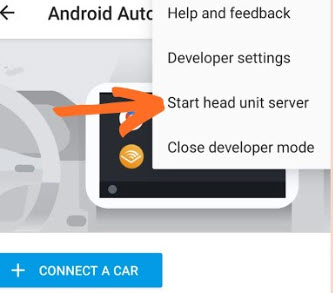
i'm using samsung Routines to setup all can do ; except for how to get tasker to start AA head unit server on the phone?

user posted image

440 Pages « < 370 371 372 373 374 > » Top
 

Change to:
| Lo-Fi Version
0.0263sec    0.68    6 queries    GZIP Disabled
Time is now: 21st December 2025 - 08:15 PM