TNB Allo Nationwide Open Fibre Expansion, CBJ,Malacca,Perak,Penang,Johor & Kedah
TNB Allo Nationwide Open Fibre Expansion, CBJ,Malacca,Perak,Penang,Johor & Kedah
|
|
 Aug 27 2021, 08:01 PM Aug 27 2021, 08:01 PM
Return to original view | Post
#41
|
 
Junior Member
183 posts Joined: Jun 2020 From: IPOH  
|
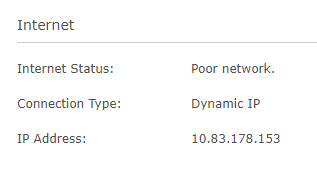
Guys, does anyone know how to fix poor connection?The internet light will become red and it unable to access the internet. It keeps on happening every day after one of the technicians unplugs my fiber cable on the FDP box during my neighbour installation. I had emailed the CS about this issue but no one reply on it.
|
|
|
|
|
|
Aug 28 2021, 03:42 PM
Return to original view | Post
#42
|
|
Junior Member
183 posts Joined: Jun 2020 From: IPOH
|
QUOTE(jimmythw @ Aug 27 2021, 09:10 PM) You should call to customer service 1300 38 8000 to complain about this ok. They just reply my email and want me to agree that RM80 will be charged if the fault is on my side. Something similar with TM. I had agreed on it because when the internet is down. I still able to get the WAN IP and it is also able to ping without any problem. So I assume that is their fault. |
|
|
Aug 28 2021, 07:41 PM
Return to original view | Post
#43
|
|
Junior Member
183 posts Joined: Jun 2020 From: IPOH
|
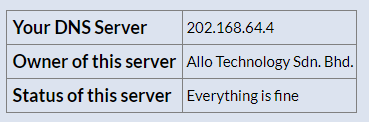
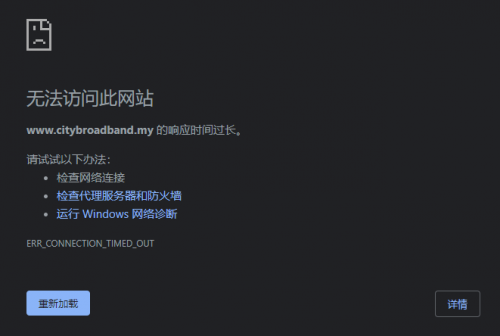
BTW, I have checked with my neighbour that if we using Allo DNS server, then the City Broadband website are unable to access also. No problem on Google DNS. Are u guys also face the same problem?
» Click to show Spoiler - click again to hide... « |
|
|
Aug 30 2021, 12:11 PM
Return to original view | Post
#44
|
|
Junior Member
183 posts Joined: Jun 2020 From: IPOH
|
ok guys, just to share my experience with the "Technician team" with you all.
 » Click to show Spoiler - click again to hide... « |
|
|
Aug 30 2021, 02:11 PM
Return to original view | Post
#45
|
|
Junior Member
183 posts Joined: Jun 2020 From: IPOH
|
QUOTE(joshhd @ Aug 30 2021, 01:54 PM) He first day of work, is it? 🤣🤣🤣 Don't know. Now I'm having a bad experience on Allo "Technical team" because the feeling that they give me is not professional as TM technical team. Just now the connection issue has happened again and I have called the CS to tell them about the scenario that I meet in this morning. They say they will make a report about it and reset my connection and ask me to monitor the connector for the next 24 hours.Or he just want to earn easy money (pay per job basis)? |
|
|
Aug 30 2021, 02:16 PM
Return to original view | Post
#46
|
|
Junior Member
183 posts Joined: Jun 2020 From: IPOH
|
QUOTE(aniq8676 @ Aug 30 2021, 02:09 PM) (-23dBm to -25dBm) oh really? They didn't tell me about it. They just take a photo on it and gone.With that reading, you will experience frequent internet interruptions. |
|
|
|
|
|
Aug 30 2021, 09:10 PM
Return to original view | Post
#47
|
|
Junior Member
183 posts Joined: Jun 2020 From: IPOH
|
QUOTE(joshhd @ Aug 30 2021, 04:26 PM) Frequent Internet interruptions? Ya. Almost every day will happen. This is how it looks like when no internet connection. WAN port is still able to ping.» Click to show Spoiler - click again to hide... « QUOTE(joshhd @ Aug 30 2021, 04:26 PM) Maybe the one that came to your house, is just want to collect evidence and screenshots, and then assign to another more "advanced technical team" to reattend your case at a later date Don't know. They just tell me to call Allo again if the problem still exists. |
|
|
Aug 31 2021, 03:25 PM
Return to original view | Post
#48
|
|
Junior Member
183 posts Joined: Jun 2020 From: IPOH
|
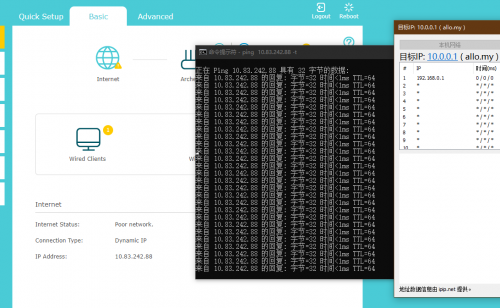
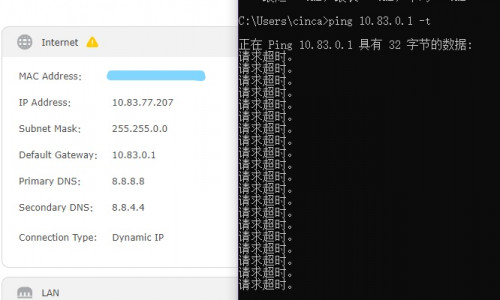
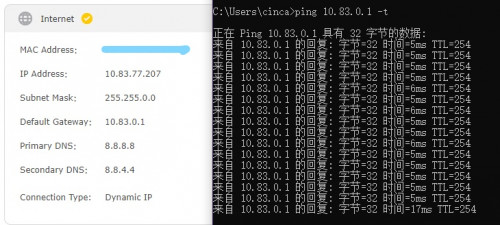
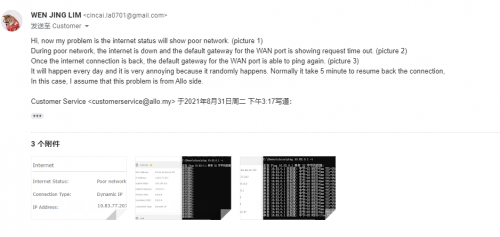
Guys what should I tell them about my problem. I had called the CS also and they seem like not understand my question. I tell them when my internet connection is lost, the default gateway on the WAN port is unable to ping. But somehow they keep on asking me it's I want the username and password for the router or not. The 1st picture is when the internet is lost and the second one is after the connection is back. How can I tell them about my problem?
» Click to show Spoiler - click again to hide... « Update: I got a call from Allo and they told me that the IP address that I show above is wrong. They want me to configure it to 192.168.3.254. They told me that IP is the standard IP address from Allo. But did I misunderstand something or what? I have to configure the IP to where? This is how I explain to them before got the call. » Click to show Spoiler - click again to hide... « This post has been edited by Cincai.La: Aug 31 2021, 04:14 PM |
|
|
Sep 1 2021, 10:52 AM
Return to original view | Post
#49
|
|
Junior Member
183 posts Joined: Jun 2020 From: IPOH
|
QUOTE(wc_how @ Sep 1 2021, 10:16 AM) Try another Lan cable for router and onu. ok, I will try to switch the cable with my pc and see. |
|
|
Sep 5 2021, 06:56 PM
Return to original view | Post
#50
|
|
Junior Member
183 posts Joined: Jun 2020 From: IPOH
|
QUOTE(Candy12 @ Sep 3 2021, 12:06 AM) Not the cable with your PC. ya. I change the cable that connects with Router and ONU device. The problem still occurs. I will try to change another router to see how it going.The cable between your Router's WAN and the ONU(fibre modem)'s single ethernet port. Replace it with a good one. Sometimes due to excessive bending it might cause the fine cable pairs inside to be broken or the connector itself. If cannot, this is another suggestion if you have a spare 3rd party router, try swapping the ISP supplied router with your spare one. This is to check is to rule out WAN ethernet cable is or the router supplied by your ISP is faulty or not. If both still doesn't solve the problem, then I suggest you call up the installer/contractor who set up your line, ask him to come check the fibre connector inside the FDP box itself outside your house. Pay him to replace a new one if needed. 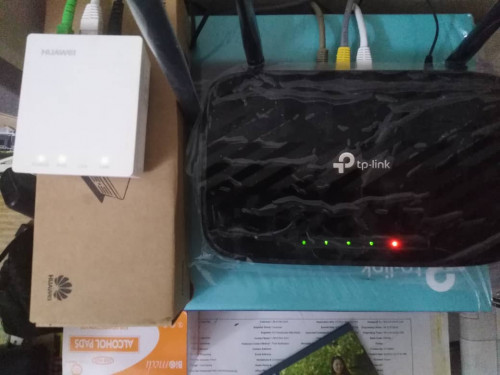 |
|
|
Sep 6 2021, 12:03 PM
Return to original view | Post
#51
|
|
Junior Member
183 posts Joined: Jun 2020 From: IPOH
|
QUOTE(jimmylim85 @ Sep 6 2021, 09:24 AM) Well guess I'm not alone now facing this frequent or shall i say, DAILY sudden disconnection issue with ALLO. OIC. But your is better than mine. Mine one takes 5 minutes to reconnect every time. I've called ALLO helpline many times and they can't solve my problem. They told me I will be charged RM 80 for checking, i told them i don't mind paying it if can really solve the issue. Cause if they spent an hour and still same issue, i'll felt bad not paying them RM 80 and still not resolving the issue. I'm using ASUS TUF AX3000 which is way better than the TP-Link they provide AC1200 (hey ALLO, wake up! Maxis 100mbps fibre is giving WiFi6 Certified router, still give us a AC1200 for 500mbos) I even change my Huawei ONT to Router lan cable to UGREEN 1 meter Cat7 which should improve my connection (still the same issue) My fiber cable is tested -18dm which is consider good. Now I'm just not bothered with it... everyday when your phone shows no network or "do you want to switch to network data" you'll know your WiFI router shows RED light of no internet. It takes about a minute to reconnect. |
|
|
Sep 7 2021, 01:00 AM
Return to original view | Post
#52
|
|
Junior Member
183 posts Joined: Jun 2020 From: IPOH
|
QUOTE(jimmylim85 @ Sep 6 2021, 02:29 PM) It could be due to that TP-Link wifi router slow processor that takes 5 minutes to reconnect. What's your Allo package? 100mbps or 500mbps? 100Mbps. |
|
|
Sep 15 2021, 11:01 PM
Return to original view | Post
#53
|
|
Junior Member
183 posts Joined: Jun 2020 From: IPOH
|
QUOTE(tany @ Sep 8 2021, 12:29 PM) Mine same as yours frequent disconnect Have u fix it? Mine still happening but not frequently now. Mine is lost connection on WAN default gateway. |
|
|
|
|
|
Sep 21 2021, 09:48 PM
Return to original view | Post
#54
|
|
Junior Member
183 posts Joined: Jun 2020 From: IPOH
|
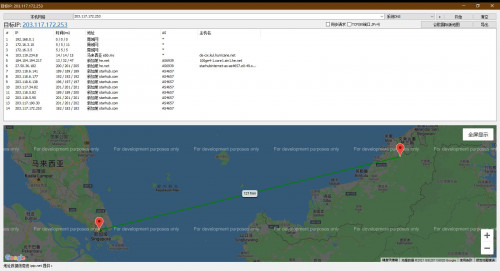
QUOTE(wanjun23 @ Sep 20 2021, 11:11 AM) Hi Me also having the same problem. I will try to report to Allo and see what they reply 1st. This is mine tracert result.Anyone facing issues on high latency while playing games like League of Legends and Maplestory? It seems that there is a really high latency and I can only fix it by connecting to VPN, which I dont really want to pay for it. Here is the tracert result. CODE tracert lol.garena.com Tracing route to sg.garenatwdev.k8s.garenanow.com [103.247.207.173] over a maximum of 30 hops: 1 <1 ms <1 ms <1 ms 192.168.1.1 2 2 ms 1 ms 1 ms 10.20.30.1 3 2 ms 1 ms 2 ms 202.168.64.129 4 2 ms 2 ms 4 ms 10.0.4.5 5 2 ms 2 ms 2 ms 172.16.36.5 6 2 ms 2 ms 2 ms de-cix.kul.hurricane.net [103.119.234.8] 7 12 ms 11 ms 11 ms 100ge4-1.core1.sin1.he.net [184.104.194.217] 8 264 ms 205 ms 198 ms starhubinternet-as-as4657.e0-49.switch2.sin2.he.net [27.50.36.182] 9 195 ms 195 ms 194 ms 203.118.4.134 10 183 ms 182 ms 182 ms 203.116.73.222 11 * * * Request timed out. 12 174 ms 173 ms 174 ms 103.115.79.155 13 178 ms 178 ms 178 ms 103.115.79.144 14 183 ms 183 ms 183 ms 103.247.207.173 Trace complete. tracert www.shopee.com.my Tracing route to shopee.com.my [143.92.81.70] over a maximum of 30 hops: 1 1 ms <1 ms <1 ms 192.168.1.1 2 2 ms 1 ms 1 ms 10.20.30.1 3 2 ms 2 ms 1 ms 202.168.64.129 4 2 ms 1 ms 2 ms 10.0.1.10 5 1 ms 4 ms 1 ms 10.0.4.1 6 3 ms 2 ms 1 ms xe-0-0-4.r21.kslrml02.my.bb.gin.ntt.net [203.78.193.65] 7 8 ms 7 ms 8 ms ae-8.r23.sngpsi07.sg.bb.gin.ntt.net [129.250.2.168] 8 7 ms 8 ms 8 ms ae-1.r01.sngpsi07.sg.bb.gin.ntt.net [129.250.4.94] 9 193 ms 193 ms 193 ms 116.51.18.138 10 192 ms 192 ms 193 ms 203.118.5.109 11 183 ms 182 ms 182 ms 203.116.73.218 12 181 ms 181 ms 180 ms 143.92.108.202 13 181 ms 171 ms 172 ms 143.92.108.158 14 188 ms 186 ms 186 ms 143.92.108.159 15 * * * Request timed out. 16 172 ms 171 ms 171 ms 143.92.81.70 Trace complete. Based on this support article from LoL garena, I need to do tracert to this IP 203.117.172.253 Here is the result of it CODE tracert 203.117.172.253 Tracing route to 203.117.172.253 over a maximum of 30 hops 1 1 ms <1 ms <1 ms 192.168.1.1 2 3 ms 1 ms 2 ms 10.20.30.1 3 2 ms 2 ms 2 ms 202.168.64.129 4 4 ms 2 ms 10 ms 10.0.1.10 5 2 ms 1 ms 1 ms 10.0.4.1 6 9 ms 13 ms 29 ms xe-0-0-4.r21.kslrml02.my.bb.gin.ntt.net [203.78.193.65] 7 13 ms 34 ms 7 ms ae-8.r23.sngpsi07.sg.bb.gin.ntt.net [129.250.2.168] 8 8 ms 7 ms 7 ms ae-1.r00.sngpsi07.sg.bb.gin.ntt.net [129.250.4.134] 9 193 ms 194 ms 193 ms ce-0-10-0-2.r00.sngpsi07.sg.ce.gin.ntt.net [128.241.6.249] 10 191 ms 191 ms 190 ms 203.118.6.145 11 196 ms 196 ms 196 ms 203.118.6.177 12 197 ms 196 ms 196 ms 203.118.6.138 13 197 ms 196 ms 196 ms 203.117.36.101 14 196 ms 196 ms 196 ms 203.118.5.82 15 191 ms 190 ms 190 ms 203.118.5.90 16 195 ms 195 ms 203 ms 203.117.190.30 17 196 ms 196 ms 196 ms 203.117.172.253 Trace complete. City broadband is saying they are only responsible for issues from network hop 1 to hop 6, after hop 6 will be beyond their control. Who can I contact on this kind of issue? » Click to show Spoiler - click again to hide... « This post has been edited by Cincai.La: Sep 21 2021, 10:15 PM |
|
|
Sep 22 2021, 02:40 AM
Return to original view | Post
#55
|
|
Junior Member
183 posts Joined: Jun 2020 From: IPOH
|
QUOTE(heLL_bOy @ Sep 22 2021, 12:07 AM) source to destination >> ok How do we verify from destination to source?destination to source >> wrong BGP path... traffic from the destination sent back to ISP was longest path ask Allo fix back their BGP path they able to do it. |
|
|
Sep 26 2021, 02:03 PM
Return to original view | Post
#56
|
|
Junior Member
183 posts Joined: Jun 2020 From: IPOH
|
QUOTE(wc_how @ Jul 5 2021, 02:09 PM) My installation date was last Friday, but only came just now. May I know what is the default password for D-Link DVG-F2452? Because my friends who using UNIFI have the same router and he has some network issue. I need to access the router to check the problem.I asked my agent, a lot of applications last 2 days. It may delay for few days. And expect them will come in sudden and without notice. They suddenly called me and told me they reached. A bit disappointed they do not give tplink A6. It is dlink DVG-F2452 |
|
|
Oct 1 2021, 08:56 PM
Return to original view | Post
#57
|
|
Junior Member
183 posts Joined: Jun 2020 From: IPOH
|
QUOTE(juzmafia @ Oct 1 2021, 08:33 PM) City Broadband got two promotion from 1st October 2021 to 31st December 2021 for residential package. The triple your speed promotion look attractive, but sadly only for new subscriber-only.1. One-Zero-Zero Promo: a Will get RM100 partner voucher if subscribed to 100mbps package b. Lucky draw 2. Triple Your Speed Promo: a. Add RM10 and get 300mbps speed for new 100mbps subscribers for 24 months. (No info on price after 24 months) b. Lucky draw Refer promo T&C here: https://www.citybroadband.my/terms-conditions-promotions/ juzmafia liked this post
|
|
|
Oct 3 2021, 07:13 PM
Return to original view | Post
#58
|
|
Junior Member
183 posts Joined: Jun 2020 From: IPOH
|
QUOTE(lwk523 @ Oct 2 2021, 09:27 PM) Any 1Gbps user here ? Is that really can get 1Gbps in upload test ? You may refer to this video as your reference. |
|
|
Oct 12 2021, 12:08 AM
Return to original view | Post
#59
|
|
Junior Member
183 posts Joined: Jun 2020 From: IPOH
|
QUOTE(jimmylim85 @ Sep 6 2021, 09:24 AM) Well guess I'm not alone now facing this frequent or shall i say, DAILY sudden disconnection issue with ALLO. hmm. I have tried my friend's router D-Link DIR-842 and it no more disconnection but once I switch it back to TP-Link Archer C9, it happens again. So I assume that is the router problem. Have email Allo to ask them about the router warranty this afternoon but still no reply from them.I've called ALLO helpline many times and they can't solve my problem. They told me I will be charged RM 80 for checking, i told them i don't mind paying it if can really solve the issue. Cause if they spent an hour and still same issue, i'll felt bad not paying them RM 80 and still not resolving the issue. I'm using ASUS TUF AX3000 which is way better than the TP-Link they provide AC1200 (hey ALLO, wake up! Maxis 100mbps fibre is giving WiFi6 Certified router, still give us a AC1200 for 500mbos) I even change my Huawei ONT to Router lan cable to UGREEN 1 meter Cat7 which should improve my connection (still the same issue) My fiber cable is tested -18dm which is consider good. Now I'm just not bothered with it... everyday when your phone shows no network or "do you want to switch to network data" you'll know your WiFI router shows RED light of no internet. It takes about a minute to reconnect. |
|
|
Oct 13 2021, 09:10 AM
Return to original view | Post
#60
|
|
Junior Member
183 posts Joined: Jun 2020 From: IPOH
|
QUOTE(afif92 @ Oct 13 2021, 01:10 AM) now unifi also not give public ip anymore to lower package (30,50 and 100) based on this post in the pdf (CGNAT_faq_community.pdf) Wow. But TM got provide IPv6. So there might be an alternative way to host the server. Hope Allo also will support IPv6 soon. |
| Change to: |  0.3167sec 0.3167sec
 0.82 0.82
 7 queries 7 queries
 GZIP Disabled GZIP Disabled
Time is now: 3rd December 2025 - 11:59 PM |
 Quote
Quote