Welcome Guest ( Log In | Register )

Outline · [ Standard ] · Linear+

 SONY TV 2020 available for order

views
     
perky
post Nov 16 2021, 12:35 PM

Regular
******
Senior Member
1,949 posts

Joined: Jan 2003
From: SBW/KCH/PER


QUOTE(WhitE LighteR @ Nov 15 2021, 06:53 PM)
Same here with my tv. To reproduce, the screen must be all black first before toggle the audio for tv volume up or down
*
QUOTE(Kahlamx @ Nov 15 2021, 08:25 PM)
Yes correct. The best way to test it is to press the "TV" button on the remote, reproduce and check.

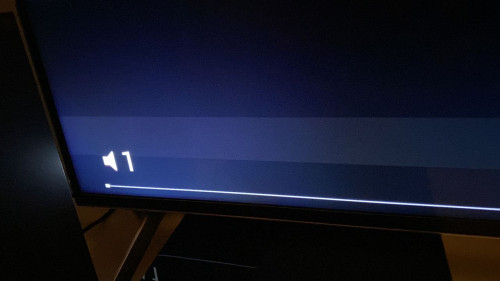
If Local Dimming is low and picture mode is "standard", the bar is very obvious from my angle and you need to sit closer to screen to see this bar. If you sit further say 6 ft the bar is not that visible.
*
After looking at the screen closer, yes I notice the line is on my screen too. The technician is going to replace your main board right? If it fixes the problem then I'm going to call them for repair as well.
shitmyx
post Nov 16 2021, 12:50 PM

Getting Started
**
Junior Member
185 posts

Joined: Apr 2009
From: Bolehland
QUOTE(Kahlamx @ Nov 12 2021, 05:13 PM)
user posted image

user posted image

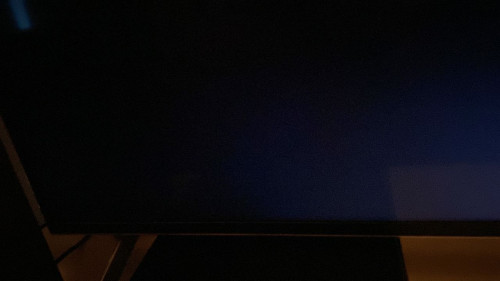
updated the 2nd new VRR update for my X90H. Just found out today there is a horizontal banding when I press the volume button.

There is no problem in watching with any contents. Home menu also no banding. I wonder if this is a firmware bug or panel problem? Anyone has this issue after the update?
*
I have the same problem too after updated my X90H to the latest software last night!!!

This post has been edited by shitmyx: Nov 16 2021, 10:09 PM
WhitE LighteR
post Nov 16 2021, 01:22 PM

WhitE LighteR Is Black~
********
All Stars
10,340 posts

Joined: Jan 2003


To me it's sounds like a software bug.
Maknusia
post Nov 16 2021, 01:28 PM

Enthusiast
*****
Junior Member
996 posts

Joined: Apr 2009


I havent tested on mine yet, need to figure out how to get the black screen, maybe from youtube?!

perky
post Nov 16 2021, 02:21 PM

Regular
******
Senior Member
1,949 posts

Joined: Jan 2003
From: SBW/KCH/PER


QUOTE(WhitE LighteR @ Nov 16 2021, 01:22 PM)
To me it's sounds like a software bug.
*
Ya most likely since all of us is experiencing it but one member here mentioned the technician who came to see his tv is going to change his tv's main board because of this issue.
Kahlamx
post Nov 16 2021, 03:11 PM

Casual
***
Junior Member
369 posts

Joined: Dec 2015
QUOTE(Maknusia @ Nov 16 2021, 01:28 PM)
I havent tested on mine yet, need to figure out how to get the black screen, maybe from youtube?!
*
On home menu, press "TV" button on your remote. It should go completely black if you didnt setup before. Then try to toggle volume button.


QUOTE(perky @ Nov 16 2021, 02:21 PM)
Ya most likely since all of us is experiencing it but one member here mentioned the technician who came to see his tv is going to change his tv's main board because of this issue.
*
I would like to clarify. I called Sony Support, he took my warranty number info and etc and said a technician will be in contact with me to diagnose at my place.

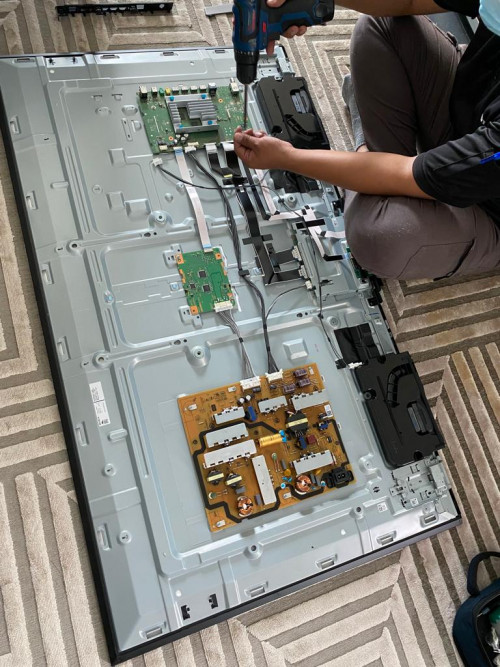
The technician WhatsApp 2 days later for model and serial number details, asked me to take pics and videos and back and forth responds. He straight away concluded this is main board problem without coming to my place and informed me he ordered the replacement part.

Like I said I don't know any better so I just went with it. Since this is just a backup TV and not my main TV and I just had a newborn in the house tongue.gif , I am not in a hurry to fix the TV cause its under 2+3 years Sony warranty.
This post has been edited by Kahlamx: Nov 16 2021, 03:14 PM
Kahlamx
post Nov 16 2021, 03:13 PM

Casual
***
Junior Member
369 posts

Joined: Dec 2015
QUOTE(perky @ Nov 16 2021, 12:35 PM)
After looking at the screen closer, yes I notice the line is on my screen too. The technician is going to replace your main board right? If it fixes the problem then I'm going to call them for repair as well.
*
It's something that once you seen it cant be unseen haha. I still think its a software bug.


QUOTE(shitmyx @ Nov 16 2021, 12:50 PM)
I have the same problem too after updated my X90H to the latest software last night. Very frustrated now because my warranty is over. What should I do?!
*
Hmm X90H launched last year and normally Sony TV comes with 2 years warranty right? Warranty ended so fast?
perky
post Nov 16 2021, 03:15 PM

Regular
******
Senior Member
1,949 posts

Joined: Jan 2003
From: SBW/KCH/PER


QUOTE(Kahlamx @ Nov 16 2021, 03:11 PM)
On home menu, press "TV" button on your remote. It should go completely black if you didnt setup before. Then try to toggle volume button.
I would like to clarify. I called Sony Support, he took my warranty number info and etc and said a technician will be in contact with me to diagnose at my place.

The technician WhatsApp 2 days later for model and serial number details, asked me to take pics and videos and back and forth responds. He straight away concluded this is main board problem without coming to my place and informed me he ordered the replacement part.

Like I said I don't know any better so I just went with it. Since this is just a backup TV and not my main TV and I just had a newborn in the house  tongue.gif , I am not in a hurry to fix the TV even cause its under 2+3 years Sony warranty.
*
Oh, i thought he came to your house and inspected your tv haha. Btw I read some where that in Europe, the latest firmware which is v6.1534 is taken down from their website so there might be a new firmware coming to us soon which I hope can fix this problem.

Btw did u follow the PS5 HDR settings recommended by Vincent Teoh, the 15-15-0 clicks?

This post has been edited by perky: Nov 16 2021, 03:17 PM
Kahlamx
post Nov 16 2021, 03:20 PM

Casual
***
Junior Member
369 posts

Joined: Dec 2015
QUOTE(perky @ Nov 16 2021, 03:15 PM)
Oh, i thought he came to your house and inspected your tv haha. Btw I read some where that in Europe, the latest firmware which is v6.1534 is taken down from their website so there might be a new firmware coming to us soon which I hope can fix this problem.
*
Yeah initially the Sony Support via phone said need to come to my place and check first but the actual technician diagnose and concluded the problem via whatsapp lmao.

Let's hope new update fixes this problem.

QUOTE(perky @ Nov 16 2021, 03:15 PM)
Btw did u follow the PS5 HDR settings recommended by Vincent Teoh, the 15-15-0 clicks?
*
No not yet. X90H is with Series X now to test VRR and DV gaming feature and the picture settings is very restricted still. This VRR update is trash imo.

PS5 with LG CX now. tongue.gif

This post has been edited by Kahlamx: Nov 16 2021, 03:34 PM
Maknusia
post Nov 16 2021, 03:20 PM

Enthusiast
*****
Junior Member
996 posts

Joined: Apr 2009


QUOTE(Kahlamx @ Nov 16 2021, 03:11 PM)
On home menu, press "TV" button on your remote. It should go completely black if you didnt setup before. Then try to toggle volume button.
I would like to clarify. I called Sony Support, he took my warranty number info and etc and said a technician will be in contact with me to diagnose at my place.

The technician WhatsApp 2 days later for model and serial number details, asked me to take pics and videos and back and forth responds. He straight away concluded this is main board problem without coming to my place and informed me he ordered the replacement part.

Like I said I don't know any better so I just went with it. Since this is just a backup TV and not my main TV and I just had a newborn in the house  tongue.gif , I am not in a hurry to fix the TV cause its under 2+3 years Sony warranty.
*
yeah...kinda buzy with conference calls now, but as soon as I read the above msg, I tried turning on my TV but my background has wallpaper with diamonds, hence not too sure camne nak turn the background off.....so I thought...later la, aku main main sikit.
shitmyx
post Nov 16 2021, 10:07 PM

Getting Started
**
Junior Member
185 posts

Joined: Apr 2009
From: Bolehland
QUOTE(Kahlamx @ Nov 16 2021, 03:13 PM)
It's something that once you seen it cant be unseen haha. I still think its a software bug.
Hmm X90H launched last year and normally Sony TV comes with 2 years warranty right? Warranty ended so fast?
*
My bad. I thought warranty is only 1 year.
Anyway I don't think it's hardware issue so no intention to claim warranty.
Really disappointed with v6.1534 firmware update.
Kindly update us after Sony replaced main board for you.
Kahlamx
post Nov 17 2021, 01:44 PM

Casual
***
Junior Member
369 posts

Joined: Dec 2015
Guys, I suggest you all no need to waste time to change the board ya. He swapped the board and the problem remains. Initially, he was fixing in the living room with "bright lighting" condition, we tested a bit and ran RGB test (black color) and really thought the problem went away so he left.

Then I moved the TV back to the room, shut the lights and tested, the bar is not that obvious but still there. So i guess just wait for new software update la. Not big issue.

» Click to show Spoiler - click again to hide... «

Maknusia
post Nov 17 2021, 02:06 PM

Enthusiast
*****
Junior Member
996 posts

Joined: Apr 2009


I tested mine yesterday nite, yes its there, but maybe due to lighting, mine is not as obvious as in the screenshot from Kahlamx

I think its just the function element block, they didnt make it transparent enough to merge with the background. Like in the PC for mouse hover, normally there is a block/box active (highlight), but its be programmed to transparent to background.

Hence I think they had problem doing it, and it doesnt impact any pictures, so not really bothered with it

This post has been edited by Maknusia: Nov 17 2021, 02:06 PM
drbone
post Nov 19 2021, 11:25 AM

Regular
******
Senior Member
1,757 posts

Joined: May 2011
Guys, am eyeing the 65x85j , is the price from the link below ok? Has anyone else managed to get a better deal?

https://shopee.com.my/SONY-65-inch-55-inch-...02-60a7862ca448
cyberkoh88
post Nov 19 2021, 05:08 PM

Getting Started
**
Junior Member
183 posts

Joined: Jan 2010
QUOTE(drbone @ Nov 19 2021, 11:25 AM)
Guys, am eyeing the 65x85j , is the price from the link below ok? Has anyone else managed to get a better deal?

https://shopee.com.my/SONY-65-inch-55-inch-...02-60a7862ca448
*
cheapest during 11.11 from one of the Johor dealer, RM4389 from this dealer:
https://www.lazada.com.my/products/sony-55-...0578254566.html?

now the price already rise again to RM5399. Maybe you wait for 12.12
drbone
post Nov 21 2021, 07:38 PM

Regular
******
Senior Member
1,757 posts

Joined: May 2011
QUOTE(cyberkoh88 @ Nov 19 2021, 05:08 PM)
cheapest during 11.11 from one of the Johor dealer, RM4389 from this dealer:
https://www.lazada.com.my/products/sony-55-...0578254566.html?

now the price already rise again to RM5399. Maybe you wait for 12.12
*
Impressive ! Hopefully price will drop come 12.12

92 Pages « < 90 91 92Top
 

Change to:
| Lo-Fi Version
0.0255sec    0.54    6 queries    GZIP Disabled
Time is now: 3rd December 2025 - 05:11 AM