Outline ·
[ Standard ] ·
Linear+
SONY TV 2020 available for order
|
perky
|
 Jan 15 2021, 10:25 AM Jan 15 2021, 10:25 AM
|

|
Guys, just wanna ask usually in Malaysia when will they release this newly announced model? Sometime around March? I am planning to upgrade my 5 year old samsung 4k tv without HDR. Should i get the x900h now or wait for the new model? My main usage is PS5, netflix and youtube. Once in a while live football from my tv box.
|
|
|
|
|
|
perky
|
Jan 15 2021, 02:24 PM
|
|
|
QUOTE(thirumaran @ Jan 15 2021, 10:32 AM) I was one of the first batch owners, got the X90H sometime in July. Can you wait that long? Tt was announced back in March, only released in July? I don't think i can wait that long haha. How do you like your tv so far? QUOTE(ikram_p @ Jan 15 2021, 12:43 PM) It take a longer time... Once x90h hit bottom in sales. Then new one will take it place. X90h a good tv, after custom tune up, the picture is 90% look like oled. That's good to hear bro. Your tv usage is mostly on? Now I'm considering on which size should i get, either the 55 or 65 inch. Its for my bedroom, distance from my eye to the tv is about 7 -8.5 feet |
|
|
|
|
|
perky
|
Jan 15 2021, 05:00 PM
|
|
|
QUOTE(Eyefirst @ Jan 15 2021, 04:08 PM) 55 is sufficient plus u got save money to compare with additional 2k for 65 upgrade. unless u want to indulge on your bed most of the time.. u could go for 65.. of course the bigger the better  Ya bro my first choice is 55inch but not easy to find nowadays, if i was quote slightly below RM6k for the 65inch..about 5.8-5.9k at my local electrical store. |
|
|
|
|
|
perky
|
Jan 15 2021, 05:34 PM
|
|
|
QUOTE(ikram_p @ Jan 15 2021, 05:29 PM) Your budget must be a tv+5 years warranty. Dont trust tv maker nowadays. The quality is not like the old days. Ah noted bro, how many years does Sony give for their TV nowadays? |
|
|
|
|
|
perky
|
Jan 15 2021, 08:40 PM
|
|
|
QUOTE(TOMEI-R @ Jan 15 2021, 06:39 PM) Haha..for your room I think 55 is adequate enough. For 65' you need to sit much further than with a 55'. i think the X90H is too hot in demand now. Going to wait for the stocks and the price to cool down first. The 55inch price is just too hard to resist. From the previous post, sounds like more stocks are coming in this month. I don't think i can wait till July for the new model to reach here haha. Was considering the 55inch LG CX also but the price hasn't drop much. |
|
|
|
|
|
perky
|
Jan 16 2021, 12:37 PM
|
|
|
QUOTE(aplio500 @ Jan 16 2021, 08:25 AM) Looks like stocks coming in are for those who had ordered previous month or longer.. If you order now maybe still need to wait few months.. Quoted RM3,600 for the 55 inch here from a local electrical store in Kuching. Good price? Have to wait for a few days for them to transfer the available stock here from their other branch in another town. |
|
|
|
|
|
perky
|
Oct 28 2021, 12:04 PM
|
|
|
QUOTE(WhitE LighteR @ Oct 28 2021, 09:15 AM) I update yesterday but the interface seem still Android TV. Didn't get Google TV interface Did you notice any improvement/difference with the firmware v6.1288? I just received OTA update for the firmware v6.1288 yesterday |
|
|
|
|
|
perky
|
Nov 12 2021, 09:32 PM
|
|
|
QUOTE(Kahlamx @ Nov 12 2021, 05:13 PM) 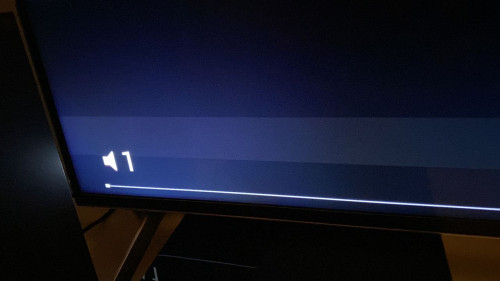 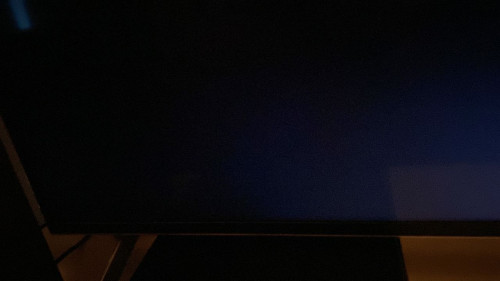 updated the 2nd new VRR update for my X90H. Just found out today there is a horizontal banding when I press the volume button. There is no problem in watching with any contents. Home menu also no banding. I wonder if this is a firmware bug or panel problem? Anyone has this issue after the update? I don't have this problem after updating to the latest firmware. Maybe try to do a factory reset, see if it fixes that. This post has been edited by perky: Nov 12 2021, 09:36 PM |
|
|
|
|
|
perky
|
Nov 15 2021, 08:42 AM
|
|
|
QUOTE(Kahlamx @ Nov 12 2021, 10:56 PM) Factory reset few times, and hard reset via power button as well. Still the same. Contacted sony support and they will come to my place to diagnose next week. Do update if the problem is because of the firmware or the panel itself. Btw after the new update, did you notice that after you open the youtube app in the ps5, the screen becomes very bright? even after I've manually set the HDR setting. |
|
|
|
|
|
perky
|
Nov 16 2021, 12:35 PM
|
|
|
QUOTE(WhitE LighteR @ Nov 15 2021, 06:53 PM) Same here with my tv. To reproduce, the screen must be all black first before toggle the audio for tv volume up or down QUOTE(Kahlamx @ Nov 15 2021, 08:25 PM) Yes correct. The best way to test it is to press the "TV" button on the remote, reproduce and check. If Local Dimming is low and picture mode is "standard", the bar is very obvious from my angle and you need to sit closer to screen to see this bar. If you sit further say 6 ft the bar is not that visible. After looking at the screen closer, yes I notice the line is on my screen too. The technician is going to replace your main board right? If it fixes the problem then I'm going to call them for repair as well. |
|
|
|
|
|
perky
|
Nov 16 2021, 02:21 PM
|
|
|
QUOTE(WhitE LighteR @ Nov 16 2021, 01:22 PM) To me it's sounds like a software bug. Ya most likely since all of us is experiencing it but one member here mentioned the technician who came to see his tv is going to change his tv's main board because of this issue. |
|
|
|
|
|
perky
|
Nov 16 2021, 03:15 PM
|
|
|
QUOTE(Kahlamx @ Nov 16 2021, 03:11 PM) On home menu, press "TV" button on your remote. It should go completely black if you didnt setup before. Then try to toggle volume button. I would like to clarify. I called Sony Support, he took my warranty number info and etc and said a technician will be in contact with me to diagnose at my place. The technician WhatsApp 2 days later for model and serial number details, asked me to take pics and videos and back and forth responds. He straight away concluded this is main board problem without coming to my place and informed me he ordered the replacement part. Like I said I don't know any better so I just went with it. Since this is just a backup TV and not my main TV and I just had a newborn in the house  , I am not in a hurry to fix the TV even cause its under 2+3 years Sony warranty. Oh, i thought he came to your house and inspected your tv haha. Btw I read some where that in Europe, the latest firmware which is v6.1534 is taken down from their website so there might be a new firmware coming to us soon which I hope can fix this problem. Btw did u follow the PS5 HDR settings recommended by Vincent Teoh, the 15-15-0 clicks? This post has been edited by perky: Nov 16 2021, 03:17 PM |
|
|
|
|



 Quote
Quote

 0.0592sec
 0.61
0.61
 7 queries
 GZIP Disabled