

QUOTE(kavman1984 @ Jun 13 2020, 10:03 PM)
They told me dont have 16 inch skin

Just buy it from DBrand. Its easy to install and the 3M sticker adhesive doesn't harm the Mac's material.I'm personally using one myself.
[2019] Macbook Pro 16-inch Discussion Thread | V1, The best for the brightest
|
|
 Jun 14 2020, 01:32 PM Jun 14 2020, 01:32 PM
|
 
Senior Member
5,936 posts Joined: Dec 2009 From: City of Subang Jaya 
|
QUOTE(kavman1984 @ Jun 13 2020, 10:03 PM) They told me dont have 16 inch skin Just buy it from DBrand. Its easy to install and the 3M sticker adhesive doesn't harm the Mac's material.I'm personally using one myself. |
|
|
|
|
|
Jun 14 2020, 01:35 PM
Show posts by this member only | IPv6 | Post
#422
|

Junior Member
147 posts Joined: Apr 2005 
|
QUOTE(codenamew @ Jun 14 2020, 08:23 AM) My MacBook Pro feels hot too during charging but once I unplug it, it don’t feel hot. It could be the battery is located beneath the palm rest. Yeah, but Im using it when it was plugged and charging, so a bit uncomfortable to type.You mean apple care or apple care +? If apple care you can get it from switch. I am looking for Apple care +. Anyone has US credit card to help me pay? This is my first macbook pro and now I know there is normal Apple Care and Apple Care +  confuse already. Not sure if its worth it to buy Apple Care. confuse already. Not sure if its worth it to buy Apple Care. |
|
|
Jun 14 2020, 09:21 PM
|
|
Senior Member
5,936 posts Joined: Dec 2009 From: City of Subang Jaya
|
QUOTE(RevolutionWorks @ Jun 14 2020, 01:35 PM) Yeah, but Im using it when it was plugged and charging, so a bit uncomfortable to type. Might want to use iStat to check the source of heat - I mean it will be warm if there's an intense load, but not to the extend of it being uncomfortable to type. This is my first macbook pro and now I know there is normal Apple Care and Apple Care + confuse already. Not sure if its worth it to buy Apple Care.The only time my Mac is uncomfortable to type is when I'm running Bootcamp for gaming playing COD  Temps will spike to around 69-75c. Temps will spike to around 69-75c. |
|
|
Jun 15 2020, 05:54 AM
|

Senior Member
601 posts Joined: Oct 2008 From: Penang
|
QUOTE(RevolutionWorks @ Jun 14 2020, 01:35 PM) Yeah, but Im using it when it was plugged and charging, so a bit uncomfortable to type. But in order to get Apple care +, you need a US credit or debit card and I believe the MacBook Pro need to be from US region.This is my first macbook pro and now I know there is normal Apple Care and Apple Care + confuse already. Not sure if its worth it to buy Apple Care.What I can say from the normal Apple Care is that it give you a peace of mind when comes to battery. If your battery capacity falls below 80% in the 3 years, you can claim a free battery. |
|
|
Jun 15 2020, 09:04 AM
|

Senior Member
3,446 posts Joined: Jan 2007
|
AFAIK APC+ Is for accidental liquid damage and only applicable for like 2 times claim?
I’ve not regretted my APC Purchase. It has served me well. |
|
|
Jun 15 2020, 08:59 PM
Show posts by this member only | IPv6 | Post
#426
|
|
Junior Member
147 posts Joined: Apr 2005
|
QUOTE(andrewtho @ Jun 14 2020, 09:21 PM) Might want to use iStat to check the source of heat - I mean it will be warm if there's an intense load, but not to the extend of it being uncomfortable to type. Will do that. This is my macbook for quite some time since 2016. Being .NET developers for so many years, want to be apps developer as well The only time my Mac is uncomfortable to type is when I'm running Bootcamp for gaming playing COD Temps will spike to around 69-75c. QUOTE(codenamew @ Jun 15 2020, 05:54 AM) But in order to get Apple care +, you need a US credit or debit card and I believe the MacBook Pro need to be from US region. What I can say from the normal Apple Care is that it give you a peace of mind when comes to battery. If your battery capacity falls below 80% in the 3 years, you can claim a free battery. QUOTE(myjunk @ Jun 15 2020, 09:04 AM) AFAIK APC+ Is for accidental liquid damage and only applicable for like 2 times claim? Alright, I will check and get the Apple Care for my new MBP 16. Thanks guys! I’ve not regretted my APC Purchase. It has served me well.  |
|
|
|
|
|
Jun 15 2020, 11:55 PM
Show posts by this member only | IPv6 | Post
#427
|

Senior Member
1,841 posts Joined: Feb 2018
|
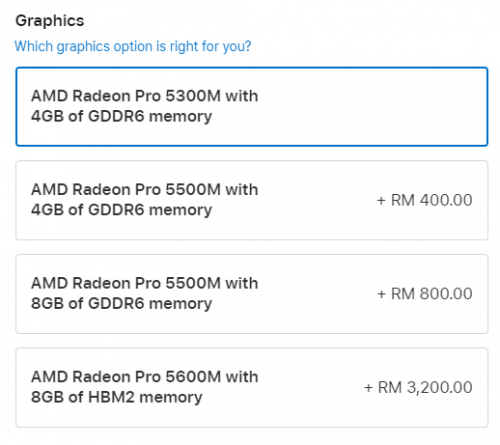
Apple has quietly updated their MBP 16" to have a better GPU - 5600M and it cost RM3200 (from base model) just to get that GPU.
 |
|
|
Jun 16 2020, 08:48 AM
|
|
Senior Member
5,936 posts Joined: Dec 2009 From: City of Subang Jaya
|
QUOTE(PoisonSoul @ Jun 15 2020, 11:55 PM) Apple has quietly updated their MBP 16" to have a better GPU - 5600M and it cost RM3200 (from base model) just to get that GPU. And people are already calling it the 2020 Macbook Pro 16 lol. Its not even an upgrade, just another option to get the 5600M.Honestly, I rather people get an eGPU with that money because the 5600M already draws 50w of power and if you are connected to a 4K monitor + work / gaming, that 96w of power supply is going to struggle, especially on Bootcamp where Microsoft doesn’t do a good job in managing the CPU unlike MacOS. |
|
|
Jun 16 2020, 08:54 AM
|

All Stars
14,312 posts Joined: Jan 2011
|
QUOTE(andrewtho @ Jun 16 2020, 08:48 AM) And people are already calling it the 2020 Macbook Pro 16 lol. Its not even an upgrade, just another option to get the 5600M. better still maybe should buy an iMac instead. haha.Honestly, I rather people get an eGPU with that money because the 5600M already draws 50w of power and if you are connected to a 4K monitor + work / gaming, that 96w of power supply is going to struggle, especially on Bootcamp where Microsoft doesn’t do a good job in managing the CPU unlike MacOS. |
|
|
Jun 16 2020, 08:57 AM
|
|
Senior Member
5,936 posts Joined: Dec 2009 From: City of Subang Jaya
|
QUOTE(westlife @ Jun 16 2020, 08:54 AM) better still maybe should buy an iMac instead. haha. I wonder if there’s a refresh of the iMac this year 🤔 |
|
|
Jun 16 2020, 09:04 AM
|
|
All Stars
14,312 posts Joined: Jan 2011
|
QUOTE(andrewtho @ Jun 16 2020, 08:57 AM) I wonder if there’s a refresh of the iMac this year 🤔 yeah. iMac needs a serious redesign urgently. the bezel is way too thick the same design has been used since 2012 till now. haha. |
|
|
Jun 16 2020, 11:20 AM
|
|
Senior Member
5,936 posts Joined: Dec 2009 From: City of Subang Jaya
|
I noticed the keyboard is different - the Enter Key and the Right Shift is different
 Attached thumbnail(s) 
|
|
|
Jun 16 2020, 11:47 AM
|
|
Senior Member
3,446 posts Joined: Jan 2007
|
QUOTE(andrewtho @ Jun 16 2020, 08:48 AM) Honestly, I rather people get an eGPU with that money because the 5600M already draws 50w of power and if you are connected to a 4K monitor + work / gaming, that 96w of power supply is going to struggle, especially on Bootcamp where Microsoft doesn’t do a good job in managing the CPU unlike MacOS. I found that when mine is charging and I put my phone to charge as well, it will take a LONG time to charge up and sometimes I also see that it's actually decreasing charge as I use it (while charging it from the Mac - which is connected to the AC)the 96w Charger cannot tahan when it is charging the laptop leh. Either that or my ciplak USBC to lightning cable is so ciplak. |
|
|
|
|
|
Jun 16 2020, 03:03 PM
Show posts by this member only | IPv6 | Post
#434
|

Junior Member
207 posts Joined: Apr 2012
|
QUOTE(andrewtho @ Jun 16 2020, 11:20 AM) I noticed the keyboard is different - the Enter Key and the Right Shift is different That’s the UK keyboard layout. They have a couple keys different from the US keyboard we are familiar with. I think it’s just for illustration purpose. For shipping it will be the regular keyboard layout with the Enter key in one row. |
|
|
Jun 16 2020, 07:39 PM
|
|
Senior Member
601 posts Joined: Oct 2008 From: Penang
|
Does anyone having low ram when running Mac OS on mbp 16? I’m using the base model and My ram usage is around 10Gb with normal task. The only apps I open is outlook , finder, excel, safari, and teams. And it’s already used up 10Gb.
|
|
|
Jun 17 2020, 12:25 PM
Show posts by this member only | IPv6 | Post
#436
|
|
Senior Member
1,841 posts Joined: Feb 2018
|
QUOTE(codenamew @ Jun 16 2020, 07:39 PM) Does anyone having low ram when running Mac OS on mbp 16? I’m using the base model and My ram usage is around 10Gb with normal task. The only apps I open is outlook , finder, excel, safari, and teams. And it’s already used up 10Gb. There was an explanation on why RAM usage by OS is fairly high but I can't find it right now. I'll try to recall what I have read.The person said that from the start, OS-es are designed to take up as much ram as possible to utilize what you have paid for. Imagine you paid XX amount of money for 32GB of ram but the OS only takes (let's just say) 4GB of RAM. In a way, to you might look at it as "Hey look my device has so much RAM left. Glad I have bought so much RAM and it's future proof." but actually that's bad. You have your OS on your SSD but your RAM is small, so how? The computer is not able to store more data temporarily into the RAM and therefore, slowing down the booting of OS. At this point if this happens to you, you might say "eh I just upgraded to SSD why it is still slow?". Now after booting up, why is it still taking so much RAM? OS logic = "When you need it, they have it instant/on the fly for you." Plus, the computer doesnt need to go to the SSD to file that particular file again and the SSD is free to do other things, maybe R/W some other data. Oh yea, if other apps need more RAM, then the computer/OS will know to "throw" which files that are in the RAM and create new RAM space for the app to launch/use. This is what I've gathered/remembered. I'll try to find the article/video and put it here when I found it. This is a starter. Sauce This post has been edited by PoisonSoul: Jun 17 2020, 12:28 PM |
|
|
Jun 18 2020, 04:01 PM
|

Senior Member
2,230 posts Joined: Aug 2010 From: Malaysia 
|
QUOTE(dikae @ Jun 8 2020, 10:13 PM) anyone know where can I get tempered glass for 16” around klang valley? Not from online coz I have butter fingers with stuffs like these, so I need the shop to install for me as well.. Never used tempered glass before for macbook, do you really need it? |
|
|
Jun 19 2020, 12:06 PM
|
|
Senior Member
601 posts Joined: Oct 2008 From: Penang
|
QUOTE(PoisonSoul @ Jun 17 2020, 12:25 PM) There was an explanation on why RAM usage by OS is fairly high but I can't find it right now. I'll try to recall what I have read. Thanks bro for explanation. Yes I read somewhere on the net too on Mac OS ram usage. I just move from windows to macOS that’s why I’m not too sure of the ram usage in macOS. But then I still feel Microsoft apps is kind of lag in macOS compared to in boot camp. I find boot camp is more smooth. But then power not so efficient.The person said that from the start, OS-es are designed to take up as much ram as possible to utilize what you have paid for. Imagine you paid XX amount of money for 32GB of ram but the OS only takes (let's just say) 4GB of RAM. In a way, to you might look at it as "Hey look my device has so much RAM left. Glad I have bought so much RAM and it's future proof." but actually that's bad. You have your OS on your SSD but your RAM is small, so how? The computer is not able to store more data temporarily into the RAM and therefore, slowing down the booting of OS. At this point if this happens to you, you might say "eh I just upgraded to SSD why it is still slow?". Now after booting up, why is it still taking so much RAM? OS logic = "When you need it, they have it instant/on the fly for you." Plus, the computer doesnt need to go to the SSD to file that particular file again and the SSD is free to do other things, maybe R/W some other data. Oh yea, if other apps need more RAM, then the computer/OS will know to "throw" which files that are in the RAM and create new RAM space for the app to launch/use. This is what I've gathered/remembered. I'll try to find the article/video and put it here when I found it. This is a starter. Sauce |
|
|
Jun 21 2020, 01:22 PM
|
|
Senior Member
5,936 posts Joined: Dec 2009 From: City of Subang Jaya
|
QUOTE(codenamew @ Jun 19 2020, 12:06 PM) Thanks bro for explanation. Yes I read somewhere on the net too on Mac OS ram usage. I just move from windows to macOS that’s why I’m not too sure of the ram usage in macOS. But then I still feel Microsoft apps is kind of lag in macOS compared to in boot camp. I find boot camp is more smooth. But then power not so efficient. Microsoft Office suite apps are not optimized for MacOS - same like how Adobe apps are not optimized for Windows. I guess, whichever RAM variant you choose, it will still show a high utilization on MacOS - but this shouldn't be an issue once you've gotten used to it. I'd rather have high RAM utilization than having more power drain on BootCamp Literally had to use 3 software(s) to ensure my machine is running 'cool' while on bootcamp. |
|
|
Jun 22 2020, 02:35 PM
|

Senior Member
2,347 posts Joined: Sep 2005
|
QUOTE(RevolutionWorks @ Jun 14 2020, 01:35 PM) Yeah, but Im using it when it was plugged and charging, so a bit uncomfortable to type. Is an external monitor connected to it by any chance? Because if so, then it is a common issue faced by myself and many others on the Macrumors forums.This is my first macbook pro and now I know there is normal Apple Care and Apple Care + confuse already. Not sure if its worth it to buy Apple Care. |
| Change to: |  0.0751sec 0.0751sec
 0.85 0.85
 8 queries 8 queries
 GZIP Disabled GZIP Disabled
Time is now: 20th December 2025 - 03:27 AM |
 Quote
Quote