

The speaker really impressive!
Attached thumbnail(s)

[2019] Macbook Pro 16-inch Discussion Thread | V1, The best for the brightest
|
|
 May 15 2020, 11:37 PM May 15 2020, 11:37 PM
Return to original view | Post
#1
|
 
Senior Member
5,936 posts Joined: Dec 2009 From: City of Subang Jaya 
|
New owner checking in, collected this beast today.
The speaker really impressive! Attached thumbnail(s)
|
|
|
|
|
|
May 16 2020, 09:03 AM
Return to original view | Post
#2
|
|
Senior Member
5,936 posts Joined: Dec 2009 From: City of Subang Jaya
|
QUOTE(Just2centslah @ May 16 2020, 12:13 AM) I really want to upgrade my 5-year old 15' macbook pro. Should visit the shop soon. weight of new model should be lighter than mine. Dont worry about the weight, unless you have jelly hands.  For a 16 inch laptop, it weighs almost the same as many office laptops that are only 13 inch. |
|
|
May 24 2020, 09:50 AM
Return to original view | Post
#3
|
|
Senior Member
5,936 posts Joined: Dec 2009 From: City of Subang Jaya
|
QUOTE(dikae @ May 24 2020, 04:18 AM) Ooo strange for a sealed unit to have early serial activation..did you ask them about it and what was the reply? It is likely the warranty date activated from the date of purchase - so likely when the stock reaches here in Malaysia, it will be 1 month or so short due to shipping etc. Even after you’ve entered the purchase date upon activation of the product, it will still return to the original purchase date after 24 hours of activation. It’s Apple’s way of controlling warranty periods because its as if you’re purchasing a ‘re-sell’ unit that is sealed. |
|
|
May 27 2020, 03:28 PM
Return to original view | Post
#4
|
|
Senior Member
5,936 posts Joined: Dec 2009 From: City of Subang Jaya
|
QUOTE(dikae @ May 26 2020, 02:04 PM) I’m also holding back..coz wwdc is on June 22nd, and based on readings..it’s almost confirmed there will be a new 16” latest by Q4 2020....small chance of them putting miniled as it was rumoured to be 2021..Higher chance to get 10 gen intel for base models or higher spec.. Highly doubt there will be any announcement during WWDC since it's a developer conference. I do foresee a minimal difference between the Gen 10 and Gen 9 CPUs - it's Intel, who are we kidding?  Wifi 6 was hygiene for the 10th gen chips, and the 13' didn't ship with it, so I doubt Apple will include that for the 16', if that's what you are waiting for. Also, the 10th gen chips are significantly higher in price in comparison to the 9th gen, so there is a possibility that the price might be bumped a little, or another way is to not give you 'higher / better' specs to compensate the extra cost. If you don't have a laptop, need one urgently, I would just say go for it. If you don't mind waiting and have one laptop on hand then you can continue waiting. One lesson that I've learned from anticipating new technologies, don't wait for them. Just get it. The 16' is good enough to last you for many years to come. If you ever have doubts, just scroll through reddit under the Macbook Pro sub-section, you'll have plenty of insights there  |
|
|
May 27 2020, 04:43 PM
Return to original view | Post
#5
|
|
Senior Member
5,936 posts Joined: Dec 2009 From: City of Subang Jaya
|
QUOTE(dikae @ May 27 2020, 04:10 PM) Thx bro, good insight indeed...currently using an iPad Pro for basic functions and have a laptop/desktop..so don’t mind waiting especially the new 16” should be due for refresh pretty soon...although might not be huge upgrades (only major in 2021 i.e miniLED etc) but anything newer is better.. Yup, totally. We're almost hitting Q3, so its more or less coming. But yes I defo agree with the ‘don’t wait for new tech’ since it’s a never ending process/waiting...  QUOTE(dikae @ May 27 2020, 04:37 PM) Question, is it advisable to use a tempered glass/screen protector on the MacBook? I’ve been using TG on all my iPads/iPhones but not sure if its a good idea to slap one on the mbp.. Nope, I don't use any. Wouldn't wanna interfere with the beautiful screen. Your devices are touch screen, so TG is normal, Macbooks aren't touchscreens sooooo you're good. Just make sure you wipe the keyboard after each use to make sure no debris is caught in between, if you are really fussy about it. I don't use any form of protection on my Macbook except skins - still waiting for DBrand to ship Also, do you use any keyboard protectors? I read keyboard protectors will somewhat damage the screen (in long run). I’m planning to use the very thin silicone that’d fit only the keyboard..not sure if it’s recommended.  |
|
|
Jun 8 2020, 09:46 PM
Return to original view | Post
#6
|
|
Senior Member
5,936 posts Joined: Dec 2009 From: City of Subang Jaya
|
QUOTE(dikae @ Jun 8 2020, 04:51 PM) A friend said that this seller is legit but has stinky attitude and kinda rude when reply etc..so I’m not sure if i wanna give them business, I’d rather pay the 1k+ from apple edu than buying from idiots.. (also MY set Yup, the seller has bad attitude and poor customer service. although nothing differs besides the adapter pin) although nothing differs besides the adapter pin)Otherwise, can consider this guy Red Apple IT. Better customer service - price fluctuates based on stock / supplier. |
|
|
|
|
|
Jun 12 2020, 06:16 PM
Return to original view | Post
#7
|
|
Senior Member
5,936 posts Joined: Dec 2009 From: City of Subang Jaya
|
QUOTE(Ch3n_low @ Jun 12 2020, 04:25 PM) Red Apple attitude is much worse than Superdeal... try to ask some questions and he replied ' dont want to sell to you' Sorry can't relate to your experience.He answered my questions promptly, very accommodating and even met up with him to COD because I couldn't wait for postage. He even gave me an 'upgrade' of the USB C Hub that I initially purchased. Had a good chat with him about SMEs in Malaysia and future plans lol! QUOTE(myjunk @ Jun 12 2020, 06:00 PM) Bosses all... I'm using a UGreen Hub, inexpensive and quality product. I think its the monitor - try to get a USB C monitor to take advantage of your USB C / Thunderbolt port.what you guys use for USB C hub ah? Can send me some recommendations ah? (The one I bought (wrongly) is those that plug direct into the laptop. Regret liao cos can't fit when I'm using a Mac Casing.. 😭 ) Other question, any issues when connecting MBP to external monitor? I connect to my VERY old Dell U2410 and the fonts looks ugly and blurry. I'm not sure if this is due to the Mac (using the USB hub to HDMI) issue or something else. I'm starting to think that it's the monitor. Too Old liao. (lifespan exceeded???) I plug in my 2006 year laptop using VGA also don't seem that nice. This monitor when I first bought it is very high end one leh... TQ |
|
|
Jun 12 2020, 08:44 PM
Return to original view | Post
#8
|
|
Senior Member
5,936 posts Joined: Dec 2009 From: City of Subang Jaya
|
QUOTE(myjunk @ Jun 12 2020, 06:44 PM) USB C monitor is V expensive leh... Nope, I'm connecting my MBP to external monitor direct via USB C. I only use Hubs for USB A, but since my monitor has USB ports, I've been using it as a hub instead lol.I'm looking for 34in UltraWide curve and those w/ USB c are super expensive. the UGREEN one you using, you're conneccting it to external monitor? u have a shopee link or something I can take a Look? Thanks.. I need to go test a (newer) external monitor and see if it's my old monitor issue leh.. UGREEN HUB I'm using this model, but didn't get it from this shop la. |
|
|
Jun 13 2020, 09:49 AM
Return to original view | Post
#9
|
|
Senior Member
5,936 posts Joined: Dec 2009 From: City of Subang Jaya
|
QUOTE(Ch3n_low @ Jun 13 2020, 12:01 AM) Im using Ugreen hub, but if you are using it often to connect to prejector or TV for presentation, you might want to think twice. The output support for Ugreen couldn't support some big high res TV and it will keep blinking / might not work. I have to change to the Apple original HDMI Adaptor. If you connect to monitor at home, i dont think there will be any problem though Oh for that I have another hub, its an Adams Elements hub with VGA / HDMI that I use for the other meeting rooms in office. Fortunately my office floor’s meeting room has Apple TV 😬 |
|
|
Jun 14 2020, 01:32 PM
Return to original view | Post
#10
|
|
Senior Member
5,936 posts Joined: Dec 2009 From: City of Subang Jaya
|
QUOTE(kavman1984 @ Jun 13 2020, 10:03 PM) They told me dont have 16 inch skin Just buy it from DBrand. Its easy to install and the 3M sticker adhesive doesn't harm the Mac's material.I'm personally using one myself. |
|
|
Jun 14 2020, 09:21 PM
Return to original view | Post
#11
|
|
Senior Member
5,936 posts Joined: Dec 2009 From: City of Subang Jaya
|
QUOTE(RevolutionWorks @ Jun 14 2020, 01:35 PM) Yeah, but Im using it when it was plugged and charging, so a bit uncomfortable to type. Might want to use iStat to check the source of heat - I mean it will be warm if there's an intense load, but not to the extend of it being uncomfortable to type. This is my first macbook pro and now I know there is normal Apple Care and Apple Care +  confuse already. Not sure if its worth it to buy Apple Care. confuse already. Not sure if its worth it to buy Apple Care.The only time my Mac is uncomfortable to type is when I'm running Bootcamp for gaming playing COD Temps will spike to around 69-75c. |
|
|
Jun 16 2020, 08:48 AM
Return to original view | Post
#12
|
|
Senior Member
5,936 posts Joined: Dec 2009 From: City of Subang Jaya
|
QUOTE(PoisonSoul @ Jun 15 2020, 11:55 PM) Apple has quietly updated their MBP 16" to have a better GPU - 5600M and it cost RM3200 (from base model) just to get that GPU. And people are already calling it the 2020 Macbook Pro 16 lol. Its not even an upgrade, just another option to get the 5600M.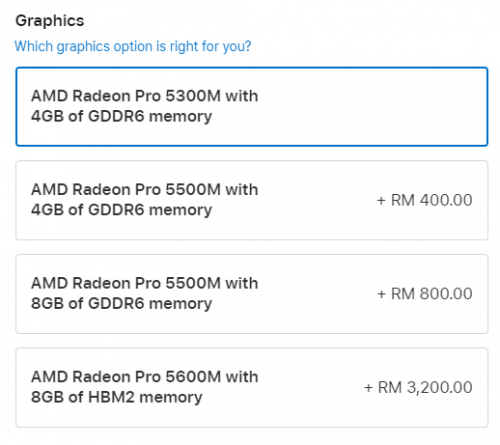 Honestly, I rather people get an eGPU with that money because the 5600M already draws 50w of power and if you are connected to a 4K monitor + work / gaming, that 96w of power supply is going to struggle, especially on Bootcamp where Microsoft doesn’t do a good job in managing the CPU unlike MacOS. |
|
|
Jun 16 2020, 08:57 AM
Return to original view | Post
#13
|
|
Senior Member
5,936 posts Joined: Dec 2009 From: City of Subang Jaya
|
QUOTE(westlife @ Jun 16 2020, 08:54 AM) better still maybe should buy an iMac instead. haha. I wonder if there’s a refresh of the iMac this year 🤔 |
|
|
|
|
|
Jun 16 2020, 11:20 AM
Return to original view | Post
#14
|
|
Senior Member
5,936 posts Joined: Dec 2009 From: City of Subang Jaya
|
I noticed the keyboard is different - the Enter Key and the Right Shift is different
 Attached thumbnail(s) 
|
|
|
Jun 21 2020, 01:22 PM
Return to original view | Post
#15
|
|
Senior Member
5,936 posts Joined: Dec 2009 From: City of Subang Jaya
|
QUOTE(codenamew @ Jun 19 2020, 12:06 PM) Thanks bro for explanation. Yes I read somewhere on the net too on Mac OS ram usage. I just move from windows to macOS that’s why I’m not too sure of the ram usage in macOS. But then I still feel Microsoft apps is kind of lag in macOS compared to in boot camp. I find boot camp is more smooth. But then power not so efficient. Microsoft Office suite apps are not optimized for MacOS - same like how Adobe apps are not optimized for Windows. I guess, whichever RAM variant you choose, it will still show a high utilization on MacOS - but this shouldn't be an issue once you've gotten used to it. I'd rather have high RAM utilization than having more power drain on BootCamp Literally had to use 3 software(s) to ensure my machine is running 'cool' while on bootcamp. |
|
|
Jun 29 2020, 10:09 AM
Return to original view | Post
#16
|
|
Senior Member
5,936 posts Joined: Dec 2009 From: City of Subang Jaya
|
QUOTE(tech_frix @ Jun 28 2020, 03:48 PM) will there be a new MBP 16 2020? Everything for now is just a rumor. or I just proceed and buy MBP 2019? You can never stop chasing new technology. If you need one right now, just buy it. There's no guarantee that there will be a 'refreshed' or non-at-all. 50/50 risk. |
|
|
Jul 27 2020, 11:30 AM
Return to original view | Post
#17
|
|
Senior Member
5,936 posts Joined: Dec 2009 From: City of Subang Jaya
|
Hoho my Mac just suffered from ghosting & flickering issue.
Sent back to QCD @ Sunway for diagnostics, hopefully its not a hardware issue - apparently its common for Retina display. |
|
|
Jul 27 2020, 02:17 PM
Return to original view | Post
#18
|
|
Senior Member
5,936 posts Joined: Dec 2009 From: City of Subang Jaya
|
QUOTE(alandhw @ Jul 27 2020, 02:04 PM) My understanding is yes,can send. It will be done locally. All authorized service centres will attend to you, as long as its under warranty. But the unit will divert to US. Parts will be ordered from Singapore directly (if required). |
|
|
Jul 28 2020, 09:09 AM
Return to original view | Post
#19
|
|
Senior Member
5,936 posts Joined: Dec 2009 From: City of Subang Jaya
|
QUOTE(alandhw @ Jul 27 2020, 09:56 PM) Ishhhh... Education store discount & 3rd party sellers are selling lower than official store. Also, they can leverage on bulk order discounts as well.But i wonder how come US set is cheaper than MY set. If check for the Apple online store, US set is expensive after currency conversion |
|
|
Jul 28 2020, 11:28 AM
Return to original view | Post
#20
|
|
Senior Member
5,936 posts Joined: Dec 2009 From: City of Subang Jaya
|
QUOTE(alandhw @ Jul 28 2020, 09:33 AM) Any reason why all 3rd parties selling unit is US set but not MY set? Cheaper price = more demand. We're talking about thousands in savings, that's alot compared to local units - and no retailers are willing to sacrifice their thin margin to sell it lower. Margin is lower because they are authorized retailers, not directly Apple so you need margin to be profitable. Give you a perspective, would you rather buy a local set that is priced the same as retail stores from a 3rd party? Most will say no. So hence why these 3rd parties will get US sets - and Macbooks are covered by International Warranty, so no worries - just change the duckhead (plug) and you are good to go. alandhw liked this post
|
| Change to: |  0.1432sec 0.1432sec
 0.62 0.62
 9 queries 9 queries
 GZIP Disabled GZIP Disabled
Time is now: 18th December 2025 - 02:08 PM |
 Quote
Quote