Welcome Guest ( Log In | Register )

Outline · [ Standard ] · Linear+

 Custom maxis fibre router with voip function, Any recommendations?

views
     
TSalfredhow78
post Jun 25 2019, 03:19 PM, updated 7y ago

Casual
***
Junior Member
380 posts

Joined: Oct 2017
Currently i am using my own router which is already great, but in order to use the voip function, i would connect LAN4(which i configured the vlan for voice and connect to maxis stock router)

I found this troublesome and it occupies space. Anyone familar with maxis fibre and is there any custom router with voip?
blacktubi
post Jun 25 2019, 07:07 PM

-
Group Icon
Elite
8,409 posts

Joined: Jul 2008

No options available, you will need the stock router or purchase a third party VOIP bridge.
Anime4000
post Jun 27 2019, 01:32 AM

Look at all my stars!!
*******
Senior Member
2,399 posts

Joined: Jul 2009
From: /dev/null


QUOTE(blacktubi @ Jun 25 2019, 07:07 PM)
purchase a third party VOIP bridge.
*
any recommendation for VoIP bridge??
blacktubi
post Jun 27 2019, 08:43 AM

-
Group Icon
Elite
8,409 posts

Joined: Jul 2008

QUOTE(Anime4000 @ Jun 27 2019, 01:32 AM)
any recommendation for VoIP bridge??
*
There used to be a D-Link model that will work but I heard Maxis closed this door recently.


trix
post Jun 27 2019, 10:57 AM

Enthusiast
*****
Senior Member
848 posts

Joined: Feb 2005
From: everywhere, yet nowhere.


ONT which model? if huawei, test if you can login to it using default credential
if yes, you can configure VOIP there
syk
post Jun 27 2019, 01:56 PM

Casual
***
Junior Member
315 posts

Joined: Jan 2003
From: KL


ONT or DLink router will not able to connect Maxis VOIP anymore.
Seem like Maixs has locked the VOIP to Maxis stock router.

If you need VOIP, best is retain Maxis stock router for the purpose and add one custom router as bridge mode for LAN & Wifi.
trix
post Jun 27 2019, 11:47 PM

Enthusiast
*****
Senior Member
848 posts

Joined: Feb 2005
From: everywhere, yet nowhere.


QUOTE(syk @ Jun 27 2019, 01:56 PM)
ONT or DLink router will not able to connect Maxis VOIP anymore.
Seem like Maixs has locked the VOIP to Maxis stock router.


If you need VOIP, best is retain Maxis stock router for the purpose and add one custom router as bridge mode for LAN & Wifi.
*
still working fine for mine, able to call out/receive call
Attached Image
syk
post Jun 28 2019, 10:44 AM

Casual
***
Junior Member
315 posts

Joined: Jan 2003
From: KL


QUOTE(trix @ Jun 27 2019, 11:47 PM)
still working fine for mine, able to call out/receive call
Attached Image
*
Mine is black color, very old model.
I was able to connect it with Maxis VOIP until 2 years ago it doesn't work anymore.
Connect with ONT sometime the VOIP setting will reset and need to redo again...
trix
post Jun 28 2019, 11:11 AM

Enthusiast
*****
Senior Member
848 posts

Joined: Feb 2005
From: everywhere, yet nowhere.


QUOTE(syk @ Jun 28 2019, 10:44 AM)
Mine is black color, very old model.
I was able to connect it with Maxis VOIP until 2 years ago it doesn't work anymore.
Connect with ONT sometime the VOIP setting will reset and need to redo again...
*
replace it yourself with the newer model then, no need to wait for TM/Maxis to do it
mine previously was HG8240w, replaced it myself with HG8240H bought from carousell for RM20
just key in the PON password obtained from the original ONT and you're good to go
wantrepreneur
post Jun 28 2019, 11:14 AM

Getting Started
**
Junior Member
56 posts

Joined: Jun 2019

QUOTE(trix @ Jun 28 2019, 11:11 AM)
replace it yourself with the newer model then, no need to wait for TM/Maxis to do it
mine previously was HG8240w, replaced it myself with HG8240H bought from carousell for RM20
just key in the PON password obtained from the original ONT and you're good to go
*
definitely the way to go!
i got myself a set from carousell for around RM20 as well.
can't be waiting around for TM to solve my problems for me, its becoming more of a diy world.
syk
post Jun 28 2019, 12:26 PM

Casual
***
Junior Member
315 posts

Joined: Jan 2003
From: KL


QUOTE(trix @ Jun 28 2019, 11:11 AM)
replace it yourself with the newer model then, no need to wait for TM/Maxis to do it
mine previously was HG8240w, replaced it myself with HG8240H bought from carousell for RM20
just key in the PON password obtained from the original ONT and you're good to go
*
Yes, this can do.
But Maxis has reset my VOIP password, and their CS refused to reveal the password. (Maybe is their SOP)
The stock router is sucks on WIFI, so I decide to keep it only for VOIP and brigde it to custom router.
TSalfredhow78
post Jun 28 2019, 10:56 PM

Casual
***
Junior Member
380 posts

Joined: Oct 2017
QUOTE(syk @ Jun 28 2019, 12:26 PM)
Yes, this can do.
But Maxis has reset my VOIP password, and their CS refused to reveal the password. (Maybe is their SOP)
The stock router is sucks on WIFI, so I decide to keep it only for VOIP and brigde it to custom router.
*
Pm me ur details i check for u
TSalfredhow78
post Jun 28 2019, 10:57 PM

Casual
***
Junior Member
380 posts

Joined: Oct 2017
QUOTE(wantrepreneur @ Jun 28 2019, 11:14 AM)
definitely the way to go!
i got myself a set from carousell for around RM20 as well.
can't be waiting around for TM to solve my problems for me, its becoming more of a diy world.
*
-

This post has been edited by alfredhow78: Jun 29 2019, 05:21 PM
TSalfredhow78
post Jun 28 2019, 10:57 PM

Casual
***
Junior Member
380 posts

Joined: Oct 2017
QUOTE(trix @ Jun 27 2019, 11:47 PM)
still working fine for mine, able to call out/receive call
Attached Image
*
wow nice.. i got mine up already. thank you smile.gif

This post has been edited by alfredhow78: Jun 29 2019, 05:12 PM
trix
post Jun 30 2019, 04:34 PM

Enthusiast
*****
Senior Member
848 posts

Joined: Feb 2005
From: everywhere, yet nowhere.


QUOTE(alfredhow78 @ Jun 28 2019, 10:57 PM)
wow nice.. i got mine up already. thank you smile.gif
*
nice. in case anyone wants to know how to, here it is:

1. set your computer's IP address to 192.168.100.x, subnet mask 255.255.255.0
2. connect directly to ONT
3. browse to 192.168.100.1, login with telecomadmin/admintelecom
4. configure VOIP like here: https://forum.lowyat.net/index.php?showtopi...&#entry91845910

ps: your VOIP username/password is like below:
username: phone number
password: account number + last 4 digit of phone number
Ichitech
post Sep 6 2019, 10:02 AM

Getting Started
**
Junior Member
196 posts

Joined: Oct 2016
QUOTE(trix @ Jun 30 2019, 04:34 PM)
nice. in case anyone wants to know how to, here it is:

1. set your computer's IP address to 192.168.100.x, subnet mask 255.255.255.0
2. connect directly to ONT
3. browse to 192.168.100.1, login with telecomadmin/admintelecom
4. configure VOIP like here: https://forum.lowyat.net/index.php?showtopi...&#entry91845910

ps: your VOIP username/password is like below:
username: phone number
password: account number + last 4 digit of phone number
*
Hey dude, as of today this still work ? I have no luck out of this..
Mind to share ur connection behind those Residential Gateway and Router ?

This post has been edited by Ichitech: Sep 6 2019, 10:03 AM
trix
post Sep 6 2019, 10:24 AM

Enthusiast
*****
Senior Member
848 posts

Joined: Feb 2005
From: everywhere, yet nowhere.


QUOTE(Ichitech @ Sep 6 2019, 10:02 AM)
Hey dude, as of today this still work ? I have no luck out of this..
Mind to share ur connection behind those Residential Gateway and Router ?
*
Still working, only had to reboot the RG once after maxis upgraded something on their backend a few weeks back
Which part not working for you?


waisang
post Sep 6 2019, 01:23 PM

On my way
****
Junior Member
588 posts

Joined: Dec 2009
QUOTE(alfredhow78 @ Jun 25 2019, 03:19 PM)
Currently i am using my own router which is already great, but in order to use the voip function, i would connect LAN4(which i configured the vlan for voice and connect to maxis stock router)

I found this troublesome and it occupies space. Anyone familar with maxis fibre and is there any custom router with voip?
*
Request Maxis if they can supply you Technicolor MediaAccess TG389ac Router (before Maxis Tplink stock router),
Alternative Maxis Aminia MA131, friend of mine is using it without any issue,
Both works well.
Ichitech
post Sep 6 2019, 09:02 PM

Getting Started
**
Junior Member
196 posts

Joined: Oct 2016
QUOTE(trix @ Sep 6 2019, 10:24 AM)
Still working, only had to reboot the RG once after maxis upgraded something on their backend a few weeks back
Which part not working for you?
*
TEL light not on, is like totally disconnected.. Same to both TEL1 or 2 port
Wonder why 🤔
trix
post Sep 7 2019, 08:52 AM

Enthusiast
*****
Senior Member
848 posts

Joined: Feb 2005
From: everywhere, yet nowhere.


QUOTE(Ichitech @ Sep 6 2019, 09:02 PM)
TEL light not on, is like totally disconnected.. Same to both TEL1 or 2 port
Wonder why 🤔
*
show your configuration in the RG here
Connexiionz
post Oct 18 2019, 03:08 PM

New Member
*
Junior Member
29 posts

Joined: Aug 2005


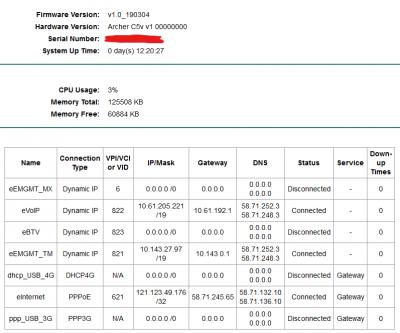
TPlink Archer C5V latest firmware is 190304.... sapa mau???
Anime4000
post Oct 20 2019, 10:56 PM

Look at all my stars!!
*******
Senior Member
2,399 posts

Joined: Jul 2009
From: /dev/null


QUOTE(Connexiionz @ Oct 18 2019, 03:08 PM)
TPlink Archer C5V latest firmware is 190304.... sapa mau???
*
mine already updated, maybe maxis auto update
Attached Image
waisang
post Oct 30 2019, 11:11 AM

On my way
****
Junior Member
588 posts

Joined: Dec 2009
QUOTE(Anime4000 @ Oct 20 2019, 10:56 PM)
mine already updated, maybe maxis auto update
Attached Image
*
hows is it the firmware stability and performance?
Anime4000
post Oct 30 2019, 07:13 PM

Look at all my stars!!
*******
Senior Member
2,399 posts

Joined: Jul 2009
From: /dev/null


QUOTE(waisang @ Oct 30 2019, 11:11 AM)
hows is it the firmware stability and performance?
*
feel same, still cannot change IPv6 DNS
alvinchan2010
post Dec 23 2019, 11:05 AM

New Member
*
Junior Member
12 posts

Joined: Jul 2010
QUOTE(alfredhow78 @ Jun 25 2019, 03:19 PM)
Currently i am using my own router which is already great, but in order to use the voip function, i would connect LAN4(which i configured the vlan for voice and connect to maxis stock router)

I found this troublesome and it occupies space. Anyone familar with maxis fibre and is there any custom router with voip?
*
You connect the dlink LAN4 (VLAN yo Voip) to TPlink WLAN right? Do you mind share how you configure the stock tplink router for the voip to work? I tried but not working here. Thank you.
alvinchan2010
post Dec 28 2019, 04:39 PM

New Member
*
Junior Member
12 posts

Joined: Jul 2010
After getting Maxis technical support help, I managed to have my DLink DIR882 setup as primary internet router while using Maxis TP Link router as Voice VOIP and Switch. Here is the setup and steps:

1. Connect ONU (TM, LAN2) to Maxis TP Link WAN port and set the Maxis TP Link router up for PPPOE and Voice VOIP. Make sure everything work fine.

2. Change the Maxis TP link router to Bridge Mode (as Switch only)

3. Connect own router (my case is DIR882) WAN port to any LAN port (I use LAN 4) in Maxis TP link router.

4. Setup DIR882 for internet access with PPPOE .

You will need Maxis Fibre PPPOE login info. You can just call maxis to set it up for you after you have your new router.
Anime4000
post Dec 29 2019, 01:27 AM

Look at all my stars!!
*******
Senior Member
2,399 posts

Joined: Jul 2009
From: /dev/null


QUOTE(alvinchan2010 @ Dec 28 2019, 04:39 PM)
After getting Maxis technical support help, I managed to have my DLink DIR882 setup as primary internet router while using Maxis TP Link router as Voice VOIP and Switch. Here is the setup and steps:

1. Connect ONU (TM, LAN2) to Maxis TP Link WAN port and set the Maxis TP Link router up for PPPOE and Voice VOIP. Make sure everything work fine.

2. Change the Maxis TP link router to Bridge Mode (as Switch only)

3. Connect own router (my case is DIR882) WAN port to any LAN port (I use LAN 4) in Maxis TP link router.

4. Setup DIR882 for internet access with PPPOE .

You will need Maxis Fibre PPPOE login info. You can just call maxis to set it up for you after you have your new router.
*
Yea, this works, no need VLAN at Custom Router
Attached Image

After that, I simply disable Wireless.

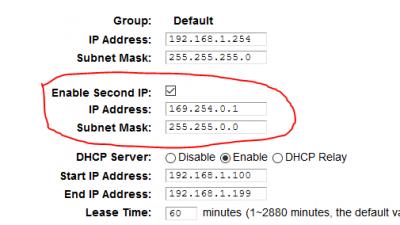
Then I disable DHCP (reduce load), add 2nd maxis tp-link router LAN IP as 169.254.0.1/16,
this make Windows IPv4 Autoconfiguration able to communicate with
maxis tp-link router since I disable DHCP, can enter router admin page
izzudin
post Dec 30 2019, 07:24 PM

Getting Started
**
Junior Member
93 posts

Joined: Jan 2003


QUOTE(trix @ Jun 30 2019, 04:34 PM)
nice. in case anyone wants to know how to, here it is:

1. set your computer's IP address to 192.168.100.x, subnet mask 255.255.255.0
2. connect directly to ONT
3. browse to 192.168.100.1, login with telecomadmin/admintelecom
4. configure VOIP like here: https://forum.lowyat.net/index.php?showtopi...&#entry91845910

ps: your VOIP username/password is like below:
username: phone number
password: account number + last 4 digit of phone number
*
Hi trix. I have the same btu and followed your steps but 192.168.100.1 doesn’t respond. What did i do wrong? I plugged to lan 1 port. Should I disconnect the fiber cable first?
Anime4000
post Dec 30 2019, 07:53 PM

Look at all my stars!!
*******
Senior Member
2,399 posts

Joined: Jul 2009
From: /dev/null


QUOTE(izzudin @ Dec 30 2019, 07:24 PM)
Hi trix. I have the same btu and followed your steps but 192.168.100.1 doesn’t respond. What did i do wrong? I plugged to lan 1 port. Should I disconnect the fiber cable first?
*
If you see my previous post, it was 192.168.1.254
izzudin
post Jan 1 2020, 11:35 AM

Getting Started
**
Junior Member
93 posts

Joined: Jan 2003


QUOTE(Anime4000 @ Dec 30 2019, 07:53 PM)
If you see my previous post, it was 192.168.1.254
*
I think you’re referring to maxis router but I’m referring to tm btu. I can log in to tm btu already. It’s 192.168.1.1 but have to unplug the fibre cable first... but now the btu voip light is blinking. Maybe maxis changed voip password. It’s not account number + last 4 digit of phone number anymore 😭
Anime4000
post Jan 1 2020, 11:52 AM

Look at all my stars!!
*******
Senior Member
2,399 posts

Joined: Jul 2009
From: /dev/null


QUOTE(izzudin @ Jan 1 2020, 11:35 AM)
I think you’re referring to maxis router but I’m referring to tm btu. I can log in to tm btu already. It’s 192.168.1.1 but have to unplug the fibre cable first... but now the btu voip light is blinking. Maybe maxis changed voip password. It’s not account number + last 4 digit of phone number anymore 😭
*
latest TM BTU, I tried and not working
CODE

_________________
WAN Configuration
‾‾‾‾‾‾‾‾‾‾‾‾‾‾‾‾‾
Enable WAN:                     ✔
Encapsulation mode:             IPoE
Protocol type:                  IPv4
WAN mode:                       Routed WAN
Service type:                   VoIP
Enable VLAN:                    ✔
VLAN ID:                        822
802.1p policy:                  Use specified value
802.1p:                         6
MTU:                            1500
IP acquisition mode:            DHCP
Vendor ID:                      
________________________
VoIP Basic Configuration
‾‾‾‾‾‾‾‾‾‾‾‾‾‾‾‾‾‾‾‾‾‾‾‾
Outbound Proxy Address:         homegw01.maxis.com.my
Outbound Proxy Port:            5060
Standby Outbound Address:      
Standby Outbound Proxy Port:    5060
Primary Proxy Address:          
Primary Proxy Port:             5060
Standby Proxy Address:          
Standby Proxy Port:             5060
Home Domain:                    homesip.maxis.com.my
Local Port:                     5060
Digitmap:                       [xABCD*#].T
Digitmap Match Mode:            Min
Registration Period:            900
Signaling Port:                 2_VOIP_R_VID_822
Media Port:                    
Region:                         Malaysia
_____________________
User Basic Parameters
‾‾‾‾‾‾‾‾‾‾‾‾‾‾‾‾‾‾‾‾‾
Enable User:                    ✔
URI:                            sip:homesip.maxis.com.my
Register User Name:             «Telphone Number»
Associated POTS:                1
Auth User Name:                 «Telphone Number»@homesip.maxis.com.my
Password:                       (PASSWORD, ID + last 4 digit tel)


This post has been edited by Anime4000: Jan 1 2020, 12:01 PM
izzudin
post Jan 1 2020, 12:13 PM

Getting Started
**
Junior Member
93 posts

Joined: Jan 2003


QUOTE(Anime4000 @ Jan 1 2020, 11:52 AM)
latest TM BTU, I tried and not working
CODE

_________________
WAN Configuration
‾‾‾‾‾‾‾‾‾‾‾‾‾‾‾‾‾
Enable WAN:                     ✔
Encapsulation mode:             IPoE
Protocol type:                  IPv4
WAN mode:                       Routed WAN
Service type:                   VoIP
Enable VLAN:                    ✔
VLAN ID:                        822
802.1p policy:                  Use specified value
802.1p:                         6
MTU:                            1500
IP acquisition mode:            DHCP
Vendor ID:                      
________________________
VoIP Basic Configuration
‾‾‾‾‾‾‾‾‾‾‾‾‾‾‾‾‾‾‾‾‾‾‾‾
Outbound Proxy Address:         homegw01.maxis.com.my
Outbound Proxy Port:            5060
Standby Outbound Address:      
Standby Outbound Proxy Port:    5060
Primary Proxy Address:          
Primary Proxy Port:             5060
Standby Proxy Address:          
Standby Proxy Port:             5060
Home Domain:                    homesip.maxis.com.my
Local Port:                     5060
Digitmap:                       [xABCD*#].T
Digitmap Match Mode:            Min
Registration Period:            900
Signaling Port:                 2_VOIP_R_VID_822
Media Port:                    
Region:                         Malaysia
_____________________
User Basic Parameters
‾‾‾‾‾‾‾‾‾‾‾‾‾‾‾‾‾‾‾‾‾
Enable User:                    ✔
URI:                            sip:homesip.maxis.com.my
Register User Name:             «Telphone Number»
Associated POTS:                1
Auth User Name:                 «Telphone Number»@homesip.maxis.com.my
Password:                       (PASSWORD, ID + last 4 digit tel)

*
Yups. Same like I did... called the maxis installer and he said even he don’t know the password because he just keyed in maxis router serial number to Kenan ID and maxis automatically set the router. He said it’s ACS system... sad

Anime4000
post Jan 1 2020, 12:32 PM

Look at all my stars!!
*******
Senior Member
2,399 posts

Joined: Jul 2009
From: /dev/null


QUOTE(izzudin @ Jan 1 2020, 12:13 PM)
Yups. Same like I did... called the maxis installer and he said even he don’t know the password because he just keyed in maxis router serial number to Kenan ID and maxis automatically set the router. He said it’s ACS system... sad
*
the password is your account number + last 4 digit tel. number
izzudin
post Jan 1 2020, 01:57 PM

Getting Started
**
Junior Member
93 posts

Joined: Jan 2003


Yeay I have successfully done mine! Just use the password from maxis router!
izzudin
post Jan 1 2020, 01:58 PM

Getting Started
**
Junior Member
93 posts

Joined: Jan 2003


QUOTE(Anime4000 @ Jan 1 2020, 12:32 PM)
the password is your account number + last 4 digit tel. number
*
It’s not... its random number...
Anime4000
post Jan 1 2020, 02:11 PM

Look at all my stars!!
*******
Senior Member
2,399 posts

Joined: Jul 2009
From: /dev/null


QUOTE(izzudin @ Jan 1 2020, 01:58 PM)
It’s not... its random number...
*
Since SIP is not encrypted, I look into Wireshark, for me, it was Account Number + Last Tel. Number
CODE
sip://0123456789:password@homesip.maxis.com.my

izzudin
post Jan 2 2020, 05:02 PM

Getting Started
**
Junior Member
93 posts

Joined: Jan 2003


QUOTE(Anime4000 @ Jan 1 2020, 11:52 AM)
latest TM BTU, I tried and not working
CODE

_________________
WAN Configuration
‾‾‾‾‾‾‾‾‾‾‾‾‾‾‾‾‾
Enable WAN:                     ✔
Encapsulation mode:             IPoE
Protocol type:                  IPv4
WAN mode:                       Routed WAN
Service type:                   VoIP
Enable VLAN:                    ✔
VLAN ID:                        822
802.1p policy:                  Use specified value
802.1p:                         6
MTU:                            1500
IP acquisition mode:            DHCP
Vendor ID:                      
________________________
VoIP Basic Configuration
‾‾‾‾‾‾‾‾‾‾‾‾‾‾‾‾‾‾‾‾‾‾‾‾
Outbound Proxy Address:         homegw01.maxis.com.my
Outbound Proxy Port:            5060
Standby Outbound Address:      
Standby Outbound Proxy Port:    5060
Primary Proxy Address:          
Primary Proxy Port:             5060
Standby Proxy Address:          
Standby Proxy Port:             5060
Home Domain:                    homesip.maxis.com.my
Local Port:                     5060
Digitmap:                       [xABCD*#].T
Digitmap Match Mode:            Min
Registration Period:            900
Signaling Port:                 2_VOIP_R_VID_822
Media Port:                    
Region:                         Malaysia
_____________________
User Basic Parameters
‾‾‾‾‾‾‾‾‾‾‾‾‾‾‾‾‾‾‾‾‾
Enable User:                    ✔
URI:                            sip:homesip.maxis.com.my
Register User Name:             «Telphone Number»
Associated POTS:                1
Auth User Name:                 «Telphone Number»@homesip.maxis.com.my
Password:                       (PASSWORD, ID + last 4 digit tel)

*
Try changing the Standby Outbound Proxy Port from 5060 to 0
Anime4000
post Jan 2 2020, 05:24 PM

Look at all my stars!!
*******
Senior Member
2,399 posts

Joined: Jul 2009
From: /dev/null


QUOTE(izzudin @ Jan 2 2020, 05:02 PM)
Try changing the Standby Outbound Proxy Port from 5060 to 0
*
you have get it working?
izzudin
post Jan 2 2020, 05:46 PM

Getting Started
**
Junior Member
93 posts

Joined: Jan 2003


Yup... outgoing, incoming and caller id all good...
abhipraaya
post Jan 26 2020, 12:56 PM

On my way
****
Junior Member
565 posts

Joined: Sep 2011


QUOTE(Anime4000 @ Dec 29 2019, 01:27 AM)
Yea, this works, no need VLAN at Custom Router
Attached Image

After that, I simply disable Wireless.

Then I disable DHCP (reduce load), add 2nd maxis tp-link router LAN IP as 169.254.0.1/16,
this make Windows IPv4 Autoconfiguration able to communicate with
maxis tp-link router since I disable DHCP, can enter router admin page
*
I managed to set the maxis router to bridge mode and my custom router is working fine now. I am able to access Internet etc through my customer router.

What if I want to access my maxis router, how do i do it ? When I plug in my laptop directly to the maxis router, 192.168.1.254 cannot be reached and I'm getting 169.254.x.x IP address on my laptop. I've also disabled the wifi radio on the maxis router.
Anime4000
post Jan 27 2020, 01:18 AM

Look at all my stars!!
*******
Senior Member
2,399 posts

Joined: Jul 2009
From: /dev/null


QUOTE(abhipraaya @ Jan 26 2020, 12:56 PM)
I managed to set the maxis router to bridge mode and my custom router is working fine now. I am able to access Internet etc through my customer router. 

What if I want to access my maxis router, how do i do it ? When I plug in my laptop directly to the maxis router, 192.168.1.254 cannot be reached and I'm getting 169.254.x.x IP address on my laptop. I've also disabled the wifi radio on the maxis router.
*
if you set 2nd IP Address at DHCP Server > LAN Settings, you able to access back by using IPv4 Autoconfiguration
Attached Image
abhipraaya
post Jan 27 2020, 05:02 PM

On my way
****
Junior Member
565 posts

Joined: Sep 2011


QUOTE(Anime4000 @ Jan 27 2020, 01:18 AM)
if you set 2nd IP Address at DHCP Server > LAN Settings, you able to access back by using IPv4 Autoconfiguration
Attached Image
*
I see. I didn't set it before enabling bridge mode. Looks like I'm locked out. I guess it's ok as i won't be needing to enter this router anymore as my Deco router is handling the internet. The Maxis is used just for voice and it's working fine in this bridge setup.

Update 1st Feb 2020:
Managed to login into the Maxis router through cable by manually configuring a static IP address on my notebook. Once in, I enabled the second IP address and set it to 169.254.0.1. It's easier now to login into the Maxis router without needing to manually configure static IP each time. Thanks for the great tip! Btw, I also turned off firewall.


Now if anyone knows the login/password for the TM btu Fiberhome model AN5506-04-BG? If I can configure the VoIP on the btu, it would be awesome just like how you all did on your Huawei and I can then get rid of the Maxis router.

This post has been edited by abhipraaya: Feb 1 2020, 06:42 PM
NubPro
post Feb 4 2020, 11:32 AM

Casual
***
Junior Member
397 posts

Joined: Apr 2012


QUOTE(Connexiionz @ Oct 18 2019, 03:08 PM)
TPlink Archer C5V latest firmware is 190304.... sapa mau???
*
Woa how did you get latest firmware and what's new?
wjgoh2001 P
post Feb 5 2020, 01:27 PM

New Member
*
Probation
11 posts

Joined: Jan 2020
QUOTE(trix @ Jun 28 2019, 11:11 AM)
replace it yourself with the newer model then, no need to wait for TM/Maxis to do it
mine previously was HG8240w, replaced it myself with HG8240H bought from carousell for RM20
just key in the PON password obtained from the original ONT and you're good to go
*
Hi, is it we can reconfigured the BTU HG8240H setting ourself? What you mean just key In thePON password obtained from the original ONT? I hear other say we can’t go change the setting or the BTU ourself coz FON is conect to tm service. Thanks
rhesusv
post Apr 26 2020, 03:44 PM

Getting Started
**
Junior Member
182 posts

Joined: Nov 2005
QUOTE(alvinchan2010 @ Dec 28 2019, 04:39 PM)
After getting Maxis technical support help, I managed to have my DLink DIR882 setup as primary internet router while using Maxis TP Link router as Voice VOIP and Switch. Here is the setup and steps:

1. Connect ONU (TM, LAN2) to Maxis TP Link WAN port and set the Maxis TP Link router up for PPPOE and Voice VOIP. Make sure everything work fine.

2. Change the Maxis TP link router to Bridge Mode (as Switch only)

3. Connect own router (my case is DIR882) WAN port to any LAN port (I use LAN 4) in Maxis TP link router.

4. Setup DIR882 for internet access with PPPOE .

You will need Maxis Fibre PPPOE login info. You can just call maxis to set it up for you after you have your new router.
*
Hi I m trying to do step no2. Can tried googling and browse through the whole page in the maxis router site but I can't seem to find the mode to change the router to switch mode. I m on the Aminia maxis AC1200 router.
Any guide for that ??
Shahnon P
post Apr 28 2020, 09:55 AM

New Member
*
Probation
1 posts

Joined: Apr 2020


QUOTE(izzudin @ Jan 2 2020, 05:46 PM)
Yup... outgoing, incoming and caller id all good...
*
En Izzudin, may I know step by step. As I am having the same problem. Currently using my Asus instead of Maxis TP Link as the router is not at par with Asus in term of apeed and coverage. I am not able to use Maxis VOIP. I am not good in IT but step by step guide should be able to follow.

Thank you in advance.
sadaniel
post May 1 2020, 08:43 PM

On my way
****
Junior Member
520 posts

Joined: Jan 2003
From: Sri Petaling, Kuala Lumpur


TP link VR600v

Can this directly replace the tplink c5v?

user posted image
yongtjunkit
post May 1 2020, 09:55 PM

Look at all my stars!!
*******
Senior Member
2,516 posts

Joined: Mar 2016
QUOTE(sadaniel @ May 1 2020, 08:43 PM)
TP link VR600v

Can this directly replace the tplink c5v?

user posted image
*
Nope, if you are on Fiber

This router is for VDSL/ADSL

This post has been edited by yongtjunkit: May 1 2020, 09:58 PM
sadaniel
post May 2 2020, 01:20 AM

On my way
****
Junior Member
520 posts

Joined: Jan 2003
From: Sri Petaling, Kuala Lumpur


QUOTE(yongtjunkit @ May 1 2020, 09:55 PM)
Nope, if you are on Fiber

This router is for VDSL/ADSL
*
I can see this model is marketed to support unifi maxis time etc. So it must support fibre optic modem via wan port right?
yongtjunkit
post May 2 2020, 06:13 AM

Look at all my stars!!
*******
Senior Member
2,516 posts

Joined: Mar 2016
QUOTE(sadaniel @ May 2 2020, 01:20 AM)
I can see this model is marketed to support unifi maxis time etc. So it must support fibre optic modem via wan port right?
*
Based on the picture on the TPlink website there’s no Wan port + no marketing about unifi maxis time probably Lazada I guess?

Even if it mention it this is designed for copper wiring(Unifi lite, streamyx, maxis - limited to 30mbps with copper connection ) or you’ll lose a lan port for that(to be used as a wan port) blacktubi might know about if this is officially supporting unifi/ maxis fiber

This post has been edited by yongtjunkit: May 2 2020, 06:21 AM
sadaniel
post May 2 2020, 08:14 PM

On my way
****
Junior Member
520 posts

Joined: Jan 2003
From: Sri Petaling, Kuala Lumpur


QUOTE(yongtjunkit @ May 2 2020, 06:13 AM)
Based on the picture on the TPlink website there’s no Wan port + no marketing about unifi maxis time probably Lazada I guess?

Even if it mention it this is designed for copper wiring(Unifi lite, streamyx, maxis - limited to 30mbps with copper connection ) or you’ll lose a lan port for that(to be used as a wan port) blacktubi might know about if this is officially supporting unifi/ maxis fiber
*
Yeah its from Lazada. Thanks for your help blush.gif
sadaniel
post May 3 2020, 07:11 AM

On my way
****
Junior Member
520 posts

Joined: Jan 2003
From: Sri Petaling, Kuala Lumpur


QUOTE(alvinchan2010 @ Dec 28 2019, 04:39 PM)
After getting Maxis technical support help, I managed to have my DLink DIR882 setup as primary internet router while using Maxis TP Link router as Voice VOIP and Switch. Here is the setup and steps:

1. Connect ONU (TM, LAN2) to Maxis TP Link WAN port and set the Maxis TP Link router up for PPPOE and Voice VOIP. Make sure everything work fine.

2. Change the Maxis TP link router to Bridge Mode (as Switch only)

3. Connect own router (my case is DIR882) WAN port to any LAN port (I use LAN 4) in Maxis TP link router.

4. Setup DIR882 for internet access with PPPOE .

You will need Maxis Fibre PPPOE login info. You can just call maxis to set it up for you after you have your new router.
*
After step 4, the dlink becomes ur main or secondary router?

I imagine ur final setup would be ONU LAN -> TPLINK WAN then TPLINK LAN -> DLINK WAN. Or is it the other way around?
lowck
post Jun 15 2020, 12:04 AM

Getting Started
**
Junior Member
153 posts

Joined: Mar 2014
QUOTE(trix @ Jun 27 2019, 11:47 PM)
still working fine for mine, able to call out/receive call
Attached Image
*
ask u abit i change my old alcatel lucent ig240g-t to hg8240h(time fibre onu) i setting onu why like this?and after plug in fiber can't log in 192.168.100.1 last time i help my friend setting voip is okay no problem like this

user posted image
jongoz
post Jun 23 2020, 04:09 PM

New Member
*
Junior Member
33 posts

Joined: Jan 2003


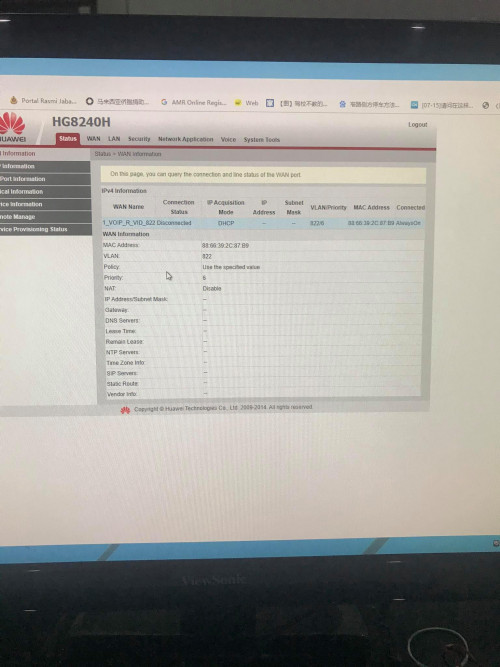
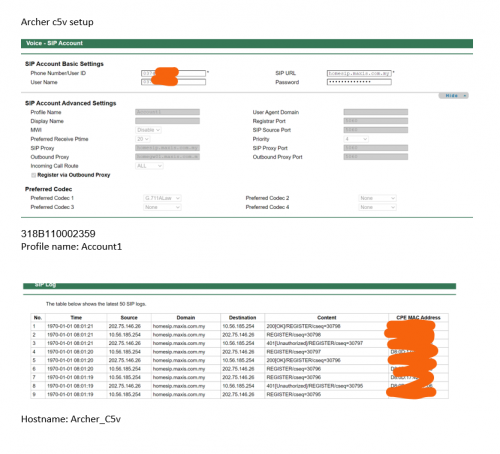
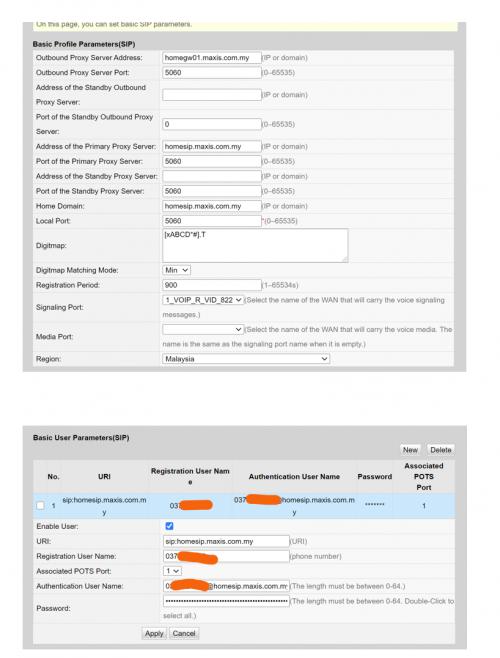
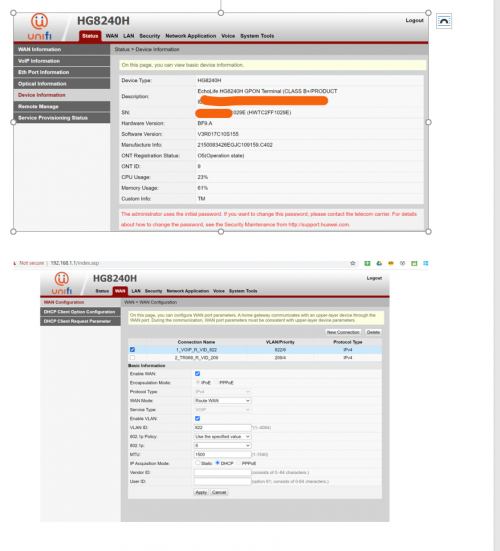
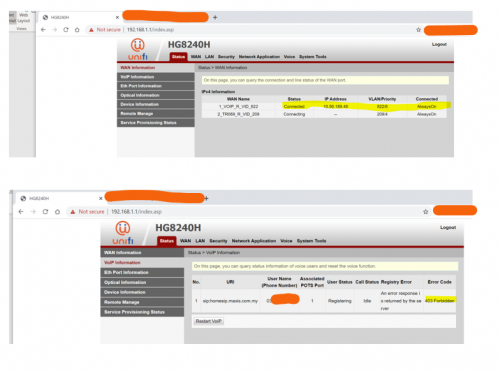
Hi all, been trying to follow guide to get VOIP working at the ONT/BTU and get rid of the Archer c5v since i have a custom router and AP

This is my current Archer setup. VOIP is working properly with the custom router
user posted image

I've followed the steps to get VOIP setup on the HG8240H
user posted image

And also setup vlan/WAN
user posted image


I managed to get WAN connected. But VOIP is returning error
user posted image

I think the voip server is looking for some signature from the Archer - whether it is MAC address, or model or something which i havent figure out.

Anybody that has managed to get this working? Help!!!
lowck
post Jun 23 2020, 05:01 PM

Getting Started
**
Junior Member
153 posts

Joined: Mar 2014
QUOTE(jongoz @ Jun 23 2020, 04:09 PM)
Hi all, been trying to follow guide to get VOIP working at the ONT/BTU and get rid of the Archer c5v since i have a custom router and AP

This is my current Archer setup. VOIP is working properly with the custom router
user posted image

I've followed the steps to get VOIP setup on the HG8240H
user posted image

And also setup vlan/WAN
user posted image
I managed to get WAN connected. But VOIP is returning error
user posted image

I think the voip server is looking for some signature from the Archer - whether it is MAC address, or model or something which i havent figure out.

Anybody that has managed to get this working? Help!!!
*
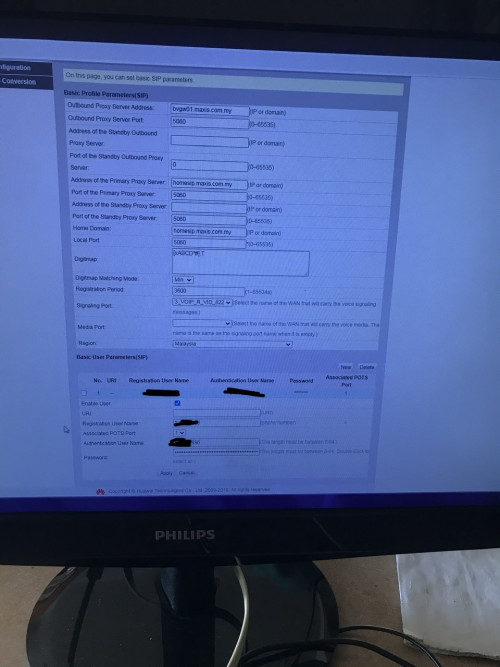
try like this
i hide that keyword is ur phone no
and password is ur account no+last 4 digit phone no

user posted image
jongoz
post Jun 23 2020, 05:34 PM

New Member
*
Junior Member
33 posts

Joined: Jan 2003


let me try bro. i think i tried the combination before but using homegw01.maxis.com.my instead of bvgw01.maxis.com.my. will try test

QUOTE(lowck @ Jun 23 2020, 05:01 PM)
try like this
i hide that keyword is ur phone no
and password is ur account no+last 4 digit phone no

user posted image
*
jongoz
post Jun 23 2020, 06:01 PM

New Member
*
Junior Member
33 posts

Joined: Jan 2003


Tried both, authentication error....

Would like to see if anyone had any success with homegw01


QUOTE(jongoz @ Jun 23 2020, 05:34 PM)
let me try bro. i think i tried the combination before but using homegw01.maxis.com.my instead of bvgw01.maxis.com.my. will try test
*
lowck
post Jun 23 2020, 06:13 PM

Getting Started
**
Junior Member
153 posts

Joined: Mar 2014
QUOTE(jongoz @ Jun 23 2020, 06:01 PM)
Tried both, authentication error....

Would like to see if anyone had any success with homegw01
*
u want to delete sip at router first and try it
jongoz
post Jun 23 2020, 07:33 PM

New Member
*
Junior Member
33 posts

Joined: Jan 2003


Ok. Let.me try
I was doing it by switching off the Archer c5v.


QUOTE(lowck @ Jun 23 2020, 06:13 PM)
u want to delete  sip at router first and try it
*
mroctopus
post Jul 26 2020, 12:39 PM

Getting Started
**
Junior Member
232 posts

Joined: Nov 2005


hi, i am using TPlink AX50 and following the below set up with Vlan VOIP at Lan4 of TPlink router.

TM ONT -> AX50 WAN port (internet is working)
AX50 configured Voip VLAN at LAN4
AX50 LAN4 connect to Aminia AC1200 WAN port via LAN cable
RJ11 is connected to Aminia tel port.

But i keep getting engaging tone with such configuration.

Help pls.... thanks.
waisang
post Jul 26 2020, 02:46 PM

On my way
****
Junior Member
588 posts

Joined: Dec 2009
QUOTE(mroctopus @ Jul 26 2020, 12:39 PM)
hi, i am using TPlink AX50 and following the below set up with Vlan VOIP at Lan4 of TPlink router.

TM ONT -> AX50 WAN port (internet is working)
AX50 configured Voip VLAN at LAN4
AX50 LAN4 connect to Aminia AC1200 WAN port via LAN cable
RJ11 is connected to Aminia tel port.

But i keep getting engaging tone with such configuration.

Help pls.... thanks.
*
As far as i know, the SIP only works with Maxis stock router, anyway good try.
liukuohao
post Sep 21 2020, 11:53 AM

New Member
*
Newbie
25 posts

Joined: Apr 2009


Hi all sifus smile.gif

I have finished my Maxis Home Fibre contract, but I decided to continue the service.

I recently bought a Xiaomi AX3600 router working as a wireless access point.

I decided to clear the air space for less wireless interference, I planned to disable the wireless radio
on the Maxis Archer c5v router, as the wireless signal as less coverage range at my house.

I managed to disable my main router: Maxis Archer c5v's wireless signal both 2.4GHz and 5GHz.

To my disappointment, when wireless radio is disabled after about 1 day, it will automatically re-enabled

I voiced out my concern to Maxis tech support, and the reply was due to Maxis system upgrade.

So no matter how many times, I disabled the wireless radio, it will re-enable back.

I thought I owe the Maxis router, and yet I have no full control over the settings on the router.
This problem is still ongoing.

So now.........I decide to ditch this Maxis Archer c5v router and replace with something else.
Is there a way? I need to VOIP service available if there is a custom Maxis router.

Please help.

Thank you in advance. notworthy.gif

liukuohao
post Sep 21 2020, 12:08 PM

New Member
*
Newbie
25 posts

Joined: Apr 2009


QUOTE(liukuohao @ Sep 21 2020, 11:53 AM)
Hi all sifus  smile.gif

I have finished my Maxis Home Fibre contract, but I decided to continue the service.

I recently bought a Xiaomi AX3600 router working as a wireless access point.

I decided to clear the air space for less wireless interference, I planned to disable the wireless radio
on the Maxis Archer c5v router, as the wireless signal as less coverage range at my house.

I managed to disable my main router: Maxis Archer c5v's wireless signal both 2.4GHz and 5GHz.

To my disappointment, when wireless radio is disabled after about 1 day, it will automatically re-enabled

I voiced out my concern to Maxis tech support, and the reply was due to Maxis system upgrade.

So no matter how many times, I disabled the wireless radio, it will re-enable back.

I thought I owe the Maxis router, and yet I have no full control over the settings on the router.
This problem is still ongoing.

So now.........I decide to ditch this Maxis Archer c5v router and replace with something else.
Is there a way? I need to VOIP service available if there is a custom Maxis router.

Please help.

Thank you in advance. notworthy.gif

*
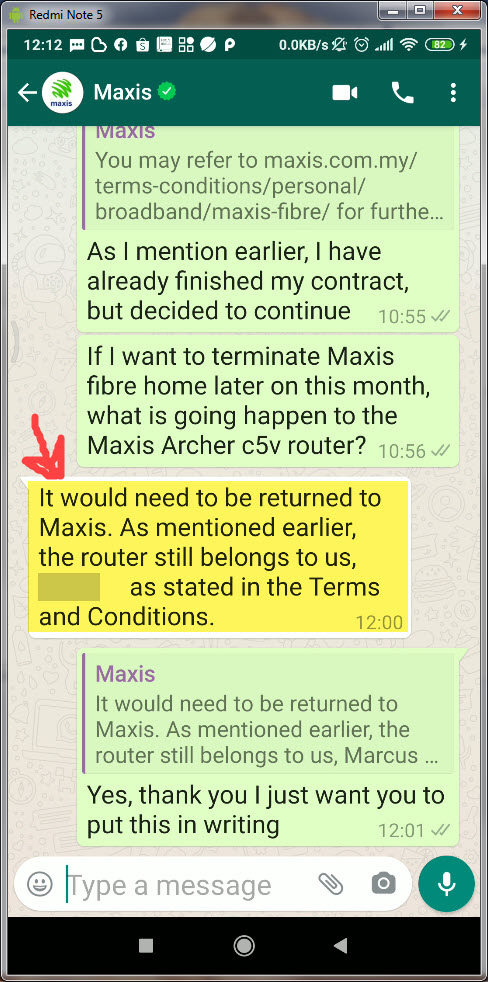
Hello all sifu smile.gif

I was chating with Maxis Tech support on whatsapp

Apparently, even though I have finished my contract with Maxis,
legally binding in terms of Terms & Conditions, I don't own the router.


TAKE NOTE:
I DON'T OWN THE MAXIS ROUTER. THE ROUTER STILL BELONGS TO MAXIS.
HENCE, MAXIS HAS THE RIGHT TO TAKE FULL CONTROL ON DEVICE SETTINGS.

liukuohao
post Sep 21 2020, 12:22 PM

New Member
*
Newbie
25 posts

Joined: Apr 2009


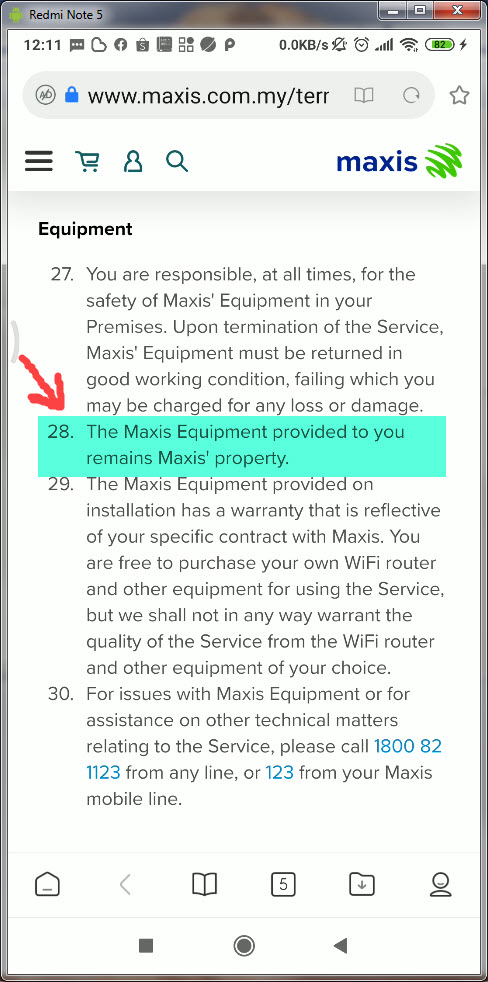
Hi Sifus,

Below is the screenshot taken from my hand phone.

This make me more determine to ditch this Maxis Archer c5v router. ranting.gif

After being a loyal Maxis customer for 2 years, why I cannot disable my wireless radio signal as
I wish. Maxis has no right to control the wireless usage at my house. vmad.gif

If anyone has successful replaced with other 3rd party router with VOIP function in a Maxis Home Fibre set up

Please let me know
icon_question.gif

Thank you

user posted image
user posted image

This post has been edited by liukuohao: Sep 21 2020, 12:24 PM
waisang
post Sep 24 2020, 02:37 PM

On my way
****
Junior Member
588 posts

Joined: Dec 2009
My friend has terminated Maxis without return the hardware lolx
grimdevil
post Nov 10 2020, 11:03 PM

Getting Started
**
Junior Member
132 posts

Joined: May 2006
From: kl


QUOTE(mroctopus @ Jul 26 2020, 12:39 PM)
hi, i am using TPlink AX50 and following the below set up with Vlan VOIP at Lan4 of TPlink router.

TM ONT -> AX50 WAN port (internet is working)
AX50 configured Voip VLAN at LAN4
AX50 LAN4 connect to Aminia AC1200 WAN port via LAN cable
RJ11 is connected to Aminia tel port.

But i keep getting engaging tone with such configuration.

Help pls.... thanks.
*
I have the same issue using a Asus router. Any fix?
alvintcn
post Nov 15 2020, 11:31 AM

Getting Started
**
Junior Member
128 posts

Joined: Dec 2005


QUOTE(jongoz @ Jun 23 2020, 07:33 PM)
Ok. Let.me try
I was doing it by switching off the Archer c5v.
*
Any update on this? I am trying to replace the stock Maxis router C5V with my own custom router, need to setup the VOIP too.
SUSCandy12
post Nov 15 2020, 07:08 PM

Regular
******
Senior Member
1,878 posts

Joined: Apr 2019
QUOTE(liukuohao @ Sep 21 2020, 12:22 PM)
Hi Sifus,

Below is the screenshot taken from my hand phone.

This make me more determine to ditch this Maxis Archer c5v router. ranting.gif

After being a loyal Maxis customer for 2 years, why I cannot disable my wireless radio signal as
I wish. Maxis has no right to control the wireless usage at my house.  vmad.gif

If anyone has successful replaced with other 3rd party router with VOIP function in a Maxis Home Fibre set up

Please let me know
  icon_question.gif

Thank you

*
Service Specific Terms & Conditions (“SSTC”) – MaxisONE Home Fibre Broadband
https://cw.maxis.com.my/en/tnc/personal-tnc...e-home-tnc.html

user posted image

Clause 25 refers to the fibre modem(ONT)/router box which is supplied by TM or the wholesale ISP network.It is on lease and needs to be returned to TM/wholesale ISP if you decide to move or stop using the fibre internet service port at your premise.

Clause 26
The TP-Link C5V router is your home WiFi router supplied belongs to the customers and is covered already in the RM500 early termination charges should you decide to move away from Maxis within the 24 months active contract period. Do note that it only has a 2 years warranty in parallel with your active contract with Maxis and after that it becomes the property of the subscriber.

user posted image

Clause 43 and 44 mentions that as long as there no changes to the hardware supplied earlier during installation of fibre broadband at the customer's premise, you can upgrade/downgrade your plans without any need to RENEW/RESET your contract unlike TM.

Meaning if your contract has ended and the you choose to supply your own router(BYO) or use your old router supplied previously by Maxis, you DO NOT NEED to renew/reset your contract when downgrading/upgrading your plans.

If you're still under active contract but you decide to downgrade/upgrade your fibre plan which DO NOT need any hardware changes(new router or given MESH repeaters such as switching between 30/100/300 plans),your contract will still resume from the day you first sign up with Maxis Fibre with no penalties unless you opt for free gifts/additional hardwares which you need to compensate.

This post has been edited by Candy12: Nov 15 2020, 07:09 PM
JimbeamofNRT
post Nov 16 2020, 01:54 PM

the Original Lanji@_ Chicken Rice Shop Since 2002
******
Senior Member
1,902 posts

Joined: Sep 2012

QUOTE(Candy12 @ Nov 15 2020, 07:08 PM)
Service Specific Terms & Conditions (“SSTC”) – MaxisONE Home Fibre Broadband
https://cw.maxis.com.my/en/tnc/personal-tnc...e-home-tnc.html

user posted image

Clause 25 refers to the fibre modem(ONT)/router box which is supplied by TM or the wholesale ISP network.It is on lease and needs to be returned to TM/wholesale ISP if you decide to move or stop using the fibre internet service port at your premise.

Clause 26
The TP-Link C5V router is your home WiFi router supplied belongs to the customers and is covered already in the RM500 early termination charges should you decide to move away from Maxis within the 24 months active contract period. Do note that it only has a 2 years warranty in parallel with your active contract with Maxis and after that it becomes the property of the subscriber.

user posted image

Clause 43 and 44 mentions that as long as there no changes to the hardware supplied earlier during installation of fibre broadband at the customer's premise, you can upgrade/downgrade your plans without any need to RENEW/RESET your contract unlike TM.

Meaning if your contract has ended and the you choose to supply your own router(BYO) or use your old router supplied previously by Maxis, you DO NOT NEED to renew/reset your contract when downgrading/upgrading your plans.

If you're still under active contract but you decide to downgrade/upgrade your fibre plan which DO NOT need any hardware changes(new router or given MESH repeaters such as switching between 30/100/300 plans),your contract will still resume from the day you first sign up with Maxis Fibre with no penalties unless you opt for free gifts/additional hardwares which you need to compensate.
*
most of them never bothered to read

ONU no return kana penalty. meksis rm200 TM rm500 kek

JimbeamofNRT
post Nov 16 2020, 01:55 PM

the Original Lanji@_ Chicken Rice Shop Since 2002
******
Senior Member
1,902 posts

Joined: Sep 2012

QUOTE(liukuohao @ Sep 21 2020, 12:22 PM)
Hi Sifus,

Below is the screenshot taken from my hand phone.

This make me more determine to ditch this Maxis Archer c5v router. ranting.gif

After being a loyal Maxis customer for 2 years, why I cannot disable my wireless radio signal as
I wish. Maxis has no right to control the wireless usage at my house.  vmad.gif

If anyone has successful replaced with other 3rd party router with VOIP function in a Maxis Home Fibre set up

Please let me know
  icon_question.gif

Thank you

user posted image
user posted image
*
cc maxis


SUSCandy12
post Nov 16 2020, 02:49 PM

Regular
******
Senior Member
1,878 posts

Joined: Apr 2019
Do note that the fibre modem(ONT) and VDSL2 router modem supplied by TM HSBB Wholesale as BTUs are actually partial functioning "routers" with their routing features turned OFF making them modems/bridges to forward traffic to respective partner ISPs

The Netis and TP-Link Archer VR1200V https://www.tp-link.com/my/home-networking/...rcher-vr1200v/) do have routing features built into them and are supplied as 1 all in one device to the customer if you're a Unifi SUBB or HSBB subscriber. When you're terminating the service, the modem/router is actually on lease term with the ISP so you've to return it.

The confusion with people comes when Maxis used the term "router/modem/dongle" in their clause.
They should have followed TM's term and call it BTU set/modem instead which is the one on lease term and has lifetime warranty.

As for Maxis, the TP-Link Archer C5V is actually referred to as the supplied home wifi router which is actually the property of the subscriber with given 2 years warranty covered by the RM500 one-off termination penalty if the customer decides to end the contract before it ends.

When their contract ends, if the customer does not opt to receive a new router unit or participate in any additional hardware deals, they can switch(downgrade/upgrade) plans without needing to renew their term contracts since no upgrade/new hardware given WITHOUT any additional costs. Clause 43-44

I'm guessing that the TM resellers are using this unclear wording to instill fear among their customers so that people won't port away from them.

Such dirty tactics our local telcos can pull against other rivals.
hjack
post Nov 16 2020, 09:13 PM

Getting Started
**
Junior Member
276 posts

Joined: May 2012
QUOTE(Candy12 @ Nov 16 2020, 02:49 PM)
As for Maxis, the TP-Link Archer C5V is actually referred to as the supplied home wifi router which is actually the property of the subscriber with given 2 years warranty covered by the RM500 one-off termination penalty if the customer decides to end the contract before it ends.
*
You sure? My guess is if you terminate during contract period, even if you return the c5v Maxis will still charge you 500. It is a penalty, not to offset the c5v.

During the term if the c5v kaput, Maxis will replace you one foc, without touching the term period as the c5v has same warranty period with your term which is 2 years.

After 2 years, will Maxis gives you a replacement foc without extending your contract? Last I had was yes, they would do it. When I first signup years ago, this was their advantage over Unifi. The router is covered by them as long as you are their subscriber.
SUSCandy12
post Nov 16 2020, 09:20 PM

Regular
******
Senior Member
1,878 posts

Joined: Apr 2019
QUOTE(hjack @ Nov 16 2020, 09:13 PM)
You sure? My guess is if you terminate during contract period, even if you return the c5v Maxis will still charge you 500. It is a penalty, not to offset the c5v.

During the term if the c5v kaput, Maxis will replace you one foc, without touching the term period as the c5v has same warranty period with your term which is 2 years.

After 2 years, will Maxis gives you a replacement foc without extending your contract? Last I had was yes, they would do it. When I first signup years ago, this was their advantage over Unifi. The router is covered by them as long as you are their subscriber.
*
I'm sure, that's why your Maxis C5V router only has a 2 years warranty which follows your contract and if you terminate early paying the RM500 you get to keep it.

Maxis's customer consultant specifically told me that.

Clause 26 CLEARLY says the supplied home wifi router belongs to the subscriber.

After 2 years when your contract has ended you're free to downgrade/upgrade your plan as long as no new hardware is provided and you don't replace the router, there's no contract renewal involved.No additional fees except pro-rated monthly subscription from the day you upgrade/downgrade your line.
PRSXFENG
post Dec 24 2020, 05:43 PM

Look at all my stars!!
*******
Senior Member
2,608 posts

Joined: Nov 2020


QUOTE(liukuohao @ Sep 21 2020, 11:53 AM)
Hi all sifus  smile.gif

I have finished my Maxis Home Fibre contract, but I decided to continue the service.

I recently bought a Xiaomi AX3600 router working as a wireless access point.

I decided to clear the air space for less wireless interference, I planned to disable the wireless radio
on the Maxis Archer c5v router, as the wireless signal as less coverage range at my house.

I managed to disable my main router: Maxis Archer c5v's wireless signal both 2.4GHz and 5GHz.

To my disappointment, when wireless radio is disabled after about 1 day, it will automatically re-enabled

I voiced out my concern to Maxis tech support, and the reply was due to Maxis system upgrade.

So no matter how many times, I disabled the wireless radio, it will re-enable back.

I thought I owe the Maxis router, and yet I have no full control over the settings on the router.
This problem is still ongoing.

So now.........I decide to ditch this Maxis Archer c5v router and replace with something else.
Is there a way? I need to VOIP service available if there is a custom Maxis router.

Please help.

Thank you in advance. notworthy.gif
*
Replying to a old post but

Have you tried logging in with these credentials

Username: MaxSysAdm
Password: Ng88Mxs@2019!

Then go down for System Tools
Find CWMP settings
And change it to disabled, save

I'm pretty sure this is what they use to remotely change settings.
vignesh77
post Jul 6 2021, 05:48 PM

Getting Started
**
Junior Member
92 posts

Joined: Sep 2018
From: Subang jaya
Hi Sifus,

Quick question. I have TM modem HG8240H5. Anyone knows how to login as I want to enable VOIP in the modem itself.

I have tried telecomadmin/admintelecom and tmadmin/Adm@XXXX (XXXX is the last 4 digit of your modem MAC address).

Both options do not work.
PRSXFENG
post Jul 6 2021, 07:06 PM

Look at all my stars!!
*******
Senior Member
2,608 posts

Joined: Nov 2020


QUOTE(vignesh77 @ Jul 6 2021, 05:48 PM)
Hi Sifus,

Quick question. I have TM modem HG8240H5. Anyone knows how to login as I want to enable VOIP in the modem itself.

I have tried telecomadmin/admintelecom and tmadmin/Adm@XXXX (XXXX is the last 4 digit of your modem MAC address).

Both options do not work.
*
telecomadmin should have worked (works for me), give root/adminHW a try I suppose, which is the pass printed below on mine

But someone else has already tried, sadly you cannot use the VOIP in the modem.
I don't know the technical side of things of why it doesn't work, but Anime4000 tried in the past, maybe they can explain
Anime4000
post Jul 7 2021, 05:58 AM

Look at all my stars!!
*******
Senior Member
2,399 posts

Joined: Jul 2009
From: /dev/null


QUOTE(PRSXFENG @ Jul 6 2021, 07:06 PM)
telecomadmin should have worked (works for me), give root/adminHW a try I suppose, which is the pass printed below on mine

But someone else has already tried, sadly you cannot use the VOIP in the modem.
I don't know the technical side of things of why it doesn't work, but Anime4000 tried in the past, maybe they can explain
*
It wont work no matter what...

Due to OLT Provisioning!!!

I probe Huawei via UART, what User config on VoIP VLAN IPoE gets overridden by OLT Provisioning

I been thinking, using Ubiquiti/Mikrotik router that have PoE, bridge VoIP to PoE Out and use VoIP Phone (Telephone with VoIP Support and get powered by router)
doremo.chin
post Aug 16 2021, 10:36 AM

New Member
*
Newbie
6 posts

Joined: May 2011
QUOTE(Anime4000 @ Jul 7 2021, 05:58 AM)
It wont work no matter what...

Due to OLT Provisioning!!!

I probe Huawei via UART, what User config on VoIP VLAN IPoE gets overridden by OLT Provisioning

I been thinking, using Ubiquiti/Mikrotik router that have PoE, bridge VoIP to PoE Out and use VoIP Phone (Telephone with VoIP Support and get powered by router)
*
I tried using sip.js and other sip client to connect also not working... i captured the sip trace for successful calls and replicated everything same in the sip.js also not working sad.gif

i'm using mikrotik to bridge the VLAN and using the Maxis router just for voip + a VoIP box convert 'Analog Voice' to 'SIP' then forward to my IP PBX. the voice quality is not so good and drop call happen very often.

Maxis/Hotlink voice services is getting worse always drop call to other telcos.
cweilim P
post Sep 8 2021, 01:28 AM

New Member
*
Probation
6 posts

Joined: Sep 2021
Hi everyone.

I am currently on Maxis home fiber using stock wifi router, Archer C5v.

The wifi speed is horribly slow especially for 2.4GHz.

Can anyone suggest an upgrade option for me? A better wifi router and able to keep the VoIP dect phone?

Thanks in advance
cweilim P
post Sep 8 2021, 01:28 AM

New Member
*
Probation
6 posts

Joined: Sep 2021
Hi everyone.

I am currently on Maxis home fiber using stock wifi router, Archer C5v.

The wifi speed is horribly slow especially for 2.4GHz.

Can anyone suggest an upgrade option for me? A better wifi router and able to keep the VoIP dect phone?

Thanks in advance
PRSXFENG
post Sep 8 2021, 09:55 AM

Look at all my stars!!
*******
Senior Member
2,608 posts

Joined: Nov 2020


QUOTE(cweilim @ Sep 8 2021, 01:28 AM)
Hi everyone.

I am currently on Maxis home fiber using stock wifi router, Archer C5v.

The wifi speed is horribly slow especially for 2.4GHz.

Can anyone suggest an upgrade option for me? A better wifi router and able to keep the VoIP dect phone?

Thanks in advance
*
TP-Link AX20 or Asus router good

But you still need to keep the stock router to keep VoIP.
hjack
post Sep 8 2021, 12:42 PM

Getting Started
**
Junior Member
276 posts

Joined: May 2012
I dont understand Maxis, really.
Why can't they just release detail information on how to setup their VOIP ? Then users can explore different kind of ways to use it if they want to, like remote dialin from notebook or other devices or what not. It will attract more people to use this function.

Surely Maxis likes their customers to actively use their services, right?
cweilim P
post Sep 11 2021, 01:55 PM

New Member
*
Probation
6 posts

Joined: Sep 2021
QUOTE(PRSXFENG @ Sep 8 2021, 09:55 AM)
TP-Link AX20 or Asus router good

But you still need to keep the stock router to keep VoIP.
*
Thanks for your reply. How do I connect the new router? Fiber Modem - Stock router - new router?

So the new router would just function as a repeater/access point? Won't the stock router still is the bottle neck if we do this?
cweilim P
post Sep 11 2021, 02:34 PM

New Member
*
Probation
6 posts

Joined: Sep 2021
QUOTE(hjack @ Sep 8 2021, 12:42 PM)
I dont understand Maxis, really.
Why can't they just release detail information on how to setup their VOIP ? Then users can explore different kind of ways to use it if they want to, like remote dialin from notebook or other devices or what not. It will attract more people to use this function.

Surely Maxis likes their customers to actively use their services, right?
*
Exactly… I am wondering if we can complaint this to MCMC.

Btw, I do not see a lot of router has RJ11 port for VoIP connection tho
PRSXFENG
post Sep 11 2021, 04:34 PM

Look at all my stars!!
*******
Senior Member
2,608 posts

Joined: Nov 2020


QUOTE(cweilim @ Sep 11 2021, 01:55 PM)
Thanks for your reply. How do I connect the new router? Fiber Modem - Stock router - new router?

So the new router would just function as a repeater/access point? Won't the stock router still is the bottle neck if we do this?
*
modem - new - stock probably better way round
cweilim P
post Sep 11 2021, 09:54 PM

New Member
*
Probation
6 posts

Joined: Sep 2021
QUOTE(PRSXFENG @ Sep 11 2021, 04:34 PM)
modem - new - stock probably better way round
*
I see. Going to give it a try. Thanks a lot
waisang
post Sep 16 2021, 10:00 PM

On my way
****
Junior Member
588 posts

Joined: Dec 2009
QUOTE(cweilim @ Sep 8 2021, 01:28 AM)
Hi everyone.

I am currently on Maxis home fiber using stock wifi router, Archer C5v.

The wifi speed is horribly slow especially for 2.4GHz.

Can anyone suggest an upgrade option for me? A better wifi router and able to keep the VoIP dect phone?

Thanks in advance
*
I have used technicolor router works well with voip, pm me if you are interested.
cweilim P
post Sep 23 2021, 11:05 AM

New Member
*
Probation
6 posts

Joined: Sep 2021
QUOTE(waisang @ Sep 16 2021, 10:00 PM)
I have used technicolor router works well with voip, pm me if you are interested.
*
Definitely interested.
happyboy1234
post Sep 30 2021, 02:10 PM

New Member
*
Junior Member
46 posts

Joined: May 2009


hi guys need some help, im changing from this stock archer v5e to asus ax55, but somehow i set pppoe correctly and the internet cant up, wondering why ? i try to set many times d
andrekua2
post Sep 30 2021, 02:15 PM

10k Club
********
All Stars
13,474 posts

Joined: Jan 2012


QUOTE(happyboy1234 @ Sep 30 2021, 02:10 PM)
hi guys need some help, im changing from this stock archer v5e to asus ax55, but somehow i set pppoe correctly and the internet cant up, wondering why ? i try to set many times d
*
Special requirement from ISP... select Maxis
happyboy1234
post Sep 30 2021, 02:22 PM

New Member
*
Junior Member
46 posts

Joined: May 2009


QUOTE(andrekua2 @ Sep 30 2021, 02:15 PM)
Special requirement from ISP... select Maxis
*
after select maxis then will auto configure ?
andrekua2
post Sep 30 2021, 02:23 PM

10k Club
********
All Stars
13,474 posts

Joined: Jan 2012


QUOTE(happyboy1234 @ Sep 30 2021, 02:22 PM)
after select maxis then will auto configure ?
*
It will auto configure the VLAN for the WAN port in order to connect.
happyboy1234
post Sep 30 2021, 02:31 PM

New Member
*
Junior Member
46 posts

Joined: May 2009


QUOTE(andrekua2 @ Sep 30 2021, 02:23 PM)
It will auto configure the VLAN for the WAN port in order to connect.
*
thanks bro, let me try.
gvr
post Jun 26 2022, 11:09 PM

Getting Started
**
Junior Member
191 posts

Joined: Apr 2009
As of today, anyone able to set the new stock Maxis router (Huawei LG8245X6) to bridge mdoe and uses its VOIP function only? I have tried methods suggested in this thread, but seems like it is not working with this model.
qinzir
post Oct 17 2022, 09:46 AM

New Member
*
Newbie
2 posts

Joined: Aug 2012
QUOTE(trix @ Jun 27 2019, 11:47 PM)
still working fine for mine, able to call out/receive call
Attached Image
*
Hi Trix,
does a 2nd hand HG8240H5 need to reconfigure before using? i am current on Maxis ISP using TM infrastructure. current ONT is the 1st gen from TM.
Appreciate any reply from anyone here.
thank you all in advance.
Qinzir

This post has been edited by qinzir: Oct 17 2022, 09:59 AM
trix
post Oct 17 2022, 10:06 AM

Enthusiast
*****
Senior Member
848 posts

Joined: Feb 2005
From: everywhere, yet nowhere.


QUOTE(qinzir @ Oct 17 2022, 09:46 AM)
Hi Trix,
does a 2nd hand HG8240H5 need to reconfigure before using? i am current on Maxis ISP using TM infrastructure. current ONT is the 1st gen from TM.
Appreciate any reply from anyone here.
thank you all in advance.
Qinzir
*
You need to retrieve PON password from the current one
Key in to the new one and connect fiber cable, the rest of the configuration will be auto retrieved from TM infra
qinzir
post Oct 19 2022, 11:38 AM

New Member
*
Newbie
2 posts

Joined: Aug 2012
QUOTE(trix @ Oct 17 2022, 10:06 AM)
You need to retrieve PON password from the current one
Key in to the new one and connect fiber cable, the rest of the configuration will be auto retrieved from TM infra
*
Alright thank you.
Ichitech
post Oct 21 2022, 04:52 PM

Getting Started
**
Junior Member
196 posts

Joined: Oct 2016
QUOTE(trix @ Jun 27 2019, 11:47 PM)
still working fine for mine, able to call out/receive call
Attached Image
*
Hi all, sorry for replying on old topic.. here I have some trouble regarding maxis fibre VOIP phone.. my current configuration was
ONU Huawei HG8240
Technicolor modem
Dect phone

The connection was pretty easy,
Incoming Optical / fibre cable to ONU
RJ45 from ONU (port 2) to technicolor router (WAN port)
RJ11 from technicolor router (Phone port) to dect phone

Everything working so far until suddenly my voip can't use (and heck know don't know when since this phone only to receive call).
I had read through few topic here but seems like add to confusion...
May I know how many type of connection there is for maxis fibre ?
Because I had came across seems like some user here connected thier phone to the ONU - which I quoted above..
trix
post Oct 21 2022, 06:35 PM

Enthusiast
*****
Senior Member
848 posts

Joined: Feb 2005
From: everywhere, yet nowhere.


QUOTE(Ichitech @ Oct 21 2022, 04:52 PM)
Hi all, sorry for replying on old topic.. here I have some trouble regarding maxis fibre VOIP phone.. my current configuration was
ONU Huawei HG8240
Technicolor modem
Dect phone

The connection was pretty easy,
Incoming Optical / fibre cable to ONU
RJ45 from ONU (port 2) to technicolor router (WAN port)
RJ11 from technicolor router (Phone port) to dect phone

Everything working so far until suddenly my voip can't use (and heck know don't know when since this phone only to receive call). 
I had read through few topic here but seems like add to confusion...
May I know how many type of connection there is for maxis fibre ?
Because I had came across seems like some user here connected thier phone to the ONU - which I quoted above..
*
sorry but i have went back to unifi 2 years back
but from what you described, isn't that the default setup?
have you tried calling maxis cs?


Change to:
| Lo-Fi Version
0.0708sec    0.24    6 queries    GZIP Disabled
Time is now: 7th December 2025 - 02:47 AM