

QUOTE(blacktubi @ Jun 25 2019, 07:07 PM)
purchase a third party VOIP bridge.

any recommendation for VoIP bridge??Custom maxis fibre router with voip function, Any recommendations?
|
|
 Jun 27 2019, 01:32 AM Jun 27 2019, 01:32 AM
Return to original view | IPv6 | Post
#1
|
 
Senior Member
2,399 posts Joined: Jul 2009 From: /dev/null  
|
QUOTE(blacktubi @ Jun 25 2019, 07:07 PM) purchase a third party VOIP bridge. any recommendation for VoIP bridge?? |
|
|
|
|
|
Oct 20 2019, 10:56 PM
Return to original view | Post
#2
|
|
Senior Member
2,399 posts Joined: Jul 2009 From: /dev/null
|
QUOTE(Connexiionz @ Oct 18 2019, 03:08 PM) TPlink Archer C5V latest firmware is 190304.... sapa mau??? mine already updated, maybe maxis auto update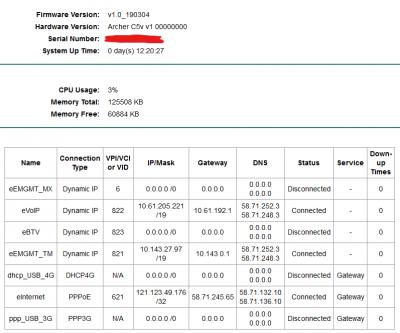
|
|
|
Oct 30 2019, 07:13 PM
Return to original view | IPv6 | Post
#3
|
|
Senior Member
2,399 posts Joined: Jul 2009 From: /dev/null
|
QUOTE(waisang @ Oct 30 2019, 11:11 AM) hows is it the firmware stability and performance? feel same, still cannot change IPv6 DNS |
|
|
Dec 29 2019, 01:27 AM
Return to original view | Post
#4
|
|
Senior Member
2,399 posts Joined: Jul 2009 From: /dev/null
|
QUOTE(alvinchan2010 @ Dec 28 2019, 04:39 PM) After getting Maxis technical support help, I managed to have my DLink DIR882 setup as primary internet router while using Maxis TP Link router as Voice VOIP and Switch. Here is the setup and steps: Yea, this works, no need VLAN at Custom Router1. Connect ONU (TM, LAN2) to Maxis TP Link WAN port and set the Maxis TP Link router up for PPPOE and Voice VOIP. Make sure everything work fine. 2. Change the Maxis TP link router to Bridge Mode (as Switch only) 3. Connect own router (my case is DIR882) WAN port to any LAN port (I use LAN 4) in Maxis TP link router. 4. Setup DIR882 for internet access with PPPOE . You will need Maxis Fibre PPPOE login info. You can just call maxis to set it up for you after you have your new router. 
After that, I simply disable Wireless. Then I disable DHCP (reduce load), add 2nd maxis tp-link router LAN IP as 169.254.0.1/16, this make Windows IPv4 Autoconfiguration able to communicate with maxis tp-link router since I disable DHCP, can enter router admin page |
|
|
Dec 30 2019, 07:53 PM
Return to original view | Post
#5
|
|
Senior Member
2,399 posts Joined: Jul 2009 From: /dev/null
|
QUOTE(izzudin @ Dec 30 2019, 07:24 PM) Hi trix. I have the same btu and followed your steps but 192.168.100.1 doesn’t respond. What did i do wrong? I plugged to lan 1 port. Should I disconnect the fiber cable first? If you see my previous post, it was 192.168.1.254 |
|
|
Jan 1 2020, 11:52 AM
Return to original view | Post
#6
|
|
Senior Member
2,399 posts Joined: Jul 2009 From: /dev/null
|
QUOTE(izzudin @ Jan 1 2020, 11:35 AM) I think you’re referring to maxis router but I’m referring to tm btu. I can log in to tm btu already. It’s 192.168.1.1 but have to unplug the fibre cable first... but now the btu voip light is blinking. Maybe maxis changed voip password. It’s not account number + last 4 digit of phone number anymore 😭 latest TM BTU, I tried and not workingCODE _________________ WAN Configuration ‾‾‾‾‾‾‾‾‾‾‾‾‾‾‾‾‾ Enable WAN: ✔ Encapsulation mode: IPoE Protocol type: IPv4 WAN mode: Routed WAN Service type: VoIP Enable VLAN: ✔ VLAN ID: 822 802.1p policy: Use specified value 802.1p: 6 MTU: 1500 IP acquisition mode: DHCP Vendor ID: ________________________ VoIP Basic Configuration ‾‾‾‾‾‾‾‾‾‾‾‾‾‾‾‾‾‾‾‾‾‾‾‾ Outbound Proxy Address: homegw01.maxis.com.my Outbound Proxy Port: 5060 Standby Outbound Address: Standby Outbound Proxy Port: 5060 Primary Proxy Address: Primary Proxy Port: 5060 Standby Proxy Address: Standby Proxy Port: 5060 Home Domain: homesip.maxis.com.my Local Port: 5060 Digitmap: [xABCD*#].T Digitmap Match Mode: Min Registration Period: 900 Signaling Port: 2_VOIP_R_VID_822 Media Port: Region: Malaysia _____________________ User Basic Parameters ‾‾‾‾‾‾‾‾‾‾‾‾‾‾‾‾‾‾‾‾‾ Enable User: ✔ URI: sip:homesip.maxis.com.my Register User Name: «Telphone Number» Associated POTS: 1 Auth User Name: «Telphone Number»@homesip.maxis.com.my Password: (PASSWORD, ID + last 4 digit tel) This post has been edited by Anime4000: Jan 1 2020, 12:01 PM |
|
|
|
|
|
Jan 1 2020, 12:32 PM
Return to original view | Post
#7
|
|
Senior Member
2,399 posts Joined: Jul 2009 From: /dev/null
|
QUOTE(izzudin @ Jan 1 2020, 12:13 PM) Yups. Same like I did... called the maxis installer and he said even he don’t know the password because he just keyed in maxis router serial number to Kenan ID and maxis automatically set the router. He said it’s ACS system... sad the password is your account number + last 4 digit tel. number |
|
|
Jan 1 2020, 02:11 PM
Return to original view | Post
#8
|
|
Senior Member
2,399 posts Joined: Jul 2009 From: /dev/null
|
QUOTE(izzudin @ Jan 1 2020, 01:58 PM) It’s not... its random number... Since SIP is not encrypted, I look into Wireshark, for me, it was Account Number + Last Tel. NumberCODE sip://0123456789:password@homesip.maxis.com.my |
|
|
Jan 2 2020, 05:24 PM
Return to original view | Post
#9
|
|
Senior Member
2,399 posts Joined: Jul 2009 From: /dev/null
|
QUOTE(izzudin @ Jan 2 2020, 05:02 PM) Try changing the Standby Outbound Proxy Port from 5060 to 0 you have get it working? |
|
|
Jan 27 2020, 01:18 AM
Return to original view | Post
#10
|
|
Senior Member
2,399 posts Joined: Jul 2009 From: /dev/null
|
QUOTE(abhipraaya @ Jan 26 2020, 12:56 PM) I managed to set the maxis router to bridge mode and my custom router is working fine now. I am able to access Internet etc through my customer router. if you set 2nd IP Address at DHCP Server > LAN Settings, you able to access back by using IPv4 AutoconfigurationWhat if I want to access my maxis router, how do i do it ? When I plug in my laptop directly to the maxis router, 192.168.1.254 cannot be reached and I'm getting 169.254.x.x IP address on my laptop. I've also disabled the wifi radio on the maxis router. 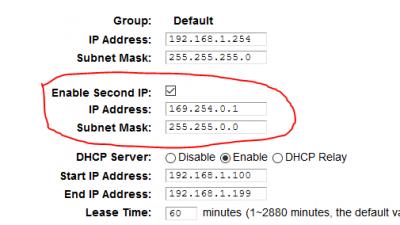
|
|
|
Jul 7 2021, 05:58 AM
Return to original view | IPv6 | Post
#11
|
|
Senior Member
2,399 posts Joined: Jul 2009 From: /dev/null
|
QUOTE(PRSXFENG @ Jul 6 2021, 07:06 PM) telecomadmin should have worked (works for me), give root/adminHW a try I suppose, which is the pass printed below on mine It wont work no matter what...But someone else has already tried, sadly you cannot use the VOIP in the modem. I don't know the technical side of things of why it doesn't work, but Anime4000 tried in the past, maybe they can explain Due to OLT Provisioning!!! I probe Huawei via UART, what User config on VoIP VLAN IPoE gets overridden by OLT Provisioning I been thinking, using Ubiquiti/Mikrotik router that have PoE, bridge VoIP to PoE Out and use VoIP Phone (Telephone with VoIP Support and get powered by router) |
| Change to: |  0.0196sec 0.0196sec
 0.76 0.76
 7 queries 7 queries
 GZIP Disabled GZIP Disabled
Time is now: 10th December 2025 - 01:19 AM |
 Quote
Quote