Welcome Guest ( Log In | Register )

Outline · [ Standard ] · Linear+

 Custom maxis fibre router with voip function, Any recommendations?

views
     
liukuohao
post Sep 21 2020, 11:53 AM

New Member
*
Newbie
25 posts

Joined: Apr 2009


Hi all sifus smile.gif

I have finished my Maxis Home Fibre contract, but I decided to continue the service.

I recently bought a Xiaomi AX3600 router working as a wireless access point.

I decided to clear the air space for less wireless interference, I planned to disable the wireless radio
on the Maxis Archer c5v router, as the wireless signal as less coverage range at my house.

I managed to disable my main router: Maxis Archer c5v's wireless signal both 2.4GHz and 5GHz.

To my disappointment, when wireless radio is disabled after about 1 day, it will automatically re-enabled

I voiced out my concern to Maxis tech support, and the reply was due to Maxis system upgrade.

So no matter how many times, I disabled the wireless radio, it will re-enable back.

I thought I owe the Maxis router, and yet I have no full control over the settings on the router.
This problem is still ongoing.

So now.........I decide to ditch this Maxis Archer c5v router and replace with something else.
Is there a way? I need to VOIP service available if there is a custom Maxis router.

Please help.

Thank you in advance. notworthy.gif

liukuohao
post Sep 21 2020, 12:08 PM

New Member
*
Newbie
25 posts

Joined: Apr 2009


QUOTE(liukuohao @ Sep 21 2020, 11:53 AM)
Hi all sifus  smile.gif

I have finished my Maxis Home Fibre contract, but I decided to continue the service.

I recently bought a Xiaomi AX3600 router working as a wireless access point.

I decided to clear the air space for less wireless interference, I planned to disable the wireless radio
on the Maxis Archer c5v router, as the wireless signal as less coverage range at my house.

I managed to disable my main router: Maxis Archer c5v's wireless signal both 2.4GHz and 5GHz.

To my disappointment, when wireless radio is disabled after about 1 day, it will automatically re-enabled

I voiced out my concern to Maxis tech support, and the reply was due to Maxis system upgrade.

So no matter how many times, I disabled the wireless radio, it will re-enable back.

I thought I owe the Maxis router, and yet I have no full control over the settings on the router.
This problem is still ongoing.

So now.........I decide to ditch this Maxis Archer c5v router and replace with something else.
Is there a way? I need to VOIP service available if there is a custom Maxis router.

Please help.

Thank you in advance. notworthy.gif
*
Hello all sifu smile.gif

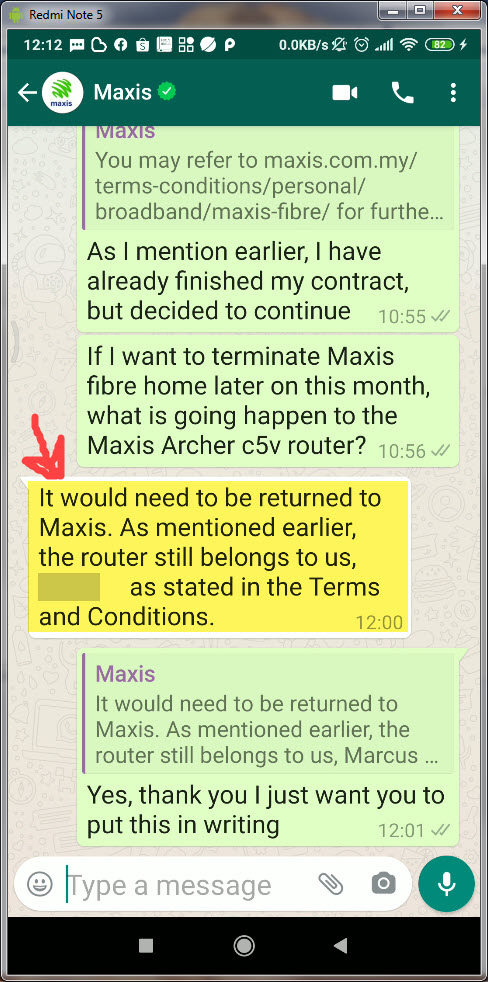
I was chating with Maxis Tech support on whatsapp

Apparently, even though I have finished my contract with Maxis,
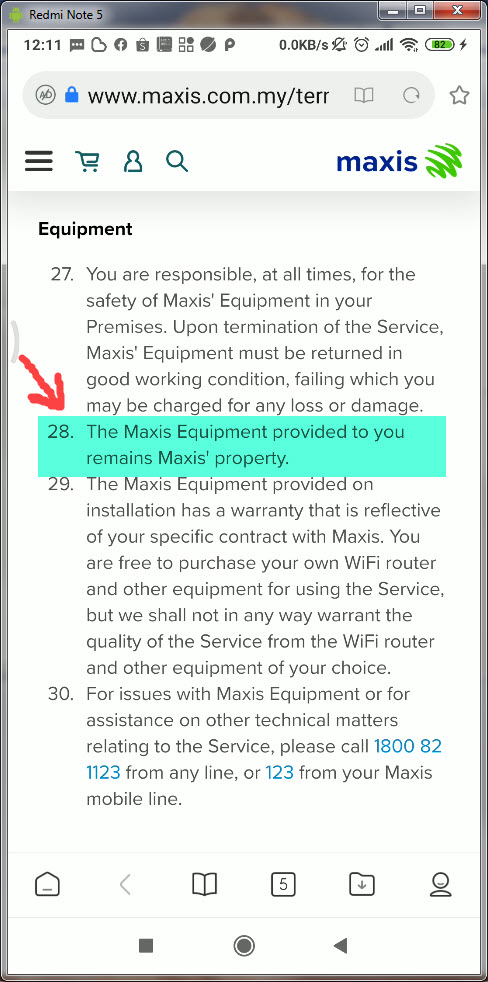
legally binding in terms of Terms & Conditions, I don't own the router.


TAKE NOTE:
I DON'T OWN THE MAXIS ROUTER. THE ROUTER STILL BELONGS TO MAXIS.
HENCE, MAXIS HAS THE RIGHT TO TAKE FULL CONTROL ON DEVICE SETTINGS.

liukuohao
post Sep 21 2020, 12:22 PM

New Member
*
Newbie
25 posts

Joined: Apr 2009


Hi Sifus,

Below is the screenshot taken from my hand phone.

This make me more determine to ditch this Maxis Archer c5v router. ranting.gif

After being a loyal Maxis customer for 2 years, why I cannot disable my wireless radio signal as
I wish. Maxis has no right to control the wireless usage at my house. vmad.gif

If anyone has successful replaced with other 3rd party router with VOIP function in a Maxis Home Fibre set up

Please let me know
icon_question.gif

Thank you

user posted image
user posted image

This post has been edited by liukuohao: Sep 21 2020, 12:24 PM


Change to:
| Lo-Fi Version
0.0163sec    1.27    7 queries    GZIP Disabled
Time is now: 16th December 2025 - 04:03 PM