

ONT which model? if huawei, test if you can login to it using default credential
if yes, you can configure VOIP there
Custom maxis fibre router with voip function, Any recommendations?
Custom maxis fibre router with voip function, Any recommendations?
|
|
 Jun 27 2019, 10:57 AM Jun 27 2019, 10:57 AM
Return to original view | Post
#1
|
 
Senior Member
848 posts Joined: Feb 2005 From: everywhere, yet nowhere.   
|
ONT which model? if huawei, test if you can login to it using default credential
if yes, you can configure VOIP there |
|
|
|
|
|
Jun 27 2019, 11:47 PM
Return to original view | Post
#2
|
|
Senior Member
848 posts Joined: Feb 2005 From: everywhere, yet nowhere.
|
QUOTE(syk @ Jun 27 2019, 01:56 PM) ONT or DLink router will not able to connect Maxis VOIP anymore. still working fine for mine, able to call out/receive callSeem like Maixs has locked the VOIP to Maxis stock router. If you need VOIP, best is retain Maxis stock router for the purpose and add one custom router as bridge mode for LAN & Wifi.  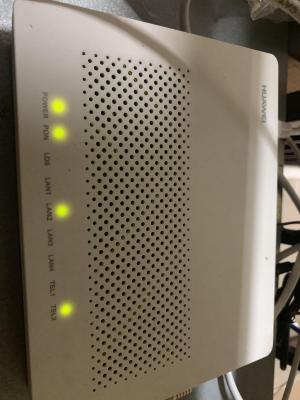
|
|
|
Jun 28 2019, 11:11 AM
Return to original view | Post
#3
|
|
Senior Member
848 posts Joined: Feb 2005 From: everywhere, yet nowhere.
|
QUOTE(syk @ Jun 28 2019, 10:44 AM) Mine is black color, very old model. replace it yourself with the newer model then, no need to wait for TM/Maxis to do itI was able to connect it with Maxis VOIP until 2 years ago it doesn't work anymore. Connect with ONT sometime the VOIP setting will reset and need to redo again... mine previously was HG8240w, replaced it myself with HG8240H bought from carousell for RM20 just key in the PON password obtained from the original ONT and you're good to go |
|
|
Jun 30 2019, 04:34 PM
Return to original view | Post
#4
|
|
Senior Member
848 posts Joined: Feb 2005 From: everywhere, yet nowhere.
|
QUOTE(alfredhow78 @ Jun 28 2019, 10:57 PM) wow nice.. i got mine up already. thank you nice. in case anyone wants to know how to, here it is: 1. set your computer's IP address to 192.168.100.x, subnet mask 255.255.255.0 2. connect directly to ONT 3. browse to 192.168.100.1, login with telecomadmin/admintelecom 4. configure VOIP like here: https://forum.lowyat.net/index.php?showtopi...&#entry91845910 ps: your VOIP username/password is like below: username: phone number password: account number + last 4 digit of phone number |
|
|
Sep 6 2019, 10:24 AM
Return to original view | Post
#5
|
|
Senior Member
848 posts Joined: Feb 2005 From: everywhere, yet nowhere.
|
QUOTE(Ichitech @ Sep 6 2019, 10:02 AM) Hey dude, as of today this still work ? I have no luck out of this.. Still working, only had to reboot the RG once after maxis upgraded something on their backend a few weeks backMind to share ur connection behind those Residential Gateway and Router ? Which part not working for you? |
|
|
Sep 7 2019, 08:52 AM
Return to original view | Post
#6
|
|
Senior Member
848 posts Joined: Feb 2005 From: everywhere, yet nowhere.
|
QUOTE(Ichitech @ Sep 6 2019, 09:02 PM) TEL light not on, is like totally disconnected.. Same to both TEL1 or 2 port show your configuration in the RG hereWonder why 🤔 |
|
|
Oct 17 2022, 10:06 AM
Return to original view | Post
#7
|
|
Senior Member
848 posts Joined: Feb 2005 From: everywhere, yet nowhere.
|
QUOTE(qinzir @ Oct 17 2022, 09:46 AM) Hi Trix, You need to retrieve PON password from the current onedoes a 2nd hand HG8240H5 need to reconfigure before using? i am current on Maxis ISP using TM infrastructure. current ONT is the 1st gen from TM. Appreciate any reply from anyone here. thank you all in advance. Qinzir Key in to the new one and connect fiber cable, the rest of the configuration will be auto retrieved from TM infra |
|
|
Oct 21 2022, 06:35 PM
Return to original view | Post
#8
|
|
Senior Member
848 posts Joined: Feb 2005 From: everywhere, yet nowhere.
|
QUOTE(Ichitech @ Oct 21 2022, 04:52 PM) Hi all, sorry for replying on old topic.. here I have some trouble regarding maxis fibre VOIP phone.. my current configuration was sorry but i have went back to unifi 2 years backONU Huawei HG8240 Technicolor modem Dect phone The connection was pretty easy, Incoming Optical / fibre cable to ONU RJ45 from ONU (port 2) to technicolor router (WAN port) RJ11 from technicolor router (Phone port) to dect phone Everything working so far until suddenly my voip can't use (and heck know don't know when since this phone only to receive call). I had read through few topic here but seems like add to confusion... May I know how many type of connection there is for maxis fibre ? Because I had came across seems like some user here connected thier phone to the ONU - which I quoted above.. but from what you described, isn't that the default setup? have you tried calling maxis cs? |
| Change to: |  0.0228sec 0.0228sec
 0.37 0.37
 7 queries 7 queries
 GZIP Disabled GZIP Disabled
Time is now: 7th December 2025 - 04:52 AM |
 Quote
Quote