Welcome Guest ( Log In | Register )

5 Pages « < 2 3 4 5 >Bottom

Outline · [ Standard ] · Linear+

 Custom maxis fibre router with voip function, Any recommendations?

views
     
waisang
post Jul 26 2020, 02:46 PM

On my way
****
Junior Member
588 posts

Joined: Dec 2009
QUOTE(mroctopus @ Jul 26 2020, 12:39 PM)
hi, i am using TPlink AX50 and following the below set up with Vlan VOIP at Lan4 of TPlink router.

TM ONT -> AX50 WAN port (internet is working)
AX50 configured Voip VLAN at LAN4
AX50 LAN4 connect to Aminia AC1200 WAN port via LAN cable
RJ11 is connected to Aminia tel port.

But i keep getting engaging tone with such configuration.

Help pls.... thanks.
*
As far as i know, the SIP only works with Maxis stock router, anyway good try.
liukuohao
post Sep 21 2020, 11:53 AM

New Member
*
Newbie
25 posts

Joined: Apr 2009


Hi all sifus smile.gif

I have finished my Maxis Home Fibre contract, but I decided to continue the service.

I recently bought a Xiaomi AX3600 router working as a wireless access point.

I decided to clear the air space for less wireless interference, I planned to disable the wireless radio
on the Maxis Archer c5v router, as the wireless signal as less coverage range at my house.

I managed to disable my main router: Maxis Archer c5v's wireless signal both 2.4GHz and 5GHz.

To my disappointment, when wireless radio is disabled after about 1 day, it will automatically re-enabled

I voiced out my concern to Maxis tech support, and the reply was due to Maxis system upgrade.

So no matter how many times, I disabled the wireless radio, it will re-enable back.

I thought I owe the Maxis router, and yet I have no full control over the settings on the router.
This problem is still ongoing.

So now.........I decide to ditch this Maxis Archer c5v router and replace with something else.
Is there a way? I need to VOIP service available if there is a custom Maxis router.

Please help.

Thank you in advance. notworthy.gif

liukuohao
post Sep 21 2020, 12:08 PM

New Member
*
Newbie
25 posts

Joined: Apr 2009


QUOTE(liukuohao @ Sep 21 2020, 11:53 AM)
Hi all sifus  smile.gif

I have finished my Maxis Home Fibre contract, but I decided to continue the service.

I recently bought a Xiaomi AX3600 router working as a wireless access point.

I decided to clear the air space for less wireless interference, I planned to disable the wireless radio
on the Maxis Archer c5v router, as the wireless signal as less coverage range at my house.

I managed to disable my main router: Maxis Archer c5v's wireless signal both 2.4GHz and 5GHz.

To my disappointment, when wireless radio is disabled after about 1 day, it will automatically re-enabled

I voiced out my concern to Maxis tech support, and the reply was due to Maxis system upgrade.

So no matter how many times, I disabled the wireless radio, it will re-enable back.

I thought I owe the Maxis router, and yet I have no full control over the settings on the router.
This problem is still ongoing.

So now.........I decide to ditch this Maxis Archer c5v router and replace with something else.
Is there a way? I need to VOIP service available if there is a custom Maxis router.

Please help.

Thank you in advance. notworthy.gif
*
Hello all sifu smile.gif

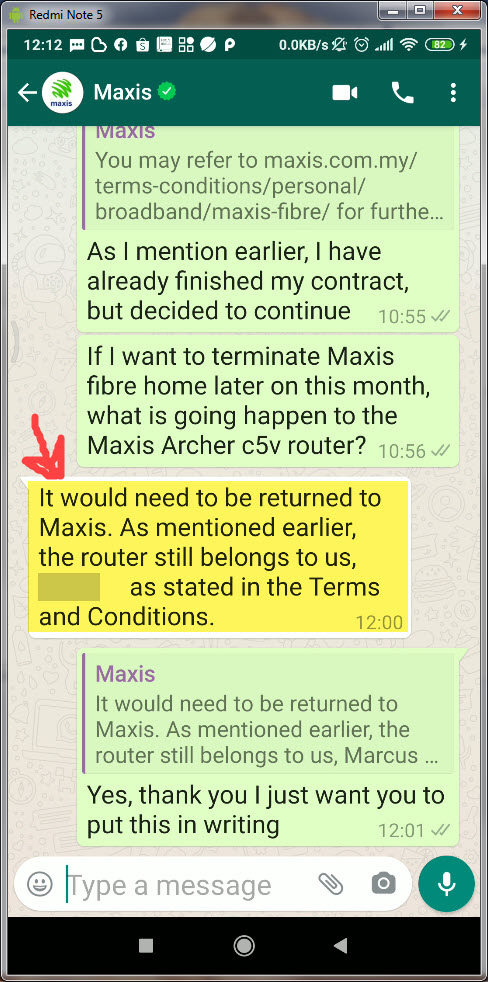
I was chating with Maxis Tech support on whatsapp

Apparently, even though I have finished my contract with Maxis,
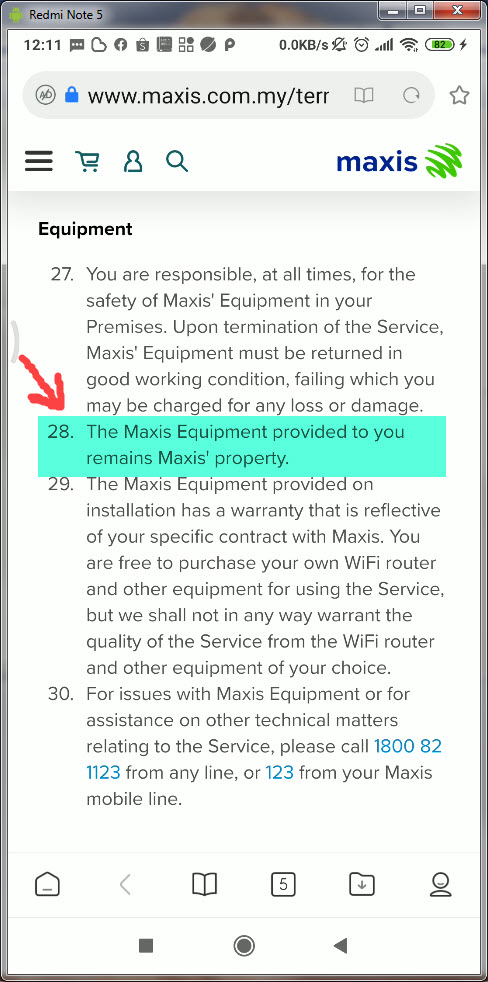
legally binding in terms of Terms & Conditions, I don't own the router.


TAKE NOTE:
I DON'T OWN THE MAXIS ROUTER. THE ROUTER STILL BELONGS TO MAXIS.
HENCE, MAXIS HAS THE RIGHT TO TAKE FULL CONTROL ON DEVICE SETTINGS.

liukuohao
post Sep 21 2020, 12:22 PM

New Member
*
Newbie
25 posts

Joined: Apr 2009


Hi Sifus,

Below is the screenshot taken from my hand phone.

This make me more determine to ditch this Maxis Archer c5v router. ranting.gif

After being a loyal Maxis customer for 2 years, why I cannot disable my wireless radio signal as
I wish. Maxis has no right to control the wireless usage at my house. vmad.gif

If anyone has successful replaced with other 3rd party router with VOIP function in a Maxis Home Fibre set up

Please let me know
icon_question.gif

Thank you

user posted image
user posted image

This post has been edited by liukuohao: Sep 21 2020, 12:24 PM
waisang
post Sep 24 2020, 02:37 PM

On my way
****
Junior Member
588 posts

Joined: Dec 2009
My friend has terminated Maxis without return the hardware lolx
grimdevil
post Nov 10 2020, 11:03 PM

Getting Started
**
Junior Member
132 posts

Joined: May 2006
From: kl


QUOTE(mroctopus @ Jul 26 2020, 12:39 PM)
hi, i am using TPlink AX50 and following the below set up with Vlan VOIP at Lan4 of TPlink router.

TM ONT -> AX50 WAN port (internet is working)
AX50 configured Voip VLAN at LAN4
AX50 LAN4 connect to Aminia AC1200 WAN port via LAN cable
RJ11 is connected to Aminia tel port.

But i keep getting engaging tone with such configuration.

Help pls.... thanks.
*
I have the same issue using a Asus router. Any fix?
alvintcn
post Nov 15 2020, 11:31 AM

Getting Started
**
Junior Member
128 posts

Joined: Dec 2005


QUOTE(jongoz @ Jun 23 2020, 07:33 PM)
Ok. Let.me try
I was doing it by switching off the Archer c5v.
*
Any update on this? I am trying to replace the stock Maxis router C5V with my own custom router, need to setup the VOIP too.
SUSCandy12
post Nov 15 2020, 07:08 PM

Regular
******
Senior Member
1,878 posts

Joined: Apr 2019
QUOTE(liukuohao @ Sep 21 2020, 12:22 PM)
Hi Sifus,

Below is the screenshot taken from my hand phone.

This make me more determine to ditch this Maxis Archer c5v router. ranting.gif

After being a loyal Maxis customer for 2 years, why I cannot disable my wireless radio signal as
I wish. Maxis has no right to control the wireless usage at my house.  vmad.gif

If anyone has successful replaced with other 3rd party router with VOIP function in a Maxis Home Fibre set up

Please let me know
  icon_question.gif

Thank you

*
Service Specific Terms & Conditions (“SSTC”) – MaxisONE Home Fibre Broadband
https://cw.maxis.com.my/en/tnc/personal-tnc...e-home-tnc.html

user posted image

Clause 25 refers to the fibre modem(ONT)/router box which is supplied by TM or the wholesale ISP network.It is on lease and needs to be returned to TM/wholesale ISP if you decide to move or stop using the fibre internet service port at your premise.

Clause 26
The TP-Link C5V router is your home WiFi router supplied belongs to the customers and is covered already in the RM500 early termination charges should you decide to move away from Maxis within the 24 months active contract period. Do note that it only has a 2 years warranty in parallel with your active contract with Maxis and after that it becomes the property of the subscriber.

user posted image

Clause 43 and 44 mentions that as long as there no changes to the hardware supplied earlier during installation of fibre broadband at the customer's premise, you can upgrade/downgrade your plans without any need to RENEW/RESET your contract unlike TM.

Meaning if your contract has ended and the you choose to supply your own router(BYO) or use your old router supplied previously by Maxis, you DO NOT NEED to renew/reset your contract when downgrading/upgrading your plans.

If you're still under active contract but you decide to downgrade/upgrade your fibre plan which DO NOT need any hardware changes(new router or given MESH repeaters such as switching between 30/100/300 plans),your contract will still resume from the day you first sign up with Maxis Fibre with no penalties unless you opt for free gifts/additional hardwares which you need to compensate.

This post has been edited by Candy12: Nov 15 2020, 07:09 PM
JimbeamofNRT
post Nov 16 2020, 01:54 PM

the Original Lanji@_ Chicken Rice Shop Since 2002
******
Senior Member
1,902 posts

Joined: Sep 2012

QUOTE(Candy12 @ Nov 15 2020, 07:08 PM)
Service Specific Terms & Conditions (“SSTC”) – MaxisONE Home Fibre Broadband
https://cw.maxis.com.my/en/tnc/personal-tnc...e-home-tnc.html

user posted image

Clause 25 refers to the fibre modem(ONT)/router box which is supplied by TM or the wholesale ISP network.It is on lease and needs to be returned to TM/wholesale ISP if you decide to move or stop using the fibre internet service port at your premise.

Clause 26
The TP-Link C5V router is your home WiFi router supplied belongs to the customers and is covered already in the RM500 early termination charges should you decide to move away from Maxis within the 24 months active contract period. Do note that it only has a 2 years warranty in parallel with your active contract with Maxis and after that it becomes the property of the subscriber.

user posted image

Clause 43 and 44 mentions that as long as there no changes to the hardware supplied earlier during installation of fibre broadband at the customer's premise, you can upgrade/downgrade your plans without any need to RENEW/RESET your contract unlike TM.

Meaning if your contract has ended and the you choose to supply your own router(BYO) or use your old router supplied previously by Maxis, you DO NOT NEED to renew/reset your contract when downgrading/upgrading your plans.

If you're still under active contract but you decide to downgrade/upgrade your fibre plan which DO NOT need any hardware changes(new router or given MESH repeaters such as switching between 30/100/300 plans),your contract will still resume from the day you first sign up with Maxis Fibre with no penalties unless you opt for free gifts/additional hardwares which you need to compensate.
*
most of them never bothered to read

ONU no return kana penalty. meksis rm200 TM rm500 kek

JimbeamofNRT
post Nov 16 2020, 01:55 PM

the Original Lanji@_ Chicken Rice Shop Since 2002
******
Senior Member
1,902 posts

Joined: Sep 2012

QUOTE(liukuohao @ Sep 21 2020, 12:22 PM)
Hi Sifus,

Below is the screenshot taken from my hand phone.

This make me more determine to ditch this Maxis Archer c5v router. ranting.gif

After being a loyal Maxis customer for 2 years, why I cannot disable my wireless radio signal as
I wish. Maxis has no right to control the wireless usage at my house.  vmad.gif

If anyone has successful replaced with other 3rd party router with VOIP function in a Maxis Home Fibre set up

Please let me know
  icon_question.gif

Thank you

user posted image
user posted image
*
cc maxis


SUSCandy12
post Nov 16 2020, 02:49 PM

Regular
******
Senior Member
1,878 posts

Joined: Apr 2019
Do note that the fibre modem(ONT) and VDSL2 router modem supplied by TM HSBB Wholesale as BTUs are actually partial functioning "routers" with their routing features turned OFF making them modems/bridges to forward traffic to respective partner ISPs

The Netis and TP-Link Archer VR1200V https://www.tp-link.com/my/home-networking/...rcher-vr1200v/) do have routing features built into them and are supplied as 1 all in one device to the customer if you're a Unifi SUBB or HSBB subscriber. When you're terminating the service, the modem/router is actually on lease term with the ISP so you've to return it.

The confusion with people comes when Maxis used the term "router/modem/dongle" in their clause.
They should have followed TM's term and call it BTU set/modem instead which is the one on lease term and has lifetime warranty.

As for Maxis, the TP-Link Archer C5V is actually referred to as the supplied home wifi router which is actually the property of the subscriber with given 2 years warranty covered by the RM500 one-off termination penalty if the customer decides to end the contract before it ends.

When their contract ends, if the customer does not opt to receive a new router unit or participate in any additional hardware deals, they can switch(downgrade/upgrade) plans without needing to renew their term contracts since no upgrade/new hardware given WITHOUT any additional costs. Clause 43-44

I'm guessing that the TM resellers are using this unclear wording to instill fear among their customers so that people won't port away from them.

Such dirty tactics our local telcos can pull against other rivals.
hjack
post Nov 16 2020, 09:13 PM

Getting Started
**
Junior Member
276 posts

Joined: May 2012
QUOTE(Candy12 @ Nov 16 2020, 02:49 PM)
As for Maxis, the TP-Link Archer C5V is actually referred to as the supplied home wifi router which is actually the property of the subscriber with given 2 years warranty covered by the RM500 one-off termination penalty if the customer decides to end the contract before it ends.
*
You sure? My guess is if you terminate during contract period, even if you return the c5v Maxis will still charge you 500. It is a penalty, not to offset the c5v.

During the term if the c5v kaput, Maxis will replace you one foc, without touching the term period as the c5v has same warranty period with your term which is 2 years.

After 2 years, will Maxis gives you a replacement foc without extending your contract? Last I had was yes, they would do it. When I first signup years ago, this was their advantage over Unifi. The router is covered by them as long as you are their subscriber.
SUSCandy12
post Nov 16 2020, 09:20 PM

Regular
******
Senior Member
1,878 posts

Joined: Apr 2019
QUOTE(hjack @ Nov 16 2020, 09:13 PM)
You sure? My guess is if you terminate during contract period, even if you return the c5v Maxis will still charge you 500. It is a penalty, not to offset the c5v.

During the term if the c5v kaput, Maxis will replace you one foc, without touching the term period as the c5v has same warranty period with your term which is 2 years.

After 2 years, will Maxis gives you a replacement foc without extending your contract? Last I had was yes, they would do it. When I first signup years ago, this was their advantage over Unifi. The router is covered by them as long as you are their subscriber.
*
I'm sure, that's why your Maxis C5V router only has a 2 years warranty which follows your contract and if you terminate early paying the RM500 you get to keep it.

Maxis's customer consultant specifically told me that.

Clause 26 CLEARLY says the supplied home wifi router belongs to the subscriber.

After 2 years when your contract has ended you're free to downgrade/upgrade your plan as long as no new hardware is provided and you don't replace the router, there's no contract renewal involved.No additional fees except pro-rated monthly subscription from the day you upgrade/downgrade your line.
PRSXFENG
post Dec 24 2020, 05:43 PM

Look at all my stars!!
*******
Senior Member
2,608 posts

Joined: Nov 2020


QUOTE(liukuohao @ Sep 21 2020, 11:53 AM)
Hi all sifus  smile.gif

I have finished my Maxis Home Fibre contract, but I decided to continue the service.

I recently bought a Xiaomi AX3600 router working as a wireless access point.

I decided to clear the air space for less wireless interference, I planned to disable the wireless radio
on the Maxis Archer c5v router, as the wireless signal as less coverage range at my house.

I managed to disable my main router: Maxis Archer c5v's wireless signal both 2.4GHz and 5GHz.

To my disappointment, when wireless radio is disabled after about 1 day, it will automatically re-enabled

I voiced out my concern to Maxis tech support, and the reply was due to Maxis system upgrade.

So no matter how many times, I disabled the wireless radio, it will re-enable back.

I thought I owe the Maxis router, and yet I have no full control over the settings on the router.
This problem is still ongoing.

So now.........I decide to ditch this Maxis Archer c5v router and replace with something else.
Is there a way? I need to VOIP service available if there is a custom Maxis router.

Please help.

Thank you in advance. notworthy.gif
*
Replying to a old post but

Have you tried logging in with these credentials

Username: MaxSysAdm
Password: Ng88Mxs@2019!

Then go down for System Tools
Find CWMP settings
And change it to disabled, save

I'm pretty sure this is what they use to remotely change settings.
vignesh77
post Jul 6 2021, 05:48 PM

Getting Started
**
Junior Member
92 posts

Joined: Sep 2018
From: Subang jaya
Hi Sifus,

Quick question. I have TM modem HG8240H5. Anyone knows how to login as I want to enable VOIP in the modem itself.

I have tried telecomadmin/admintelecom and tmadmin/Adm@XXXX (XXXX is the last 4 digit of your modem MAC address).

Both options do not work.
PRSXFENG
post Jul 6 2021, 07:06 PM

Look at all my stars!!
*******
Senior Member
2,608 posts

Joined: Nov 2020


QUOTE(vignesh77 @ Jul 6 2021, 05:48 PM)
Hi Sifus,

Quick question. I have TM modem HG8240H5. Anyone knows how to login as I want to enable VOIP in the modem itself.

I have tried telecomadmin/admintelecom and tmadmin/Adm@XXXX (XXXX is the last 4 digit of your modem MAC address).

Both options do not work.
*
telecomadmin should have worked (works for me), give root/adminHW a try I suppose, which is the pass printed below on mine

But someone else has already tried, sadly you cannot use the VOIP in the modem.
I don't know the technical side of things of why it doesn't work, but Anime4000 tried in the past, maybe they can explain
Anime4000
post Jul 7 2021, 05:58 AM

Look at all my stars!!
*******
Senior Member
2,399 posts

Joined: Jul 2009
From: /dev/null


QUOTE(PRSXFENG @ Jul 6 2021, 07:06 PM)
telecomadmin should have worked (works for me), give root/adminHW a try I suppose, which is the pass printed below on mine

But someone else has already tried, sadly you cannot use the VOIP in the modem.
I don't know the technical side of things of why it doesn't work, but Anime4000 tried in the past, maybe they can explain
*
It wont work no matter what...

Due to OLT Provisioning!!!

I probe Huawei via UART, what User config on VoIP VLAN IPoE gets overridden by OLT Provisioning

I been thinking, using Ubiquiti/Mikrotik router that have PoE, bridge VoIP to PoE Out and use VoIP Phone (Telephone with VoIP Support and get powered by router)
doremo.chin
post Aug 16 2021, 10:36 AM

New Member
*
Newbie
6 posts

Joined: May 2011
QUOTE(Anime4000 @ Jul 7 2021, 05:58 AM)
It wont work no matter what...

Due to OLT Provisioning!!!

I probe Huawei via UART, what User config on VoIP VLAN IPoE gets overridden by OLT Provisioning

I been thinking, using Ubiquiti/Mikrotik router that have PoE, bridge VoIP to PoE Out and use VoIP Phone (Telephone with VoIP Support and get powered by router)
*
I tried using sip.js and other sip client to connect also not working... i captured the sip trace for successful calls and replicated everything same in the sip.js also not working sad.gif

i'm using mikrotik to bridge the VLAN and using the Maxis router just for voip + a VoIP box convert 'Analog Voice' to 'SIP' then forward to my IP PBX. the voice quality is not so good and drop call happen very often.

Maxis/Hotlink voice services is getting worse always drop call to other telcos.
cweilim P
post Sep 8 2021, 01:28 AM

New Member
*
Probation
6 posts

Joined: Sep 2021
Hi everyone.

I am currently on Maxis home fiber using stock wifi router, Archer C5v.

The wifi speed is horribly slow especially for 2.4GHz.

Can anyone suggest an upgrade option for me? A better wifi router and able to keep the VoIP dect phone?

Thanks in advance
cweilim P
post Sep 8 2021, 01:28 AM

New Member
*
Probation
6 posts

Joined: Sep 2021
Hi everyone.

I am currently on Maxis home fiber using stock wifi router, Archer C5v.

The wifi speed is horribly slow especially for 2.4GHz.

Can anyone suggest an upgrade option for me? A better wifi router and able to keep the VoIP dect phone?

Thanks in advance

5 Pages « < 2 3 4 5 >Top
 

Change to:
| Lo-Fi Version
0.0271sec    0.31    6 queries    GZIP Disabled
Time is now: 11th December 2025 - 05:53 AM