Outline ·
[ Standard ] ·
Linear+
Custom maxis fibre router with voip function, Any recommendations?
|
TSalfredhow78
|
 Jun 25 2019, 03:19 PM, updated 7y ago Jun 25 2019, 03:19 PM, updated 7y ago
|

|
Currently i am using my own router which is already great, but in order to use the voip function, i would connect LAN4(which i configured the vlan for voice and connect to maxis stock router)
I found this troublesome and it occupies space. Anyone familar with maxis fibre and is there any custom router with voip?
|
|
|
|
|
|
blacktubi
|
Jun 25 2019, 07:07 PM
|
-

|
No options available, you will need the stock router or purchase a third party VOIP bridge.
|
|
|
|
|
|
Anime4000
|
Jun 27 2019, 01:32 AM
|
|
|
QUOTE(blacktubi @ Jun 25 2019, 07:07 PM) purchase a third party VOIP bridge. any recommendation for VoIP bridge?? |
|
|
|
|
|
blacktubi
|
Jun 27 2019, 08:43 AM
|
-
|
QUOTE(Anime4000 @ Jun 27 2019, 01:32 AM) any recommendation for VoIP bridge?? There used to be a D-Link model that will work but I heard Maxis closed this door recently. |
|
|
|
|
|
trix
|
Jun 27 2019, 10:57 AM
|
|
|
ONT which model? if huawei, test if you can login to it using default credential
if yes, you can configure VOIP there
|
|
|
|
|
|
syk
|
Jun 27 2019, 01:56 PM
|
|
|
ONT or DLink router will not able to connect Maxis VOIP anymore.
Seem like Maixs has locked the VOIP to Maxis stock router.
If you need VOIP, best is retain Maxis stock router for the purpose and add one custom router as bridge mode for LAN & Wifi.
|
|
|
|
|
|
trix
|
Jun 27 2019, 11:47 PM
|
|
|
QUOTE(syk @ Jun 27 2019, 01:56 PM) ONT or DLink router will not able to connect Maxis VOIP anymore.
Seem like Maixs has locked the VOIP to Maxis stock router.If you need VOIP, best is retain Maxis stock router for the purpose and add one custom router as bridge mode for LAN & Wifi. still working fine for mine, able to call out/receive call 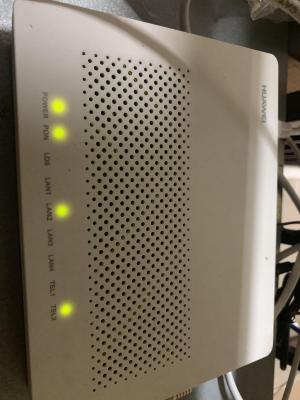
|
|
|
|
|
|
syk
|
Jun 28 2019, 10:44 AM
|
|
|
QUOTE(trix @ Jun 27 2019, 11:47 PM) still working fine for mine, able to call out/receive call
Mine is black color, very old model. I was able to connect it with Maxis VOIP until 2 years ago it doesn't work anymore. Connect with ONT sometime the VOIP setting will reset and need to redo again... |
|
|
|
|
|
trix
|
Jun 28 2019, 11:11 AM
|
|
|
QUOTE(syk @ Jun 28 2019, 10:44 AM) Mine is black color, very old model. I was able to connect it with Maxis VOIP until 2 years ago it doesn't work anymore. Connect with ONT sometime the VOIP setting will reset and need to redo again... replace it yourself with the newer model then, no need to wait for TM/Maxis to do it mine previously was HG8240w, replaced it myself with HG8240H bought from carousell for RM20 just key in the PON password obtained from the original ONT and you're good to go |
|
|
|
|
|
wantrepreneur
|
Jun 28 2019, 11:14 AM
|
Getting Started

|
QUOTE(trix @ Jun 28 2019, 11:11 AM) replace it yourself with the newer model then, no need to wait for TM/Maxis to do it mine previously was HG8240w, replaced it myself with HG8240H bought from carousell for RM20 just key in the PON password obtained from the original ONT and you're good to go definitely the way to go! i got myself a set from carousell for around RM20 as well. can't be waiting around for TM to solve my problems for me, its becoming more of a diy world. |
|
|
|
|
|
syk
|
Jun 28 2019, 12:26 PM
|
|
|
QUOTE(trix @ Jun 28 2019, 11:11 AM) replace it yourself with the newer model then, no need to wait for TM/Maxis to do it mine previously was HG8240w, replaced it myself with HG8240H bought from carousell for RM20 just key in the PON password obtained from the original ONT and you're good to go Yes, this can do. But Maxis has reset my VOIP password, and their CS refused to reveal the password. (Maybe is their SOP) The stock router is sucks on WIFI, so I decide to keep it only for VOIP and brigde it to custom router. |
|
|
|
|
|
TSalfredhow78
|
Jun 28 2019, 10:56 PM
|
|
|
QUOTE(syk @ Jun 28 2019, 12:26 PM) Yes, this can do. But Maxis has reset my VOIP password, and their CS refused to reveal the password. (Maybe is their SOP) The stock router is sucks on WIFI, so I decide to keep it only for VOIP and brigde it to custom router. Pm me ur details i check for u |
|
|
|
|
|
TSalfredhow78
|
Jun 28 2019, 10:57 PM
|
|
|
QUOTE(wantrepreneur @ Jun 28 2019, 11:14 AM) definitely the way to go! i got myself a set from carousell for around RM20 as well. can't be waiting around for TM to solve my problems for me, its becoming more of a diy world. - This post has been edited by alfredhow78: Jun 29 2019, 05:21 PM |
|
|
|
|
|
TSalfredhow78
|
Jun 28 2019, 10:57 PM
|
|
|
QUOTE(trix @ Jun 27 2019, 11:47 PM) still working fine for mine, able to call out/receive call
wow nice.. i got mine up already. thank you  This post has been edited by alfredhow78: Jun 29 2019, 05:12 PM This post has been edited by alfredhow78: Jun 29 2019, 05:12 PM |
|
|
|
|
|
trix
|
Jun 30 2019, 04:34 PM
|
|
|
QUOTE(alfredhow78 @ Jun 28 2019, 10:57 PM) wow nice.. i got mine up already. thank you nice. in case anyone wants to know how to, here it is: 1. set your computer's IP address to 192.168.100.x, subnet mask 255.255.255.0 2. connect directly to ONT 3. browse to 192.168.100.1, login with telecomadmin/admintelecom 4. configure VOIP like here: https://forum.lowyat.net/index.php?showtopi...&#entry91845910ps: your VOIP username/password is like below: username: phone number password: account number + last 4 digit of phone number |
|
|
|
|
|
Ichitech
|
Sep 6 2019, 10:02 AM
|
Getting Started
|
QUOTE(trix @ Jun 30 2019, 04:34 PM) nice. in case anyone wants to know how to, here it is: 1. set your computer's IP address to 192.168.100.x, subnet mask 255.255.255.0 2. connect directly to ONT 3. browse to 192.168.100.1, login with telecomadmin/admintelecom 4. configure VOIP like here: https://forum.lowyat.net/index.php?showtopi...&#entry91845910ps: your VOIP username/password is like below: username: phone number password: account number + last 4 digit of phone number Hey dude, as of today this still work ? I have no luck out of this.. Mind to share ur connection behind those Residential Gateway and Router ? This post has been edited by Ichitech: Sep 6 2019, 10:03 AM |
|
|
|
|
|
trix
|
Sep 6 2019, 10:24 AM
|
|
|
QUOTE(Ichitech @ Sep 6 2019, 10:02 AM) Hey dude, as of today this still work ? I have no luck out of this.. Mind to share ur connection behind those Residential Gateway and Router ? Still working, only had to reboot the RG once after maxis upgraded something on their backend a few weeks back Which part not working for you? |
|
|
|
|
|
waisang
|
Sep 6 2019, 01:23 PM
|
|
|
QUOTE(alfredhow78 @ Jun 25 2019, 03:19 PM) Currently i am using my own router which is already great, but in order to use the voip function, i would connect LAN4(which i configured the vlan for voice and connect to maxis stock router) I found this troublesome and it occupies space. Anyone familar with maxis fibre and is there any custom router with voip? Request Maxis if they can supply you Technicolor MediaAccess TG389ac Router (before Maxis Tplink stock router), Alternative Maxis Aminia MA131, friend of mine is using it without any issue, Both works well. |
|
|
|
|
|
Ichitech
|
Sep 6 2019, 09:02 PM
|
Getting Started
|
QUOTE(trix @ Sep 6 2019, 10:24 AM) Still working, only had to reboot the RG once after maxis upgraded something on their backend a few weeks back Which part not working for you? TEL light not on, is like totally disconnected.. Same to both TEL1 or 2 port Wonder why 🤔 |
|
|
|
|
|
trix
|
Sep 7 2019, 08:52 AM
|
|
|
QUOTE(Ichitech @ Sep 6 2019, 09:02 PM) TEL light not on, is like totally disconnected.. Same to both TEL1 or 2 port Wonder why 🤔 show your configuration in the RG here |
|
|
|
|



 Quote
Quote


 0.0290sec
 0.53
0.53
 6 queries
 GZIP Disabled