Outline ·
[ Standard ] ·
Linear+
Custom maxis fibre router with voip function, Any recommendations?
|
Anime4000
|
 Jan 27 2020, 01:18 AM Jan 27 2020, 01:18 AM
|

|
QUOTE(abhipraaya @ Jan 26 2020, 12:56 PM) I managed to set the maxis router to bridge mode and my custom router is working fine now. I am able to access Internet etc through my customer router. What if I want to access my maxis router, how do i do it ? When I plug in my laptop directly to the maxis router, 192.168.1.254 cannot be reached and I'm getting 169.254.x.x IP address on my laptop. I've also disabled the wifi radio on the maxis router. if you set 2nd IP Address at DHCP Server > LAN Settings, you able to access back by using IPv4 Autoconfiguration 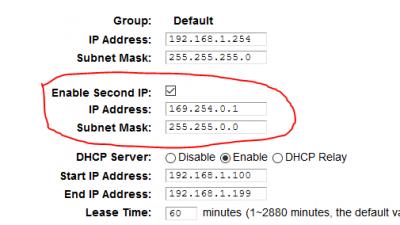
|
|
|
|
|
|
abhipraaya
|
Jan 27 2020, 05:02 PM
|
|
|
QUOTE(Anime4000 @ Jan 27 2020, 01:18 AM) if you set 2nd IP Address at DHCP Server > LAN Settings, you able to access back by using IPv4 Autoconfiguration
I see. I didn't set it before enabling bridge mode. Looks like I'm locked out. I guess it's ok as i won't be needing to enter this router anymore as my Deco router is handling the internet. The Maxis is used just for voice and it's working fine in this bridge setup. Update 1st Feb 2020: Managed to login into the Maxis router through cable by manually configuring a static IP address on my notebook. Once in, I enabled the second IP address and set it to 169.254.0.1. It's easier now to login into the Maxis router without needing to manually configure static IP each time. Thanks for the great tip! Btw, I also turned off firewall. Now if anyone knows the login/password for the TM btu Fiberhome model AN5506-04-BG? If I can configure the VoIP on the btu, it would be awesome just like how you all did on your Huawei and I can then get rid of the Maxis router. This post has been edited by abhipraaya: Feb 1 2020, 06:42 PM |
|
|
|
|
|
NubPro
|
Feb 4 2020, 11:32 AM
|
|
|
QUOTE(Connexiionz @ Oct 18 2019, 03:08 PM) TPlink Archer C5V latest firmware is 190304.... sapa mau??? Woa how did you get latest firmware and what's new? |
|
|
|
|
|
wjgoh2001 P
|
Feb 5 2020, 01:27 PM
|
New Member

|
QUOTE(trix @ Jun 28 2019, 11:11 AM) replace it yourself with the newer model then, no need to wait for TM/Maxis to do it mine previously was HG8240w, replaced it myself with HG8240H bought from carousell for RM20 just key in the PON password obtained from the original ONT and you're good to go Hi, is it we can reconfigured the BTU HG8240H setting ourself? What you mean just key In thePON password obtained from the original ONT? I hear other say we can’t go change the setting or the BTU ourself coz FON is conect to tm service. Thanks |
|
|
|
|
|
rhesusv
|
Apr 26 2020, 03:44 PM
|
Getting Started
|
QUOTE(alvinchan2010 @ Dec 28 2019, 04:39 PM) After getting Maxis technical support help, I managed to have my DLink DIR882 setup as primary internet router while using Maxis TP Link router as Voice VOIP and Switch. Here is the setup and steps: 1. Connect ONU (TM, LAN2) to Maxis TP Link WAN port and set the Maxis TP Link router up for PPPOE and Voice VOIP. Make sure everything work fine. 2. Change the Maxis TP link router to Bridge Mode (as Switch only) 3. Connect own router (my case is DIR882) WAN port to any LAN port (I use LAN 4) in Maxis TP link router. 4. Setup DIR882 for internet access with PPPOE . You will need Maxis Fibre PPPOE login info. You can just call maxis to set it up for you after you have your new router. Hi I m trying to do step no2. Can tried googling and browse through the whole page in the maxis router site but I can't seem to find the mode to change the router to switch mode. I m on the Aminia maxis AC1200 router. Any guide for that ?? |
|
|
|
|
|
Shahnon P
|
Apr 28 2020, 09:55 AM
|
New Member
|
QUOTE(izzudin @ Jan 2 2020, 05:46 PM) Yup... outgoing, incoming and caller id all good... En Izzudin, may I know step by step. As I am having the same problem. Currently using my Asus instead of Maxis TP Link as the router is not at par with Asus in term of apeed and coverage. I am not able to use Maxis VOIP. I am not good in IT but step by step guide should be able to follow. Thank you in advance. |
|
|
|
|
|
sadaniel
|
May 1 2020, 08:43 PM
|
|
|
TP link VR600v Can this directly replace the tplink c5v? 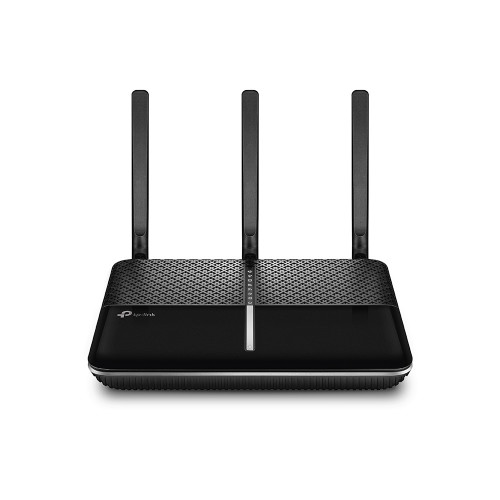 |
|
|
|
|
|
yongtjunkit
|
May 1 2020, 09:55 PM
|
|
|
QUOTE(sadaniel @ May 1 2020, 08:43 PM) TP link VR600v Can this directly replace the tplink c5v? Nope, if you are on Fiber This router is for VDSL/ADSL This post has been edited by yongtjunkit: May 1 2020, 09:58 PM |
|
|
|
|
|
sadaniel
|
May 2 2020, 01:20 AM
|
|
|
QUOTE(yongtjunkit @ May 1 2020, 09:55 PM) Nope, if you are on Fiber This router is for VDSL/ADSL I can see this model is marketed to support unifi maxis time etc. So it must support fibre optic modem via wan port right? |
|
|
|
|
|
yongtjunkit
|
May 2 2020, 06:13 AM
|
|
|
QUOTE(sadaniel @ May 2 2020, 01:20 AM) I can see this model is marketed to support unifi maxis time etc. So it must support fibre optic modem via wan port right? Based on the picture on the TPlink website there’s no Wan port + no marketing about unifi maxis time probably Lazada I guess? Even if it mention it this is designed for copper wiring(Unifi lite, streamyx, maxis - limited to 30mbps with copper connection ) or you’ll lose a lan port for that(to be used as a wan port) blacktubi might know about if this is officially supporting unifi/ maxis fiber This post has been edited by yongtjunkit: May 2 2020, 06:21 AM |
|
|
|
|
|
sadaniel
|
May 2 2020, 08:14 PM
|
|
|
QUOTE(yongtjunkit @ May 2 2020, 06:13 AM) Based on the picture on the TPlink website there’s no Wan port + no marketing about unifi maxis time probably Lazada I guess? Even if it mention it this is designed for copper wiring(Unifi lite, streamyx, maxis - limited to 30mbps with copper connection ) or you’ll lose a lan port for that(to be used as a wan port) blacktubi might know about if this is officially supporting unifi/ maxis fiber Yeah its from Lazada. Thanks for your help  |
|
|
|
|
|
sadaniel
|
May 3 2020, 07:11 AM
|
|
|
QUOTE(alvinchan2010 @ Dec 28 2019, 04:39 PM) After getting Maxis technical support help, I managed to have my DLink DIR882 setup as primary internet router while using Maxis TP Link router as Voice VOIP and Switch. Here is the setup and steps: 1. Connect ONU (TM, LAN2) to Maxis TP Link WAN port and set the Maxis TP Link router up for PPPOE and Voice VOIP. Make sure everything work fine. 2. Change the Maxis TP link router to Bridge Mode (as Switch only) 3. Connect own router (my case is DIR882) WAN port to any LAN port (I use LAN 4) in Maxis TP link router. 4. Setup DIR882 for internet access with PPPOE . You will need Maxis Fibre PPPOE login info. You can just call maxis to set it up for you after you have your new router. After step 4, the dlink becomes ur main or secondary router? I imagine ur final setup would be ONU LAN -> TPLINK WAN then TPLINK LAN -> DLINK WAN. Or is it the other way around? |
|
|
|
|
|
lowck
|
Jun 15 2020, 12:04 AM
|
Getting Started
|
QUOTE(trix @ Jun 27 2019, 11:47 PM) still working fine for mine, able to call out/receive call [attachmentid=10272051] ask u abit i change my old alcatel lucent ig240g-t to hg8240h(time fibre onu) i setting onu why like this?and after plug in fiber can't log in 192.168.100.1 last time i help my friend setting voip is okay no problem like this 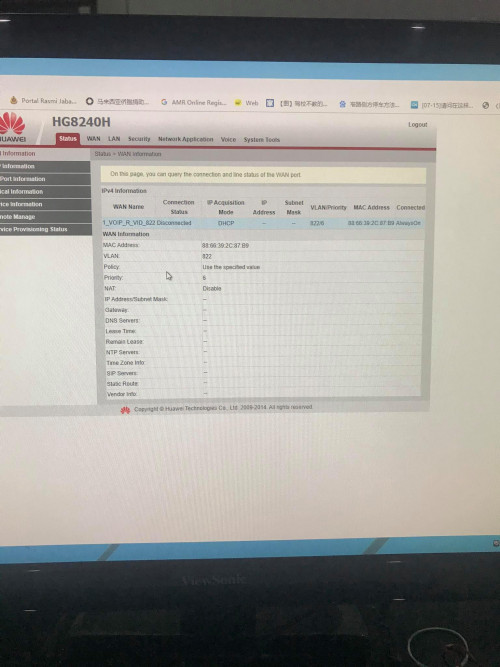 |
|
|
|
|
|
jongoz
|
Jun 23 2020, 04:09 PM
|
New Member
|
Hi all, been trying to follow guide to get VOIP working at the ONT/BTU and get rid of the Archer c5v since i have a custom router and AP This is my current Archer setup. VOIP is working properly with the custom router 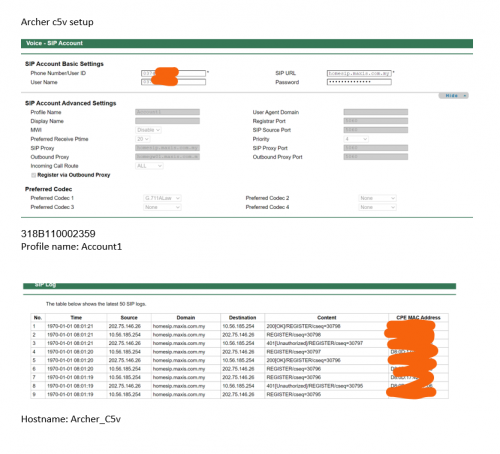 I've followed the steps to get VOIP setup on the HG8240H 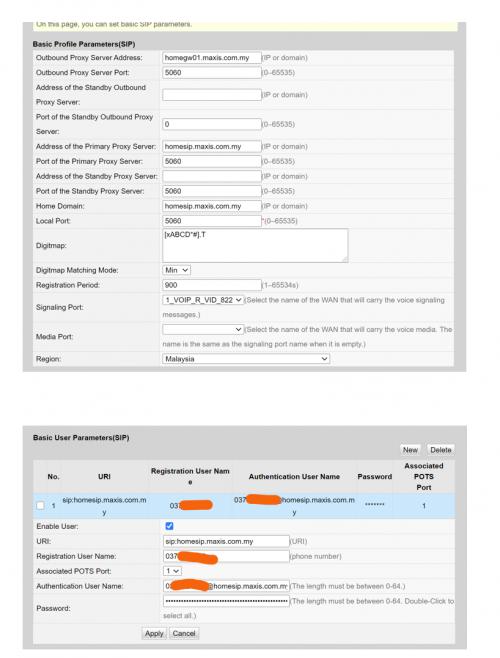 And also setup vlan/WAN 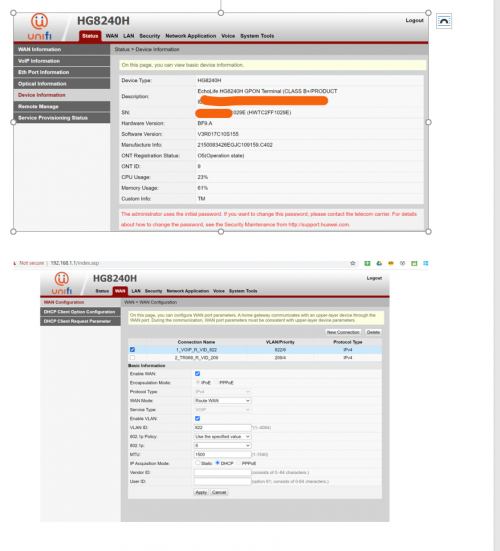 I managed to get WAN connected. But VOIP is returning error 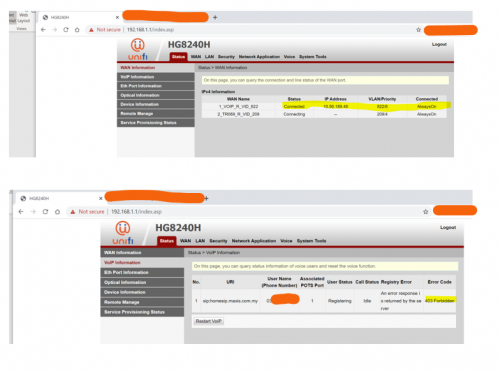 I think the voip server is looking for some signature from the Archer - whether it is MAC address, or model or something which i havent figure out. Anybody that has managed to get this working? Help!!! |
|
|
|
|
|
lowck
|
Jun 23 2020, 05:01 PM
|
Getting Started
|
QUOTE(jongoz @ Jun 23 2020, 04:09 PM) Hi all, been trying to follow guide to get VOIP working at the ONT/BTU and get rid of the Archer c5v since i have a custom router and AP This is my current Archer setup. VOIP is working properly with the custom router I've followed the steps to get VOIP setup on the HG8240H And also setup vlan/WAN I managed to get WAN connected. But VOIP is returning error I think the voip server is looking for some signature from the Archer - whether it is MAC address, or model or something which i havent figure out. Anybody that has managed to get this working? Help!!! try like this i hide that keyword is ur phone no and password is ur account no+last 4 digit phone no 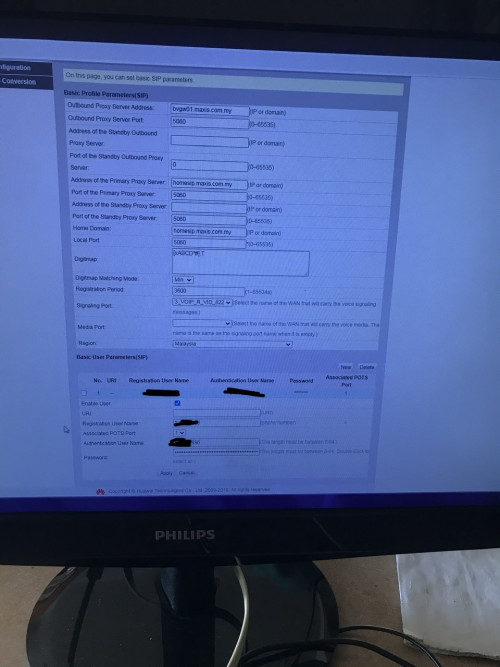 |
|
|
|
|
|
jongoz
|
Jun 23 2020, 05:34 PM
|
New Member
|
let me try bro. i think i tried the combination before but using homegw01.maxis.com.my instead of bvgw01.maxis.com.my. will try test QUOTE(lowck @ Jun 23 2020, 05:01 PM) try like this i hide that keyword is ur phone no and password is ur account no+last 4 digit phone no |
|
|
|
|
|
jongoz
|
Jun 23 2020, 06:01 PM
|
New Member
|
Tried both, authentication error.... Would like to see if anyone had any success with homegw01 QUOTE(jongoz @ Jun 23 2020, 05:34 PM) let me try bro. i think i tried the combination before but using homegw01.maxis.com.my instead of bvgw01.maxis.com.my. will try test |
|
|
|
|
|
lowck
|
Jun 23 2020, 06:13 PM
|
Getting Started
|
QUOTE(jongoz @ Jun 23 2020, 06:01 PM) Tried both, authentication error.... Would like to see if anyone had any success with homegw01 u want to delete sip at router first and try it |
|
|
|
|
|
jongoz
|
Jun 23 2020, 07:33 PM
|
New Member
|
Ok. Let.me try I was doing it by switching off the Archer c5v. QUOTE(lowck @ Jun 23 2020, 06:13 PM) u want to delete sip at router first and try it |
|
|
|
|
|
mroctopus
|
Jul 26 2020, 12:39 PM
|
Getting Started
|
hi, i am using TPlink AX50 and following the below set up with Vlan VOIP at Lan4 of TPlink router.
TM ONT -> AX50 WAN port (internet is working)
AX50 configured Voip VLAN at LAN4
AX50 LAN4 connect to Aminia AC1200 WAN port via LAN cable
RJ11 is connected to Aminia tel port.
But i keep getting engaging tone with such configuration.
Help pls.... thanks.
|
|
|
|
|



 Quote
Quote


 0.0244sec
 0.84
0.84
 6 queries
 GZIP Disabled