

QUOTE(blacktubi @ Apr 18 2020, 01:16 PM)
You can only choose one. Either Ethernet backhaul or Unifi TV. 

Should i disable 2.4ghz and how wireless backhaul connect each deco m5 node? Can this 5ghz use for multiple user in house?Problem with Tp-link Deco M5
|
|
 Apr 18 2020, 02:15 PM Apr 18 2020, 02:15 PM
|
 
Junior Member
493 posts Joined: Nov 2008 From: Localhost : 127.0.0.1/24   
|
QUOTE(blacktubi @ Apr 18 2020, 01:16 PM) You can only choose one. Either Ethernet backhaul or Unifi TV. Should i disable 2.4ghz and how wireless backhaul connect each deco m5 node? Can this 5ghz use for multiple user in house? |
|
|
|
|
|
Apr 18 2020, 02:44 PM
|
 
Elite
8,420 posts Joined: Jul 2008 
|
QUOTE(elmodistortion @ Apr 18 2020, 02:15 PM) Should i disable 2.4ghz and how wireless backhaul connect each deco m5 node? Can this 5ghz use for multiple user in house? No need to do anything special, the Deco M5 works well by default. Of course it support multiple users. |
|
|
Apr 18 2020, 09:48 PM
|
|
Junior Member
493 posts Joined: Nov 2008 From: Localhost : 127.0.0.1/24
|
QUOTE(blacktubi @ Apr 18 2020, 02:44 PM) No need to do anything special, the Deco M5 works well by default. Been using for 2 days now. Both deco is quite hot ya. Hotter than my standard unifi router. is it normal?Of course it support multiple users. |
|
|
Apr 18 2020, 10:29 PM
|
|
Elite
8,420 posts Joined: Jul 2008
|
QUOTE(elmodistortion @ Apr 18 2020, 09:48 PM) Been using for 2 days now. Both deco is quite hot ya. Hotter than my standard unifi router. is it normal? Yea, that's totally normal and it will not impact performance.TP-Link is really trying to make it compact by squeezing a lot of things in a small package. |
|
|
May 5 2020, 11:10 PM
|

Junior Member
100 posts Joined: Aug 2013 
|
Hello, Im planning to buy this mesh system and looking to see what would the best setup be?
Current setup: Unifi router connection have 1 connection to HyppTV, 1 connection to the Unifi Modem and 1 connection to CCTV If I buy this mesh, whats the best way to connect. Should i directly connect the mesh m5 from the Unifi router and leave the hypptv and cctv at default, or should i make the Deco M5 to dial PPoE but then how would i setup the HyppTV and cctv considering theres only 2 ports. I could think of getting a switch to expand it however, normal switches wont be able to assign VLAN tagging and stuff. Kindly advice |
|
|
May 10 2020, 11:58 PM
|

Senior Member
1,594 posts Joined: Nov 2008
|
Hi, i managed to setup 2 Deco M5, [main] at living hall and [extended] at study room. It was working fine on that day
After few hours, the extended Deco M5 (at study room) turn into yellow light. I tried to reset this unit, delete both main and extended profile, download updated firmware, press the [Reset] button; but still the extended unit still stuck at yellow light. Anyone encounter this issue before? |
|
|
|
|
|
May 14 2020, 10:15 PM
Show posts by this member only | IPv6 | Post
#47
|
|
Junior Member
147 posts Joined: Dec 2008
|
Hi I'm currently using TPLink MR200 4G LTE modem and using Yoodo as my simcard data.
Question: Does Deco Mesh M4/M5 works if I'm using 4G LTE connection as my wifi? Or Deco Mesh only works with Home Fibre Broadband. Appreciate & thanks for your help. |
|
|
May 16 2020, 03:49 PM
Show posts by this member only | IPv6 | Post
#48
|
|
Junior Member
289 posts Joined: Sep 2012
|
QUOTE(arkana @ May 14 2020, 10:15 PM) Hi I'm currently using TPLink MR200 4G LTE modem and using Yoodo as my simcard data. Yes you may. Connect deco M5 to your MR200 LAN port and set it as access point mode will do.Question: Does Deco Mesh M4/M5 works if I'm using 4G LTE connection as my wifi? Or Deco Mesh only works with Home Fibre Broadband. Appreciate & thanks for your help. |
|
|
May 16 2020, 03:52 PM
Show posts by this member only | IPv6 | Post
#49
|
|
Junior Member
289 posts Joined: Sep 2012
|
QUOTE(ju146 @ May 10 2020, 11:58 PM) Hi, i managed to setup 2 Deco M5, [main] at living hall and [extended] at study room. It was working fine on that day Do you have faulty adapter? Try if other adapter works or not?After few hours, the extended Deco M5 (at study room) turn into yellow light. I tried to reset this unit, delete both main and extended profile, download updated firmware, press the [Reset] button; but still the extended unit still stuck at yellow light. Anyone encounter this issue before? https://www.tp-link.com/us/support/faq/1464/ |
|
|
May 20 2020, 08:21 PM
Show posts by this member only | IPv6 | Post
#50
|

Senior Member
1,564 posts Joined: Jan 2003 From: working@SG, hometown in Kay L 
|
QUOTE(blacktubi @ Apr 18 2020, 12:40 PM) Oh crap, you are running the latest firmware where they reserved the second LAN port for HyppTV and there's no way to disable it now. so meaning that there's no way to hook up the unused port of the main DECO unit to a switch(managed with the proper VLANs 500 for internet traffic and 600 for IPTV traffic)..correct? One possible way to solve this is to downgrade to an older firmware using the web interface. |
|
|
May 26 2020, 10:00 PM
|
|
Probation
1 posts Joined: Dec 2019
|
QUOTE(cnks @ Apr 16 2020, 11:04 AM) Just got myself a dual pack last week. Everything works well except 2 things. Hi cnks,1. My HyppTV Set Top Box won't work. It shows DMP Connection successful, but when I click into HyppTV, it is stuck at the Splash Screen forever. 2. My MiBox 3S China Edition could not connect to the WiFi. Any sifu can help? I'm having the same issue. Just setup Deco M9 yesterday and exactly same problem. Had you found a solution? Anyone can help here? Enabled VLAN, IPTV. Thanks, shirley. |
|
|
May 27 2020, 10:09 AM
|

Junior Member
102 posts Joined: May 2005
|
QUOTE(Bumblebee2000 @ May 26 2020, 11:00 PM) Hi cnks, Hi there. Unfortunately no. I have sent in a feedback to TP-Link Customer Support as well but have not gotten any reply yet too.I'm having the same issue. Just setup Deco M9 yesterday and exactly same problem. Had you found a solution? Anyone can help here? Enabled VLAN, IPTV. Thanks, shirley. |
|
|
May 28 2020, 03:44 PM
|

Junior Member
125 posts Joined: Oct 2009
|
QUOTE(blacktubi @ Apr 18 2020, 12:40 PM) Oh crap, you are running the latest firmware where they reserved the second LAN port for HyppTV and there's no way to disable it now. Unfortunetely unable to downgrade the firmware.One possible way to solve this is to downgrade to an older firmware using the web interface. "Upgrade failed. Please select the latest version of firmware to upgrade." QUOTE(elmodistortion @ Apr 18 2020, 01:00 PM) I saw there is custom in existing preset unifi. Can u have a look bro? I also tried setting this manually, with only Internet VLAN and disable IPTV VLAN but it won't connect to the Internet.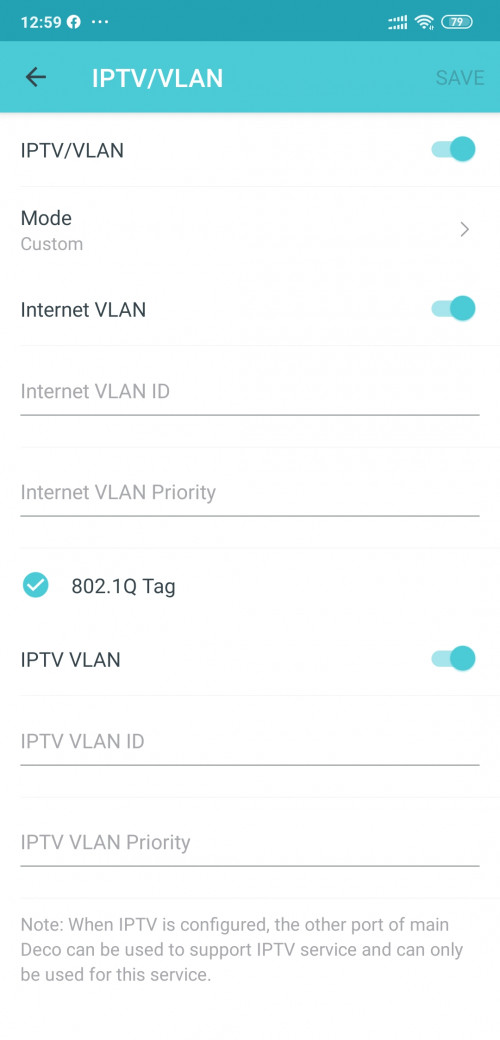 Anyone found a solution to this? |
|
|
|
|
|
May 31 2020, 05:10 PM
|
|
Junior Member
493 posts Joined: Nov 2008 From: Localhost : 127.0.0.1/24
|
QUOTE(calvinyeap @ May 28 2020, 03:44 PM) Unfortunetely unable to downgrade the firmware. it wont connect to internet if we disable IPTV VLAN?"Upgrade failed. Please select the latest version of firmware to upgrade." I also tried setting this manually, with only Internet VLAN and disable IPTV VLAN but it won't connect to the Internet. Anyone found a solution to this? |
|
|
Jun 7 2020, 05:21 PM
|
|
Junior Member
493 posts Joined: Nov 2008 From: Localhost : 127.0.0.1/24
|
I have use custome vlan 500 internet. But sad if i van setup second m5 deco to vlan 600 for second port will be great.
|
|
|
Jul 30 2020, 10:43 PM
|

Senior Member
596 posts Joined: Sep 2004 From: localhost
|
Same here.. i tried to connect to hypptv and its not working.. anyonr have solutions yet?
|
|
|
Aug 2 2020, 10:25 AM
|
|
Senior Member
596 posts Joined: Sep 2004 From: localhost
|
QUOTE(blacktubi @ Apr 18 2020, 10:29 PM) Yea, that's totally normal and it will not impact performance. Sifu.. another problem arise. When my smart tv sony connect to m5, it says wifi no Internet access? I cannot even cast to my tv? Any solution for this?TP-Link is really trying to make it compact by squeezing a lot of things in a small package. |
|
|
Aug 8 2020, 01:28 PM
|
|
Senior Member
1,682 posts Joined: Oct 2012
|
QUOTE(rofreak @ Aug 2 2020, 10:25 AM) Sifu.. another problem arise. When my smart tv sony connect to m5, it says wifi no Internet access? I cannot even cast to my tv? Any solution for this? Have you found a solution to this yet? Thinking of M4 or M5 at the moment.  |
|
|
Sep 12 2020, 02:46 PM
Show posts by this member only | IPv6 | Post
#59
|
|
Probation
2 posts Joined: Sep 2020
|
Hi guys.
Currently on Time Broadband 500Mbps, with Router Dlink DIR 850L, condo size 1900sqft. If I change the router to deco M5 1 pack can solve weak wifi in the farthest corner? Most of the time can only get around 5-15Mbps with a range extender. |
|
|
Nov 13 2020, 04:02 PM
Show posts by this member only | IPv6 | Post
#60
|
|
Probation
2 posts Joined: Nov 2020
|
[quote=calvinyeap,May 28 2020, 03:44 PM]
Unfortunetely unable to downgrade the firmware. "Upgrade failed. Please select the latest version of firmware to upgrade." I also tried setting this manually, with only Internet VLAN and disable IPTV VLAN but it won't connect to the Internet. Anyone found a solution to this? [/quote Set the VLAN/IPTV mode as “Custom” instead of “Malaysia-TM Unifi”; put in the internet VLAN ID as 500, priority 0; and tick the 802.1Q Tag. You need to disable the IPTV VLAN button at the bottom. Anyone knows if this really works? |
| Change to: |  0.0243sec 0.0243sec
 0.75 0.75
 5 queries 5 queries
 GZIP Disabled GZIP Disabled
Time is now: 17th December 2025 - 12:01 PM |
 Quote
Quote