Welcome Guest ( Log In | Register )

7 Pages « < 3 4 5 6 7 >Bottom

Outline · [ Standard ] · Linear+

 Problem with Tp-link Deco M5

views
     
tachlio
post Feb 13 2021, 04:22 PM

de~sign "ing"
*******
Senior Member
3,102 posts

Joined: May 2005
From: Penang *̡͌l̡*̡̡
QUOTE(eric8188 @ Feb 13 2021, 02:09 PM)
After using deco now I have 2 WiFi networks. 1 is deco 1 is front the modem router. What should I do towards the non deco WiFi network? Is there a way to turn it off?
*
If you using Deco as AP, then turn on Router Wifi signal.
But Deco can be router by it own.
hussain
post Mar 6 2021, 11:13 AM

Look at all my stars!!
*******
Senior Member
2,012 posts

Joined: Dec 2007
From: Malaysia


Guys ..I need some help ..I installed 2 m5 ..first I tried as direct to modem without router ..no internet connection..but when I connect m5 to router it works ,..can some kind soul share what settings to change to make m 5 as router ?

Also ..now I find after connect m5 to.router ..the original wifi signal become much stronger compared to connect to m5? Am.i missing something?
blacktubi
post Mar 6 2021, 11:14 AM

-
Group Icon
Elite
8,421 posts

Joined: Jul 2008

QUOTE(hussain @ Mar 6 2021, 11:13 AM)
Guys ..I need some help ..I installed 2 m5 ..first I tried as direct to modem without router ..no internet connection..but when I connect m5 to router it works ,..can some kind soul share what settings to change to make m 5 as router ?

Also ..now I find after connect m5 to.router ..the original wifi signal become much stronger compared to connect to m5?  Am.i missing something?
*
When you do a direct connection to the modem, make sure you have the PPPOE username and password from TM
hussain
post Mar 6 2021, 12:23 PM

Look at all my stars!!
*******
Senior Member
2,012 posts

Joined: Dec 2007
From: Malaysia


QUOTE(blacktubi @ Mar 6 2021, 11:14 AM)
When you do a direct connection to the modem, make sure you have the PPPOE username and password from TM
*
Sorry bro ..I'm really blur at this ..do you have the settings ?
jacktiew
post Mar 6 2021, 12:59 PM

Getting Started
**
Junior Member
289 posts

Joined: Sep 2012
QUOTE(hussain @ Mar 6 2021, 12:23 PM)
Sorry bro ..I'm really blur at this ..do you have the settings ?
*


This post has been edited by jacktiew: Mar 6 2021, 01:00 PM
hussain
post Mar 6 2021, 01:28 PM

Look at all my stars!!
*******
Senior Member
2,012 posts

Joined: Dec 2007
From: Malaysia


QUOTE(jacktiew @ Mar 6 2021, 12:59 PM)

*
Thanks bro ...one last question..to connect cctv to main deco 2nd port ..can it be done using the same way as connecting to hypptv method by enabling iptv?
jacktiew
post Mar 6 2021, 01:38 PM

Getting Started
**
Junior Member
289 posts

Joined: Sep 2012
QUOTE(hussain @ Mar 6 2021, 01:28 PM)
Thanks bro ...one last question..to connect cctv to main deco 2nd port ..can it be  done using the same way as connecting to hypptv method by enabling iptv?
*
If you want to use for CCTV, then you don't have to set the IPTV part. Otherwise the port can only use for IPTV.
johnnyg
post Mar 7 2021, 08:27 PM

Getting Started
**
Junior Member
290 posts

Joined: Jul 2008
Hi All,

I had setup a few M5 deco in my house and working fine. I have now got m9 from Unifi with the upgrade. How can I make one of the M9 unit become the main deco that is connected to the router?
tachlio
post Mar 7 2021, 10:24 PM

de~sign "ing"
*******
Senior Member
3,102 posts

Joined: May 2005
From: Penang *̡͌l̡*̡̡
QUOTE(johnnyg @ Mar 7 2021, 08:27 PM)
Hi All,

I had setup a few M5 deco in my house and working fine. I have now got m9 from Unifi with the upgrade. How can I make one of the M9 unit become the main deco that is connected to the router?
*
reset M5, and setup M9 as fresh router, then connect back m5
johnnyg
post Mar 7 2021, 10:35 PM

Getting Started
**
Junior Member
290 posts

Joined: Jul 2008
QUOTE(tachlio @ Mar 7 2021, 10:24 PM)
reset M5, and setup M9 as fresh router, then connect back m5
*
Do I need to reset all M5 in the house or just the one with the router?
jacktiew
post Mar 9 2021, 12:04 AM

Getting Started
**
Junior Member
289 posts

Joined: Sep 2012
QUOTE(johnnyg @ Mar 7 2021, 10:35 PM)
Do I need to reset all M5 in the house or just the one with the router?
*
No need. Just add the M9 to the current setup first.

Then open the deco app, press the internet icon, then press the 3 dots on the right corner and choose M9 as the main deco.

Voila.
johnnyg
post Mar 10 2021, 04:16 PM

Getting Started
**
Junior Member
290 posts

Joined: Jul 2008
QUOTE(jacktiew @ Mar 9 2021, 12:04 AM)
No need. Just add the M9 to the current setup first.

Then open the deco app, press the internet icon, then press the 3 dots on the right corner and choose M9 as the main deco.

Voila.
*
Hi Jack,

My current router (from TM long time ago) is connected using cable to the M5. I would then unplugged the M5 and then connect the M9 and it would work right?
jacktiew
post Mar 10 2021, 04:47 PM

Getting Started
**
Junior Member
289 posts

Joined: Sep 2012
QUOTE(johnnyg @ Mar 10 2021, 04:16 PM)
Hi Jack,

My current router (from TM long time ago) is connected using cable to the M5. I would then unplugged the M5 and then connect the M9 and it would work right?
*
1. Just add the deco m9 to the current setup.
2. Set M9 as main deco.
3. Unplug m5 and connect m9.
4. Done

Edit: Misunderstood your questions just now.

This post has been edited by jacktiew: Mar 10 2021, 07:23 PM
johnnyg
post Mar 10 2021, 08:16 PM

Getting Started
**
Junior Member
290 posts

Joined: Jul 2008
QUOTE(jacktiew @ Mar 10 2021, 04:47 PM)
1. Just add the deco m9 to the current setup.
2. Set M9 as main deco.
3. Unplug m5 and connect m9.
4. Done

Edit: Misunderstood your questions just now.
*
Thanks brother for the explanation. 🙏

skyp
post Mar 14 2021, 03:15 PM

Regular
******
Senior Member
1,289 posts

Joined: Apr 2012
Sorry guys, I also need help with setup my newly bought m5, replacing maxis router.

The setup completed earlier, then suddenly one of the secondary router disconnected.
Reset many times and still doesn't work.
It only work when I placed it next to another working m5 router.

ranger2020
post Jul 10 2021, 10:10 PM

Getting Started
**
Junior Member
214 posts

Joined: Sep 2013
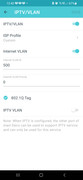
QUOTE(jasondc @ Nov 21 2020, 11:42 AM)
hi, i have installed the M5 to replace the TM issued router. Wifi is working fine. But i am not getting any network connection on the 2nd LAN port from the main M5 unit when testing it with my laptop … what is causing this issue, and how can i resolve it? hope someone here can assist me on this. thanks in advance!

[UPDATE] Solved this already, by doing custom settings for the IPTV/VLAN ...

*
Hi what are the custom settings?

Thanks

cannavaro
post Jul 12 2021, 12:42 PM

CATTENACIO
*******
Senior Member
3,008 posts

Joined: Sep 2005
From: T.T.D.I, Bukit Damansara


QUOTE(ranger2020 @ Jul 10 2021, 10:10 PM)
Hi what are the custom settings?

Thanks
*
user posted image
arkana
post Jul 20 2021, 07:55 PM

Getting Started
**
Junior Member
147 posts

Joined: Dec 2008
Hi need help...

I just bought HP Deskjet Wireless 6475 printer.

I try to connect the printer to my wireless network link to DecoM5 but it seems that it unable to connect and complete the setup.

Anyone encounter before this issue or any advise to solve this issue is much appreciated.

Thank you in advance.
tachlio
post Jul 21 2021, 11:58 AM

de~sign "ing"
*******
Senior Member
3,102 posts

Joined: May 2005
From: Penang *̡͌l̡*̡̡
QUOTE(arkana @ Jul 20 2021, 07:55 PM)
Hi need help...

I just bought HP Deskjet Wireless 6475 printer.

I try to connect the printer to my wireless network link to DecoM5 but it seems that it unable to connect and complete the setup.

Anyone encounter before this issue or any advise to solve this issue is much appreciated.

Thank you in advance.
*
disable 5Ghz during setup
AnuarRahim el renggami P
post Aug 28 2021, 12:02 AM

New Member
*
Probation
2 posts

Joined: Aug 2021
Hie i have almost every post. Can someone guide how to use the m5 direct to the BTU. I cant find the vlan setting on PPPoe. Thanks

7 Pages « < 3 4 5 6 7 >Top
 

Change to:
| Lo-Fi Version
0.0273sec    0.47    5 queries    GZIP Disabled
Time is now: 20th December 2025 - 11:58 PM