Outline ·
[ Standard ] ·
Linear+
ILLEGEAR Custom Performance Laptops v.4, AMD RYZEN 4800H with FREE AC Valhalla
|
Nightstalker1993
|
 Jan 1 2021, 01:15 AM Jan 1 2021, 01:15 AM
|

|
QUOTE(tiggywombat @ Jan 1 2021, 12:44 AM) I would use office mode if I were you. It would be more power-efficient, and help to maximize your laptop's lifespan. You'll still get a good gaming experience Unless you don't care about those things and are chasing the maximum FPS 90W 2060 is around 1600Mhz Actually I don't game, turbo mode for max performance when rendering video. Plus, already connected to the power outlet, don't really bother about power efficiency  All I know is that I tried rendering a video with the power unplugged and damn the speed dropped like 4 times. Rendering video GPU maxed out at around 25w if I remembered correctly which became a bottleneck so CPU utilization was low and only around 10w  Weird that the clock speed are way higher than Nvidia's official figures, thanks for the heads up! |
|
|
|
|
|
Jared21
|
Jan 1 2021, 01:28 AM
|
New Member

|
QUOTE(Nightstalker1993 @ Jan 1 2021, 01:15 AM) Actually I don't game, turbo mode for max performance when rendering video. Plus, already connected to the power outlet, don't really bother about power efficiency All I know is that I tried rendering a video with the power unplugged and damn the speed dropped like 4 times. Rendering video GPU maxed out at around 25w if I remembered correctly which became a bottleneck so CPU utilization was low and only around 10w Weird that the clock speed are way higher than Nvidia's official figures, thanks for the heads up! Thats typical battery performance haha. You could try to change some settings in the nvidia control panel to let the gpu boost higher if you need on battery but there will be a hard limit to how much it will boost without being plugged in to the wall |
|
|
|
|
|
Nightstalker1993
|
Jan 1 2021, 01:32 AM
|
|
|
QUOTE(Jared21 @ Jan 1 2021, 01:28 AM) Thats typical battery performance haha. You could try to change some settings in the nvidia control panel to let the gpu boost higher if you need on battery but there will be a hard limit to how much it will boost without being plugged in to the wall Yeah didn't expect the performance hit to be THAT bad. Now the Macbook M1 seems ungodly now that it can maintain the performance even unplugged. Where in the Nvidia Control Panel can you set the GPU boost when unplugged? |
|
|
|
|
|
Nightstalker1993
|
Jan 2 2021, 03:57 PM
|
|
|
Pro tip for those on AMD Ryzen, go into AMD Radeon Software and under Display, DISABLE the Vari-Bright option. It not only limits the max brightness of the display when on battery, but also screws up the colors especially dark colors greatly when unplugged which is very important if you're into content creation work. Was wondering why my edited video look so weird then I noticed it only happens on battery power, and also in my Windows dark UI it looks weird when unplugged as well. Did some researching around and found out this option was the culprit.
|
|
|
|
|
|
Jared21
|
Jan 3 2021, 03:52 AM
|
New Member
|
QUOTE(Nightstalker1993 @ Jan 1 2021, 01:32 AM) Yeah didn't expect the performance hit to be THAT bad. Now the Macbook M1 seems ungodly now that it can maintain the performance even unplugged. Where in the Nvidia Control Panel can you set the GPU boost when unplugged? You should be able to set your gpu to prefer max performance for the specific app you want to run on battery. It wont give you the full power of the gpu but it should be better than letting Optimus determine how much power the gpu uses Attached thumbnail(s)
|
|
|
|
|
|
incubus_skj
|
Jan 4 2021, 09:43 AM
|
|
|
QUOTE(Uncle Slowcum @ Dec 30 2020, 10:57 PM) Hi Illegear, I ordered my illegear Onyx V Ryzen (Order#198521) on 21/12/2020 and have recently contacted the illegear team to inquire about the status of my order and when it would be expected to be ready for collection. The first time i contacted them on 23/12/2020, i got a prompt response on email telling me that the "ETA for the order to be ready is 10-20 working days" and that stock would "arrive by next month". Based on this, my expectation would be mid jan. However, today on 30/12/2020 i contacted the illegear team again to get clarification about the status of my order and was told by email that the stock for my configuration will take some time to arrive and the message was "no ETA from manufacturing". I was then given an option to upgrade at a price in order to reduce waiting time. I replied saying i wanted to remain my oder as is and when further questioned about the eta, i got a reply estimating that stock would arrive "towards CNY 2021" which is around mid Feb. This is just the part when the parts arrive, assembly and testing will probably take some more time.. Using basic maths i can estimate that this is surely going to take up till late Feb (2 months) which more than 10-20 working days as stated in their emails??? Not sure why they bother to state 10-20 days if they are unable to achieve this. I have seen many other complaints on this forum about long delivery times and do not understand why they do not just state the real eta. If this takes too long i do not mind getting a refund. as usual la, salesman talk, before payment everything also can, delivery date very solid. once payment done, all the excuses reasons come out already. "we currently have too many orders" "the stock shortage from china" "no screen" "stress test 2 weeks for you" QUOTE(Uncle Slowcum @ Dec 31 2020, 02:31 PM) Hi guys, Update: illegear have given me an option to upgrade my processor from my initial configuration of Ryzen 5 4600H GTX 1650 to Ryzen 7 4800H for RM299. If I stay with my current configuration it till probably take up till cny time as mentioned before. However if I choose to upgrade to the Ryzen 7, it "can be ready by mid to end of next week". Do you guys think it's worth the price? Please advice hehe, this is my first gaming laptop and I wouldn't consider myself to be an expert! Thanks in advance. that's good to hear. hopefully the RM299 will actually fasten up your laptop delivery. good luck! |
|
|
|
|
|
Uncle Slowcum P
|
Jan 4 2021, 12:10 PM
|
New Member
|
Hi guys,
I should be getting my laptop this week, do you guys think it is necessary to buy a screen protector? Or is the screen pretty durable from your experiences?
Thanks
|
|
|
|
|
|
chinti
|
Jan 4 2021, 03:50 PM
|
|
|
QUOTE(Uncle Slowcum @ Jan 4 2021, 12:10 PM) Hi guys, I should be getting my laptop this week, do you guys think it is necessary to buy a screen protector? Or is the screen pretty durable from your experiences? Thanks screen protector is not needed, laptop screen are not that fragile. as long as u dun purposely go scratch it with sharp object, then nothing to worry bout.  |
|
|
|
|
|
Uncle Slowcum P
|
Jan 4 2021, 03:55 PM
|
New Member
|
QUOTE(chinti @ Jan 4 2021, 03:50 PM) screen protector is not needed, laptop screen are not that fragile. as long as u dun purposely go scratch it with sharp object, then nothing to worry bout. :thumbsup: Alright, thanks chinti! 😁 |
|
|
|
|
|
huislaw
|
Jan 4 2021, 06:02 PM
|
|
|
Do you guys think ONYX V RYZEN will be refreshed with Nvidia GeForce RTX 2070 8GB GDDR6 (Max-performance) soon (For 5K++) ?  |
|
|
|
|
|
Nightstalker1993
|
Jan 4 2021, 07:26 PM
|
|
|
QUOTE(huislaw @ Jan 4 2021, 06:02 PM) Do you guys think ONYX V RYZEN will be refreshed with Nvidia GeForce RTX 2070 8GB GDDR6 (Max-performance) soon (For 5K++) ? IMO, it will be quite some time until laptops with RTX30 series can actually be purchased. Maybe from the big brands it will be in a few months, but I would expect China ODMs to take slightly longer. If you don't need a laptop so soon I would say you're better off waiting. |
|
|
|
|
|
SaiyanGoku
|
Jan 5 2021, 03:14 AM
|
New Member
|
QUOTE(Prince J @ Dec 31 2020, 03:20 PM) Yes power adapter has 1 year of warranty. You can also try to change power cord to check if the issue still persists. Could you reply to my DM or here about this: https://forum.lowyat.net/index.php?showtopi...post&p=99245493I want to know the ETA for GPU PL Throttling fix. |
|
|
|
|
|
Santau_GO P
|
Jan 5 2021, 10:46 AM
|
New Member
|
QUOTE(SaiyanGoku @ Jan 5 2021, 03:14 AM) Could you reply to my DM or here about this: https://forum.lowyat.net/index.php?showtopi...post&p=99245493I want to know the ETA for GPU PL Throttling fix. can u run msi afterburner and show gpu power? im curious to know at what watts do u reach power limit throttling |
|
|
|
|
|
SaiyanGoku
|
Jan 5 2021, 03:35 PM
|
New Member
|
QUOTE(Santau_GO @ Jan 5 2021, 08:16 AM) can u run msi afterburner and show gpu power? im curious to know at what watts do u reach power limit throttling Attached the screenshot here. Restarted the system just before running the game. Attached thumbnail(s)
|
|
|
|
|
|
t3n
|
Jan 5 2021, 08:29 PM
|
|
|
QUOTE(Nightstalker1993 @ Jan 1 2021, 12:37 AM) Interesting, I remember something like that in one of the other TF ODM reviews, forgot which one. My clock speed went up to 1920mhz, stabilizing around 1850mhz according to GPUID, not too sure what's the 90w RTX2060 supposed to be running at but if follow paper specs, mine is way above all of it just do 3d mark and compare the graphic score with others 2060 115W.. |
|
|
|
|
|
Nightstalker1993
|
Jan 9 2021, 02:39 PM
|
|
|
My Rogue Ryzen with Ryzen 7 4800h and 63wh battery after some startup tasks, services and task scheduler optimization  Followed this guide mostly https://www.reddit.com/r/thinkpad/comments/...tery_life_tips/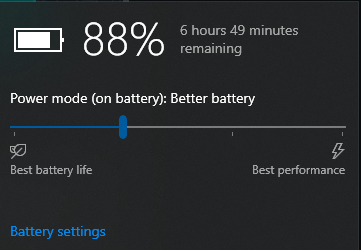 The 'Rate' column is the power draw in MilliWatts. Value of 8000 would mean 8W, so for a 63wh battery, if constant draw of 8watts would give you 7.8 Hours of battery life, but realistically while browsing the net the current draw ranges from 8-12watts and idles around 6 watts. With monitor off I recorded current draw of 3+ watts. Previously it was drawing 15+ watts on idle and while using it goes fro 15-20 watts. 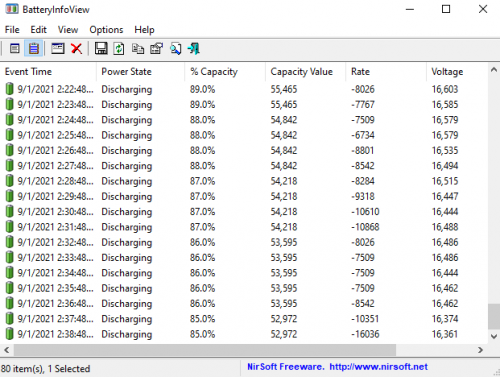 This post has been edited by Nightstalker1993: Jan 9 2021, 02:42 PM This post has been edited by Nightstalker1993: Jan 9 2021, 02:42 PM |
|
|
|
|
|
Jared21
|
Jan 11 2021, 03:14 PM
|
New Member
|
QUOTE(Nightstalker1993 @ Jan 9 2021, 02:39 PM) My Rogue Ryzen with Ryzen 7 4800h and 63wh battery after some startup tasks, services and task scheduler optimization Followed this guide mostly https://www.reddit.com/r/thinkpad/comments/...tery_life_tips/The 'Rate' column is the power draw in MilliWatts. Value of 8000 would mean 8W, so for a 63wh battery, if constant draw of 8watts would give you 7.8 Hours of battery life, but realistically while browsing the net the current draw ranges from 8-12watts and idles around 6 watts. With monitor off I recorded current draw of 3+ watts. Previously it was drawing 15+ watts on idle and while using it goes fro 15-20 watts. Very nice! My Selenite can do about 6 hours or so with an undervolt and some services disabled as well. Gonna try more of the tweaks in the post |
|
|
|
|
|
huislaw
|
Jan 14 2021, 12:46 PM
|
|
|
https://store.illegear.com/onyx-series/261-...-v-rtx3000.htmlSo now ONYX V has Nvidia GeForce RTX 3060  Now need to choose the CPU - AMD Ryzen 7 4800H Processor (8 Cores, 16 Threads, 2.9GHz to 4.2GHz) - 10th Gen. Intel Core i7-10875H (8 Cores, 16 Threads, 16M Cache, 2.3GHz to 5.1GHz) [Add RM499] For gaming, which one is better? https://versus.com/en/amd-ryzen-7-4800h-vs-...-core-i7-10875hAMD cheaper and seems like better. Any reason to go for Intel instead of AMD ?
|
|
|
|
|
|
Zeroxhunter
|
Jan 14 2021, 12:54 PM
|
|
|
QUOTE(huislaw @ Jan 14 2021, 01:46 PM) https://store.illegear.com/onyx-series/261-...-v-rtx3000.htmlSo now ONYX V has Nvidia GeForce RTX 3060 Now need to choose the CPU - AMD Ryzen 7 4800H Processor (8 Cores, 16 Threads, 2.9GHz to 4.2GHz) - 10th Gen. Intel Core i7-10875H (8 Cores, 16 Threads, 16M Cache, 2.3GHz to 5.1GHz) [Add RM499] For gaming, which one is better? https://versus.com/en/amd-ryzen-7-4800h-vs-...-core-i7-10875hAMD cheaper and seems like better. Any reason to go for Intel instead of AMD ? Err... Fast delivery? If Ryzen, it may take a bit longer. |
|
|
|
|
|
huislaw
|
Jan 14 2021, 01:06 PM
|
|
|
QUOTE(Zeroxhunter @ Jan 14 2021, 12:54 PM) Err... Fast delivery? If Ryzen, it may take a bit longer. No idea, probably will delay due to MCO |
|
|
|
|



 Quote
Quote





 0.0388sec
 0.39
0.39
 6 queries
 GZIP Disabled