Welcome Guest ( Log In | Register )

Bump Topic Topic Closed RSS Feed

Outline · [ Standard ] · Linear+

 ILLEGEAR Custom Performance Laptops v.4, AMD RYZEN 4800H with FREE AC Valhalla

views
     
Nightstalker1993
post Dec 12 2020, 03:30 AM

M� �R�|�
*******
Senior Member
8,930 posts

Joined: Nov 2005
From: Subang Jaya


Hi guys, was looking at getting the Rogue Ryzen with the 4800h but the promo of the Rogue Intel with 10875h is actually more worth it when configured the same with 16gb ram, 1tb Samsung SSD, and is already pre-configured with the144hz display. The specs of the AMD 4800h seems crippled.

AMD 4800H(rm299 add on) setup with 144hz(rm199 add on) , 1tb Samsung(rm649 add on) , RTX2060(rm999 add on), all in is RM5743 with cash price discount.

Intel 10875H(Rm299 add on) setup with 144hz(ORE CONFIGURED FREE), 1TB Samsung(free for 1212 promo), RTX2060(RM899 Add on instead of 999 for ryzen), all in RM5603 with cash price discount.

So in this case, going for a higher end 17" laptop build, the Intel would be more worthwhile than the AMD. The AMD build should cost a few hundred less than the Intel build but instead it costs more than rm100 more.

Performance wise the Intel and amd is quite similar but the AMD should be more budget friendly and also since it's based off the 7nm process while the Intel is based off the 14nm process, battery life should be better on the AMD as well. Hoping someone from Illegear can reply regarding this pricing irregularity.
Nightstalker1993
post Dec 12 2020, 07:52 PM

M� �R�|�
*******
Senior Member
8,930 posts

Joined: Nov 2005
From: Subang Jaya


QUOTE(Prince J @ Dec 12 2020, 07:43 PM)
What games do you intend to play on battery mode?
It could be related to hardware or software, have you tried to contact our tech support on this?
Intel is usually more expensive for the same specs but we close the gap by throwing in samsung 1tb ssd upgrade. The purpose is to encourage users to opt for Intel systems (ex stock) for shortening order processing period.
*
Yes but the AMD still performs better than the Intel in most tasks and more importantly for a laptop, battery efficiency as well. I wish the AMD version have the free 1tb upgrade as well. Looks like I'll be opting for the AMD version. The extra battery life would definitely be useful.
Nightstalker1993
post Dec 12 2020, 08:13 PM

M� �R�|�
*******
Senior Member
8,930 posts

Joined: Nov 2005
From: Subang Jaya


QUOTE(teamjoker @ Dec 12 2020, 07:58 PM)
But I thought AMD 4800H consume a lot of power. Anyone compared both power consumption?
*
4800h based on 7nm process vs Intel. 14nm.process, definitely will be more efficient. Saw one video comparing battery life of the AMD 4800h vs 10750h and the AMD had like 25% better battery life on video decoding and almost twice as efficient for heavy tasks.

Fast forward to 14:00 mark


Nightstalker1993
post Dec 12 2020, 10:29 PM

M� �R�|�
*******
Senior Member
8,930 posts

Joined: Nov 2005
From: Subang Jaya


user posted image

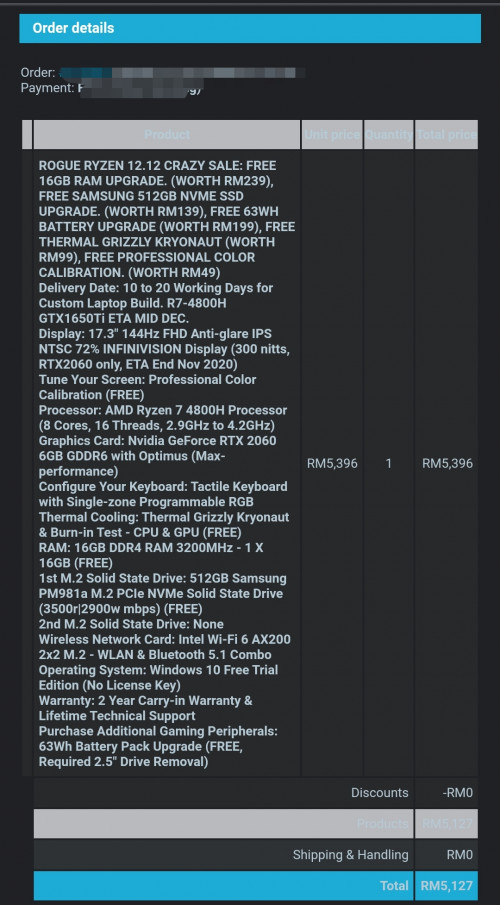
OK finally decided to order it. Now just hope for the best and that my order can ship quickly and that it won't be a lemon wish.gif
Nightstalker1993
post Dec 12 2020, 10:51 PM

M� �R�|�
*******
Senior Member
8,930 posts

Joined: Nov 2005
From: Subang Jaya


QUOTE(Mex17 @ Dec 12 2020, 10:31 PM)
Let see how fast they can ship the product...probably 1.5 month 😄
*
Support says 10-20 days. Just gonna pray for that
Nightstalker1993
post Dec 13 2020, 12:29 PM

M� �R�|�
*******
Senior Member
8,930 posts

Joined: Nov 2005
From: Subang Jaya


QUOTE(villager @ Dec 12 2020, 11:09 PM)
Please update once reveived, sir. Want to feel ur excite too
*
Yeah man, super excited! If only the laptop can arrive tomorrow then I would be even more excited laugh.gif

QUOTE(teamjoker @ Dec 13 2020, 08:56 AM)
Congrats joining us.
*
Thanks!

Any idea if the Rogue supports battery charge limiting? Would like to limit the charge level to 50-60% in order to lengthen the life of the batteries. I see some other TongFang and Clevo based laptop is able to do this in the BIOS if not mistaken but not sure if the Rogue model have this function.
Nightstalker1993
post Dec 30 2020, 06:26 PM

M� �R�|�
*******
Senior Member
8,930 posts

Joined: Nov 2005
From: Subang Jaya


QUOTE(enclashz @ Dec 30 2020, 12:39 PM)
Hi illegear,

I bought two usb-c docking station brand j5 and Ugreen. Tried to connect to monitor seems not working. Anything I need to enable first? Btw, I tested on two scenario as per below is working fine.

Tested:
1. handhone -> Docking (vga/hdmi) -> Monitor = OK
2. Dell laptop -> Docking (vga/hdmi) -> Monitor = OK
*
From what I understand, the USB-C port does not support external monitors.

Anyway guys, just received my Rogue Ryzen today and completely unannounced! Did not get any message on Whatsapp by the Marketing team or email that it had been shipped out, but GDEX magically appeared on my door today rclxm9.gif

So far still setting it up and moving stuff from my old laptop. Bought Windows 10 license on Shopee cheap cheap. cool2.gif The screen is soooooo much better than my old TN panel, and pretty amazing that today's 17" laptop can have the same physical footprint as my old 15" laptop.
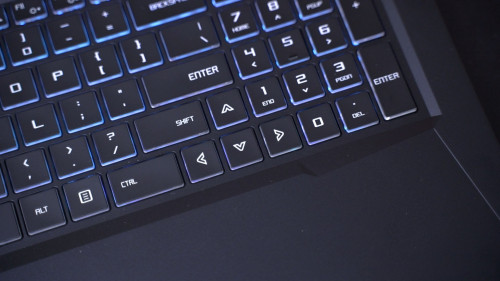

I for one am pretty satisfied with the speakers especially with THX Spatial Audio and the volume normalization turned on to increase the volumes of soft-playing videos etc. I actually turned down the brightness of keyboard backlighting as I don't want the lighting to be too distracting.

Still yet to put it through it's paces but so far seems pretty good. Overall pretty satisfied with my purchase. Build quality is pretty much as expected for the price, just kinda bummed I can't open the laptop with one hand unlike my old Lenovo. Wish there were more USB ports on the left side and for some reason the default mic was set to the mic jack instead of the internal mic. Keyboard wise I prefer the scissor-style keys of most common laptops as they are crisper but I guess I'll get used to these membrane keyboard pretty quickly.
Nightstalker1993
post Dec 31 2020, 12:29 AM

M� �R�|�
*******
Senior Member
8,930 posts

Joined: Nov 2005
From: Subang Jaya


QUOTE(teamjoker @ Dec 30 2020, 06:49 PM)
Congrats for the new machine. I looked up at your keyboard pictures. Looks brighter and easier to see

user posted image

Compared to the ionic keyboard

user posted image

I think the colour of the notebook makes a difference
*
Thanks! And same to you too. Yeap I'm even using the same colour keyboard backlight as in that picture, the backlight really do stand out more on black when compared to white/silver.

Just did some benchmark and CPU power went all the way up to 75w with boost mode but the GPU eventhough it is the refreshed 115w capable GPU, seems to be limited to 85-90w sad.gif

Thought I will have the full 115w GPU performance but looks like it is being artificially throttled. At the current power limit, GPU is at pretty cool 73c after running GFXBench.

QUOTE(Uncle Slowcum @ Dec 30 2020, 10:57 PM)
Hi Illegear,

I ordered my illegear Onyx V Ryzen (Order#198521) on 21/12/2020 and have recently contacted the illegear team to inquire about the status of my order and when it would be expected to be ready for collection. The first time i contacted them on 23/12/2020, i got a prompt response on email telling me that the "ETA for the order to be ready is 10-20 working days" and that stock would "arrive by next month". Based on this, my expectation would be mid jan. However, today on 30/12/2020 i contacted the illegear team again to get clarification about the status of my order and was told by email that the stock for my configuration will take some time to arrive and the message was "no ETA from manufacturing". I was then given an option to upgrade at a price in order to reduce waiting time. I replied saying i wanted to remain my oder as is and when further questioned about the eta, i got a reply estimating that stock would arrive "towards CNY 2021" which is around mid Feb. This is just the part when the parts arrive, assembly and testing will probably take some more time.. Using basic maths i can estimate that this is surely going to take up till late Feb (2 months) which more than 10-20 working days as stated in their emails??? Not sure why they bother to state 10-20 days if they are unable to achieve this. I have seen many other complaints on this forum about long delivery times and do not understand why they do not just state the real eta. If this takes too long i do not mind getting a refund.
*
Sorry to hear that brother, I'm guessing they are offering you an 'upgrade' to the Intel processors? Feeling quite lucky that my order took 18 days without any delays. Ryzen chips seem to be pretty hot now and demand is higher than supply.
Nightstalker1993
post Dec 31 2020, 01:53 AM

M� �R�|�
*******
Senior Member
8,930 posts

Joined: Nov 2005
From: Subang Jaya


QUOTE(Uncle Slowcum @ Dec 31 2020, 01:50 AM)
Yea man they offered me an upgrade but if course I need to pay for it. I just don't understand how illegear hasn't tried to improve on their producer delivery timing as it has been an issue for quite a she now with many people on this forum complaining!
*
What system did you order and what upgrade did they offer? If you ordered a Ryzen and they offer an Intel version, that isn't really an upgrade. But if you ordered a 4600h and they offer an upgade to the 4800h then that's not too bad.
Nightstalker1993
post Dec 31 2020, 02:51 PM

M� �R�|�
*******
Senior Member
8,930 posts

Joined: Nov 2005
From: Subang Jaya


QUOTE(Uncle Slowcum @ Dec 31 2020, 02:31 PM)
Hi guys,

Update: illegear have given me an option to upgrade my processor from my initial configuration of Ryzen 5 4600H GTX 1650 to Ryzen 7 4800H for RM299. If I stay with my current configuration it till probably take up till cny time as mentioned before. However if I choose to upgrade to the Ryzen 7, it "can be ready by mid to end of next week". Do you guys think it's worth the price? Please advice hehe, this is my first gaming laptop and I wouldn't consider myself to be an expert!

Thanks in advance.
*
Well for just extra RM299 you geet an extra 2 cores and performance that beats an I7-10850h. I for one went with th 4800h for future-proofing and also the RTX2060 can only be configured with the 4800h.

Not sure how much they are offering you to upgrade from 1650 to 1650ti, but from what I understand, the upgrade from 1650 to 1650ti is barely noticeable, while upgrading from 4600h to 4800h, you get 2 extra cores which is pretty significant depending on the task. But then again if you're using it purely for gaming, a higher end graphic card would be more noticeable compared to a higher end processor.
Nightstalker1993
post Dec 31 2020, 06:24 PM

M� �R�|�
*******
Senior Member
8,930 posts

Joined: Nov 2005
From: Subang Jaya


QUOTE(Prince J @ Dec 31 2020, 05:50 PM)
Yes power adapter has 1 year of warranty. You can also try to change power cord to check if the issue still persists.
*
Hi Prince J, would like to ask if it's possible to request from TF to make a bios for the Rogue Ryzen that enables you to set a custom max battery charge limit in order to extend the life of the batteries? Looks like more and more laptops recently are coming with this feature and it's even more important now that laptop batteries are using LiPo instead of LiIon like last time where the batteries can expand over time.
Nightstalker1993
post Jan 1 2021, 12:37 AM

M� �R�|�
*******
Senior Member
8,930 posts

Joined: Nov 2005
From: Subang Jaya


QUOTE(tiggywombat @ Dec 31 2020, 11:44 PM)
115W is not detectable by software. It's hardware enabled by TongFang. You can use a wattage meter, you will see that it draws more power.

Or check your GPU core clock speeds. Should be higher in turbo vs gaming mode
*
Interesting, I remember something like that in one of the other TF ODM reviews, forgot which one. My clock speed went up to 1920mhz, stabilizing around 1850mhz according to GPUID, not too sure what's the 90w RTX2060 supposed to be running at but if follow paper specs, mine is way above all of it sweat.gif

This post has been edited by Nightstalker1993: Jan 1 2021, 12:38 AM
Nightstalker1993
post Jan 1 2021, 01:15 AM

M� �R�|�
*******
Senior Member
8,930 posts

Joined: Nov 2005
From: Subang Jaya


QUOTE(tiggywombat @ Jan 1 2021, 12:44 AM)
I would use office mode if I were you. It would be more power-efficient, and help to maximize your laptop's lifespan. You'll still get a good gaming experience

Unless you don't care about those things and are chasing the maximum FPS

90W 2060 is around 1600Mhz
*
Actually I don't game, turbo mode for max performance when rendering video. Plus, already connected to the power outlet, don't really bother about power efficiency laugh.gif

All I know is that I tried rendering a video with the power unplugged and damn the speed dropped like 4 times. Rendering video GPU maxed out at around 25w if I remembered correctly which became a bottleneck so CPU utilization was low and only around 10w sweat.gif

Weird that the clock speed are way higher than Nvidia's official figures, thanks for the heads up!
Nightstalker1993
post Jan 1 2021, 01:32 AM

M� �R�|�
*******
Senior Member
8,930 posts

Joined: Nov 2005
From: Subang Jaya


QUOTE(Jared21 @ Jan 1 2021, 01:28 AM)
Thats typical battery performance haha. You could try to change some settings in the nvidia control panel to let the gpu boost higher if you need on battery but there will be a hard limit to how much it will boost without being plugged in to the wall
*
Yeah didn't expect the performance hit to be THAT bad. sweat.gif Now the Macbook M1 seems ungodly now that it can maintain the performance even unplugged.

Where in the Nvidia Control Panel can you set the GPU boost when unplugged?
Nightstalker1993
post Jan 2 2021, 03:57 PM

M� �R�|�
*******
Senior Member
8,930 posts

Joined: Nov 2005
From: Subang Jaya


Pro tip for those on AMD Ryzen, go into AMD Radeon Software and under Display, DISABLE the Vari-Bright option. It not only limits the max brightness of the display when on battery, but also screws up the colors especially dark colors greatly when unplugged which is very important if you're into content creation work. Was wondering why my edited video look so weird then I noticed it only happens on battery power, and also in my Windows dark UI it looks weird when unplugged as well. Did some researching around and found out this option was the culprit.
Nightstalker1993
post Jan 4 2021, 07:26 PM

M� �R�|�
*******
Senior Member
8,930 posts

Joined: Nov 2005
From: Subang Jaya


QUOTE(huislaw @ Jan 4 2021, 06:02 PM)
Do you guys think ONYX V RYZEN will be refreshed with Nvidia GeForce RTX 2070 8GB GDDR6 (Max-performance) soon (For 5K++) ?  hmm.gif
*
IMO, it will be quite some time until laptops with RTX30 series can actually be purchased. Maybe from the big brands it will be in a few months, but I would expect China ODMs to take slightly longer. If you don't need a laptop so soon I would say you're better off waiting.
Nightstalker1993
post Jan 9 2021, 02:39 PM

M� �R�|�
*******
Senior Member
8,930 posts

Joined: Nov 2005
From: Subang Jaya


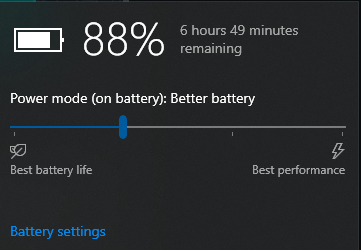
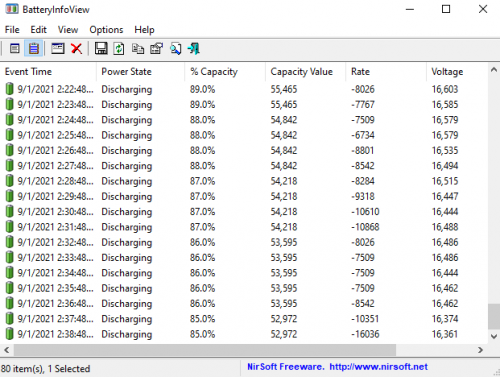
My Rogue Ryzen with Ryzen 7 4800h and 63wh battery after some startup tasks, services and task scheduler optimization icon_rolleyes.gif

Followed this guide mostly

https://www.reddit.com/r/thinkpad/comments/...tery_life_tips/

user posted image

The 'Rate' column is the power draw in MilliWatts. Value of 8000 would mean 8W, so for a 63wh battery, if constant draw of 8watts would give you 7.8 Hours of battery life, but realistically while browsing the net the current draw ranges from 8-12watts and idles around 6 watts. With monitor off I recorded current draw of 3+ watts. Previously it was drawing 15+ watts on idle and while using it goes fro 15-20 watts.

user posted image

This post has been edited by Nightstalker1993: Jan 9 2021, 02:42 PM
Nightstalker1993
post Jan 17 2021, 11:45 AM

M� �R�|�
*******
Senior Member
8,930 posts

Joined: Nov 2005
From: Subang Jaya


QUOTE(Jared21 @ Jan 11 2021, 03:14 PM)
Very nice! My Selenite can do about 6 hours or so with an undervolt and some services disabled as well. Gonna try more of the tweaks in the post
*
Your Selenite is Intel is it? AMD got no methods to undervolt AFAIK :sad:

Just be careful which service you disable. I accidentally disabled the service for THX audio and not sure which one to enable back, end up reinstalling it and needed to reinstall the thx app seperately as well

QUOTE(huislaw @ Jan 14 2021, 12:46 PM)
https://store.illegear.com/onyx-series/261-...-v-rtx3000.html
So now ONYX V has Nvidia GeForce RTX 3060  rclxm9.gif

Now need to choose the CPU
- AMD Ryzen 7 4800H Processor (8 Cores, 16 Threads, 2.9GHz to 4.2GHz) 
- 10th Gen. Intel Core i7-10875H (8 Cores, 16 Threads, 16M Cache, 2.3GHz to 5.1GHz)  [Add RM499]

For gaming, which one is better?

https://versus.com/en/amd-ryzen-7-4800h-vs-...-core-i7-10875h
AMD cheaper and seems like better.
Any reason to go for Intel instead of AMD ?  hmm.gif
*
I think gaming wise Intel might be better but AMD is more efficient and better for productivity I guess.

Also Intel have QuickSync for video rendering, speeds up video rendering time.
Nightstalker1993
post Jan 17 2021, 09:28 PM

M� �R�|�
*******
Senior Member
8,930 posts

Joined: Nov 2005
From: Subang Jaya


QUOTE(Jared21 @ Jan 17 2021, 03:50 PM)
Yep mine is 9th gen intel with the 2060. Initially had huge issues with c states thanks to an nvidia bug where the gpu was active all the time even when i was in  MSHybrid mode but luckily a driver update using nvcleaninstall worked.

I got rid of the THX/Creative software and just use the basic Realtek driver and windows equalizer. Much better than any software exp since its native to windows
*
For me the THX software made alot of difference to listening on speakers. The Normalize function greatly increases the volume of soft videos like on netflix or series.

Topic ClosedOptions
 

Change to:
| Lo-Fi Version
0.0814sec    0.49    7 queries    GZIP Disabled
Time is now: 9th December 2025 - 07:52 AM