Welcome Guest ( Log In | Register )

35 Pages « < 12 13 14 15 16 > » Bottom

Outline · [ Standard ] · Linear+

 ILLEGEAR Selenite Discussion Thread V1, world’s first 17.3” bezel-less laptop

views
     
SaiyanGoku
post Nov 29 2019, 10:49 PM

New Member
*
Junior Member
8 posts

Joined: Apr 2019
From: Hyderabad, India


QUOTE(oyama @ Nov 24 2019, 05:04 AM)
care to share what you did tweaks? notworthy.gif
*
I undervolted to -125 mv on both core and cache, disabled turboboost (throttlestop)
Followed these guides here:
http://forum.notebookreview.com/threads/gu...-states.815602/
https://www.tenforums.com/tutorials/72971-a...ns-windows.html
https://www.tenforums.com/tutorials/144700-...ndows-10-a.html
https://www.tenforums.com/tutorials/107718-...ndows-10-a.html

Set Core Parking Index to 17% via Quick Cpu
Set power plan to Battery Saving
Removed devices not in use,
Disabled keyboard backlit
Set screen to 60Hz and lowest brightness
Closed GPU and CPU monitoring softwares except the Command center
Switched off wifi
Got to Office Mode -> Advanced -> 1st fan option.

BUT FOR SOME REASON CAN'T GET LOWER C STATES bangwall.gif bangwall.gif
Also, in HWMonitor, "Uncore" is always consuming 11W while "Package" uses total of 13.5W rclxub.gif rclxub.gif

QUOTE(YVONNE@ILLEGEAR @ Nov 27 2019, 04:20 PM)
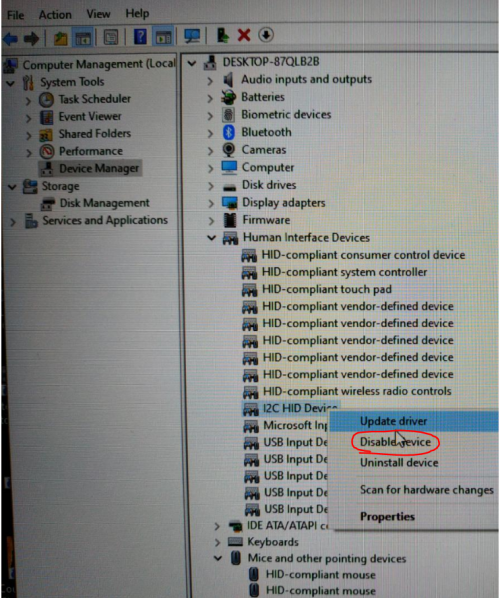
To disable the touchpad on Selenite model you may try to disable I2C HID Device under HUMAN INTERFACE DEVICES in the device manager.
It will permanently disable the touchpad. You can re-enable it back if you wish to after your dota section  laugh.gif 

user posted image
*
Would lowering PL values in registry make the TDP go even further down (like 10W)? Also, need help in lowering C state when idle.
oyama
post Nov 30 2019, 08:00 AM

Enthusiast
*****
Senior Member
925 posts

Joined: Jan 2006
From: Penang


QUOTE(SaiyanGoku @ Nov 29 2019, 10:49 PM)
I undervolted to -125 mv on both core and cache, disabled turboboost (throttlestop)
Followed these guides here:
http://forum.notebookreview.com/threads/gu...-states.815602/
https://www.tenforums.com/tutorials/72971-a...ns-windows.html
https://www.tenforums.com/tutorials/144700-...ndows-10-a.html
https://www.tenforums.com/tutorials/107718-...ndows-10-a.html

Set Core Parking Index to 17% via Quick Cpu
Set power plan to Battery Saving
Removed devices not in use,
Disabled keyboard backlit
Set screen to 60Hz and lowest brightness
Closed GPU and CPU monitoring softwares except the Command center
Switched off wifi
Got to Office Mode -> Advanced -> 1st fan option.

BUT FOR SOME REASON CAN'T GET LOWER C STATES  bangwall.gif  bangwall.gif
Also, in HWMonitor, "Uncore" is always consuming 11W while "Package" uses total of 13.5W  rclxub.gif  rclxub.gif
Would lowering PL values in registry make the TDP go even further down (like 10W)? Also, need help in lowering C state when idle.
*
wow didn't expect such detail.. thanks bro! but lotsa of work need to be done.. sweat.gif
GisixEX P
post Dec 1 2019, 02:09 AM

New Member
*
Probation
1 posts

Joined: Aug 2019


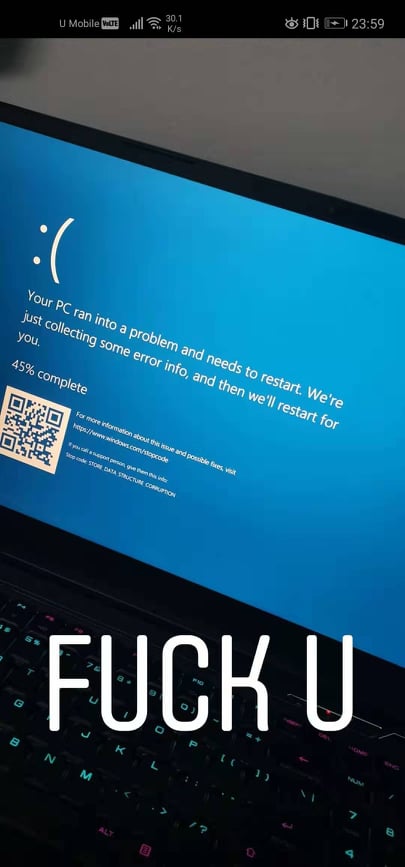
My selenite is having blue screen error now.
using memtest64 to check my ram, it shows no error so i think might not ram issue
im have disable my undervolt setting already, still getting blue screen
user posted image
Jared21
post Dec 1 2019, 03:16 PM

New Member
*
Newbie
2 posts

Joined: Aug 2015
QUOTE(SaiyanGoku @ Nov 29 2019, 10:49 PM)
I undervolted to -125 mv on both core and cache, disabled turboboost (throttlestop)
Followed these guides here:
http://forum.notebookreview.com/threads/gu...-states.815602/
https://www.tenforums.com/tutorials/72971-a...ns-windows.html
https://www.tenforums.com/tutorials/144700-...ndows-10-a.html
https://www.tenforums.com/tutorials/107718-...ndows-10-a.html

Set Core Parking Index to 17% via Quick Cpu
Set power plan to Battery Saving
Removed devices not in use,
Disabled keyboard backlit
Set screen to 60Hz and lowest brightness
Closed GPU and CPU monitoring softwares except the Command center
Switched off wifi
Got to Office Mode -> Advanced -> 1st fan option.

BUT FOR SOME REASON CAN'T GET LOWER C STATES  bangwall.gif  bangwall.gif
Also, in HWMonitor, "Uncore" is always consuming 11W while "Package" uses total of 13.5W  rclxub.gif  rclxub.gif
Would lowering PL values in registry make the TDP go even further down (like 10W)? Also, need help in lowering C state when idle.
*
Getting really annoyed that i cant get any C states lower than C3

PKG consumption on battery at 13 to 15w is unacceptable. Makes buying the 63whr battery a worthless purchase if you get the same battery life as the 47whr one
Prince J
post Dec 1 2019, 04:06 PM

Regular
******
Senior Member
1,272 posts

Joined: May 2010
From: Team ILLEGEAR


QUOTE(GisixEX @ Dec 1 2019, 02:09 AM)
My selenite is having blue screen error now.
using memtest64 to check my ram, it shows no error so i think might not ram issue
im have disable my undervolt setting already, still getting blue screen
*
Hi GisisEX,

May i know if you have contacted our support team +60 18-261 8599 (WhatsApp)? We are able to assist you on the BSOD.
SaiyanGoku
post Dec 1 2019, 08:17 PM

New Member
*
Junior Member
8 posts

Joined: Apr 2019
From: Hyderabad, India


QUOTE(Prince J @ Dec 1 2019, 01:36 PM)
Hi GisisEX,

May i know if you have contacted our support team +60 18-261 8599 (WhatsApp)? We are able to assist you on the BSOD.
*
Is there a firmware or driver update available for the Illegear branded ssd? Current driver is from 2006. I think that might be one of the reasons why C states aren't getting lowered.

user posted image
Jared21
post Dec 2 2019, 11:23 AM

New Member
*
Newbie
2 posts

Joined: Aug 2015
QUOTE(SaiyanGoku @ Dec 1 2019, 08:17 PM)
Is there a firmware or driver update available for the Illegear branded ssd? Current driver is from 2006. I think that might be one of the reasons why C states aren't getting lowered.

user posted image
*
does it say what drive it is in device manager? You can also use HWinfo or AS SSD or Crystal disk mark to find out the SSD model
Prince J
post Dec 2 2019, 04:13 PM

Regular
******
Senior Member
1,272 posts

Joined: May 2010
From: Team ILLEGEAR


QUOTE(SaiyanGoku @ Dec 1 2019, 08:17 PM)
Is there a firmware or driver update available for the Illegear branded ssd? Current driver is from 2006. I think that might be one of the reasons why C states aren't getting lowered.

user posted image
*
Hi SaiyanGoku

As per checking, the version here is the driver & OS in the SSD, not the firmware.
SaiyanGoku
post Dec 3 2019, 01:24 AM

New Member
*
Junior Member
8 posts

Joined: Apr 2019
From: Hyderabad, India


QUOTE(Jared21 @ Dec 2 2019, 08:53 AM)
does it say what drive it is in device manager? You can also use HWinfo or AS SSD or Crystal disk mark to find out the SSD model
*
No, it is the same everywhere. sad.gif

QUOTE(Prince J @ Dec 2 2019, 01:43 PM)
Hi SaiyanGoku

As per checking, the version here is the driver & OS in the SSD, not the firmware.
*
https://store.illegear.com/extreme-performa...lenite-pro.html

That 93 Wh battery seems sweet! Would it fit Selenite as well?
AZIM@ILLEGEAR
post Dec 3 2019, 11:53 AM

New Member
*
Junior Member
28 posts

Joined: Feb 2017
From: Team ILLEGEAR


QUOTE(SaiyanGoku @ Dec 3 2019, 01:24 AM)
That 93 Wh battery seems sweet! Would it fit Selenite as well?
*
Hi SaiyanGoku, we haven't tested the compatibility yet but we shall officially announce if it is & available as an upgrade option later smile.gif
Jared21
post Dec 3 2019, 06:33 PM

New Member
*
Newbie
2 posts

Joined: Aug 2015
QUOTE(AZIM@ILLEGEAR @ Dec 3 2019, 11:53 AM)
Hi SaiyanGoku, we haven't tested the compatibility yet but we shall officially announce if it is & available as an upgrade option later smile.gif
*
Has there been any update on how to get lower C states? My machine is basically stuck at C3

I've just finished a full clean install with NV Cleaninstall and i still cannot get more than 2 hours on full battery saving mode. Also got a very agrressive -180mv undervolt set. Theres no way this machine can last me more than one class without having to bring the power brick along

NGL its getting really annoying trying every trick i can find to get lower c states. 15w pkg power on battery is insane. My X7 without Optimus could last me at least 4 hours on a good day with 3 and a half hours being the norm
AZIM@ILLEGEAR
post Dec 3 2019, 07:19 PM

New Member
*
Junior Member
28 posts

Joined: Feb 2017
From: Team ILLEGEAR


QUOTE(Jared21 @ Dec 3 2019, 06:33 PM)
Has there been any update on how to get lower C states? My machine is basically stuck at C3

I've just finished a full clean install with NV Cleaninstall and i still cannot get more than 2 hours on full battery saving mode. Also got a very agrressive -180mv undervolt set. Theres no way this machine can last me more than one class without having to bring the power brick along

NGL its getting really annoying trying every trick i can find to get lower c states. 15w pkg power on battery is insane. My X7 without Optimus could last me at least 4 hours on a good day with 3 and a half hours being the norm
*
Hi Jared, we can try to perform a remote diagnosis on this matter for an effective resolution. However for easier communication, you may liaise with our Support Team directly via our Support Line by using the number below:

018-261 8599 (WhatsApp)
YVONNE@ILLEGEAR
post Dec 3 2019, 07:22 PM

New Member
*
Newbie
2 posts

Joined: Nov 2017
From: Team ILLEGEAR


QUOTE(GisixEX @ Dec 1 2019, 02:09 AM)
My selenite is having blue screen error now.
using memtest64 to check my ram, it shows no error so i think might not ram issue
im have disable my undervolt setting already, still getting blue screen
user posted image
*
Hi, very sorry for your laptop issue. Is it okay for you to send in your laptop to us for diagnosis?

Lucas94
post Dec 4 2019, 01:45 PM

New Member
*
Junior Member
9 posts

Joined: Jul 2013
Hi all,

Just made an order for the Selenite with RTX2060.

Hopefully will be ready by early next week. I've got some comments on how Illegear's sales service can improve. But will keep that to a separate post.

That said, it's my first time owning a gaming laptop/pc of sorts, so but have my reservations on too as I see so many different aspects such as undervolting, checking C-States etc.

Anyone got any tips for a first time Selenite and gaming laptop owner? smile.gif)

- What is GPU Max Performance and boost vs normal one?
- Read some mixed opinions on Selenites thermals for CPU especially. Is this a cause for concern?
- Are battery issues related to C-State something I should prep for?
- How's everyone's experience so far?

Thanks and cheers!

This post has been edited by Lucas94: Dec 4 2019, 01:45 PM
Jared21
post Dec 4 2019, 02:46 PM

New Member
*
Newbie
2 posts

Joined: Aug 2015
QUOTE(Lucas94 @ Dec 4 2019, 01:45 PM)
Hi all,

Just made an order for the Selenite with RTX2060.

Hopefully will be ready by early next week. I've got some comments on how Illegear's sales service can improve. But will keep that to a separate post.

That said, it's my first time owning a gaming laptop/pc of sorts, so but have my reservations on too as I see so many different aspects such as undervolting, checking C-States etc.

Anyone got any tips for a first time Selenite and gaming laptop owner? smile.gif)

- What is GPU Max Performance and boost vs normal one?
- Read some mixed opinions on Selenites thermals for CPU especially. Is this a cause for concern?
- Are battery issues related to C-State something I should prep for?
- How's everyone's experience so far?

Thanks and cheers!
*
1. GPU boost on my unit pushes the 2060 to close to 2000mhz. Personally dont use it as i use a frame limiter but for more demanding games it can give a decent boost to your frame rate.

2. I personally think that the thermals have more to do with the amount of airflow the fans are getting. Running max fans while the laptop is on a table and when its raised a bit did give me a noticeable change to the pitch of the fans indicating that they may be a bit starved of air. Would recommend propping the laptop up when you plan on gaming. It may also be related to pump out of thermal paste. Kryonaut is not very thick and can pump out quite easily. There have also been posts on the notebookreview forums of their kryonaut drying out quickly.

3. This one is hard to pinpoint and seems to be really dependent on your unit. To see if you have this issue, use throtlestop and disconnect from wall power. Switch on everything related to battery saving. On the main window of Throttlestop, watch your package power. If its more than just a couple of watts you have the C state problem. Click on the C10 button and watch your package C state percentage. Try this guide out if you have that issue: http://forum.notebookreview.com/threads/gu...-states.815602/

4. I honestly love this laptop. It can run almost anything you throw at it (within reason of course) and not break a sweat. But as with most laptops out there, tweaking is needed to utilize its full potential. Here are a few things you may want to take note of:

a) immediately undervolt using throttlestop. I have also taken the CPU boost down a couple of levels to manage temps more. Currently on a -180mv for core and -80mv for cache with 6 core boost at 3.9Ghz.

b) Have illegear update your BIOS and EC to the latest one and have command center 1.0.50 installed. The previous version did not bring down PL1 and PL2 for office mode to 35w and left it at its default 70w

c) Your display will either be something from BOE or if you're lucky, Chi Mei. If you get the BOE panel (BOE07B6) it will have PWM to control its brightness and you may or may not notice flickering on your panel depending on your sensitivity to it.

d) Repaste with a thicker thermal paste. Barebones laptops are notorious for uneven heatsinks. Kryonaut (if you chose this option) is not very thick and can pump out quite easily leading to uneven core temps and eventually higher CPU temps in the long run as i noted above. Drying out is also a real possibility. You can read the description for Kryonaut on TG's website. Theres a reason why Kryonaut is sought after for LN2 overclocking and not your standard systems. I would recommend CM Master Maker Gel (11w/mk) Its much thicker hence it shouldn't pump out easily or dry up as quickly as Kryonaut does. DO NOT USE LIQUID METAL UNLESS YOU WANT TO SAY BYE BYE TO YOUR WARRANTY

e) In conjunction with the thermal paste, get something to prop up the back of your laptop to allow your fans to breathe fully. Or a cooling pad. I use a Notepal U3

Illegear has some great pre sale service and their staff are very knowledgeable on their products, But i do agree that their aftersales could use some work and i hope that they can be more transparent with whatever issues that are present on their laptops. Its what makes resellers like them stand out from the crowd. Perhaps they can use the community interaction that Western resellers like XMG and HIDEvolution have with the enthusiast community as a starting point. Those two companies are very active on forums and aim to help their customers as much as possible and keep the community informed of the happenings behind the scenes as well

I hope that they see this as constructive feedback and not as just bashing them. I have absolutely no qualms with anyone at Illegear and i really love what they're doing. But at the same time i'm hoping that they can improve in every way possible. Illegear was where i got my first proper gaming laptop and i will definitely continue to support them. Plus, who knows, maybe i'll even apply to join them some day! Its always been a goal of mine to be able to work around custom machines with a team of fellow enthusiasts thumbup.gif
eugenelimys
post Dec 4 2019, 03:43 PM

On my way
****
Senior Member
639 posts

Joined: Dec 2010
From: Nowhere; Anywhere; Somewhere


Do you guys actually get a 17" backpack to bring your laptop around? I'm tempted to get the selenite pro rather than the onyx pro mainly due to the battery life difference . But I'm worried the laptop won't fit into my current backpack haha
Jared21
post Dec 4 2019, 03:48 PM

New Member
*
Newbie
2 posts

Joined: Aug 2015
QUOTE(eugenelimys @ Dec 4 2019, 03:43 PM)
Do you guys actually get a 17" backpack to bring your laptop around? I'm tempted to get the selenite pro rather than the onyx pro mainly due to the battery life difference . But I'm worried the laptop won't fit into my current backpack haha
*
A 15in one should be good enough. Just convert its dimensions in to inches. My Selenite fits fine in to a 15 bag
eugenelimys
post Dec 4 2019, 04:25 PM

On my way
****
Senior Member
639 posts

Joined: Dec 2010
From: Nowhere; Anywhere; Somewhere


QUOTE(Jared21 @ Dec 4 2019, 03:48 PM)
A 15in one should be good enough. Just convert its dimensions in to inches. My Selenite fits fine in to a 15 bag
*
Ahh ok.. so a snug fit?
Jared21
post Dec 4 2019, 04:33 PM

New Member
*
Newbie
2 posts

Joined: Aug 2015
QUOTE(eugenelimys @ Dec 4 2019, 04:25 PM)
Ahh ok.. so a snug fit?
*
Pretty snug. Would personally recommend a 17 in one if you want a bit more space around the zips
Lucas94
post Dec 5 2019, 12:27 AM

New Member
*
Junior Member
9 posts

Joined: Jul 2013
QUOTE(Jared21 @ Dec 4 2019, 02:46 PM)
1. GPU boost on my unit pushes the 2060 to close to 2000mhz. Personally dont use it as i use a frame limiter but for more demanding games it can give a decent boost to your frame rate.

2. I personally think that the thermals have more to do with the amount of airflow the fans are getting. Running max fans while the laptop is on a table and when its raised a bit did give me a noticeable change to the pitch of the fans indicating that they may be a bit starved of air. Would recommend propping the laptop up when you plan on gaming. It may also be related to pump out of thermal paste. Kryonaut is not very thick and can pump out quite easily. There have also been posts on the notebookreview forums of their kryonaut drying out quickly.

3. This one is hard to pinpoint and seems to be really dependent on your unit. To see if you have this issue, use throtlestop and disconnect from wall power. Switch on everything related to battery saving. On the main window of Throttlestop, watch your package power. If its more than just a couple of watts you have the C state problem. Click on the C10 button and watch your package C state percentage. Try this guide out if you have that issue: http://forum.notebookreview.com/threads/gu...-states.815602/

4. I honestly love this laptop. It can run almost anything you throw at it (within reason of course) and not break a sweat. But as with most laptops out there, tweaking is needed to utilize its full potential. Here are a few things you may want to take note of:

a) immediately undervolt using throttlestop. I have also taken the CPU boost down a couple of levels to manage temps more. Currently on a -180mv for core and -80mv for cache with 6 core boost at 3.9Ghz.

b) Have illegear update your BIOS and EC to the latest one and have command center 1.0.50 installed. The previous version did not bring down PL1 and PL2 for office mode to 35w and left it at its default 70w

c) Your display will either be something from BOE or if you're lucky, Chi Mei. If you get the BOE panel (BOE07B6) it will have PWM to control its brightness and you may or may not notice flickering on your panel depending on your sensitivity to it.

d) Repaste with a thicker thermal paste. Barebones laptops are notorious for uneven heatsinks. Kryonaut (if you chose this option) is not very thick and can pump out quite easily leading to uneven core temps and eventually higher CPU temps in the long run as i noted above. Drying out is also a real possibility. You can read the description for Kryonaut on TG's website. Theres a reason why Kryonaut is sought after for LN2 overclocking and not your standard systems. I would recommend CM Master Maker Gel (11w/mk) Its much thicker hence it shouldn't pump out easily or dry up as quickly as Kryonaut does. DO NOT USE LIQUID METAL UNLESS YOU WANT TO SAY BYE BYE TO YOUR WARRANTY

e) In conjunction with the thermal paste, get something to prop up the back of your laptop to allow your fans to breathe fully. Or a cooling pad. I use a Notepal U3

Illegear has some great pre sale service and their staff are very knowledgeable on their products, But i do agree that their aftersales could use some work and i hope that they can be more transparent with whatever issues that are present on their laptops. Its what makes resellers like them stand out from the crowd. Perhaps they can use the community interaction that Western resellers like XMG and HIDEvolution have with the enthusiast community as a starting point. Those two companies are very active on forums and aim to help their customers as much as possible and keep the community informed of the happenings behind the scenes as well

I hope that they see this as constructive feedback and not as just bashing them. I have absolutely no qualms with anyone at Illegear and i really love what they're doing. But at the same time i'm hoping that they can improve in every way possible. Illegear was where i got my first proper gaming laptop and i will definitely continue to support them. Plus, who knows, maybe i'll even apply to join them some day! Its always been a goal of mine to be able to work around custom machines with a team of fellow enthusiasts  thumbup.gif

*
Amazing, thanks so much for the detailed and comprehensive tip! biggrin.gif It's exactly what I needed for someone who has very little to no experience on gaming on PC let alone Laptop.

Appreciate it.

Quick question, in regards to laptops, if the fans are on Turbo constantly to help manage the temps - aside from the noise; is it bad for the laptop?

Looking forward to the Selenite!

35 Pages « < 12 13 14 15 16 > » Top
 

Change to:
| Lo-Fi Version
0.0310sec    0.56    6 queries    GZIP Disabled
Time is now: 4th December 2025 - 05:41 PM