Outline ·
[ Standard ] ·
Linear+
ILLEGEAR Selenite Discussion Thread V1, world’s first 17.3” bezel-less laptop
|
tidus88
|
 Nov 23 2019, 01:38 PM Nov 23 2019, 01:38 PM
|
New Member


|
Just got my laptop today. Sunday night made payment and receive by Saturday Morning through postage.
In overall, I'm satisfied with this laptop. I did a clean installation of Windows 10 Pro 64 bits with digital keys and so far no problem yet.
Just wonder
1.do we have any ShortKey to change our keylit Profile 1-5 in the illegear command center?
2. Any way to disable the double touch on off touch pad? Sometimes I accidentally turn on the touch pad when I gaming.
3. How to make my keyboard light on forever? Mine will shut off if I afk 1 min.
This post has been edited by tidus88: Nov 23 2019, 02:53 PM
|
|
|
|
|
|
JaredTan21
|
Nov 23 2019, 08:12 PM
|
New Member
|
QUOTE(tidus88 @ Nov 23 2019, 01:38 PM) Just got my laptop today. Sunday night made payment and receive by Saturday Morning through postage. In overall, I'm satisfied with this laptop. I did a clean installation of Windows 10 Pro 64 bits with digital keys and so far no problem yet. Just wonder 1.do we have any ShortKey to change our keylit Profile 1-5 in the illegear command center? 2. Any way to disable the double touch on off touch pad? Sometimes I accidentally turn on the touch pad when I gaming. 3. How to make my keyboard light on forever? Mine will shut off if I afk 1 min. 1) Dont think that there is any shortcut or macro to switch between the profiles in the command center 2) You can look under windows touchpad settings where it disables itself whenever it detects that an external mouse is plugged in 3) Is your command center version 1.0.0.45? If it is, then you need to get the latest one on the support page for the Selenite. It fixes that isuse |
|
|
|
|
|
tidus88
|
Nov 23 2019, 08:51 PM
|
New Member
|
QUOTE(JaredTan21 @ Nov 23 2019, 08:12 PM) 1) Dont think that there is any shortcut or macro to switch between the profiles in the command center 2) You can look under windows touchpad settings where it disables itself whenever it detects that an external mouse is plugged in 3) Is your command center version 1.0.0.45? If it is, then you need to get the latest one on the support page for the Selenite. It fixes that isuse Alright thanks! The fan is pretty loud when I play dota. Love the laptop anyway 👍👍👍 |
|
|
|
|
|
JaredTan21
|
Nov 23 2019, 09:59 PM
|
New Member
|
QUOTE(tidus88 @ Nov 23 2019, 08:51 PM) Alright thanks! The fan is pretty loud when I play dota. Love the laptop anyway 👍👍👍 Use Throttlestop to undervolt and underclock. My CPU runs quite toasty even with a frame limit set. If you not that confident in doing that, just put something like a thick highlighter pen below the laptop in the middle to raise it up. I've done a couple of small tests and can safely say that the laptop is not receiving enough air due to its feet being too short |
|
|
|
|
|
oyama
|
Nov 24 2019, 07:31 AM
|
|
|
QUOTE(tidus88 @ Nov 23 2019, 01:38 PM) Just got my laptop today. Sunday night made payment and receive by Saturday Morning through postage. In overall, I'm satisfied with this laptop. I did a clean installation of Windows 10 Pro 64 bits with digital keys and so far no problem yet. Just wonder 1.do we have any ShortKey to change our keylit Profile 1-5 in the illegear command center? 2. Any way to disable the double touch on off touch pad? Sometimes I accidentally turn on the touch pad when I gaming. 3. How to make my keyboard light on forever? Mine will shut off if I afk 1 min. 2. you can double tap on the top left side of the touch pad to switch it on and off.. there is one tiny light and notification pop up indicating when you are doing so.. |
|
|
|
|
|
oyama
|
Nov 24 2019, 07:34 AM
|
|
|
QUOTE(SaiyanGoku @ Nov 16 2019, 03:36 PM) Finally, after trying out multiple tweaks and tricks, got to about 5 hrs on stock battery (or at least what windows reports it to be).  Yes, I've noticed the same for points 1 and 3. Haven't checked for point 2. care to share what you did tweaks?  |
|
|
|
|
|
tidus88
|
Nov 24 2019, 11:06 AM
|
New Member
|
QUOTE(JaredTan21 @ Nov 23 2019, 09:59 PM) Use Throttlestop to undervolt and underclock. My CPU runs quite toasty even with a frame limit set. If you not that confident in doing that, just put something like a thick highlighter pen below the laptop in the middle to raise it up. I've done a couple of small tests and can safely say that the laptop is not receiving enough air due to its feet being too short Hello. I'm getting some error msg installing ThrottleStop. However I went into bios setting and saw the adjustable value is only 50mv to - 50mv. The default value is 50mv. So to undervolt I should change the value to - 50 to get - 100mv? The fan noise is quite loud playing dota. Gonna be annoying when my gf sleeps and the fan noise is loud. I found that "Balance mode" in power option give better temperature than "High performance" mode. It works well too. |
|
|
|
|
|
JaredTan21
|
Nov 24 2019, 11:41 AM
|
New Member
|
QUOTE(tidus88 @ Nov 24 2019, 11:06 AM) Hello. I'm getting some error msg installing ThrottleStop. However I went into bios setting and saw the adjustable value is only 50mv to - 50mv. The default value is 50mv. So to undervolt I should change the value to - 50 to get - 100mv? The fan noise is quite loud playing dota. Gonna be annoying when my gf sleeps and the fan noise is loud. I found that "Balance mode" in power option give better temperature than "High performance" mode. It works well too. The BIOS now only allows that -50mv offset. The older bios used to be able to give you a lot more options. What error are you getting? Its quite simply, unzip the file and launch the exe file. |
|
|
|
|
|
tidus88
|
Nov 24 2019, 01:11 PM
|
New Member
|
QUOTE(JaredTan21 @ Nov 24 2019, 11:41 AM) The BIOS now only allows that -50mv offset. The older bios used to be able to give you a lot more options. What error are you getting? Its quite simply, unzip the file and launch the exe file. Solved. MSVCR120.dll is missing. Did i do it correctly anyway? 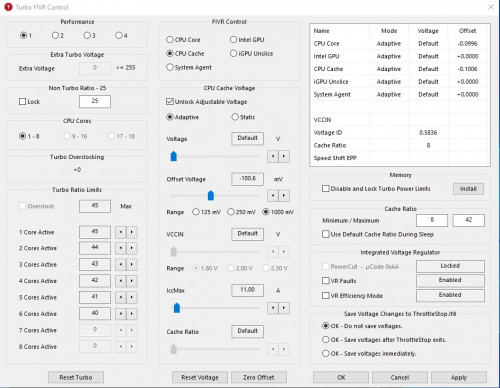 |
|
|
|
|
|
JaredTan21
|
Nov 24 2019, 10:14 PM
|
New Member
|
QUOTE(tidus88 @ Nov 24 2019, 01:11 PM) Solved. MSVCR120.dll is missing. Did i do it correctly anyway? Yea thats about right for a standard undervolt. If you want to go lower on the core, just start a stress test and slowly go down in increments of 10. Make sure to also click save voltages once throttlestop exits |
|
|
|
|
|
JaredTan21
|
Nov 25 2019, 01:52 AM
|
New Member
|
Illegear staff:
Does anyone know how to get lower C states on this laptop?
When all power saving features are enabled, the deepest state this laptop can reach is C2 and C3 and its pulling up to 15w on package power while idling plugged in and on battery. This is also leading to idle temps being quite high when it shouldn't be and the fans spinning up and down aggressively
The most my battery can last is a stupidly low 2 hours with the 63whr battery with an extremely aggressive undervolt and all power saving features enabled.
Theres no way this can be right.
This post has been edited by JaredTan21: Nov 25 2019, 02:02 AM
|
|
|
|
|
|
tidus88
|
Nov 25 2019, 10:32 AM
|
New Member
|
QUOTE(JaredTan21 @ Nov 24 2019, 10:14 PM) Yea thats about right for a standard undervolt. If you want to go lower on the core, just start a stress test and slowly go down in increments of 10. Make sure to also click save voltages once throttlestop exits Thanks a lot! |
|
|
|
|
|
tidus88
|
Nov 25 2019, 10:31 PM
|
New Member
|
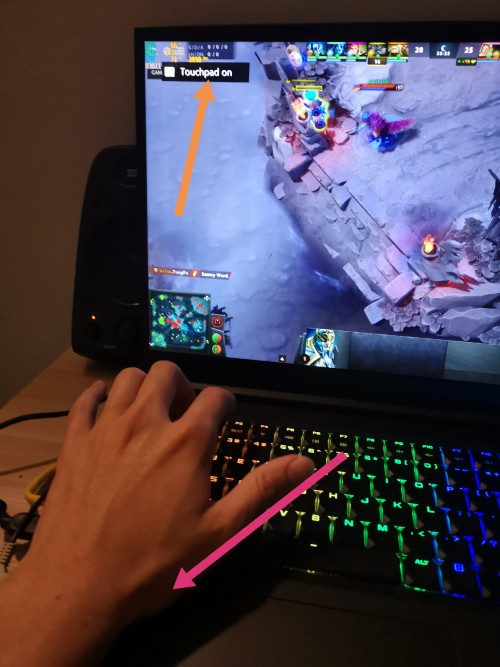 Sorry but none of you have this problem? When I play Dota 2 in full screen mode and sometimes my palm accidentally activated the touch pad and the game tab into desktop because if the notification. I feel putting at that location is really a bad idea... Is there anywhere to completely off that particular thing? We have Fn + F5 to on/off touchpad... I feel that button at touchpad is really annoying. |
|
|
|
|
|
JaredTan21
|
Nov 26 2019, 03:05 PM
|
New Member
|
QUOTE(tidus88 @ Nov 25 2019, 10:31 PM) Sorry but none of you have this problem? When I play Dota 2 in full screen mode and sometimes my palm accidentally activated the touch pad and the game tab into desktop because if the notification. I feel putting at that location is really a bad idea... Is there anywhere to completely off that particular thing? We have Fn + F5 to on/off touchpad... I feel that button at touchpad is really annoying. Interesting. My unit's touchpad has not come on accidentally while playing games. If you dont use your touchpad that often, then maybe its worth disabling it completely in device manager since your external mouse would be your primary device? Or you could look deeper in to touchpad settings and find if there is an option of keeping the touchpad disabled whenever the laptop detects that an external mouse is plugged in. I know ELAN touchpads have that option but this is my first laptop with an MS Precision one so it may or may not have that option. |
|
|
|
|
|
tidus88
|
Nov 26 2019, 04:40 PM
|
New Member
|
QUOTE(JaredTan21 @ Nov 26 2019, 03:05 PM) Interesting. My unit's touchpad has not come on accidentally while playing games. If you dont use your touchpad that often, then maybe its worth disabling it completely in device manager since your external mouse would be your primary device? Or you could look deeper in to touchpad settings and find if there is an option of keeping the touchpad disabled whenever the laptop detects that an external mouse is plugged in. I know ELAN touchpads have that option but this is my first laptop with an MS Precision one so it may or may not have that option. It keeps on and off lol... Oh well my solution is putting sticker on it lol. Disable touch pad won't stop it from on and off the touchpad, even with mouse on. - Still on and off. Anyone dismember this unit before? I'm thinking of pulling off the wire connection of the touchpad. Extremely annoying. 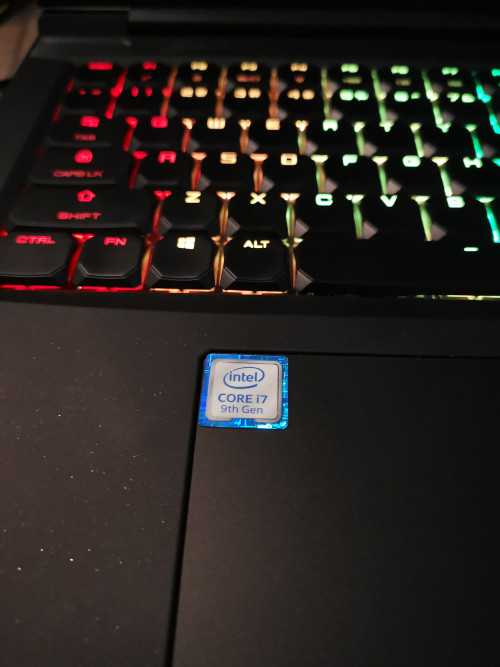 This post has been edited by tidus88: Nov 26 2019, 07:21 PM This post has been edited by tidus88: Nov 26 2019, 07:21 PM |
|
|
|
|
|
YVONNE@ILLEGEAR
|
Nov 27 2019, 06:50 PM
|
New Member
|
QUOTE(JaredTan21 @ Nov 26 2019, 03:05 PM) Interesting. My unit's touchpad has not come on accidentally while playing games. If you dont use your touchpad that often, then maybe its worth disabling it completely in device manager since your external mouse would be your primary device? Or you could look deeper in to touchpad settings and find if there is an option of keeping the touchpad disabled whenever the laptop detects that an external mouse is plugged in. I know ELAN touchpads have that option but this is my first laptop with an MS Precision one so it may or may not have that option. To disable the touchpad on Selenite model you may try to disable I2C HID Device under HUMAN INTERFACE DEVICES in the device manager. It will permanently disable the touchpad. You can re-enable it back if you wish to after your dota section  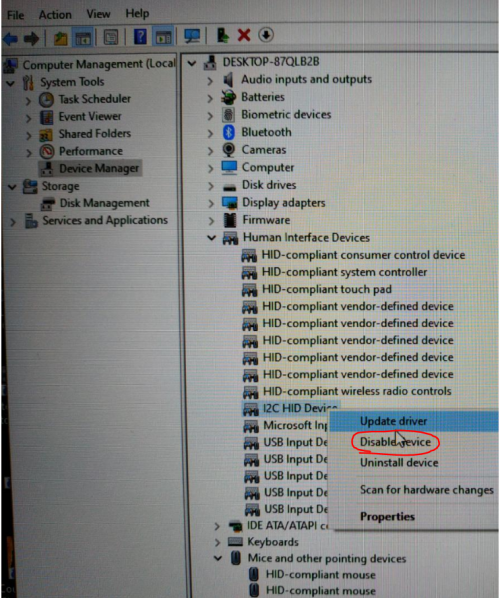 |
|
|
|
|
|
tidus88
|
Nov 27 2019, 08:09 PM
|
New Member
|
QUOTE(YVONNE@ILLEGEAR @ Nov 27 2019, 06:50 PM) To disable the touchpad on Selenite model you may try to disable I2C HID Device under HUMAN INTERFACE DEVICES in the device manager. It will permanently disable the touchpad. You can re-enable it back if you wish to after your dota section It works! Really thanks! Hahah |
|
|
|
|
|
Jared21
|
Nov 28 2019, 12:18 AM
|
New Member
|
How do we change the crossover frequency in the sound blaster software?
My bar keeps jumping from 50 to 80hz and its greyed out. Can't change the value whatsoever
|
|
|
|
|
|
YVONNE@ILLEGEAR
|
Nov 28 2019, 04:36 PM
|
New Member
|
QUOTE(Jared21 @ Nov 28 2019, 12:18 AM) How do we change the crossover frequency in the sound blaster software? My bar keeps jumping from 50 to 80hz and its greyed out. Can't change the value whatsoever Can you provide us a picture of the crossover frequency that is grey out section ? |
|
|
|
|
|
Jared21
|
Nov 29 2019, 06:48 PM
|
New Member
|
QUOTE(YVONNE@ILLEGEAR @ Nov 28 2019, 04:36 PM) Can you provide us a picture of the crossover frequency that is grey out section ? Attached below. Also, any word on how to deal with the C states issue. Still cant get it below C3 and its really draining my battery Attached thumbnail(s)
|
|
|
|
|



 Quote
Quote


 0.0277sec
 0.78
0.78
 6 queries
 GZIP Disabled