

Anyone tried change pack and get error message?
Verification Failed
Request parameter {0} is empty.
Unifi TV Ver 2, Formerly known as HyppTV
Unifi TV Ver 2, Formerly known as HyppTV
|
|
 Oct 22 2025, 08:39 PM Oct 22 2025, 08:39 PM
|
 
Senior Member
3,032 posts Joined: Dec 2011  
|
Anyone tried change pack and get error message?
Verification Failed Request parameter {0} is empty. |
|
|
|
|
|
Oct 23 2025, 10:57 AM
|

Junior Member
172 posts Joined: Jul 2011
|
QUOTE(jusbella @ Oct 22 2025, 08:39 PM) Anyone tried change pack and get error message? yes , i also encounter the same errorVerification Failed Request parameter {0} is empty.  jusbella liked this post
|
|
|
Oct 23 2025, 01:56 PM
Show posts by this member only | IPv6 | Post
#8763
|
|
Senior Member
1,024 posts Joined: Jun 2019
|
QUOTE(jusbella @ Oct 22 2025, 08:39 PM) Anyone tried change pack and get error message? Verification Failed Request parameter {0} is empty. QUOTE(space_boy_88 @ Oct 23 2025, 10:57 AM) yes , i also encounter the same error From Unifi TV Portal or MyUnifi/Unifi UniVerse app? |
|
|
Oct 23 2025, 02:39 PM
|
|
Junior Member
172 posts Joined: Jul 2011
|
QUOTE(doubleM2 @ Oct 23 2025, 01:56 PM) From Unifi TV Portal or MyUnifi/Unifi UniVerse app? Unifi Selfcare Portal |
|
|
Oct 23 2025, 02:42 PM
Show posts by this member only | IPv6 | Post
#8765
|
|
Senior Member
3,032 posts Joined: Dec 2011
|
QUOTE(doubleM2 @ Oct 23 2025, 01:56 PM) From Unifi TV Portal or MyUnifi/Unifi UniVerse app? Selfcare and MyUnifi apps. Universe I can't as I'm from legacy plan vip 20 until 800mbps. |
|
|
Oct 23 2025, 09:56 PM
|
|
Junior Member
369 posts Joined: Sep 2018
|
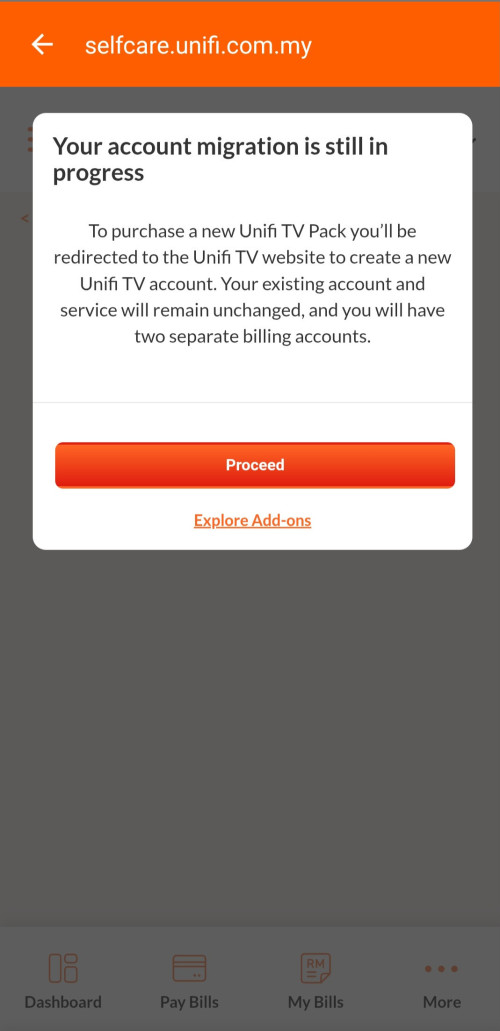
That's mean i can migrate unifi tv pack to the new packs. Then i will have to separate bill..🤔🤔
 |
|
|
|
|
|
Oct 23 2025, 10:54 PM
Show posts by this member only | IPv6 | Post
#8767
|
|
Senior Member
3,032 posts Joined: Dec 2011
|
QUOTE(amirul hafizz @ Oct 23 2025, 09:56 PM) That's mean i can migrate unifi tv pack to the new packs. Then i will have to separate bill..🤔🤔 U can proceed, but you'll get error after that.------------------------------------------------------- Edit:- Anyway I manage to load selfcare change package after few days / week keep error Hey! We're on it! You will be contacted by our Unifi Representative from number 03-2021 7625 or 03-2021 7915. Thank you and enjoy your Unifi TV! Anda akan dihubungi oleh Wakil Unifi kami dari nombor 03-2021 7625 or 03-2021 7915. Terima kasih dan nikmati Unifi TV anda! Reference No. / No. Rujukan xxxxxx Your order Plan Ying Xiong Pack RM21.00 /month Selected TV Pack Ying Xiong Pack Monthly total Charged on your monthly bill. RM21.00/month This post has been edited by jusbella: Oct 23 2025, 11:32 PM |
|
|
Oct 24 2025, 03:03 PM
|
|
Senior Member
3,032 posts Joined: Dec 2011
|
Just update on my last post.
I received whatsapp from unifi Hi XXXXXX, Referring to your application as below: Application Reference No.: 1-XXXXXXX Preferred Unifi TV Pack: Ying Xiong Pack Please follow the steps below to add on your preferred Unifi TV Pack without changing your existing internet plan. 1. Go to www.unifi.com.my/new 2. Select your preferred Unifi TV Pack 3. When the pop-up “ARE YOU A UNIFI CUSTOMER (HOME OR MOBILE)?” appears, click “YES” 4. A pop-up will appear promoting the 30-day Free Trial – click “REDEEM NOW” 5. You will see an option for the 30-day Trial. Click on the drop-down menu and select your preferred TV Pack 6. Follow the on-screen steps to complete your TV Pack selection, eKYC verification, and create your Unifi TV ID 7. Once completed, sign in with your new Unifi TV ID (e.g. example@iptv) on the Unifi TV 2.0 app, available on mobile phones, tablets, or smart TVs After completing the steps above, a separate account will be created for your Unifi TV Pack add-on. Please note that you will receive two separate bills: *Account 1: Existing Unifi internet plan *Account 2: Newly added Unifi TV Pack We hope you enjoy your new Unifi TV Pack and the exciting entertainment it brings! 🎬📺 This is an automated message. Please do not reply. If you need further assistance, please visit https://unifi.com.my/support/contact-us. ---------------------------------------------- When I tried do that, there is existing legacy pack on my account and seems cannot be removed, only can add new subscription. So tat means if I choose Ying Xiong pack RM21 then I will need to pay RM21 + legacy ultimate pack RM60 ? |
|
|
Oct 24 2025, 04:16 PM
Show posts by this member only | IPv6 | Post
#8769
|
|
Senior Member
1,024 posts Joined: Jun 2019
|
QUOTE(jusbella @ Oct 24 2025, 03:03 PM) When I tried do that, there is existing legacy pack on my account and seems cannot be removed, only can add new subscription. If I’ve understood your situation correctly, yes.So tat means if I choose Ying Xiong pack RM21 then I will need to pay RM21 + legacy ultimate pack RM60 ? Your new second account is created solely for the Unifi TV pack you’ve selected, which TM has tagged as a separate add-on. Because of this, your previous Unifi TV pack (tagged with Unifi Home) cannot be merged or switched into the new one. This post has been edited by doubleM2: Oct 24 2025, 04:20 PM |
|
|
Oct 24 2025, 04:54 PM
Show posts by this member only | IPv6 | Post
#8770
|
|
Senior Member
3,032 posts Joined: Dec 2011
|
QUOTE(doubleM2 @ Oct 24 2025, 04:16 PM) If I’ve understood your situation correctly, yes. Yes I think most legacy pack unifi user won't able to remove the pack. Which serve no purpose.Your new second account is created solely for the Unifi TV pack you’ve selected, which TM has tagged as a separate add-on. Because of this, your previous Unifi TV pack (tagged with Unifi Home) cannot be merged or switched into the new one. |
|
|
Oct 24 2025, 11:36 PM
|
|
Junior Member
369 posts Joined: Sep 2018
|
QUOTE(jusbella @ Oct 24 2025, 03:03 PM) Just update on my last post. That means u got 2 account with unifi tv. 1 account for new packs then 1 account for legacy pack.I received whatsapp from unifi Hi XXXXXX, Referring to your application as below: Application Reference No.: 1-XXXXXXX Preferred Unifi TV Pack: Ying Xiong Pack Please follow the steps below to add on your preferred Unifi TV Pack without changing your existing internet plan. 1. Go to www.unifi.com.my/new 2. Select your preferred Unifi TV Pack 3. When the pop-up “ARE YOU A UNIFI CUSTOMER (HOME OR MOBILE)?” appears, click “YES” 4. A pop-up will appear promoting the 30-day Free Trial – click “REDEEM NOW” 5. You will see an option for the 30-day Trial. Click on the drop-down menu and select your preferred TV Pack 6. Follow the on-screen steps to complete your TV Pack selection, eKYC verification, and create your Unifi TV ID 7. Once completed, sign in with your new Unifi TV ID (e.g. example@iptv) on the Unifi TV 2.0 app, available on mobile phones, tablets, or smart TVs After completing the steps above, a separate account will be created for your Unifi TV Pack add-on. Please note that you will receive two separate bills: *Account 1: Existing Unifi internet plan *Account 2: Newly added Unifi TV Pack We hope you enjoy your new Unifi TV Pack and the exciting entertainment it brings! 🎬📺 This is an automated message. Please do not reply. If you need further assistance, please visit https://unifi.com.my/support/contact-us. ---------------------------------------------- When I tried do that, there is existing legacy pack on my account and seems cannot be removed, only can add new subscription. So tat means if I choose Ying Xiong pack RM21 then I will need to pay RM21 + legacy ultimate pack RM60 ? TM always giler. I am unifi tv legacy pack( ultimate pack). |
|
|
Oct 25 2025, 12:09 AM
|
|
Senior Member
3,032 posts Joined: Dec 2011
|
QUOTE(amirul hafizz @ Oct 24 2025, 11:36 PM) That means u got 2 account with unifi tv. 1 account for new packs then 1 account for legacy pack. Me also on Ultimate pack legacy.TM always giler. I am unifi tv legacy pack( ultimate pack). Just clarified with customer service that my current plan cannot remove legacy TV pack. So seems like no point to change to new TV Pack. This is good point for those subscribed internet plan ONLY without TV pack!!! |
|
|
Oct 25 2025, 01:08 AM
|

Junior Member
251 posts Joined: Sep 2021
|
QUOTE(doubleM2 @ Oct 21 2025, 10:39 AM) I faced this exact issue when I first subscribed to Unifi TV standalone last month. I don't have passport so I can't do that but maybe can ask them if they can give me access to Unifi UniverseAt that time, I couldn’t access my Unifi TV subscription summary on Unifi UniVerse and could only manage it through the Unifi TV Portal. Out of frustration, I ended up creating a new Unifi TV account using my passport instead. This time, however, I registered for a Unifi Digital ID on Unifi UniVerse before subscribing to Unifi TV. The system then merged both accounts for confirmation, allowing me to finally manage everything directly through the Unifi UniVerse app. Since I ended up with two Unifi TV accounts under the same name (one registered with my IC, which I wanted to delete, and another with my passport), I contacted a TM agent through the Maya portal to request the removal of the IC-linked account to avoid double charges. The agent promptly managed to delete my first Unifi TV account tied to my IC. |
|
|
|
|
|
Oct 26 2025, 03:04 PM
|
|
Junior Member
12 posts Joined: Jun 2008
|
The migration for existing users like a mess.
|
|
|
Oct 26 2025, 08:50 PM
|
|
Senior Member
1,201 posts Joined: Jul 2013
|
Hello guys, I have cancelled Unifi TV subscription but I still want to use the hardware as a normal android tv box. Is there a way to revert firmware back to the previous version?
|
|
|
Oct 26 2025, 10:15 PM
|

Senior Member
1,529 posts Joined: Feb 2011 From: PJ
|
Anyone having issues that the Android TV getting blank screen when 1st ON after moved from Unifi TV v1 to v2? How to fixed it permanent?
|
|
|
Oct 27 2025, 08:12 AM
Show posts by this member only | IPv6 | Post
#8777
|
|
Senior Member
1,024 posts Joined: Jun 2019
|
QUOTE(xperiaVuser @ Oct 26 2025, 08:50 PM) Hello guys, I have cancelled Unifi TV subscription but I still want to use the hardware as a normal android tv box. Is there a way to revert firmware back to the previous version? No. End of story. |
|
|
Oct 27 2025, 11:04 AM
Show posts by this member only | IPv6 | Post
#8778
|
|
Senior Member
1,201 posts Joined: Jul 2013
|
QUOTE(doubleM2 @ Oct 27 2025, 08:12 AM) No. End of story. Thanks for replying. Another e-waste then. The Unifi TV box is a Skyworth Leap S4 equivalent right?Never mind, it's too much work flashing to other firmware. This post has been edited by xperiaVuser: Oct 27 2025, 11:13 AM |
|
|
Oct 27 2025, 05:06 PM
Show posts by this member only | IPv6 | Post
#8779
|
|
Senior Member
1,024 posts Joined: Jun 2019
|
QUOTE(xperiaVuser @ Oct 27 2025, 11:04 AM) Thanks for replying. Another e-waste then. The Unifi TV box is a Skyworth Leap S4 equivalent right? The Unifi TV Box is made by Skyworth as well.Never mind, it's too much work flashing to other firmware. xperiaVuser liked this post
|
|
|
Oct 28 2025, 09:33 PM
|

Newbie
48 posts Joined: Feb 2015
|
QUOTE(xperiaVuser @ Oct 27 2025, 11:04 AM) Thanks for replying. Another e-waste then. The Unifi TV box is a Skyworth Leap S4 equivalent right? you can use it without logging in to unifitv, press the button with square icon, that will bring up app list, you can access all the apps as usual.Never mind, it's too much work flashing to other firmware. |
| Change to: |  0.0193sec 0.0193sec
 0.70 0.70
 6 queries 6 queries
 GZIP Disabled GZIP Disabled
Time is now: 1st December 2025 - 01:39 PM |
 Quote
Quote