I was just about reply to someone but topic closed a sec ago lol.
BTW No 'Post reserved for future updates.' stuff?
Unifi Official TM UniFi High Speed Broadband Thread V36, READ 1ST PAGE FOR TURBO SPEED INFO!
Unifi Official TM UniFi High Speed Broadband Thread V36, READ 1ST PAGE FOR TURBO SPEED INFO!
|
|
 Nov 2 2018, 08:13 AM Nov 2 2018, 08:13 AM
Return to original view | IPv6 | Post
#1
|
 
Senior Member
1,155 posts Joined: Apr 2016  
|
I was just about reply to someone but topic closed a sec ago lol.
BTW No 'Post reserved for future updates.' stuff? |
|
|
|
|
|
Nov 2 2018, 08:50 AM
Return to original view | Post
#2
|
|
Senior Member
1,155 posts Joined: Apr 2016
|
QUOTE(birain @ Nov 2 2018, 07:30 AM) btw, i did not post a /k style answer. you cannot aspect your old hardware to match the current situation unless you upgraded you wifi network card as well. do check your laptop specs and look for the network card protocol that support the current speed. no point using old tech and expecting to get full gigabit speed. you got your 300,500 and 800 speed upgrade but don't forget to invest in your hardware as well. want full speed, use LAN connection instead of wifi. that is look like /K style reply answer to me saying just 'throw away your old hardware(laptop and iphone) and buy the latest with the current specs.' is not a really helpful form of answer to me,instead you can just reply with like recommend upgrade to a better wifi card instead of Throw away your stuff *etc and buy new one answer style. He was asking why his laptop 1x1 802.11ac wifi speed is lower than his smartphone.check list:- 1) network card/wifi card 2) LAN cable version e.g Cat5, Cat6 & Cat6A 3) BTU and modem as well  QUOTE you cannot aspect your old hardware to match the current situation unless you upgraded you wifi network card as well. He was using a 1x1 802.11ac Wifi card which according to johnlai you can get a speed of 240Mbps in best case  QUOTE no point using old tech and expecting to get full gigabit speed. i think you are confused or not reading another of his post and was thinking he was using 802.11n wifi card. |
|
|
Nov 3 2018, 03:19 AM
Return to original view | IPv6 | Post
#3
|
|
Senior Member
1,155 posts Joined: Apr 2016
|
QUOTE(cskean @ Nov 2 2018, 11:21 PM) I think so, I went back to the shop at LYP who sold me the cable for such service. But they say didn't provide such service due to not free to do so~ Just wanna know roughly how much is the charges for such service? And is there any specific grade of connector to be used for CAT5E, CAT6 & CAT7? Or connector is standard among all type of LAN cables? QUOTE(JohnLai @ Nov 2 2018, 11:46 PM) RJ45 connector itself is standard for all CAT5, 5e and 6. Nothing specific. -.- The shop would rather ask you to buy new one. It brings more profit for the shop. QUOTE(JohnLai @ Nov 2 2018, 11:58 PM) I don't know, buy a crimping tool (about RM25 for cheap one?) and rj45 connector (80 cent?) ? Be sure to buy solid core 8P8C connector and not those cheap stranded 8P8C that designed to be used with stranded wire, it also recommended that you purchase 8P8C connector that deisgned to pass CAT6 fluke test, also is you have extra budget you can buy a plug boots for cable strain relief and reduce chance/preventing those stupid pin from breakingOr go find other pc shop that offer crimping service? (If you can find one in first place.....) This post has been edited by Doraku: Nov 3 2018, 03:20 AM |
|
|
Nov 3 2018, 04:17 AM
Return to original view | IPv6 | Post
#4
|
|
Senior Member
1,155 posts Joined: Apr 2016
|
QUOTE(bluetech20 @ Nov 3 2018, 02:27 AM) Hi I would like to update on my latest speed test Same here i can get avg speed of around 150Mbps on 2.4Ghz TM Package: TM Best 100 Mbps Router: DIR-842 C2 LAN Link Speed: 1 Gbps with Cat-5e Cable Wireless Link Speed: 433 Mbps (5Ghz) / 150 Mbps (2.4Ghz) 5Ghz Speed Test: Download Avg: 106 - 110 Mbps Upload Avg: 53 - 56 Mbps 2.4Ghz: Download Avg: 101 - 106 Mbps Upload Avg: 51 - 53 Mbps LAN Speed Test: Same as above. TBH, I'm pretty happy as I'm able to squeeze the maximum speed through 2.4 Ghz band. Pretty Good free Router support 100 Mbps on both band.  This post has been edited by Doraku: Nov 3 2018, 04:18 AM |
|
|
Nov 3 2018, 07:08 PM
Return to original view | Post
#5
|
|
Senior Member
1,155 posts Joined: Apr 2016
|
QUOTE(cskean @ Nov 3 2018, 12:22 PM) 1. How do I differentiate the solid core vs stranded 8P8C RJ45 connector? later i link my old post about 8p8c connector i using phone right now and it going pain to find old post.2. Is there any label or sign that shows the connector is designed to pass CAT6 fluke test? Any recommended shop that has all the service about? Which model of Asus router are your eyeing on? 11.11 should give you a good deal, but shipment back to Malaysia might take longer time~ 2. Dont know just buy the brand that your trust and not unbranded one. |
|
|
Nov 3 2018, 08:28 PM
Return to original view | IPv6 | Post
#6
|
|
Senior Member
1,155 posts Joined: Apr 2016
|
QUOTE(cskean @ Nov 3 2018, 07:23 PM) Tqvm I never made my own ethernet cable even tho my BTU come with 5 picies 8p8c connector(i try to destroy one of the connector but failed lol) BTW Please check you cable first solid or stranded cable before pick connector,here is my old post You DIY it or send to shop and do? Hopefully Jalan Pasar got some pro there~ Plus this link also helpful http://www.l-com.com/content/Article.aspx?Type=N&ID=10592 QUOTE(Doraku @ Sep 11 2018, 03:28 AM) Did you make that cable your own?, is so then did you use those cheap Stranded 8P8C modular connector and use it on solid core cat6 cable?. Using wrong type of 8P8C connector can cause a bad connection 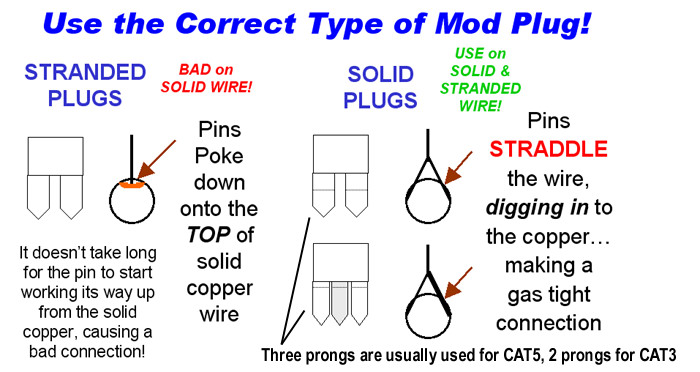 http://www.l-com.com/multimedia/catalog_pa...lar%20Plugs.pdf https://www.cableorganizer.com/rj45-plugs-boots/#article |
|
|
|
|
|
Nov 3 2018, 10:33 PM
Return to original view | IPv6 | Post
#7
|
|
Senior Member
1,155 posts Joined: Apr 2016
|
QUOTE(cskean @ Nov 3 2018, 09:31 PM) » Click to show Spoiler - click again to hide... « Tqvm for the link, will go through it~ Did go through the links, although not very sure I can fully understand it~ Just to ask, how do I differentiate from the outer part of the LAN cable, whether it is SOLID or STRANDED? Or it need to be cut off, and see the internal wire?  |
|
|
Nov 4 2018, 03:43 AM
Return to original view | IPv6 | Post
#8
|
|
Senior Member
1,155 posts Joined: Apr 2016
|
QUOTE(cskean @ Nov 3 2018, 10:44 PM) » Click to show Spoiler - click again to hide... « Actually is there any performance difference between SOLID and STRANDED LAN cables? OR we just need to make sure the right connector to pair with the right cable? » Click to show Spoiler - click again to hide... « Also this video might be useful SOS http://www.l-com.com/content/Article.aspx?Type=N&ID=10592 This post has been edited by Doraku: Nov 4 2018, 03:45 AM |
|
|
Nov 4 2018, 08:33 AM
Return to original view | IPv6 | Post
#9
|
|
Senior Member
1,155 posts Joined: Apr 2016
|
QUOTE(cskean @ Nov 4 2018, 05:13 AM) » Click to show Spoiler - click again to hide... « Thanks for the highlight, now I'm much more clearer... So in order to know whether a LAN cable is SOLID or STRANDED, the only method is to cut the wire inside and see it ourselves? Or there is some code/term printed on the cable itself? So those cable that we buy at pc shop, mostly are STRANDED? |
|
|
Nov 4 2018, 08:59 PM
Return to original view | IPv6 | Post
#10
|
|
Senior Member
1,155 posts Joined: Apr 2016
|
QUOTE(JohnLai @ Nov 4 2018, 01:31 PM) Why do you think I have seedbox + vpn subscription? Woah what OS do you use for your routing server? C1200/850L --->Custom routing server on I3-4330 (route to anonymous vpn server here)--->Gigabit switch---> LAN connections to 3 neighbours' router. I have my household devices connected directly to C1200/850L.  |
|
|
Nov 4 2018, 10:57 PM
Return to original view | IPv6 | Post
#11
|
|
Senior Member
1,155 posts Joined: Apr 2016
|
QUOTE(th3game @ Nov 4 2018, 06:21 PM) My own house and my inlaws house located 3km away driving distance. So in straight distance maybe about 2km. Plus my house located a bit higher ground compared to my inlaws. you want to transmit wifi signal to your inlaw house that away like 3-5km? with a dish? you may get into trouble tho ,So my question is ...Is that possible if i can install a dish on my roof and beaming it towards my in laws house and provide them my Internet? My current plan is 500Mbps. Can save another subscription on my inlaw. Anyone?? Maximum transmit power for 2.4Ghz according to MCMC is 500miliwatt i dont know 100-500mw is enough for distance, around 3-5km?(i dont know much about wifi trasmit power lol). You may cause wifi interference to your neighbours and it maybe severe. are you really comfortable to let those wifi packet flying across your neighbourhood lol someone can attack your wifi using KRACK Vulnerability https://www.krackattacks.com/ » Click to show Spoiler - click again to hide... « This post has been edited by Doraku: Nov 4 2018, 11:30 PM |
|
|
Nov 6 2018, 11:25 AM
Return to original view | IPv6 | Post
#12
|
|
Senior Member
1,155 posts Joined: Apr 2016
|
Wat? lol Speedtest app 309Mbps firefox speedtest 202Mbps which one?
 For those asking all of core usage is averaged non of them is Max out, OS : Windows 10 version 1803 OS Build 17134.376 CPU Intel core 2 quad Q9300 4C/4T 
|
|
|
Nov 6 2018, 11:53 AM
Return to original view | IPv6 | Post
#13
|
|
Senior Member
1,155 posts Joined: Apr 2016
|
QUOTE(AVFAN @ Nov 6 2018, 11:38 AM) i read some people suggesting use of 20mghz? or was it 80mghz? Its MHz* not mghz, Anyway Using shorter channel width may/can reduce wifi interference and may improve stability(Depending on situation*) But that will reduce your wifi speed and bandwidth by half (Depending on channel width size) i Recommend using wifi analyzer first before Changing wifi settingsthis is for wifi, not LAN, right? any router setting u can suggest to check and try? i am ok with wifi, accept it, just not satisfied with <700mbps for LAN. |
|
|
|
|
|
Nov 6 2018, 12:13 PM
Return to original view | IPv6 | Post
#14
|
|
Senior Member
1,155 posts Joined: Apr 2016
|
QUOTE(AVFAN @ Nov 6 2018, 12:09 PM) ah yes... mhz, not mghz! mghz = milligramhertz?   This post has been edited by Doraku: Nov 6 2018, 12:13 PM |
|
|
Nov 7 2018, 05:29 PM
Return to original view | IPv6 | Post
#15
|
|
Senior Member
1,155 posts Joined: Apr 2016
|
QUOTE(metalside @ Nov 7 2018, 05:21 PM) are they give new contract for this ? Just use edit function, instead of posting multiple same post |
|
|
Nov 8 2018, 01:45 AM
Return to original view | IPv6 | Post
#16
|
|
Senior Member
1,155 posts Joined: Apr 2016
|
QUOTE(JohnLai @ Nov 7 2018, 07:07 PM)  Didn't I ask you on your laptop CPU model etc? Didn't I ask you on your laptop CPU model etc? |
|
|
Nov 8 2018, 05:17 PM
Return to original view | IPv6 | Post
#17
|
|
Senior Member
1,155 posts Joined: Apr 2016
|
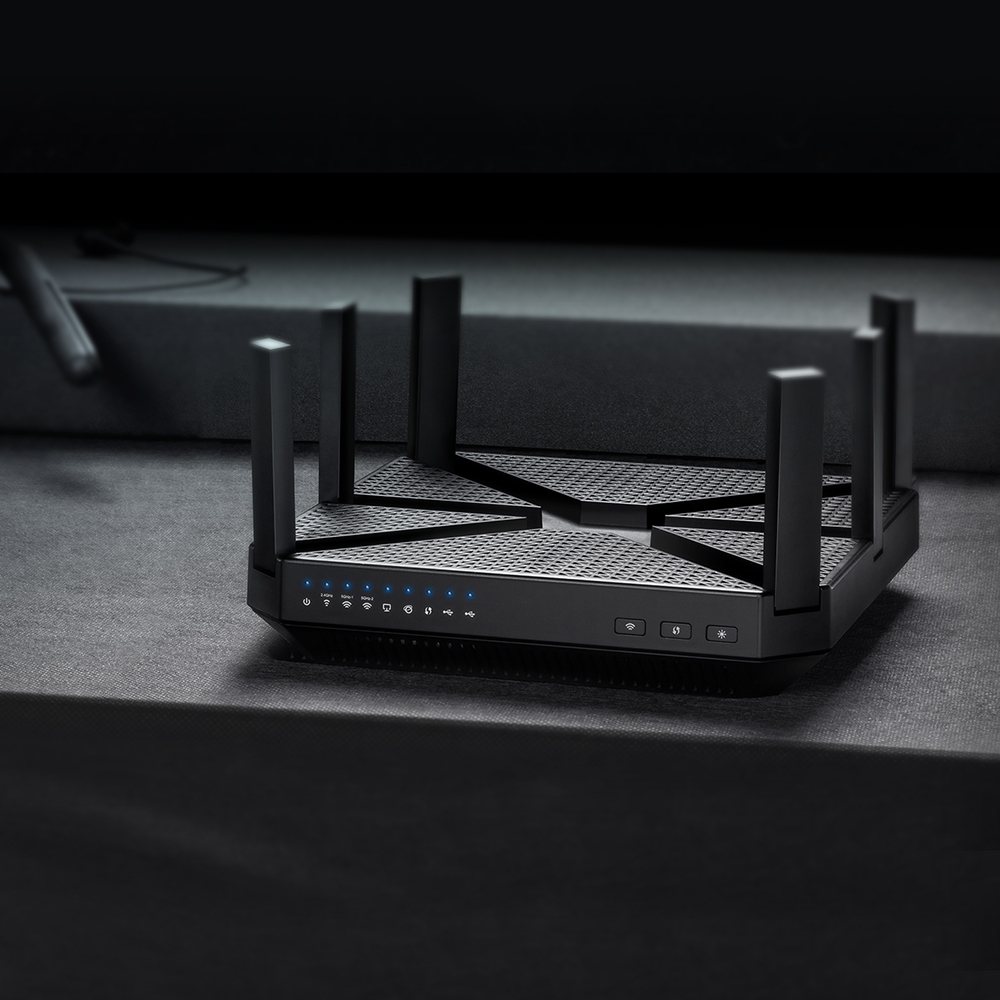
New TP-Link router comming up?
Archer C4000 Tri Band (1625Mbps(5Ghz)+1625Mbps(5Ghz)+750Mbps(2.4Ghz) https://www.tp-link.com/my/products/details...cher-C4000.html » Click to show Spoiler - click again to hide... « Archer A10 1733Mbps(5Ghz) 600Mbps(2.4Ghz) https://www.tp-link.com/my/products/details...Archer-A10.html |
|
|
Nov 12 2018, 02:59 AM
Return to original view | IPv6 | Post
#18
|
|
Senior Member
1,155 posts Joined: Apr 2016
|
QUOTE(MrSpeedy @ Nov 12 2018, 01:58 AM) Yeah especially those porno-ish like Tik-Tok ads getting wilder... And dont forget that youtube sometimes also recommending a gay video lolNow looking for 2nd hand Raspberry Pi. Do USB from Tplink AC1200 suffice for powering up? |
|
|
Nov 12 2018, 05:07 PM
Return to original view | IPv6 | Post
#19
|
|
Senior Member
1,155 posts Joined: Apr 2016
|
QUOTE(sHawTY @ Nov 12 2018, 02:58 PM) "Unstable" is the correct word lol TM still stuck with IPv6 Brokeness? or its Website hosters fault??  |
|
|
Nov 13 2018, 04:16 PM
Return to original view | IPv6 | Post
#20
|
|
Senior Member
1,155 posts Joined: Apr 2016
|
QUOTE(cskean @ Nov 13 2018, 01:03 AM) Too bad I didn't bring along my laptop. My parent is using desktop at their house. I wanted to reset the router, but I didn't have my parent unifi username and password. So don't wanna take the risk... lol try go to router WebGUI e.g 192.168.0.1 - 192.168.1.1 and disable + renable wifi see its work or not.This post has been edited by Doraku: Nov 13 2018, 04:31 PM |
|
Topic ClosedOptions
|
| Change to: |  0.2254sec 0.2254sec
 0.51 0.51
 7 queries 7 queries
 GZIP Disabled GZIP Disabled
Time is now: 5th December 2025 - 05:37 PM |
 Quote
Quote