Welcome Guest ( Log In | Register )

Bump Topic Topic Closed RSS Feed
12 Pages « < 6 7 8 9 10 > » Bottom

Outline · [ Standard ] · Linear+

Unifi Official TM UniFi High Speed Broadband Thread V36, READ 1ST PAGE FOR TURBO SPEED INFO!

views
     
mylinear
post Nov 21 2018, 10:14 PM

Enthusiast
*****
Senior Member
974 posts

Joined: Jan 2009
QUOTE(GreenGuy6767 @ Nov 21 2018, 10:02 PM)
More pening now  rclxub.gif  rclxub.gif  rclxub.gif
What does the news mean ?
https://www.soyacincau.com/2018/11/17/unifi...fter-24-months/
*
Not sure what they are saying. Maybe like I said earlier, this could be because you already have STB which RM129 does not. You must check your bill when it comes for the breakdown.

Package price should remain the same. You can see #14 here.

https://unifi.com.my/lsds/assets/images/per...Q-Home-plan.pdf

Try asking again to another customer service and for more explanation of the calculation of bill for now and after 24 months. Sometimes customer service says different things. Maybe you can call 100 and ask more details.

Can some users who switched from 500M to 100M clarify how their billing is for comparison?

mylinear
post Nov 22 2018, 06:08 PM

Enthusiast
*****
Senior Member
974 posts

Joined: Jan 2009
QUOTE(holymushroom @ Nov 22 2018, 02:08 PM)
Finally my complaint works. 100mbps priced at 129 while waiting for turbo. They still retain my ultimate pack. Phew
*
This is what they should have done for users in the first place if they value customers as they claim. But no, you have to go fight for it, and mostly you won't get it. You are lucky for your case.

I tried to get RM20 discount for not having STD20. After 1 month, I think they got tired and gave me STD20 instead. Would have preferred the discount though.

BTW, are you retaining old copper line at RM1? RM129 + SST = RM136.75. Yours is RM137.75. Just wondering.

mylinear
post Nov 23 2018, 04:24 PM

Enthusiast
*****
Senior Member
974 posts

Joined: Jan 2009
QUOTE(yvliew @ Nov 23 2018, 03:51 PM)
Hope to get some advice from sifus here.

My gf house in Penang is using 50mbps from thank you campaign . Now is paying 189. Wanted to upgrade to 100mbps 129. Requested and they called back to confirm that her house not support 100mbps. So can take 119 30mbps instead. That is total nonsense. Why don’t they offer cheaper price for the same speed 50mbps she having now? How can I get cheaper price for this? It’s high rise building. Please advice what can I do now if not opt for downgrade 30mbps.
*
Previously users here posted in high-rise they got price reduction for
30M from RM179 to RM119
50M from RM189 to RM129

After asking customer service, you may have to go TMPoint to see if can get better offer there.

Maybe can check if got Maxis and Time coverage in building or not.

mylinear
post Nov 27 2018, 01:01 PM

Enthusiast
*****
Senior Member
974 posts

Joined: Jan 2009
QUOTE(lamusiqa @ Nov 27 2018, 11:07 AM)
Actually, there's a big chance their monthly fee could be reduced along with the turbo upgrade. Because of the upgrade, my monthly fee went from RM329 to RM220. 100mbps to 800mbps. Which is why I would recommend anyone to get their speed upgrade quickly.
*
Can you share the breakdown of prices before and after upgrade ie price, discount, got Ultimate, got STD20 etc? Did they just add a discount to lower the price after upgrade?

mylinear
post Nov 27 2018, 05:14 PM

Enthusiast
*****
Senior Member
974 posts

Joined: Jan 2009
QUOTE(Jty @ Nov 27 2018, 04:56 PM)
Yeah I understand that bit, but just want to know what is the fair price, seems like some is on 189, some 199, some about 200 all got 500mbps
wondering if any lower or something like that.

Thanks.
*
There is no fair price as they don't have any standard price. Users have all sorts of variations in package and prices.

There are users who are paying RM159 for 500M. There are also a couple here who have got RM129 for 500M. Then as you said, there are others who pay RM179 - 199 and above also.

If you don't need the speed, you can look into going back to RM129 100M for now to save some money. If you were ok with 50M before this, 100M is double that speed. Later if they have higher speed packages, you can upgrade if you want.

What is the name of your package now shown in customer portal or in bill? What UnifiTV pack do you have? Do you have STD20 voice calls included in your RM179? Your bill details will show the price and discount you are getting.

mylinear
post Nov 28 2018, 06:57 PM

Enthusiast
*****
Senior Member
974 posts

Joined: Jan 2009
QUOTE(imalmighty @ Nov 28 2018, 06:30 PM)
user posted image
mylinear
*
Good that you got it.

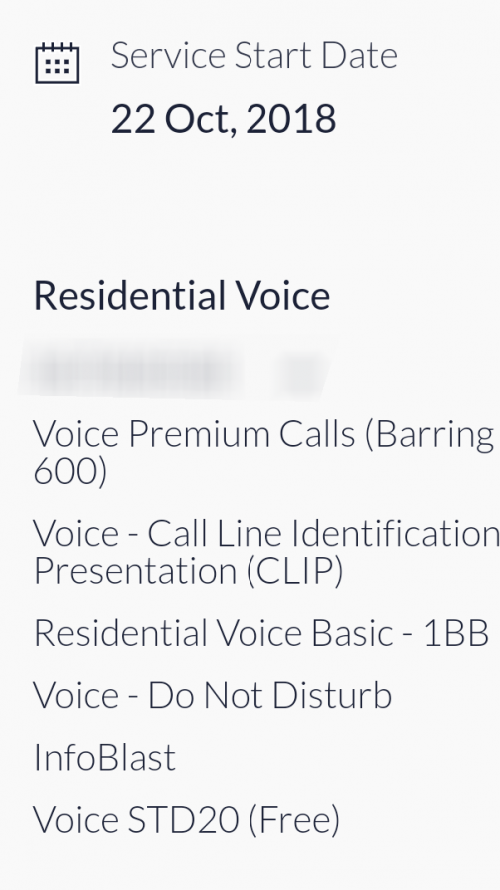
Reminder for users on RM129 10M who got turbo to 100M to request for STD20 as the new 100M has it for the same price.

mylinear
post Nov 28 2018, 09:16 PM

Enthusiast
*****
Senior Member
974 posts

Joined: Jan 2009
QUOTE(Quan920907 @ Nov 28 2018, 07:27 PM)
Hi all,
Currently my Unifi package show Unifi Pro 800mbps
Can i downgrade to 100mbps ( Rm129 )?
*
Please read the FAQ, especially the Upgrade / Downgrade section.

https://unifi.com.my/lsds/assets/images/per...Q-Home-plan.pdf


Login to your customer portal and see next to package name and Activity status, the "..." drop down list. There is option there to see what packages are available.

You can contact customer service through chat or call 100 and find out more details.

mylinear
post Nov 30 2018, 11:43 AM

Enthusiast
*****
Senior Member
974 posts

Joined: Jan 2009
QUOTE(cskean @ Nov 30 2018, 02:46 AM)
I can't promise all TM Point provide this plan, but the TM Point I went did offer me this plan~
*
A few users here have got this package before. It seems it is only given to try to prevent you from terminating your service. It is not listed anywhere. And customer service will say they don't know about it. I think they want everyone to be at least on the RM129 100M package. If they had announced the RM99 50M, I think many 10M, 30M and 50M users would have switched to it. Maybe even some 100M users would have switched to it as you can save a lot in some cases if you don't need the higher speeds. They would have lost more revenue this way.

If they bring out this package later on, one problem is that there may be a penalty fee to switch to it as it may be considered as downgrade for those already on 100M now. For example, a RM129 10M user may have been happy with RM99 50M, but already got turbo to RM129 100M. Then to switch back to RM99 50M may be considered a downgrade with penalty fee.

mylinear
post Nov 30 2018, 12:55 PM

Enthusiast
*****
Senior Member
974 posts

Joined: Jan 2009
QUOTE(dickybird @ Nov 30 2018, 12:13 PM)
Haha. They finally got some lazy ass to do something that puts the onus on the customer pushing buttons and not staff. Not some lame ass, cakap banyak but does not deliver type that only makes more unnecessary work for others. Lol
Good job tm, for once!
*
Some 3 months later only do. Better late than never, I guess.

QUOTE(Iceman74 @ Nov 30 2018, 12:13 PM)
Me also change to Oct-Dec 2018
Previous email, me on so call lucky few can get turbo starting from Aug

Chat with them yesterday and u guess what he told me, in their system, my upgrade is next year Jan.
he also said is schedule to turbo but dare not promise anything and was told to wait.... doh.gif
Really donno what to said, continue paying RM189 for 50Mbps cos still 1 more year contract or upgrade to 100Mbps RM129? rclxub.gif
*
Up to you to decide which is important to you. Save RM60 per month and get double speed? Or pay more and get 500M, if you really need it? Also others pay RM159 for 500M. So unless your price is adjusted, you will be paying more than others.

mylinear
post Nov 30 2018, 04:48 PM

Enthusiast
*****
Senior Member
974 posts

Joined: Jan 2009
QUOTE(holymushroom @ Nov 30 2018, 03:26 PM)
What is this tr ip add tr gateway etc? How to turn this off?? I have checked my old dir850 there is no such ip addreess. Now when i load fb those with WiFi some pics wont show, but it load perfectly well with my mobile data not sure if this is causing it.
*
Even though you have set Google DNS as shown, you should double check if it really is being used. One way is to go to a site that is blocked and see if you get an error message.

mylinear
post Nov 30 2018, 04:58 PM

Enthusiast
*****
Senior Member
974 posts

Joined: Jan 2009
QUOTE(redzanime @ Nov 30 2018, 04:40 PM)
Aiyo, after waited for so many long months today check the TURBO status in Unifi portal, so very dissapointed that TM unable to TURBO my speed.

Felt just like got cheated with the monthly charges (199+30+30) for the Advance Plus 50Mbps (Thank You Campaign 2017) while some other pay lesser before got TURBOed.

Will plan to terminate the line in near future.
*
You paying RM259 for 50M now? Even if you get 500M turbo, unless your price is adjusted, other 500M users are paying RM159 after turbo compared to you. Just today someone posted they got RM99 50M package. Compare that with your current price. You have other options than paying so much, so hope you save some money soon.

mylinear
post Nov 30 2018, 05:02 PM

Enthusiast
*****
Senior Member
974 posts

Joined: Jan 2009
QUOTE(truthseeker @ Nov 30 2018, 04:58 PM)
hi, i have been turbo-ed to 300Mbps since last week and i just check the status in unifi website, it says i need to change the btu. The strange thing is , i subscribed to unifi 30mbps 3 months ago in August. So when i got turbo-ed i expect i dun need to change any equipment. Do you guys know what BTU model TM will change to?
*
What are your results using PC / notebook on a wired connection?

http://speedtest.tm.com.my/

And what BTU do you have now? Check on 1st post for your model and some info.


This post has been edited by mylinear: Nov 30 2018, 05:03 PM
mylinear
post Nov 30 2018, 05:09 PM

Enthusiast
*****
Senior Member
974 posts

Joined: Jan 2009
QUOTE(holymushroom @ Nov 30 2018, 05:02 PM)
Yes it helped to unblock those websits. But i dont get what is all this tr ip address for? I checked my old unit and this kind of ip is not there.
*
The 10.x.x.x range is private IPs used for internal networks. I think its for TM use only, not accessible fromoutside.

This is DIR-842 router? If you are using PC / notebook, have you also set DNS on the computer itself? Because I thought just setting DNS on router does not seem to work as it is supposed to be hard-coded with TM DNS.


mylinear
post Nov 30 2018, 05:15 PM

Enthusiast
*****
Senior Member
974 posts

Joined: Jan 2009
QUOTE(truthseeker @ Nov 30 2018, 05:13 PM)
so far i have only tested via wifi. And i could get 220Mbps via speedtest.net. Will try wired at home. My modem is white in color FTTH. In terms of speed, i thought i am getting pretty close to my package. That's why i dun really understand why the btu needs to be changed.
*
If you getting the full speed on wired, then no need to change the BTU.

mylinear
post Nov 30 2018, 05:21 PM

Enthusiast
*****
Senior Member
974 posts

Joined: Jan 2009
QUOTE(cannavaro @ Nov 30 2018, 05:17 PM)
For 1 of my accounts, I got the same msg saying have to change the BTU.
That account is actually using huawei hg8240h since late October and have no problems getting full 800Mbps speed
Probably TM didn't update their database properly or something.
If they change, most likely you will get huawei hg8240h.
*
In the customer portal, the Turbo Status option, when you click Check, I think the pop-up message is a template message. It will either say you will get turbo soon or it will say you have already got turbo. Both will have same message about changing BTU. Obviously, only those having problems getting full speed may need to change. Others don't need to. Like some customer service replies, I think this is a template for all.

mylinear
post Nov 30 2018, 05:56 PM

Enthusiast
*****
Senior Member
974 posts

Joined: Jan 2009
QUOTE(holymushroom @ Nov 30 2018, 05:30 PM)
Ya it is working, didn't set any dns on my new phone.
*
If you have a Windows machine, could you please open a command prompt window and run this to list the DNS servers.

ipconfig /all

It is listed towards the end.


Added:

QUOTE(kentken12 @ Nov 30 2018, 05:49 PM)
I also asking for the RM99 for 50mbps package through live chat just now and no luck they said TM didn't offer this package and only got Unifi basis and Unifi Lite. I want to them double confirm and still the same. I thinking who are willing to share the image and i can show them the proof............
*
That is what customer service says. No point showing them anything. They will then tell you to go TMPoint and ask there. This package seems only available to a few eg when you want to terminate. Does not seem open to all.


This post has been edited by mylinear: Nov 30 2018, 06:08 PM
mylinear
post Nov 30 2018, 06:29 PM

Enthusiast
*****
Senior Member
974 posts

Joined: Jan 2009
QUOTE(holymushroom @ Nov 30 2018, 06:17 PM)
it shows this


   DNS Servers . . . . . . . . . . . : 192.168.0.1
*
Can anyone explain this? I think it means that the machine is getting DNS from the router. But is the router actually returning Google DNS as set, or it still used TM DNS?

If you change DNS in the Windows machine itself under network adaptor properties, the above output will sho what you have set, ie DNS1 = 8.8.8.8 and DNS2 = 8.8.4.4 (as example)

For me, if its the first case above, some blocked site will give me the error message. But using second case above, it will not. Which is why I think its still using TM DNS. Or my settings somewhere is wrong.


This post has been edited by mylinear: Nov 30 2018, 06:30 PM
mylinear
post Nov 30 2018, 09:35 PM

Enthusiast
*****
Senior Member
974 posts

Joined: Jan 2009
QUOTE(sgpdsmss @ Nov 30 2018, 08:27 PM)
i eligible for turboed ...but from aug till dec 2018 ...but at current still 100Mbps ...

May i change plan to unifi lite 100Mbps at rm129?
currently still on contract ..

thanks ..
*
Please read the FAQ, especially the Upgrade / Downgrade section:

https://unifi.com.my/lsds/assets/images/per...Q-Home-plan.pdf


QUOTE(cactuscch2 @ Nov 30 2018, 08:29 PM)
I got this sms, what should I do?

RM0.00 unifi: Yay! Your unifi svc : 603xxxxxxx has been TURBO-ed! Call us at 100 (Press 1) to lodge a request for equipment replacement. T&C apply.

Previous package: 10Mbps (TP-Link AC1200 Wireless Dual Band Gigabit Router (Model: Archer C1200) & HG8240w)

After Turbo: 100Mbps
- tested with phone wifi: can achieve 100/ 50
- tested with laptop wifi: can achive 50/40, LAN not tested yet.
TM sent me a message.....My current equipment (BTU) needs to be replaced?
*
The SMS says call 100, so do that and get more info.
Also, try with LAN to see if you get full speed.


This post has been edited by mylinear: Nov 30 2018, 09:38 PM
mylinear
post Nov 30 2018, 11:31 PM

Enthusiast
*****
Senior Member
974 posts

Joined: Jan 2009
QUOTE(luckywang @ Nov 30 2018, 09:59 PM)
i think this is due to the DNS relay. is it enabled in your router?
*
Yes. When enabled, DNS is 192.168.0.1 but I'm not sure how to find out what the router actually uses, ie whether it uses only the 2 DNS you set, or its ignoring those and using DNS obtained from TM side.

When it is disabled, it uses TM DNS. If you then set the 2 DNS (for example Google), it then will list all 4 DNS (Google and TM). When all 4 are listed, it is possible any could be queried at random.

Just wondering how to make sure it only uses the 2 DNS you set.

mylinear
post Nov 30 2018, 11:46 PM

Enthusiast
*****
Senior Member
974 posts

Joined: Jan 2009
QUOTE(sgpdsmss @ Nov 30 2018, 10:37 PM)
just upgrade / downgrade ...no mention same speed with different price ...
so how ar..…
*
Yes, as you can see from your customer portal, the option is there to change to the new RM129 100M plans. Your contract will be renewed for 2 years. Not eligible for turbo if you switch. Lots of users have done this switch as you can read from previous posts.

You can call customer service for more info. Or fill in the form in the customer portal and they will call you back I guess. You can also just call 100 and do the switch without going to TMPoint. Let us know how it goes.


12 Pages « < 6 7 8 9 10 > » Top
Topic ClosedOptions
 

Change to:
| Lo-Fi Version
0.2193sec    0.86    7 queries    GZIP Disabled
Time is now: 14th December 2025 - 02:43 PM