Outline ·
[ Standard ] ·
Linear+
Huawei Mate 20/20 Pro/20 X & Huawei GT
|
jeremy7
|
 Dec 15 2018, 10:30 PM Dec 15 2018, 10:30 PM
|
Getting Started


|
QUOTE(buggie @ Dec 14 2018, 06:40 PM) Anyone here installed the X-one screen protector? Is it fully adhesive so as to retain all functions? The one I have on not full stick... Only the sides stick and the finger print scanner not working. It's pricey. Quoted rm89 at shop. Can get 59 on shopper but not sure I can install it correctly I am using x one..so far so good, finger print working no issue..I don’t know is the product or the Huawei man skill not good, some bubble near edge,but don’t affect me..overall quite satis |
|
|
|
|
|
santiago84
|
Dec 15 2018, 11:20 PM
|
Getting Started
|
Just got my mate 20x blue variant .using note 9 and mate x now . the screen although is 1080hdr but is so damn good that I can't different with note 9 . Battery wise this phone really a beast I'm really happy with it. Overall mate x is my definitely recommended 2018 smart phone if you love big phone other wise note 9 is good for a go.
|
|
|
|
|
|
off_shore
|
Dec 15 2018, 11:37 PM
|
|
|
QUOTE(jeremy7 @ Dec 15 2018, 10:30 PM) I am using x one..so far so good, finger print working no issue..I don’t know is the product or the Huawei man skill not good, some bubble near edge,but don’t affect me..overall quite satis X one comes with tempered glass too? I think theirs is more to silicon wrap right? Hoda is abit expensive 😅😅 |
|
|
|
|
|
Taeng9389
|
Dec 16 2018, 12:27 AM
|
|
|
m20p on nova launcher here, been using for a couple days, sometimes, the navigation keys will disappear, had to restart for it to reappear
|
|
|
|
|
|
jhleo1
|
Dec 16 2018, 07:23 AM
|
|
|
Can any mate 20x confirm this? Where is the easy memo app? I can't find out. QUOTE(jhleo1 @ Dec 15 2018, 09:48 PM) The Huawei M20x m-pen come with Easy Memo app which could be something similar with Samsung note taking app. The M-pen can be used for note-taking right from the locked screen and creating notes via the Easy Memo app. Where to get easy memo app? I haven't checked if any download code in the box yet. http://en.zinggadget.com/dsadafadcuncoveri...mate-20x-m-pen/ |
|
|
|
|
|
_x_
|
Dec 16 2018, 08:49 AM
|
Getting Started
|
New user here. Want to ask, anyone else Instagram stories is being cut at the sides? Any fix for this?
|
|
|
|
|
|
kusha
|
Dec 16 2018, 08:52 AM
|
|
|
using screen protector from ninjaz... Rm69 quite reliable and good
cover from spigen
any other suggested cover? seems spigen making phone quite heavy
|
|
|
|
|
|
benny888
|
Dec 16 2018, 09:42 AM
|
Gadget Freak

|
QUOTE(juneong @ Dec 16 2018, 12:36 AM) just n9 battery really suck ... Suck ? How bad? I am fine with N9 battery life. Without gaming SOT 7 to 8 hours. Phone mainly on internet stuffs - browser, tweeter, Facebook, you tube, Netflix, mail etc |
|
|
|
|
|
josh5671
|
Dec 16 2018, 09:51 AM
|
|
|
QUOTE(santiago84 @ Dec 15 2018, 11:20 PM) Just got my mate 20x blue variant .using note 9 and mate x now . the screen although is 1080hdr but is so damn good that I can't different with note 9 . Battery wise this phone really a beast I'm really happy with it. Overall mate x is my definitely recommended 2018 smart phone if you love big phone other wise note 9 is good for a go. honest comment. at some point really cant diff 2K and 1080p. me personally using HD+ on my m20p.... so... |
|
|
|
|
|
joytest
|
Dec 16 2018, 10:06 AM
|
|
|
QUOTE(jhleo1 @ Dec 15 2018, 09:48 PM) The Huawei M20x m-pen come with Easy Memo app which could be something similar with Samsung note taking app. The M-pen can be used for note-taking right from the locked screen and creating notes via the Easy Memo app. Where to get easy memo app? I haven't checked if any download code in the box yet. http://en.zinggadget.com/dsadafadcuncoveri...mate-20x-m-pen/On the lockscreen, when it is black, tap the screen while pressing on the stylus button. The memopad app will pop up. |
|
|
|
|
|
santiago84
|
Dec 16 2018, 10:59 AM
|
Getting Started
|
QUOTE(juneong @ Dec 16 2018, 12:36 AM) just n9 battery really suck ... I wouldn't said it suck . I'm getting 5h sot standby 20hours plus . Which is good to go. 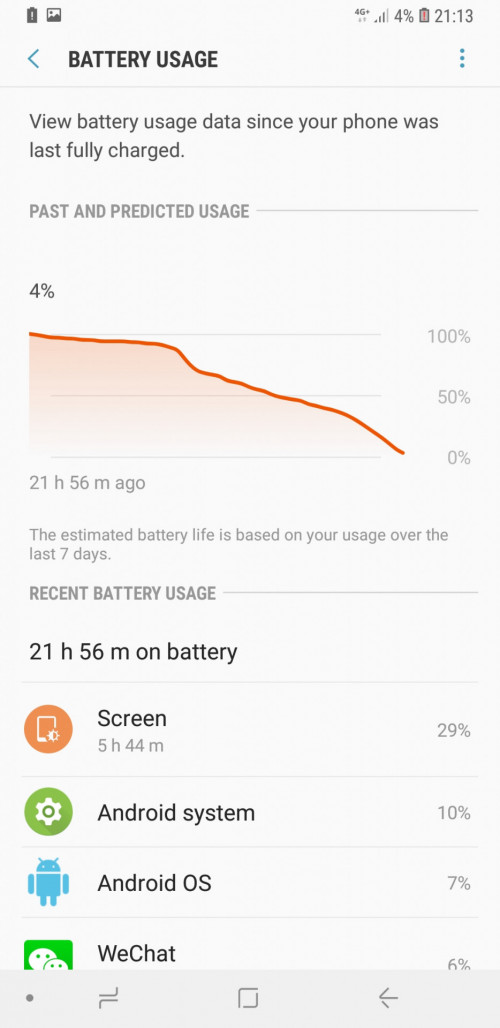 |
|
|
|
|
|
jhleo1
|
Dec 16 2018, 11:05 AM
|
|
|
Oic, the app pre-installed? not in app drawer. Will go back to check my M-pen manual. Thanks. QUOTE(joytest @ Dec 16 2018, 10:06 AM) On the lockscreen, when it is black, tap the screen while pressing on the stylus button. The memopad app will pop up. |
|
|
|
|
|
davidletterboyz
|
Dec 16 2018, 11:25 AM
|
|
|
QUOTE(santiago84 @ Dec 15 2018, 11:20 PM) Just got my mate 20x blue variant .using note 9 and mate x now . the screen although is 1080hdr but is so damn good that I can't different with note 9 . Battery wise this phone really a beast I'm really happy with it. Overall mate x is my definitely recommended 2018 smart phone if you love big phone other wise note 9 is good for a go. Well, you have to view 2160p HDR on Note 9 to compare. Otherwise you are not using it to the full potential.  |
|
|
|
|
|
apecorp
|
Dec 16 2018, 11:29 AM
|
|
|
QUOTE(jhleo1 @ Dec 16 2018, 11:05 AM) Oic, the app pre-installed? not in app drawer. Will go back to check my M-pen manual. Thanks. There's also this M-pen zone app in the drawer. Mayb can check in there? Actually i dono wats in there coz until now i havent actually use my M-pen yet. |
|
|
|
|
|
joytest
|
Dec 16 2018, 11:32 AM
|
|
|
QUOTE(apecorp @ Dec 16 2018, 11:29 AM) There's also this M-pen zone app in the drawer. Mayb can check in there? Actually i dono wats in there coz until now i havent actually use my M-pen yet. That is a link to apps from China which support stylus and drawing functions. I'd rather not install those. Samsung Note works well enough if you can clone it from a Note 8 or 9. Otherwise OneNote is the best multiplatform synchronized note taking app. |
|
|
|
|
|
jhleo1
|
Dec 16 2018, 11:48 AM
|
|
|
Ya saw that zone app but only got 3 app in there. I haven't actually used it too. Just unboxed it n tested on screen a while n found it work n nothing special. Lol After I watched some review n found out actually lots of good stuff to do with this pen. https://m.youtube.com/watch?v=TIXnwUvbmF0QUOTE(apecorp @ Dec 16 2018, 11:29 AM) There's also this M-pen zone app in the drawer. Mayb can check in there? Actually i dono wats in there coz until now i havent actually use my M-pen yet. |
|
|
|
|
|
jhleo1
|
Dec 16 2018, 11:51 AM
|
|
|
I just installed Samsung Notes 2.3.03.2. Version 3 seems not working, immediately dissappear once launched. QUOTE(joytest @ Dec 16 2018, 11:32 AM) That is a link to apps from China which support stylus and drawing functions. I'd rather not install those. Samsung Note works well enough if you can clone it from a Note 8 or 9. Otherwise OneNote is the best multiplatform synchronized note taking app. |
|
|
|
|
|
ipconfig85
|
Dec 16 2018, 03:16 PM
|
New Member
|
For all the Mate 20 X planing to give this a try . not a big fan of fip case. https://www.olixar.com/sentinel-huawei-mate...creen-protector |
|
|
|
|
|
Taeng9389
|
Dec 16 2018, 03:30 PM
|
|
|
QUOTE(ipconfig85 @ Dec 16 2018, 03:16 PM) For all the Mate 20 X planing to give this a try . not a big fan of fip case. https://www.olixar.com/sentinel-huawei-mate...creen-protectorsame everything, except for branding Aliex |
|
|
|
|
|
davidletterboyz
|
Dec 16 2018, 06:22 PM
|
|
|
QUOTE(jeremy7 @ Dec 15 2018, 10:10 PM) Any mate 20 pro user here encounter this problem.. like from home screen, go to facebook app, after few second the screen brightness dim a bit.. From facebook app go home screen, after few second the screen bright a bit.. ( auto brightness, eye comfort is OFF) ...any solutions? Tq I don't have a Mate 20 Pro. But this infamous issue was well known during P10 and Mate 10 era. Some apps like Chrome and FB will have auto dimmer. If you access the app from home by tapping the app icon, the auto dim will be enabled. But if you access it from multi tasking pane, it won't auto dim. It's annoying as hell. I thought Huawei had stopped doing this since P20 series. |
|
|
|
|



 Quote
Quote


 0.0459sec
 0.49
0.49
 6 queries
 GZIP Disabled