Outline ·
[ Standard ] ·
Linear+
Huawei Mate 20/20 Pro/20 X & Huawei GT
|
buggie
|
 Dec 14 2018, 08:02 PM Dec 14 2018, 08:02 PM
|

|
QUOTE(holymushroom @ Dec 14 2018, 07:45 PM) the 1 i get from taobao also stick on the side only. very hd and everything is working. actually for me curve screen is easier to install. just aim top and bottom then can stick already. Great! Can post the taobao link here please. |
|
|
|
|
|
joytest
|
Dec 14 2018, 08:40 PM
|
|
|
I just got this .. M20 X 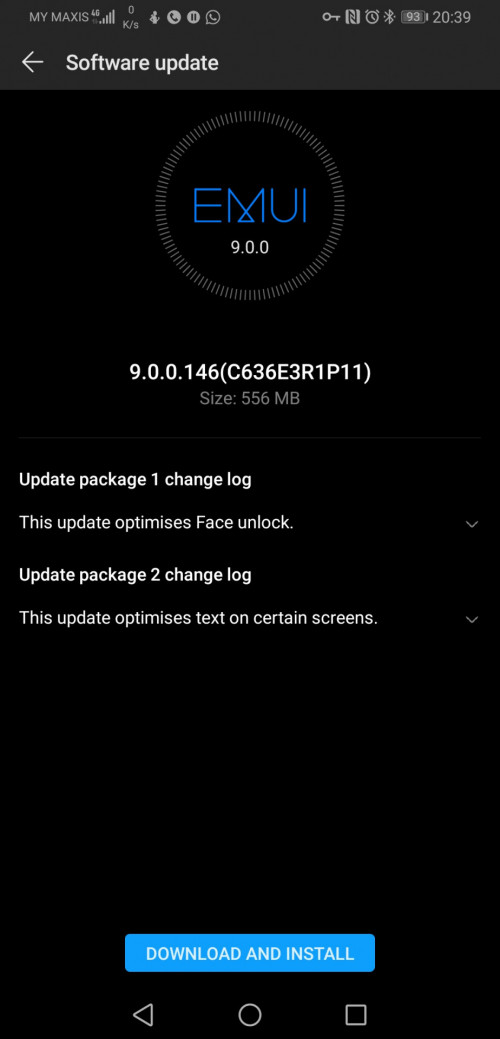 |
|
|
|
|
|
haziqmck7
|
Dec 15 2018, 09:02 AM
|
|
|
Hi. Mate 20 pro twilight color reporting in. Relieve that my set is BOE display. So far so good. What other thing to check othen than the hulk issue
|
|
|
|
|
|
josh5671
|
Dec 15 2018, 10:00 AM
|
|
|
QUOTE(haziqmck7 @ Dec 15 2018, 09:02 AM) Hi. Mate 20 pro twilight color reporting in. Relieve that my set is BOE display. So far so good. What other thing to check othen than the hulk issue I think all problem gone so far if you can't notice any problem. Just enjoy the phone  |
|
|
|
|
|
Vervain
|
Dec 15 2018, 02:42 PM
|
|
|
Hi mate 20x user. When putting the phone on landscape can you run split screen with both apps on landscape?
Can the phone perform crop on screen capture like Samsung?
|
|
|
|
|
|
josh5671
|
Dec 15 2018, 04:43 PM
|
|
|
QUOTE(Vervain @ Dec 15 2018, 02:42 PM) Hi mate 20x user. When putting the phone on landscape can you run split screen with both apps on landscape? Can the phone perform crop on screen capture like Samsung? 1. Me from mate 9 swtich to mate 20 pro both can landscape splitscreen. If the app supported. 2.i normally knock the screen and pull. So it capture area you pull. |
|
|
|
|
|
haziqmck7
|
Dec 15 2018, 05:17 PM
|
|
|
How to get rid of this notification Attached thumbnail(s)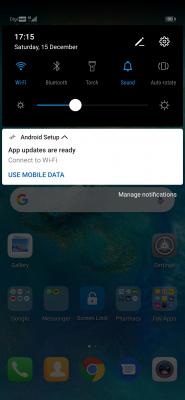
|
|
|
|
|
|
jhleo1
|
Dec 15 2018, 05:32 PM
|
|
|
Just hold a while, the notification will come out. Just disable it. QUOTE(haziqmck7 @ Dec 15 2018, 05:17 PM) How to get rid of this notification |
|
|
|
|
|
jhleo1
|
Dec 15 2018, 05:32 PM
|
|
|
Just both can. QUOTE(Vervain @ Dec 15 2018, 02:42 PM) Hi mate 20x user. When putting the phone on landscape can you run split screen with both apps on landscape? Can the phone perform crop on screen capture like Samsung? |
|
|
|
|
|
haziqmck7
|
Dec 15 2018, 05:35 PM
|
|
|
QUOTE(jhleo1 @ Dec 15 2018, 05:32 PM) Just hold a while, the notification will come out. Just disable it. Is it always happened to mate 20 pro? N is it alright to disable it? |
|
|
|
|
|
jhleo1
|
Dec 15 2018, 06:16 PM
|
|
|
My one is Mate 20x and yes if not mistaken happened to my previous Mate 20 pro. System app may relate to any Android setup or update. Better left it. QUOTE(haziqmck7 @ Dec 15 2018, 05:35 PM) Is it always happened to mate 20 pro? N is it alright to disable it? |
|
|
|
|
|
Vervain
|
Dec 15 2018, 06:17 PM
|
|
|
QUOTE(josh5671 @ Dec 15 2018, 04:43 PM) 1. Me from mate 9 swtich to mate 20 pro both can landscape splitscreen. If the app supported. 2.i normally knock the screen and pull. So it capture area you pull. Means still dependent on app support? Wave can live on split screen? QUOTE(jhleo1 @ Dec 15 2018, 05:32 PM) Thanks |
|
|
|
|
|
FG123
|
Dec 15 2018, 08:53 PM
|
Getting Started

|
just get the phone. What is latest ver of EMUI?
|
|
|
|
|
|
fouzhi
|
Dec 15 2018, 08:58 PM
|
|
|
Just walk in service center (Penang) today to claim for my Mate 20 Pro (green tint issue) and the staff mentioned that no ready stock at the moment but will exchange 1 to 1 with me once the new stock arrived, then I just try to ask for refund and surprisingly the staff didn't give me hard time but instead ask me to provide proof of purchase then help me to log a report to Huawei HQ KL then she said the HQ KL will call me once they verified the invoice is legit. Anyone been through this process before? mind to share a bit?
|
|
|
|
|
|
jhleo1
|
Dec 15 2018, 09:16 PM
|
|
|
What kind of process? Refund? My refund process go thru their country director on fb. Then Huawei asked me to bring my phone n all gifts back to Pavillion. Money bank in within 2 to 3 working days after that. I bought my unit during first launched in Pavillion. QUOTE(fouzhi @ Dec 15 2018, 08:58 PM) Just walk in service center (Penang) today to claim for my Mate 20 Pro (green tint issue) and the staff mentioned that no ready stock at the moment but will exchange 1 to 1 with me once the new stock arrived, then I just try to ask for refund and surprisingly the staff didn't give me hard time but instead ask me to provide proof of purchase then help me to log a report to Huawei HQ KL then she said the HQ KL will call me once they verified the invoice is legit. Anyone been through this process before? mind to share a bit? |
|
|
|
|
|
fouzhi
|
Dec 15 2018, 09:25 PM
|
|
|
QUOTE(jhleo1 @ Dec 15 2018, 09:16 PM) What kind of process? Refund? My refund process go thru their country director on fb. Then Huawei asked me to bring my phone n all gifts back to Pavillion. Money bank in within 2 to 3 working days after that. I bought my unit during first launched in Pavillion. Ya, the refund process. I believe a lot of Mate 20 Pro owner here request for refund that is why the staff act very calm and steady like the process being done on countless cases already. |
|
|
|
|
|
jhleo1
|
Dec 15 2018, 09:48 PM
|
|
|
The Huawei M20x m-pen come with Easy Memo app which could be something similar with Samsung note taking app. The M-pen can be used for note-taking right from the locked screen and creating notes via the Easy Memo app. Where to get easy memo app? I haven't checked if any download code in the box yet. http://en.zinggadget.com/dsadafadcuncoveri...mate-20x-m-pen/This post has been edited by jhleo1: Dec 15 2018, 09:55 PM |
|
|
|
|
|
jeremy7
|
Dec 15 2018, 10:10 PM
|
Getting Started
|
Any mate 20 pro user here encounter this problem.. like from home screen, go to facebook app, after few second the screen brightness dim a bit.. From facebook app go home screen, after few second the screen bright a bit.. ( auto brightness, eye comfort is OFF) ...any solutions? Tq
|
|
|
|
|
|
off_shore
|
Dec 15 2018, 10:11 PM
|
|
|
Guys, what kind of tempered glass sp u guys are using now and have no issue with finger print scanner? I think mine is on the thicker side thus failing almost 90% of the time.
|
|
|
|
|
|
jeremy7
|
Dec 15 2018, 10:25 PM
|
Getting Started
|
QUOTE(off_shore @ Dec 15 2018, 10:11 PM) Guys, what kind of tempered glass sp u guys are using now and have no issue with finger print scanner? I think mine is on the thicker side thus failing almost 90% of the time. Heard HODA not bad,no issue at all... or facebook you can find a seller name Ricky Chong, trustworthiness seller, I think he got other brands |
|
|
|
|



 Quote
Quote


 0.0353sec
 0.43
0.43
 6 queries
 GZIP Disabled