Welcome Guest ( Log In | Register )

10 Pages « < 2 3 4 5 6 > » Bottom

Outline · [ Standard ] · Linear+

TIME [OFFICIAL] TIME Fibre Broadband™ v4, Experience the ONE TRUE 2Gbps

views
     
PRSXFENG
post Jul 29 2023, 04:44 PM

Look at all my stars!!
*******
Senior Member
2,613 posts

Joined: Nov 2020


There is a bug/issue with TIME that some sites hosted on Amazon doesnt load
try if androidpolice.com loads

try rebooting the router multiple times until the site above loads

This post has been edited by PRSXFENG: Jul 29 2023, 04:44 PM
PRSXFENG
post Jul 31 2023, 04:13 PM

Look at all my stars!!
*******
Senior Member
2,613 posts

Joined: Nov 2020


Finally received the RM100 Shopee Voucher today on the last day lol

But it came as 2x RM50 vouchers, ok but that means I need to make 2 transactions lol wacko.gif

Also the vouchers will only be valid tomorrow on 1st August until 31/1/2024
PRSXFENG
post Aug 4 2023, 09:16 AM

Look at all my stars!!
*******
Senior Member
2,613 posts

Joined: Nov 2020


QUOTE(LA773 @ Aug 4 2023, 07:52 AM)
Did u guys get the free first month promo?

Do double check ur bills, myself and my friend got billed for the first full calendar month, even though ots suppose to be free
*
My first month bill did get the promo credited but had a weird pro-rated period causing a ~RM25 bill
PRSXFENG
post Aug 9 2023, 09:51 PM

Look at all my stars!!
*******
Senior Member
2,613 posts

Joined: Nov 2020


QUOTE(superavenger @ Aug 9 2023, 07:55 PM)
Currently considering switching over to Time Fibre either 100mbps or 500mbps but am not sure of the ping/speed to Canada.

Anyone kind enough to help with a speedtest on nperf.com for [CA] Beauharnois - 10Gb/s - OVH.com
*
https://www.nperf.com/r/3464374138871387-EcZVlw3V

Here you go

Notes:
500mbps plan
ipv4, didnt select the ipv6 server
test done via wifi, not quiet network (watching live stream, torrent, etc in the background)
provided Huawei HG8145X6 router
Intel AX200 wifi card

Extra: I've noticed the stock provided router has quite the bufferbloat, so might be better if you use own router
PRSXFENG
post Aug 13 2023, 02:52 PM

Look at all my stars!!
*******
Senior Member
2,613 posts

Joined: Nov 2020


QUOTE(marquis @ Aug 13 2023, 11:24 AM)
Hello all!

I’ve searched the thread to get some definitive answer but can’t seem to find anything directly related. I am currently using an AX20, and am considering either a 100 or 500 Mbps package. If I go for the 100, I’ll most likely continue to use my router as the bundled one seems meh.

However, the 500 package is bundled with the HG8145X6 which to my limited knowledge, seems to be the same as the AX20. Also comes with a wife 6 mesh node (at least that’s what the website indicates). I am considering to get myself a mesh extender to use with the AX20 eventually (a proper one at least. Currently using an RE305).

So, the question is, is the huawei bundle (router plus mesh) better than my existing router combo? Coz if it is, it’s a no brainier and I’ll just get the 500 plan since the diff is only about rm 40/month, for a 5x increase in speed. Coz I’m reading some comments on the bundled extender not giving the proper speed (and some saying it’s a WiFi 5 device).

Appreciate any and all help!

Side note: also tried googling but there doesn’t seem to be a direct comparison between the two. Anyone knows if there’s another name for the huawei?
*
I'm unsure on how the AX20 compares to the Huawei since info about the Huawei is scarce

However, you could try the following method
Since there is a "RM99 for First 6 Months " promo for 500Mbps plan
Simply sign up for 500Mbps, get that equipment and try it out
then, you can decide to stay on 500
or downgrade to 100 after the 6 months, with a contract reset

I'm currently on 500 and that promo ends around November for me and I plan to downgrade to 100
*Downgrade with contract reset is what I've heard from these forums, I havent tried to do it myself since the time hasnt come yet

PRSXFENG
post Aug 13 2023, 07:50 PM

Look at all my stars!!
*******
Senior Member
2,613 posts

Joined: Nov 2020


QUOTE(marquis @ Aug 13 2023, 06:36 PM)
Yeah that’s the problem. There’s almost no info about the Huawei. General consensus from this thread that I’ve read so far is that it’s meh.

I might just do that. Get the 500 Mbps and try it out coz apparently all that happens is the tenure would be added by another 6 months. Do you know what happens if you downgrade to 100 Mbps and decide that 500 is better and switch back?
*
I'm not sure sure you have to check their TnC but I think you'll have to wait another 6 months before you can make changes and you can upgrade without a contract reset
PRSXFENG
post Aug 17 2023, 09:06 AM

Look at all my stars!!
*******
Senior Member
2,613 posts

Joined: Nov 2020


QUOTE(ronnie @ Aug 17 2023, 08:40 AM)
Same same idea here...
will downgrade in October 2023
*
Part of me is also hoping it becomes permanent with the announcement of reduced prices in September tongue.gif

This post has been edited by PRSXFENG: Aug 17 2023, 09:06 AM
PRSXFENG
post Aug 17 2023, 03:34 PM

Look at all my stars!!
*******
Senior Member
2,613 posts

Joined: Nov 2020


https://soyacincau.com/2023/08/17/time-teas...-lower-latency/
PRSXFENG
post Aug 17 2023, 08:45 PM

Look at all my stars!!
*******
Senior Member
2,613 posts

Joined: Nov 2020


QUOTE(ChenKaiWen @ Aug 17 2023, 08:25 PM)
TIME came to install today. Working as intended. They complained about the amount of FDP for our area. They said at Penang island, it's one FDP per 4 houses away. But for us, it's very far. Luckily the drop cable was enough to connect to the FDP on the other side.
It seems that TIME uses UPC except for ONU they use APC. I, too received the new HG8145X6-10
Any ideas how to obtain the PPPoE or TIME does not require PPPoE
*
PPPoE information is in the self care portal / app
You can get it there
PRSXFENG
post Aug 25 2023, 01:52 PM

Look at all my stars!!
*******
Senior Member
2,613 posts

Joined: Nov 2020


QUOTE(jeremy05 @ Aug 25 2023, 12:41 PM)
Can I use 3rd WiFi router to replace time provided WiFi router? Is there any non compatible WiFi router that time fiber not support?
*
Yes, the provided 2 in 1 router can be set to modem only mode (by contacting CS) and then you can connect up any router that can do PPPoE

This post has been edited by PRSXFENG: Aug 25 2023, 01:53 PM
PRSXFENG
post Aug 25 2023, 10:31 PM

Look at all my stars!!
*******
Senior Member
2,613 posts

Joined: Nov 2020


QUOTE(saib85 @ Aug 25 2023, 06:37 PM)
that is a setting in the router itself?
*
Must contact CS to change the mode of operation
PRSXFENG
post Aug 30 2023, 08:36 PM

Look at all my stars!!
*******
Senior Member
2,613 posts

Joined: Nov 2020


QUOTE(L3SME @ Aug 30 2023, 08:34 PM)
For the package come with mesh node. If we want add another mesh node after installation, let say a year later, do we still need buy the node from time, or we can buy ourselves? And what brand/model compatible with existing mesh node?
*
You need to buy Huawei Mesh Nodes from TIME
But there are plenty of people selling the ones they don't need on carousell, way cheaper than buying from time

Or just invest in a better mesh system like TP-Link Deco or Asus AiMesh
PRSXFENG
post Sep 13 2023, 12:03 PM

Look at all my stars!!
*******
Senior Member
2,613 posts

Joined: Nov 2020


QUOTE(Edify @ Sep 13 2023, 11:13 AM)
Thank you very much for the advice Sir.

1) May I further inquire which brand or model would you recommend I should buy (AX5400)? There are different suppliers for this model.
2) Do I need to upgrade or change my Huawei modem as well? (please recommend if it suitable)

Thank you so much again.
*
TP-Link or Asus are good choices for router

as for the Huawei modem, its not possible to change it but its still perfectly fine to use, no need to change it
PRSXFENG
post Sep 17 2023, 05:35 PM

Look at all my stars!!
*******
Senior Member
2,613 posts

Joined: Nov 2020


QUOTE(ronnie @ Sep 17 2023, 05:16 PM)
i will do mine after the last RM40 is creditted... i wonder the downgrade option must thru phone call or via the Self-Care
*
from what I've heard the option to downgrade will show up on self care
PRSXFENG
post Sep 19 2023, 03:13 PM

Look at all my stars!!
*******
Senior Member
2,613 posts

Joined: Nov 2020


QUOTE(bowerchung @ Sep 19 2023, 02:06 PM)
Anyone knows how to disable the WPS on the latest TIME Huawei Optixstar HG8145X6-10 Unit?

The wps setting doesn't shows up in the wlan configuration page at 192.168.100.1

rclxub.gif
*
Is it not in Advanced -> WLAN -> 2.4G (and also 5G) Basic Network -> your wifi SSID -> Enable WPS (untick)
PRSXFENG
post Sep 20 2023, 11:09 AM

Look at all my stars!!
*******
Senior Member
2,613 posts

Joined: Nov 2020


QUOTE(blacktubi @ Sep 20 2023, 10:29 AM)
They must have done something wrong if the DHCP service on the HG8145X6 is still active and still giving out IP addresses.
*
The conversion of the HG8145X6 from all in one to modem mode seems to have always been kinda buggy, a lot of times here people say wifi didnt get disabled and you have to manually log into webui to disable it
PRSXFENG
post Oct 4 2023, 10:31 PM

Look at all my stars!!
*******
Senior Member
2,613 posts

Joined: Nov 2020


QUOTE(ChenKaiWen @ Oct 4 2023, 09:20 PM)
Now we wait for TIME and other ISPs to announce their new pricing as well.
*
I hope it comes soon since I'm on the 500Mbps RM99 for 6 months promo and plan to downgrade to 100Mbps once the rebate ends this October/November
Hope I can maintain the same speed but lower cost biggrin.gif tongue.gif

This post has been edited by PRSXFENG: Oct 5 2023, 08:12 AM
PRSXFENG
post Oct 5 2023, 04:17 PM

Look at all my stars!!
*******
Senior Member
2,613 posts

Joined: Nov 2020


QUOTE(Lembu Goreng @ Oct 5 2023, 09:36 AM)
I live in condo, now that Unifi has reduced to RM89 for 100Mbps I think I will take up their offer and terminate TIME.

Also Unifi offers more flexibility ie if I have to move house within my 2-year contract then I dont have to pay any penalty just by relocating, whereas TIME could be a possibility of penalty if I move to a place without TIME
*
No need to rush and terminate lah, wait and see how it goes first
TIME for sure will not let Unifi beat them
PRSXFENG
post Oct 8 2023, 05:35 PM

Look at all my stars!!
*******
Senior Member
2,613 posts

Joined: Nov 2020


QUOTE(gaman @ Oct 8 2023, 11:43 AM)
Thanks for your prompt reply.

How about down time?

I heard stories that TIME had regular down time, sometimes up to few hours. I am more worry about that than upload speed.

My current Unifi ADSL rarely have down time. If so, just few minutes.
*
My experience with time since May

There was 1 day outage not long after sign up
They sent an email saying they were going to do maintenance around midnight and it was only going to last 4 hours
Unfortunately I guess something went wrong since it lasted until 6pm

And other time the maintenance went as scheduled
PRSXFENG
post Nov 1 2023, 09:53 PM

Look at all my stars!!
*******
Senior Member
2,613 posts

Joined: Nov 2020


QUOTE(Clavie @ Nov 1 2023, 09:47 PM)
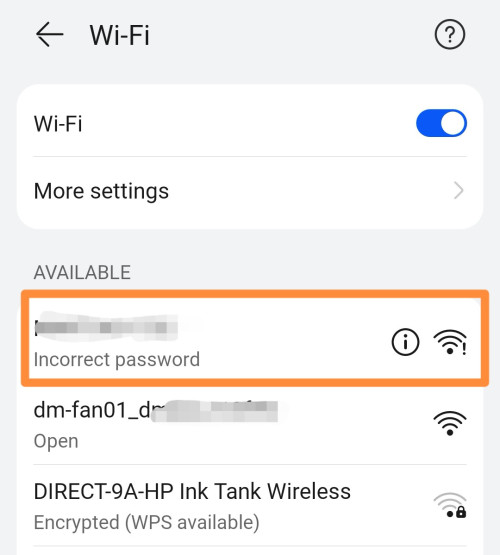
Hi! Has anyone experienced connection issue via WiFi from a device to Time's Huawei HG8145X6 router with a sudden "Incorrect Password"?

I reboot it once a week, up to now no issues. And it's not DHCP issue as I tried with setting a device with static IP and there was still the problem reoccurring the next day.
I need to wait several minutes for the connection to resume properly.

user posted image
*
I use a different phone so I don't get an incorrect password notice but I've faced a similar issue

But I think it's to do with your device leaving the place then coming back quickly

Like if I go down a few floors to grab mail and come back, this happens
I have to change between Private and Real MAC in the WiFi settings of the phone to get it to connect back

My guess is the router never realized your phone disconnected, and when your phone tries to connect again it rejects it

This post has been edited by PRSXFENG: Nov 1 2023, 09:54 PM

10 Pages « < 2 3 4 5 6 > » Top
 

Change to:
| Lo-Fi Version
0.0387sec    1.14    7 queries    GZIP Disabled
Time is now: 18th December 2025 - 04:22 AM