Welcome Guest ( Log In | Register )

10 Pages < 1 2 3 4 5 > » Bottom

Outline · [ Standard ] · Linear+

TIME [OFFICIAL] TIME Fibre Broadband™ v4, Experience the ONE TRUE 2Gbps

views
     
PRSXFENG
post Oct 8 2022, 08:48 AM

Look at all my stars!!
*******
Senior Member
2,613 posts

Joined: Nov 2020


QUOTE(Sam Leong @ Oct 8 2022, 08:26 AM)
May i know can i replace the HG8145V5 ONT to my own PON Stick and plug it into router that supports SFP?
If im not mistaken TIME uses password based authentication and not LOID right?
I can get the password from TIME HG8145V5 ONT admin page , turns out it was same with our PPPoE password
Beside password authentication , what does TIME's OLT requires in order to make custom PON Stick work on TIME network?
*
Hmm maybe can check
https://forum.lowyat.net/topic/4925452
Or maybe can ask them Anime4000
PRSXFENG
post Oct 11 2022, 10:42 AM

Look at all my stars!!
*******
Senior Member
2,613 posts

Joined: Nov 2020


QUOTE(zmxpro @ Oct 11 2022, 10:40 AM)
HI sifus, i have to add  asus wifi 6 router to my huawei router (provided by TIME), as the huawei router only wifi 5,

My question is what the best way to setup my asus, since it doesn't have fiber optic port
*
Request from CS that the Huawei router be set into bridge mode so that it basically only functions as an ONT, and plug in the Asus router and setup as usual

This post has been edited by PRSXFENG: Oct 11 2022, 10:43 AM
PRSXFENG
post Dec 8 2022, 08:17 PM

Look at all my stars!!
*******
Senior Member
2,613 posts

Joined: Nov 2020


QUOTE(brandonkl @ Dec 8 2022, 07:48 PM)
Enquired with Time on the upgrade to 2Gbps. They said a technician must come to change the router to 2Gbps router with WiFi6.

I said I am already using a router with a 2.5 Gbps port and WiFi6. So, I don't plan to use Time router but they insist must schedule appointment for their technician to come.

I asked can't you just upgrade to 2 Gbps on your side without coming to my house, seems like no. So will not upgrade for time being.
*
While yes your own router has 2.5Gig and technically the fibre side can do 2.4Gig/1.2Gig
your old provided modem/ONT only has Gigabit Ethernet ports, which would become a bottleneck, so they need to come change it

PRSXFENG
post Feb 9 2023, 11:06 AM

Look at all my stars!!
*******
Senior Member
2,613 posts

Joined: Nov 2020


QUOTE(LHY89 @ Feb 9 2023, 10:33 AM)
Hi all, newly subscribed to TIME package and was given the huawei Hg8145x6. I realized it combines the modem + router (mean the optical cable also connect to same unit)
Can anyone advise if i want a modem + router setup what is needed?
Can this huawei unit set as just modem (similar to TM/Maxis) then i attach my own router? or i need to buy a separate modem to achieve this?
Many thanks!
*
Contact TIME to change the combo modem/router into modem only mode, then connect up your own router as usual.
PRSXFENG
post Feb 20 2023, 07:19 PM

Look at all my stars!!
*******
Senior Member
2,613 posts

Joined: Nov 2020


QUOTE(Boldnut @ Feb 17 2023, 03:53 PM)
wuah... time got serve landed prop one kah?

I just receive a flyer from my mail box, ask me to sign up

I dont have memory that they lay cables infront my house. What fiber network they use?
*
they do, but rarely, usually due to not being allowed to

they lay their own cables
there could be a chance the cables are run underground
PRSXFENG
post Mar 2 2023, 07:59 PM

Look at all my stars!!
*******
Senior Member
2,613 posts

Joined: Nov 2020


QUOTE(Addword @ Mar 2 2023, 02:35 PM)
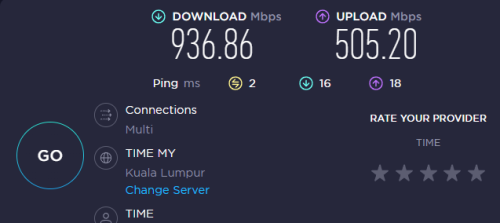
Just subscribed Time 1Gbps, getting this speed via LAN CAT5e. Acceptable? Any tips to hit 4 digits? laugh.gif

user posted image tongue.gif
*
its acceptable
with gigabit ethernet overhead, you wont see 1000Mbps, at best maybe 980Mbps or so

only way is as linked by the other member, with own ONU/router with 2.5Gbps (or higher) ethernet ports
PRSXFENG
post Mar 8 2023, 10:53 PM

Look at all my stars!!
*******
Senior Member
2,613 posts

Joined: Nov 2020


QUOTE(Optizorb @ Mar 8 2023, 03:49 PM)
currently using 100mbps with stock old time router which is dir850l i think, not much issue for me. only that in my toilet the signal is weak. router is in the hall, living in a condo.

receive email upgrade to mesh huawei wa8021v5 for free on 24 months contract, maintain same price. got another one upgrade to 300mbps for extra 10/month but i dont need the speed so im not going for that.

question:
1) is this huawei wa8021v5 compatible to act as meh with dir850l router? from what i read on time selfcare, it is not listed as a compatible device?
2) if not compatible, then in terms of functioning purely as a router, is this huawei wa8021v5 at least better than the dir850l? or worse performance?

if the huawei wa8021v5 performance is better than the dir850l then i think its ok to take up their 24 months contract offer, if it can improve my wifi in the toilet.

but this is low priority, so i dont need suggestion about getting a better router, etc.. Im fine with the dir850l. just want to know whether this wa8021v5 is an improvement over it or not only..
*
on paper the peformance could/should be better
cant mesh a proprietary huawei mesh router with a not even mesh supporting dlink
but not worth getting tied in a contract considering its not even a wifi 6 router

PRSXFENG
post Mar 20 2023, 09:01 PM

Look at all my stars!!
*******
Senior Member
2,613 posts

Joined: Nov 2020


confused by the wording

but if you are saying you dont want to use the provided huawei router, you can contact time cs and ask to change it into bridge mode and you can connect up your own router
PRSXFENG
post Mar 26 2023, 09:31 PM

Look at all my stars!!
*******
Senior Member
2,613 posts

Joined: Nov 2020


QUOTE(QuantumEdge @ Mar 26 2023, 06:19 PM)
Hey guys, anyway to setup bridge mode for the provided router+modem combo without contacting customer service?
Owner of the unit refused to contact CS on this matter even though I offer to install an Asus wifi 6 router for all FOC lol
Need to DIY
Or maybe I can change the modem too? With the Huawei HG8240H5?
*
it's been mentioned before somewhere in this thread
if you had access to the superadmin credentials you could login and change it
but its mentioned that they're not allowed to reveal it, so contacting them to remotely change it for you is basically the only way
PRSXFENG
post Apr 4 2023, 02:08 PM

Look at all my stars!!
*******
Senior Member
2,613 posts

Joined: Nov 2020


QUOTE(-kytz- @ Apr 4 2023, 12:08 PM)
Is the Asus AX58BT better than the TP Link TX3000E?

I'm thinking Asus might be better hence, the RM80-ish higher price tag, but Asus mesh systems are also more expensive should I upgrade the router and all too.

My Wifi 6 Huawei router is just outside my room but I'm only getting less than 250MBs (My TIME 500MB/s plan) via my old Asus PCE AC88 PCIE Wifi receiver
*
Probably minor difference, maybe even none

Both are using the same Intel AX200 chipset under the hood

So, just get the cheaper option since it's basically the same

The difference of the antenna might make a difference but I don't know tbh

Personally I would just get the cheaper one and not worry about it too much
PRSXFENG
post Apr 5 2023, 05:38 PM

Look at all my stars!!
*******
Senior Member
2,613 posts

Joined: Nov 2020


QUOTE(steelv @ Apr 5 2023, 02:51 PM)
Hi, how to change time modem/router to bridge mode ? Can i do it my self without calling time CS ?
*
You have to call CS
technically it would be possible to do it yourself if you had the root/technican password, but seems like they're not allowed to reveal it and so far it hasnt leaked out yet
PRSXFENG
post Apr 5 2023, 05:40 PM

Look at all my stars!!
*******
Senior Member
2,613 posts

Joined: Nov 2020


QUOTE(LoNeLyKiRa @ Apr 5 2023, 03:46 PM)
sifus please share if there is a way to replace the whole HG8145X6 with aftermarket router+modem? (without changing to bridge mode)

asides, for 1gbps plan. is the X6 1G lan port sufficient for that bandwith? will have any bottleneck? like when speed test using lan cable cant get 1000mbps above, with cat6 and 2.5G network port.
*
Look into this thread
https://forum.lowyat.net/topic/4925452

Pretty technical though

1Gig port, its kinda expeceted to not see 1000Mbps
rougly 940Mbps is the max for gigabit ethernet


PRSXFENG
post May 15 2023, 10:22 PM

Look at all my stars!!
*******
Senior Member
2,613 posts

Joined: Nov 2020


QUOTE(coolguyz98 @ Nov 5 2022, 05:21 PM)
Do you guys have problem accessing the Android Police website?  I can access using VPN and even on my mobile phone but I get an error whenever I use Time Broadband.  I'm using Google DNS 8.8.8.8, I've also tried Cloudflare 1.1.1.1.

user posted image
*
Replying to old post but just got TIME installed today and also have the same issue

VPN works, mobile data works, but not on time
Tried Cloudflare and Quad9 DNS

Same error of
ERR_HTTP2_PROTOCOL_ERROR

Also, gamerant.com and cbr.com don't load for me with the same error

Poking around, it seems like all those sites are hosted on Amazon AWS, so something related to that.
PRSXFENG
post May 18 2023, 08:02 PM

Look at all my stars!!
*******
Senior Member
2,613 posts

Joined: Nov 2020


QUOTE(Icehart @ May 18 2023, 02:33 PM)
Face this problem last time. Are you using two routers?
*
Nope, just TIME Provided Huawei OptiXstar HG8145X6
PRSXFENG
post Jun 16 2023, 01:50 PM

Look at all my stars!!
*******
Senior Member
2,613 posts

Joined: Nov 2020


QUOTE(dest9116 @ Jun 14 2023, 09:46 PM)
My time fibre gives the Hg8145x6 mesh router, have 2 piece but I'm only using 1 piece, another piece I want to use for my other house as wifi repeater.

However when I go to the router settings wifi repeater, it just won't connect to any wifi AP even my own phone Hotspot.

Anyone have this issue and how to solve? Thank you
*
TIME branded one somewhat locked down

please try AP mode (guide somewhere in this therad)

Still, I wouldn't recommend using this as a wifi repeater
PRSXFENG
post Jun 19 2023, 03:20 PM

Look at all my stars!!
*******
Senior Member
2,613 posts

Joined: Nov 2020


QUOTE(ronnie @ Jun 19 2023, 08:13 AM)
if the line is noisy "high noise" then the connection bound to be unstable.
How did you check this number ?
*
If you are using one of those Huawei All in One Routers

Login -> System Information -> Optical
and pay attention to RX Optical Power
PRSXFENG
post Jun 19 2023, 03:56 PM

Look at all my stars!!
*******
Senior Member
2,613 posts

Joined: Nov 2020


QUOTE(ronnie @ Jun 19 2023, 03:43 PM)
What numbers are considered good vs bad ?
*
I would say it should be no more than -25
so something like -15 would be good
PRSXFENG
post Jul 3 2023, 04:56 PM

Look at all my stars!!
*******
Senior Member
2,613 posts

Joined: Nov 2020


QUOTE(ho-ll @ Jul 3 2023, 11:20 AM)
Hi sifus, I did a reset on the router yesterday, and unable to connect to the internet anymore  cry.gif

I'm trying to reconfigure the connection, but stuck on the first step of logging to this page:
user posted image

I called the customer service, and she informed me to refer to the label of the router, but it did not work. Anyone knows what should be the right credentials to use?

p/s 1: There is no credential provided on the modem.
p/s 2: CS asked me to refer to router label to login the website above which I find it weird. (Thought it supposed to be modem, not router?)
*
You are logging into the Huawei ONT/Modem, not router

What is the model of the router? (there should be another device that isnt this Huawei HG8240H)
PRSXFENG
post Jul 15 2023, 09:30 PM

Look at all my stars!!
*******
Senior Member
2,613 posts

Joined: Nov 2020


QUOTE(dvinez @ Jul 15 2023, 06:21 PM)
Hi guys,

Just got my TIME broadband installed.

They gave me 2in1 Huawei HG8145V5.
I got TP-Link AX20 for router, when I connect LAN1 to WAN, AX20 automatically can online.

No need to call customer service or, login or setting at both device.

I then proceed to login HG8145V5 and disable its wireless.

Am I doing okay now? Or it is totally different thing?
Better call customer service request bridge mode etc? hmm.gif

Thank you in advance, your advice is very much appreciated.
*
While yes, this does make it able to get online, you are creating a Double NAT situation

It is still recommended to change to bridge mode
PRSXFENG
post Jul 27 2023, 12:27 PM

Look at all my stars!!
*******
Senior Member
2,613 posts

Joined: Nov 2020


QUOTE(kennyng77 @ Jul 27 2023, 10:48 AM)
I kept the Huawei fibre modem from previous condo, now new condo TIME using HG8145X6. Just to check, can I use back the old huawei fibre modem to enable to use my TP-Link AX73 or really need to call CS to change HG8145X6 as bridge mode?
*
Probably the 2nd one, since the old modem has its own settings/id/details that would not be the same
Could you possibly change the details to match? Probably if the credentials were known

But just call CS to change the mode of the HG8145X6

10 Pages < 1 2 3 4 5 > » Top
 

Change to:
| Lo-Fi Version
0.0389sec    0.51    7 queries    GZIP Disabled
Time is now: 18th December 2025 - 12:54 PM