Welcome Guest ( Log In | Register )

10 Pages « < 4 5 6 7 8 > » Bottom

Outline · [ Standard ] · Linear+

TIME [OFFICIAL] TIME Fibre Broadband™ v4, Experience the ONE TRUE 2Gbps

views
     
PRSXFENG
post Feb 6 2024, 08:54 AM

Look at all my stars!!
*******
Senior Member
2,616 posts

Joined: Nov 2020


QUOTE(eugene66 @ Feb 6 2024, 07:56 AM)
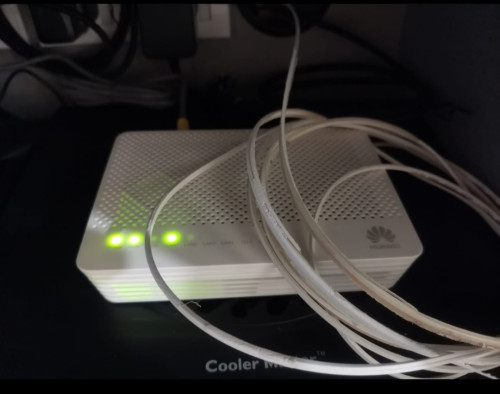
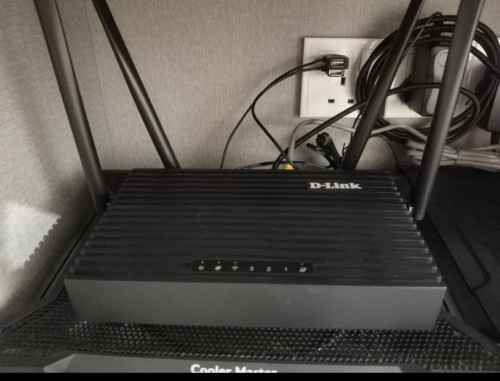
I'm uisng U mobile fibre for a week plus now. So far no complain, installer is from TIME. If TIME pulled fibre optic cable to your house previously, basically there's no need to repull again. Speedtest can get average of 95-103mbps download and 90-105mbps upload using wireless.
user posted image
user posted image
*
we need a U Mobile Fiber thread now biggrin.gif
What model D-Link is that, that was provided by U Mobile?

also, I see you are also part of the "use laptop cooler as router cooler" gang tongue.gif
cooler master has a router cooler but its so expensive, rather use cheap laptop cooler
PRSXFENG
post Feb 19 2024, 08:26 PM

Look at all my stars!!
*******
Senior Member
2,616 posts

Joined: Nov 2020


QUOTE(contestchris @ Feb 19 2024, 01:33 PM)
TIME
EMIT

just reversed

that is one clever naming...
PRSXFENG
post Feb 20 2024, 09:51 PM

Look at all my stars!!
*******
Senior Member
2,616 posts

Joined: Nov 2020


QUOTE(muncheno @ Feb 20 2024, 07:57 PM)
What is the easiest way to check contract due date?
*
You can see it in the portal
PRSXFENG
post Feb 23 2024, 11:47 AM

Look at all my stars!!
*******
Senior Member
2,616 posts

Joined: Nov 2020


QUOTE(CommodoreAmiga @ Feb 23 2024, 11:27 AM)
One suprise. My son's Room WIFI has improved. He is using this GIGABYTE AORUS 450-I PRO motherboard with builit in Wifi. I check specs also WIFI AC only, not AX, but from 300Mbps previously now can reach almost 450Mbps...his room nearer to router. So i guess not all is bad. Also my Nintendo Switch can finally connect to the 5Ghz wifi without tantrums. Previously won't work unless it set to a specific channel (20 or 40, can't remember).

Hmm, i wonder if i get newer Wifi USB dongle supporting AX can get better speed?
*
PCIe Wifi card is forever better than USB ones, most wifi 6 cards based on Intel AX200 are good

even on say, that Gigabyte board with built in wifi, you can actually replace the wifi card
guide: https://forum.level1techs.com/t/replacing-w...-strix/155874/2
(guide is for an asus board but it's all the same)
PRSXFENG
post Feb 24 2024, 10:44 AM

Look at all my stars!!
*******
Senior Member
2,616 posts

Joined: Nov 2020


QUOTE(eNDY<3games @ Feb 24 2024, 08:49 AM)
Hello, anyone here that previously got the EchoLife EG8145V5 router/modem from TIME? If I wanna use another router, will the EchoLife EG8145V5 act as a modem rather than a router? Sorry not really familiar with routers and modems.
*
It is a combo 2 in one modem router

Just ask TIME CS to change it over to modem mode for you and then you can connect your own router
PRSXFENG
post Feb 26 2024, 12:20 AM

Look at all my stars!!
*******
Senior Member
2,616 posts

Joined: Nov 2020


QUOTE(westlife @ Feb 25 2024, 11:40 PM)
i dun know... haven't tried. u can try to do it. if there is a penalty, it should indicate...

but i doubt so, since ur contract is renewed for 24 months. routers for sure no need to return...
*
I have done it before
I subscribed to 500Mbps to get the wifi6 devices and enjoy the speed at rm99 for 6 months but fully intend to downgrade to 100mbps to keep the price at rm99

after 6 months pass, the downgrade button in the image above becomes avaliable
once you confirm and submit the downgrade request, you downgrade with a contract reset
so you are back to being stuck with them for 24 months

you get the keep the hardware

the only penalty is the contract reset
PRSXFENG
post Mar 18 2024, 09:33 PM

Look at all my stars!!
*******
Senior Member
2,616 posts

Joined: Nov 2020


QUOTE(westlife @ Mar 18 2024, 05:56 PM)
RM99 + rm20 = RM110? Worth it ah of course. 🤪 if u do use speed above 100Mbps.
*
Messed up on that calculation there
99 + 20 = 119

(Think of it like rm100 + 20 = rm120)

It is a slight discount over public price but you get locked back in again
Also the free routers are ehhhhhh
PRSXFENG
post Mar 28 2024, 12:38 PM

Look at all my stars!!
*******
Senior Member
2,616 posts

Joined: Nov 2020


QUOTE(Vincent6596 @ Mar 28 2024, 08:57 AM)
when will get the speed boost ?
price remain the same as before ?
*
I took a closer look at the tnc page and I noticed

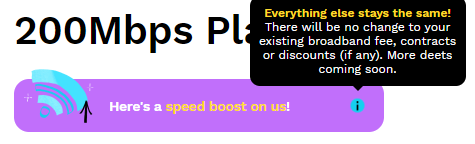
> and to existing subscribers who received complimentary speed boost between 27 March 2024 to 7 April 2024.
PRSXFENG
post Apr 1 2024, 12:03 AM

Look at all my stars!!
*******
Senior Member
2,616 posts

Joined: Nov 2020


QUOTE(contestchris @ Mar 31 2024, 09:03 PM)
Mine in shop still 100mbps. Looks like I'm not eligible.
*
for me
checking on selfcare webpage shop shows 100
yet mobile app shop shows 200
PRSXFENG
post Apr 6 2024, 12:10 PM

Look at all my stars!!
*******
Senior Member
2,616 posts

Joined: Nov 2020


QUOTE(JimmyX @ Apr 6 2024, 11:49 AM)
Finally, my 100mbps is getting speed boost! Thanks Time!

user posted image

user posted image

user posted image
*
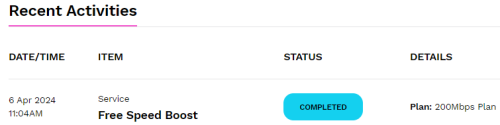
also got it here, nice!
PRSXFENG
post Apr 8 2024, 10:07 AM

Look at all my stars!!
*******
Senior Member
2,616 posts

Joined: Nov 2020


QUOTE(contestchris @ Apr 8 2024, 12:34 AM)
user posted image

I'm on a 100mbps plan (with 1 year contract period remaining) and have received the speed boost.

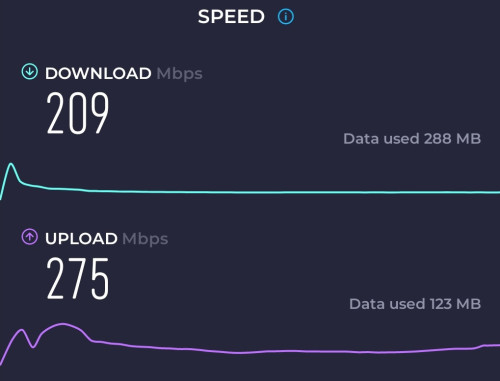
Confirmed by doing a speedtest, my peak speed is >200mbps now.

HOWEVER, the speed is pretty unchanged at my PC room, likely due to the distance. In the past, on 5Ghz bandwith, I'd get around 30 to 40mbps. Still same now. On the 2.4Ghz bandwith, the speed is also similar to before (around 20 to 30mbps).

I thought with the doubling of the speed cap, my speed all around will double up?

I need to go near to the stock router to get anywhere near 200mbps.
*
you could have 2Gbps at the router for all that matters but if your pc has a N150 card you will only ever get ~40Mbps, the speed of the connection between your router and device and between router and device is different
,
40Mbps is the realistic maximum you will get on 2.4Ghz
you will need to use 5Ghz for max speed

what is your wifi card? older wifi cards may not be able to get the max speed
for me I can get 200Mbps no problem with Intel AX200 card


PRSXFENG
post Apr 9 2024, 05:32 PM

Look at all my stars!!
*******
Senior Member
2,616 posts

Joined: Nov 2020


QUOTE(ckokwei @ Apr 9 2024, 04:08 PM)
yes, because that is an old WIFI 5 router
the time one is at least wifi 6
PRSXFENG
post Apr 14 2024, 12:17 PM

Look at all my stars!!
*******
Senior Member
2,616 posts

Joined: Nov 2020


QUOTE(westlife @ Apr 14 2024, 11:57 AM)
Seems like the free speed boost only boosts download speed and not upload speed?
*
probably their max upload is 500mbps plans since even 2gbps plan gets 500mbps upload

for me I went from 100/100 to 200/200
PRSXFENG
post Apr 18 2024, 01:07 PM

Look at all my stars!!
*******
Senior Member
2,616 posts

Joined: Nov 2020


QUOTE(westlife @ Apr 18 2024, 12:34 PM)
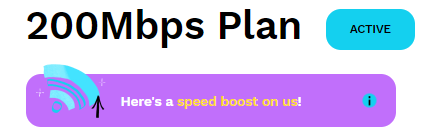
nice... the base internet speed is 200Mbps.. initially i still worry that the free speed boost is only for existing users... if i downgrade to 100Mbps, i will not get 200Mbps.. now no need to worry anymore... tongue.gif

100Mbps is more than sufficient for me, 200Mbps is lagi better..

anyone knows what is the upload speed for 200Mbps plan?

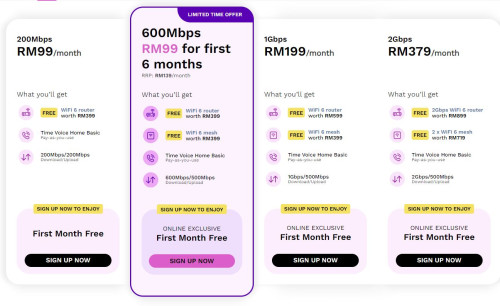
user posted image
*
It's right there, 200/200

PRSXFENG
post Apr 21 2024, 09:40 PM

Look at all my stars!!
*******
Senior Member
2,616 posts

Joined: Nov 2020


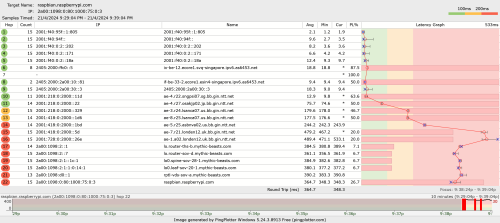
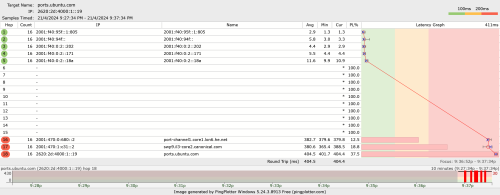
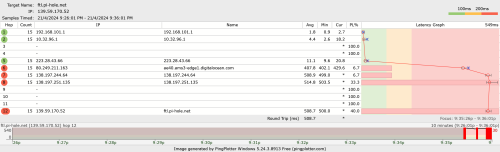
I basically cant update any of my linux sbcs

user posted image

user posted image

user posted image

the latency / packet loss shoots up immediately after leaving the local network

This post has been edited by PRSXFENG: Apr 21 2024, 09:41 PM
PRSXFENG
post Apr 24 2024, 12:20 PM

Look at all my stars!!
*******
Senior Member
2,616 posts

Joined: Nov 2020


QUOTE(doomx @ Apr 24 2024, 12:06 PM)
hey all just gotten time after unifi been quite erratic recently in my area

I am using the archer AX20, so i setup as quick setup just putting in username and password through PPPOE like how i setup unifi, it still shows that i dont have internet.

is there any added step that i am missing? Thanks
*
Did you already set the 2 in 1 router/ont into bridge mode?
You can ask CS to do that for you

Also I think time might use VLAN 499
PRSXFENG
post Apr 25 2024, 01:42 PM

Look at all my stars!!
*******
Senior Member
2,616 posts

Joined: Nov 2020


QUOTE(bsb85my @ Apr 25 2024, 12:35 PM)

*
you need to change the gpon password/SN to match your old one

on the new one it's under
Advanced -> System Management -> ONT Authentication

login to old one and find that and copy the password and SN from old one to here
PRSXFENG
post Apr 26 2024, 06:50 PM

Look at all my stars!!
*******
Senior Member
2,616 posts

Joined: Nov 2020


QUOTE(petpenyubobo @ Apr 26 2024, 06:21 PM)
But the weird thing is that many VPN providers have taken down their India physical servers and replaced them with virtualized servers which are secretly based somewhere else.
user posted image
*
Basically, India didn't outright ban VPNs but made it so that anyone who wants to operate there must log all the information

Which is the opposite of what a VPN service typically offers

https://web.archive.org/web/20221202192813/...collection-law/

Archive link because paywall
PRSXFENG
post Apr 26 2024, 07:28 PM

Look at all my stars!!
*******
Senior Member
2,616 posts

Joined: Nov 2020


QUOTE(petpenyubobo @ Apr 26 2024, 07:05 PM)
Latency for no reason from Malaysia also has increased considerably. Doesn't make sense with 300ms just across the Indian Ocean?

We have many other major undersea cables that links us to India/Middle East besides SE-WE-ME 5, is there something hidden that we public aren't aware?
Cyber warfare determent?

So coincident that India recently clamped down on physical VPN servers operating in their country?
*
That news article is from 2022... That's not "recently"
PRSXFENG
post Apr 27 2024, 05:42 PM

Look at all my stars!!
*******
Senior Member
2,616 posts

Joined: Nov 2020


QUOTE(whitejack @ Apr 27 2024, 02:05 PM)

*
> My current setup is: HG8240H5 > EC230-G1 > Powerline adapter

what powerline adapter are you using?

> 1) What is the recommended setup to improve the internet speed at the yellow area?

1st one, dont even bother with that
2nd, can be considered but, just drop the EC230-G1 and go

HG8240H5 -> Deco M4 -> another unit of Deco M4

but do also consider newer wifi6 routers

> 2) What is estimated speed drop if using mesh as compared to my current powerline adapter?

better, but best if you can run a lan cable between them or use an expensive tri-band mesh

> 3) Do i need to upgrade my current router?

can consider wifi6 router/mesh


10 Pages « < 4 5 6 7 8 > » Top
 

Change to:
| Lo-Fi Version
0.0392sec    0.92    7 queries    GZIP Disabled
Time is now: 23rd December 2025 - 08:15 AM