QUOTE(diehard1979 @ Sep 23 2022, 01:46 PM)
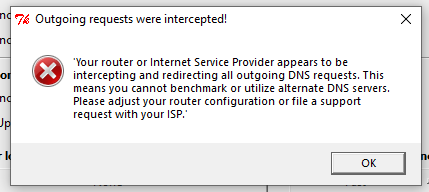
anyone can help me on DNS things?
I not familiar with this HG8145X6.
Do anyone got pdf user manual on every setting of this device?
Can someone show me how to set the DNS for this?
where is it?
both dns for IPv4 and IPv6 need to be set? or set IPv4 dns enough already?
after set I click "apply" then I have to switch off the device and on it back to make it latest setting? or when I click apply, it will work with latest setting already?
I found out in steamgifts, when it load, it also refer something from these 2 site
maxcdn.bootstrapcdn.com
securepubads.g.doubleclick.net
which make it load very slow and missing icon without TIME DNS.
203.121.18.10
203.121.18.8
203.121.18.9
are these 3 default DNS for TIME?
best you set for both ipv4 and ipv6, it should be instantly set on the router side, but you will have to disconnect and reconnect your devices (or restart the router to force everything to reconnect) so that your devices know it has changed and to use the new settings, because your router announces what to use when a device connects up (DHCP)
as for the maxcdn thing, it is a known isssue that mcmc is wrongly blocking it, there's another thread on here talking about it
securepubads is just google ads, shouldnt be a problem...


 Feb 16 2022, 09:45 PM


 Quote
Quote




 0.0447sec
 0.80
0.80
 7 queries
 GZIP Disabled