

QUOTE(Harddisk @ Dec 2 2024, 10:46 AM)
I have requested termination for the 5th time now. The button still grey.

Yes, they purposely made termination hard.TIME [OFFICIAL] TIME Fibre Broadband™ v4, Experience the ONE TRUE 2Gbps
|
|
 Dec 2 2024, 10:52 AM Dec 2 2024, 10:52 AM
Return to original view | Post
#1881
|
 
Senior Member
3,606 posts Joined: Feb 2006 
|
QUOTE(Harddisk @ Dec 2 2024, 10:46 AM) I have requested termination for the 5th time now. The button still grey. Yes, they purposely made termination hard. |
|
|
|
|
|
Dec 5 2024, 12:18 PM
Return to original view | Post
#1882
|
|
Senior Member
3,606 posts Joined: Feb 2006
|
QUOTE(Xsence @ Dec 3 2024, 06:48 PM) Anyone have experience connecting Asus router? I have pppoe on hand, but unsure about the settings needed to do Scenario 1 :Any pointers? If you are using a Huawei HG8240H/HG8240H5 ONU, then you can directly connect your Asus Router to LAN1 port of the ONU, and configure your PPPOE credentials in your Asus Router. Scenario 2 : If you are using a Huawei ONT (Eg. HG8145X6, HN8245X6S-8N-30, HG8145B7N), you need to call CS to request them to change it to the Bridge Mode, just inform them you wish to use your own router, there's no way for them to stop you for doing so. * Note : Once it is changed to Bridge Mode, when you login to the ONT, under WAN Configuration, you can only see VOIP Profile, the Internet Profile is removed. Moogle Stiltzkin liked this post
|
|
|
Dec 10 2024, 06:55 PM
Return to original view | Post
#1883
|
|
Senior Member
3,606 posts Joined: Feb 2006
|
QUOTE(Ohfv9 @ Dec 10 2024, 02:33 PM) Can someone confirm if HG8145V5 is ONU or ONT? Do I need to reach out CS change to the bridge mode before I plug in my new bought ASUS router? It is by default an ONT. |
|
|
Dec 11 2024, 10:55 AM
Return to original view | Post
#1884
|
|
Senior Member
3,606 posts Joined: Feb 2006
|
QUOTE(litlit @ Dec 11 2024, 02:38 AM) Hi all, I am on 600mbps plan , my TIME router is Huawei OptiXstar HG8145X6-10. Totally agree with blacktubi.. ditch this router & get yourself a better one.Is there anyway to disable smart wifi, or separate 2.4G and 5G. Cause my connection speed very bad , like dl speed only 50-60mbps and upload speed below 5mbps or sometimes even 0 on my iPhone 15PM even next to the router. Thanks all |
|
|
Dec 12 2024, 08:25 PM
Return to original view | IPv6 | Post
#1885
|
|
Senior Member
3,606 posts Joined: Feb 2006
|
QUOTE(n20nine @ Dec 12 2024, 06:59 PM) Hey folks, I got the new Wifi 7 router fro TIME. I really can't explain it but I have had bad headaches and discomfort from using this. Was never the case with previous routers. Sound familiar? Should I just get a normal Asus router? Should get yourself another router, any router at your preference. |
|
|
Dec 16 2024, 03:34 PM
Return to original view | Post
#1886
|
|
Senior Member
3,606 posts Joined: Feb 2006
|
QUOTE(mhhee @ Dec 16 2024, 02:55 PM) Anyone is having issue with CN websites or CN app slowniness & sometimes not even response? Yes... tons of such complaints in the recent 2 years & getting more obvious.Using Mi Home app CN region & most of the times cannot get it connected. |
|
|
|
|
|
Jan 7 2025, 09:54 AM
Return to original view | Post
#1887
|
|
Senior Member
3,606 posts Joined: Feb 2006
|
QUOTE(westlife @ Jan 4 2025, 10:57 PM) FTTR is good. Whether FTTR or conventional Network-cabled up the 2 units, that will depend on the unit's design, usually FTTR is not recommended due to it's fragility & device limitation. is it normal that all dual key units also will have the two time fibre points? It's mandatory if there are 2 addresses registered at local council. Anyway, some dual key units which only has one address will have individual fibre point & some will be shared with only 1, it depends on design. to be fair, it is a good design that if one own a dual key units, can rent out to two separate tenants and each of them can apply their own fibre internet. but owner ownself stay in the unit it will not be good becos need to sign up two fibre internet? unless use mesh etc. to cover across two units? for if subscribe to FTTR for time, whether they will allow to FTTR the two units under one time fibre internet account is a question mark i guess? |
|
|
Jan 7 2025, 11:37 AM
Return to original view | Post
#1888
|
|
Senior Member
3,606 posts Joined: Feb 2006
|
QUOTE(westlife @ Jan 7 2025, 10:39 AM) it is impossible for a dual key unit to have 2 registered addresses at local council. It's still the last resort where one is exttremely concerning about the cosmetic look of the cabling running around the house, not very much concern about the limitation of using the given stock devices and willing to take the high risk of cable damage later.Not entirely true, as dual key units will have indication during developer's submission for address issuance. dual key is just the design and layout, and ppl buy dual key becos they pay the price for one unit for technically own two units layout so that they can rent out two units separately or one unit for own stay and one to rent out. it is certainly one SNP only when the owner bought it. FTTR is good, i dun see a prob with it. and the installer will lay the cables according to the layout which unlikely they will be so easily damaged and cause prob. and the fibre cable they use is thin and not so apparent to be notice which is good for aesthetic. fibre is certainly a better medium than UTP cables. This is not a comparison between UTP & Fibre, this is about the fargility of such optical fiber medium used by FTTR. We have done FTTR with our China counterparts before local ISPs rolled out this solution, trust me it is still not the promising way to do it at least without some modifications. yes, it limits the devices one can use but if one has no network ports (concealed) one ready and dun want to hack the walls etc. by paying rm1k++ upfront it is still reasonable cost to spend. wifi mesh especially wifi 7 is certainly not cheap and can easily cost the same if factor in the cost to build the concealed network ports etc... Usually we will work out with consultants & developers at the design & planning stage before the constructions kick start to come out with solutions for wifi signal, smart home etc. with future proof concern... |
|
|
Jan 7 2025, 03:09 PM
Return to original view | Post
#1889
|
|
Senior Member
3,606 posts Joined: Feb 2006
|
QUOTE(westlife @ Jan 7 2025, 02:01 PM) dun think so, i never heard of any dual key with two addresses one. There are many types of designs for dual key units, some more to privacy concern & it is exactly like 2 individual units separated where you can pull network cable during reno, not necessarily require FTTR.it is just a pure design. Not 2 address, it is indication in the submission for approval. even the 2 bedrooms and 3 bedrooms dual key units i visited, by default they are just normal 2 bedrooms and 3 bedrooms unit, and if owner can add a wall or hack a wall in the unit to make it dual keys. i believe the bro here with dual key unit can confirm. Like I mentioned, if one don't mind, then it is up to his/her choice to choose whether to go for FTTR. |
|
|
Jan 7 2025, 03:12 PM
Return to original view | Post
#1890
|
|
Senior Member
3,606 posts Joined: Feb 2006
|
QUOTE(westlife @ Jan 7 2025, 02:04 PM) they use run thru the edge and almost invisible and no need to drill or hack walls at all. Thank you for your sharing. You have your own opinions.the cables are certainly not that obvious.. i dun think it is going to be any eyesores to the aesthetics of the house as they are transparent micro fibre cables. i find the cost reasonable to enjoy the maximum benefits from fibre comparing to buying wifi 7 mesh which is expensive too and not to mention need to hack walls, install ethernet points etc... Scenario 1: FTTR Solutions CelcomDigi FTTR 1+1 Nodes: RM1,440 (incl. installation) 1+2 Nodes: RM1,800 (incl. installation) 1+3 Nodes: RM2,280 (incl. installation) Time Gig Speed Home 1+1 Nodes: RM1,320 Promo / RM2,640 Full Price (installation included) 1+2 Nodes: RM1,800 Promo / RM3,600 Full Price (installation included) 1+3 Nodes: RM2,160 Promo / RM4,320 Full Price (installation included) Scenario 2: Creating Ethernet Points and Wi-Fi 7 Mesh Solution Costs Breakdown: Ethernet Points Installation Hacking walls and wiring: RM800–RM1,500 per point (depending on house size and complexity). For 3 rooms: RM2,400–RM4,500. Wi-Fi 7 Mesh Solution Mid-range Wi-Fi 7 Mesh (e.g., ASUS ZenWiFi XT9): RM2,800–RM3,500. High-end Wi-Fi 7 Mesh (e.g., ASUS ROG Rapture GT-BE98): RM5,000+. Total Cost (3 Rooms): Mid-range solution: RM5,200–RM8,000. High-end solution: RM7,400–RM9,500+. Comparison Summary FTTR Solutions: RM1,320–RM4,320 (easier setup, aesthetic, no wall hacking). Ethernet Points + Wi-Fi 7 Mesh: RM5,200–RM9,500 (greater upfront cost, higher customization). Verdict: FTTR is significantly cheaper and less invasive. Ethernet + Wi-Fi 7 mesh is ideal only if you need maximum performance or have advanced networking needs. Transparent microfibre cables are ultra-thin, lightweight cables made of microfibre materials with a transparent or translucent appearance. They are typically designed for specialized applications where aesthetics, flexibility, or unobtrusiveness are critical. We are here to highlight the actual problems we have encountered, pros & cons to have this FTTR deployed. We usually will pay a visit to our customers house to do a preliminary survey & propose a solution for them. End of the day, it is really up to the owner to decide whether to proceed or not. This post has been edited by jjj2: Jan 7 2025, 03:14 PM |
|
|
Jan 7 2025, 03:18 PM
Return to original view | Post
#1891
|
|
Senior Member
3,606 posts Joined: Feb 2006
|
QUOTE(blacktubi @ Jan 7 2025, 03:16 PM) Dont recommend this to owners with cat. True Or maybe do recommend to them, you will have endless maintenance job.   |
|
|
Jan 14 2025, 10:25 AM
Return to original view | Post
#1892
|
|
Senior Member
3,606 posts Joined: Feb 2006
|
QUOTE(terdit @ Jan 14 2025, 10:07 AM) 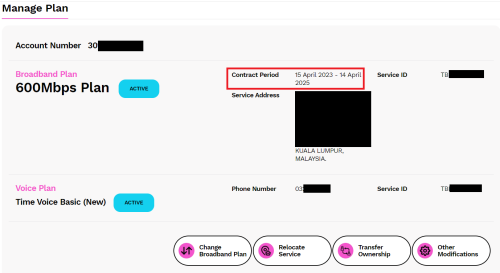 Hi All Sifus, i renewed my contract with TIME almost 2 years ago, next contract expiry is on mid of April 2025 (ngam ngam 3 months from today). Would like to ask, when will i able to see the offer for contract renewal? still didnt see such things after login to self care. previous renewal i got 2 unit of Huawei HG8145X6, which currently use 1 of it as my router after my TP-Link AX73 start to become not stable on the internet. the TP-Link AX73 was bought on mid 2021 with 3 years warranty, so after warranty expired it start to have problem on Q3 2024  they memang count till ngam ngam on the lifespan? current Huawei HG8145X6, i found that the performance is not that good, sometimes internet (WiFi) is a bit slow when in the room. never have this problem when using TP-Link AX73 previously. Should i head for the WIFI7 router from TIME? (if they offer me the router for contract renewal) Go for your own Router. or should i just get another router from other brand? saw this TP-Link BE230 WiFi 7 BE3600 while exploring. add on: i have quite a number of gadget and IOT connecting to the WiFi need advice on the above. thanks again. terdit liked this post
|
|
|
Jan 14 2025, 06:23 PM
Return to original view | Post
#1893
|
|
Senior Member
3,606 posts Joined: Feb 2006
|
QUOTE(terdit @ Jan 14 2025, 10:44 AM) Any recommended router from you? For single Router, budget wise, you can go for BE230, or top up a bit to go for BE550. terdit liked this post
|
|
|
|
|
|
Jan 15 2025, 10:49 AM
Return to original view | IPv6 | Post
#1894
|
|
Senior Member
3,606 posts Joined: Feb 2006
|
QUOTE(chupapi_munyayo @ Jan 14 2025, 09:23 PM) own house cheapest tplink Wi-Fi 6 signal can reach 2nd floor but huawei wifi 7 from TIME router at 1000sq condo living room can’t even reach master bedroom n toilet Yes.. The be3600 dual band wifi7 router is more to a marketing gimmick & merely a very basic one, rather go for your own router.Dafuq This post has been edited by jjj2: Jan 15 2025, 10:53 AM |
|
|
Jan 18 2025, 08:31 AM
Return to original view | Post
#1895
|
|
Senior Member
3,606 posts Joined: Feb 2006
|
QUOTE(Quazacolt @ Jan 18 2025, 06:09 AM) speaking of that, can the Huawei HG8145B7N be connected to mesh? i don't think there's any Mesh option or setting in the router advanced page. It can be used as Mesh. assuming it can use Huawei own mesh, i would assume it cannot be compatible to other brands mesh products? Yes not compatible. ok, i am considering my own 6ghz Router now, sigh lol. well, i'm not actually sure if i am in a medium to high density condo, most tenants not moved in yet and SSID isn't crowded... yet. but the walls /concrete seems thick and HG8145B7N signals couldn't reach master bedroom (1 end) from the living room (the other end, where the route is placed) same goes for toilets, should you want to use your phone during business Quazacolt liked this post
|
|
|
Jan 18 2025, 02:44 PM
Return to original view | Post
#1896
|
|
Senior Member
3,606 posts Joined: Feb 2006
|
QUOTE(my44 @ Jan 18 2025, 12:27 PM)  Anyone facing this issue today? Suddenly no internet and PPPoE showing IP address 0.0.0.0 my44 liked this post
|
|
|
Jan 27 2025, 01:28 AM
Return to original view | Post
#1897
|
|
Senior Member
3,606 posts Joined: Feb 2006
|
QUOTE(Quazacolt @ Jan 26 2025, 05:04 PM) Guys, where do I access EasyMesh configuration or options in the time router? To install the same model mesh unit, place the mesh unit near to the ONT, press the WPS key on the ONT, and the mesh unit will auto paired. There is no need to press the WPS button on the mesh unit as Huawei ONT supports smartlink protocol.[attachmentid=11509434] [attachmentid=11509435] Once the WPS button on the ONT is pressed, observe the Mesh Unit WPS light, it will blink slowly it measn it is pairing with the ONT. When the WPS light on the ONT is Off, it means the Mesh unit is successfully paired. Quazacolt liked this post
|
|
|
Jan 28 2025, 11:37 PM
Return to original view | Post
#1898
|
|
Senior Member
3,606 posts Joined: Feb 2006
|
QUOTE(Quazacolt @ Jan 27 2025, 09:47 AM) Thanks bro Welcome Bro By model I'm assuming you meant same brand? Yes What if I go for another brand like say, TP-Link that supports WiFi 7 EasyMesh? Nope procedure is different, It will be acting as wifi repeater, it will not be "full mesh". Same method and theoretically they'll just work as you described? Quazacolt liked this post
|
|
|
Feb 7 2025, 05:50 PM
Return to original view | Post
#1899
|
|
Senior Member
3,606 posts Joined: Feb 2006
|
QUOTE(nevenchailj @ Feb 7 2025, 01:52 PM) Hi guys, Hi, is your current WiFi6 Router connected with fiber, if so then it's an ONT. You can't simply swap it, as authentication with OLT is required.I am currently using TIME Internet 600Mbps with a WiFi 6 router. However, I recently got my hands on a TIME WiFi 7 router. I tried replacing my current router with the WiFi 7 router, but it doesn’t work. Is there anything else I need to configure? During setup, there was no option to enter a PPPoE username or password, only the SSID and WiFi password. The WiFi 7 router I’m using is Huawei OptiXstar HG8145B7N. Thanks in advance for your help! You need to contact the CS to request assistance. Sorry we are not allowed to publish the DIY guideline here. |
|
|
Feb 9 2025, 01:52 PM
Return to original view | Post
#1900
|
|
Senior Member
3,606 posts Joined: Feb 2006
|
QUOTE(nevenchailj @ Feb 8 2025, 10:25 PM) Hello. Just realised that after configuring sometime. Thanks a lot for the reply. If I were to contact CS, would they be able to help? Yes, CS able to assist. Thanks.If you’re not allowed to to publish DIY guideline, do you mind to PM? Thank you… Appreciate it nevenchailj liked this post
|
| Change to: |  0.0376sec 0.0376sec
 0.59 0.59
 7 queries 7 queries
 GZIP Disabled GZIP Disabled
Time is now: 6th December 2025 - 03:45 PM |
 Quote
Quote