Welcome Guest ( Log In | Register )

100 Pages « < 92 93 94 95 96 > » Bottom

Outline · [ Standard ] · Linear+

TIME [OFFICIAL] TIME Fibre Broadband™ v4, Experience the ONE TRUE 2Gbps

views
     
jjj2
post Oct 31 2024, 09:12 PM

Look at all my stars!!
*******
Senior Member
3,606 posts

Joined: Feb 2006
QUOTE(karenzayn @ Oct 30 2024, 09:39 PM)
Hi, does anyone manage to change to bridge mode for the newer model of the AIO router that TIME give?

Model: Huawei HG8145B7N
*
It can be changed to bridge mode for sure, due to instruction from time, sorry we could not show you how to do it, anyway you can call CS to request for that.

Thanks.
jjj2
post Nov 4 2024, 08:23 AM

Look at all my stars!!
*******
Senior Member
3,606 posts

Joined: Feb 2006
QUOTE(jkfoong @ Nov 1 2024, 04:48 PM)
I'm looking to replace the Wifi 7 router provided by Time, seems to be unstable even within near speed.

What do you guys think? I'm looking at TP-Link AX53. Yes I am aware that it is a Wifi 6 router, but i don't think I need Wifi 7 at 600Mbps.

One more question is that can I directly connect to the ONU without the Huawei router?

Current Router Model: Huawei HG8145B7N

user posted image
*
If your house has a soho box (a centralized distribution box where all fibers & network cables centralized), then usually you are given an additional ONU & the WiFi7 ONT (Huawei HG8145B7N) will be connected to this ONU. In this case, you can get ready the PPPOE credentials & have your WiFi6 TPLink AX53 connected to LAN1 port of the ONU, and configure the PPPOE credentials into your AX53.

If you do not have an additional ONU & given only an ONT HG8145B7N, then please call CS to request them to change it to bridge mode because you want to use your own router.

This post has been edited by jjj2: Nov 4 2024, 08:25 AM
jjj2
post Nov 4 2024, 08:33 AM

Look at all my stars!!
*******
Senior Member
3,606 posts

Joined: Feb 2006
QUOTE(jason111785 @ Nov 1 2024, 06:48 PM)
I am planning for my connectivity now for my new (but old) condo - AraGreen residence.

My unit is a dual key unit (with individual fiber port). Anyone knows if TIME does do connection at the MDF room?

Else I will need to do FTTR so that I can have both unit coverage (1100+800 sqft)
*
The simplest way is to pull a network cable over, if network over to the adjacent unit is not possible, then FTTR maybe an alternative if you are particular on the cosmetic look, do take note that with this you will lose the flexibility of using your own devices at the same time facing very fragile cable risk, not to mention high implementation cost.

Another way is to utilize the spare core from your Riser FTB & pull additional fiber into your unit (the one has no fiber point), of course with the consent from your building management.

Another way, is to modify your existing fiber point (if it has 2 cores), splice it, and pull another cable to the adjacent unit.

Thanks.

jjj2
post Nov 4 2024, 08:38 AM

Look at all my stars!!
*******
Senior Member
3,606 posts

Joined: Feb 2006
QUOTE(leechunghan @ Nov 2 2024, 09:30 PM)
I just apply new fibre. Soon they come to install, can I ask the installer to setup using my own router?
*
They can setup their own devices, for setting up your router, there will be a charge of RM80/hour following the ratecard.
jjj2
post Nov 4 2024, 09:23 PM

Look at all my stars!!
*******
Senior Member
3,606 posts

Joined: Feb 2006
QUOTE(rabbit.dynamite @ Nov 2 2024, 01:13 PM)
Hello.. Anyone can recommend a network cable contractor in KL?

Staying in new condo unit, got my general contractor to relocate the fibre port from its original location and I think he might have damaged it cos the Time installer found high fibre reading of - 28.5dB.

Now looking for contractor who can hack the wall, troubleshoot the problem, and fix the wire.
*
Hi, how I wish I could help, but I'm in Penang. I can give you some ideas what to look at... before this how did your contractor relocate the fiber port ?
Do check for any bending on the cable, splicing point (if any) & the fast connector as well...
You may text me for more details.

Thanks.
jjj2
post Nov 7 2024, 11:30 AM

Look at all my stars!!
*******
Senior Member
3,606 posts

Joined: Feb 2006
QUOTE(baem.ab90 @ Nov 6 2024, 05:57 PM)
fgs just now got problem, then after 2 hours they restored.
I check on my router. WAN IP starts with 10.x.x.x  CG-NAT.

I've been using Time for only about 2 years. All this while I get public IP, no problem. I just called them straight to complain after I realise all my services doesn't work.
Very sneaky....
*
Yes, this is something not acceptable, many users are having the similar problem like yours, at least customers should be officially informed before any changes being made.
jjj2
post Nov 18 2024, 09:15 AM

Look at all my stars!!
*******
Senior Member
3,606 posts

Joined: Feb 2006
QUOTE(Harddisk @ Nov 18 2024, 12:36 AM)
I no longer getting YOU ARE AWESOME RM10 discount on my bill. Should I cancel my subscription and resub again? Resub again gets a free Wifi 7 with 2 years contract. RM99 for first 6 months.
*
It's really up to your choice... sometimes they might counter with "Free 6 Months" to avoid losing customers.
jjj2
post Nov 18 2024, 06:02 PM

Look at all my stars!!
*******
Senior Member
3,606 posts

Joined: Feb 2006
QUOTE(Icehart @ Nov 18 2024, 10:09 AM)
How to get this?
Realized my contract ended few months ago and likely be staying at current place for 2 years+
*
Refer comment from @blacktubi... it speaks all tongue.gif
jjj2
post Nov 18 2024, 06:07 PM

Look at all my stars!!
*******
Senior Member
3,606 posts

Joined: Feb 2006
QUOTE(michael666 @ Nov 18 2024, 02:11 PM)
Dear sifus, i just sign up new time broadband which offer new wifi modem Huawei HG8145B7N. But sadly my s24+ unable to connect to 6E as it always shows i connect to 5ghz network only. Anyone know how to disable he 5ghz  and only enable 6ghz channel?
*
As @blacktubi highlighted, this Huawei HG8145B7N does not have 6GHz, it only has 2X2 MIMO (2.4GHz & 5GHz) with 160 MHz frequency bandwidth.
jjj2
post Nov 18 2024, 06:35 PM

Look at all my stars!!
*******
Senior Member
3,606 posts

Joined: Feb 2006
QUOTE(Autocountstick @ Nov 18 2024, 06:11 PM)
mine give discount 10 for years, show at the login page. After 1 year no longer have 10 discount per month?
*
It depends, some offers only last for 24 months.
jjj2
post Nov 22 2024, 10:59 AM

Look at all my stars!!
*******
Senior Member
3,606 posts

Joined: Feb 2006
QUOTE(terdit @ Nov 22 2024, 10:49 AM)
Hi All Sifus

I got 2 unit of Huawei HG8145X6 for my contract renewal (Year 2023). 
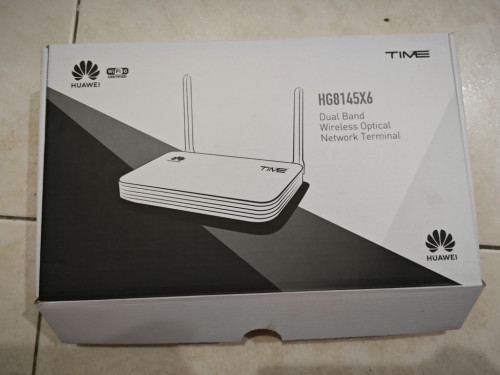
user posted image

would like to ask, can i use this Huawei HG8145X6 as Wifi Router?
Yes you can, press & hold the WPS button for 15s until you see all the lights are on. After you reboot the device it will be on router AP (Router) mode. Do note that this term AP naming used by Huawei is bit confusing. Connect it to the LAN1 port of your ONU.

means it still connect to my old modem (as below):
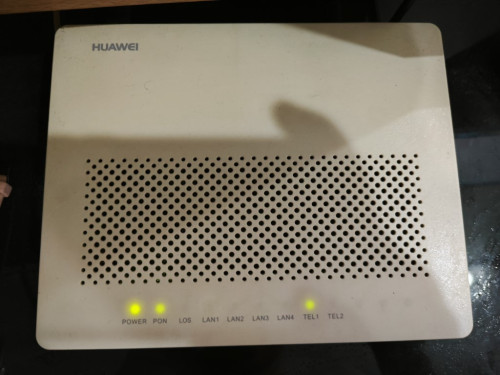
user posted image


I believe it's doable, coz 2 of my friend house is being configure that way.
but when i try, i not able to find the place to put in the PPPoE credentials.

also when i try to configure, i notice 192.168.100.1 (if i remember the IP correctly), will reach different page.
when use wifi, will reach this page:
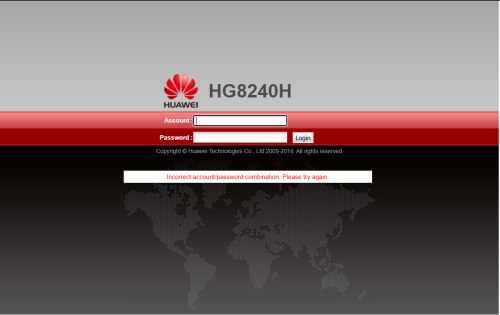
user posted image
the username/password at the bottom of the device not able to login this page.

when use LAN cable, is another page but too bad forgot to screenshot.
the username/password at the bottom of the device able to login this page. i manage to configure the wifi name and password here, but not able to find place to put in PPPoE credential

*
jjj2
post Nov 22 2024, 11:35 AM

Look at all my stars!!
*******
Senior Member
3,606 posts

Joined: Feb 2006
QUOTE(terdit @ Nov 22 2024, 11:11 AM)
Thanks a lot. will give it a try tonight  notworthy.gif

to confirm, the WPS button is the 1 at the side of the device, correct?
*
Yes
jjj2
post Nov 25 2024, 04:11 PM

Look at all my stars!!
*******
Senior Member
3,606 posts

Joined: Feb 2006
QUOTE(terdit @ Nov 25 2024, 02:54 PM)
didnt get into the page again while i try to re-configure.
internet are working fine now so can just ignore that page issue lol
anyway thanks for your explanation  thumbsup.gif
able to put in the PPPoE credential and use that as my wifi router.
thanks for the advice.  thumbup.gif
btw, i change to AP mode in the system instead of pressing the button  tongue.gif
*
Yes, you can do that as well.
jjj2
post Nov 26 2024, 04:42 PM

Look at all my stars!!
*******
Senior Member
3,606 posts

Joined: Feb 2006
QUOTE(Harddisk @ Nov 26 2024, 01:33 PM)
So no separate ONT (fibre terminal)?
*
It depends on the design of the prelaid fibre infrastructure in your unit... if you have SoHo box where fibre & network centralized there, then you will be given a separate ONU (aka fiber modem).


jjj2
post Nov 26 2024, 10:08 PM

Look at all my stars!!
*******
Senior Member
3,606 posts

Joined: Feb 2006
QUOTE(Harddisk @ Nov 26 2024, 08:55 PM)
This part is confusing for me. Why can't the 2-in-1 router function as fibre modem?
*
It can function as an ONU (aka fibre modem) as well when you switch it to bridge mode (where all routing functions being turned off).
jjj2
post Nov 26 2024, 10:14 PM

Look at all my stars!!
*******
Senior Member
3,606 posts

Joined: Feb 2006
QUOTE(Harddisk @ Nov 26 2024, 09:50 PM)
I tried, they can't do it. So I'm attempting to cancel my subscription, and resub again and will request to have only 1 device. Customer service has yet to follow up, since the last call on last Friday.

So as for jjj2's comment regarding SoHo box. I'm confused if it was something specific that can't be achieved with a 2-in-1 device.
I'm putting both devices together now. If I could use only 1 device, I save up 1 power socket, for other stuff.

And if I need to extend the network (to reduce the wifi load on single device), I can setup a wifi bridge. But I digress.
*
We are kinda confused on your scenario.

Allow me to ask a few questions :

1) Are you a new or existing customer ?
2) Are you moving from another house to this new house where it has a SoHo Box ?
3) So currently you are using 1x Huawei HG8240H5 ONU + 1x Huawei HG8145X6 ONT/Router ?

jjj2
post Nov 27 2024, 04:25 PM

Look at all my stars!!
*******
Senior Member
3,606 posts

Joined: Feb 2006
QUOTE(Harddisk @ Nov 26 2024, 11:29 PM)
I want it to be able to function as 2-in-1, meaning, as ONU (fibre modem) at the same time, as wifi router.

So I don't need to connect another wifi router to the ONU/ONT.
1) Yes
2) Nope. Currently staying in apartment. What exactly is Soho box? Is it something accessible to resident?
It's a distribution box where all infra like fiber & network centralized, some do have patch panel inside for better cable management. It's usually located in a designated room eg. store room, near entrance, backdoor area etc. Yes, it is accessible by unit resident.
I just know the fibre line comes into my wall point (below TV). Then the fibre cable connects to the ONT now. (2-in-1 wifi router also has a fibre socket, which I able to connect it physically too)
If like your case, starting 2022 onwards, a 2-in-1 combo unit called ONT (both ONU + Router) is introduced. But older customers who previously using ONU + Router remains untouched.
3) ONU (fibre modem, no routing function, dunno what's the model, quite old already one) + Asus wifi router.

Thanks for any insight.  notworthy.gif

PS: I actually have a unit of 2-in-1 ONT/Router. I got it when I renew my 24-months contract. But I can't use it as fibre modem + router.

You can either sign up a new line like what you intended to do or DIY by using the ONT you have.
Sorry I can't show you the exact method here as we are not allowed to do so. If you are a techie, you can scroll back the posts, look for the OLT authentication. Do note that by doing so, you agree to void the warranty.


*
jjj2
post Nov 27 2024, 04:43 PM

Look at all my stars!!
*******
Senior Member
3,606 posts

Joined: Feb 2006
QUOTE(YS3nsatiOn @ Nov 27 2024, 04:31 PM)
Hi everyone, I'm currently facing an issue which I don't understand, so would wanna seek your expertise to help me out.

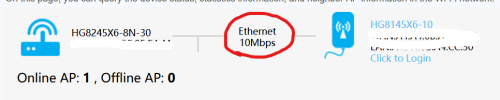
I have a TIME subscription 1GBps and they gave me 2 units which are the HG8245X6-8N-30 & HG8145X6-10. The 1st one is connected downstairs at my living room area and the 2nd unit I put it upstairs and connect them both with a LAN cable via the wall port. I think TIME technician helped me set up the 2nd unit as a repeater/ AP.

Somehow, as per screenshot below, the Ethernet repeater speed will keep dropping to 10Mbps. Upon initial connection, it will show 1000Mbps then after about 5-10 minutes it goes back to this.

Anyone knows what is wrong with this?

user posted image
*
Forget about the indication, try to plug in the network cable directly into your laptop & perform a speedtest.
If it's still giving you speed less than 100Mbps, then you need to check the Termination at both ends, as well as the modular jack at the wall jack.

This post has been edited by jjj2: Nov 27 2024, 04:45 PM
jjj2
post Dec 1 2024, 08:31 PM

Look at all my stars!!
*******
Senior Member
3,606 posts

Joined: Feb 2006
QUOTE(KageBunshi @ Nov 30 2024, 11:40 PM)
Hi.
My house is using Time Broadband.
When using home wife, i have issue to sign into MS Teams. But it has not issue with wifi from other place. Or using mobile data.
Just my home wifi having issue. The same issue happen to my wife phone as well. Need to switch to mobile data when using ms team at home.
Wonder if it is related to Time or router setting.
Thanks
*
Yes, more & more of similar issues appeared since last year... If you are already on public IP, try alter the DNS or use DOH.

jjj2
post Dec 2 2024, 09:06 AM

Look at all my stars!!
*******
Senior Member
3,606 posts

Joined: Feb 2006
QUOTE(KageBunshi @ Dec 1 2024, 11:48 PM)
Thanks. How do I know that im on public IP?
*
One of the simplest way is to login to your router & check from there.

100 Pages « < 92 93 94 95 96 > » Top
 

Change to:
| Lo-Fi Version
0.0300sec    0.17    7 queries    GZIP Disabled
Time is now: 6th December 2025 - 05:30 PM