Welcome Guest ( Log In | Register )

100 Pages « < 88 89 90 91 92 > » Bottom

Outline · [ Standard ] · Linear+

TIME [OFFICIAL] TIME Fibre Broadband™ v4, Experience the ONE TRUE 2Gbps

views
     
jjj2
post May 10 2024, 11:42 PM

Look at all my stars!!
*******
Senior Member
3,606 posts

Joined: Feb 2006
QUOTE(blacktubi @ May 10 2024, 08:49 PM)
Yes, can barely load twitter tweets from web browser.

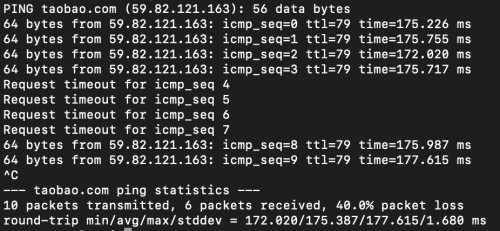
There's around 40% packet loss to Taobao.com and many other China sites from TIME.

I complain to MCMC / TIME since a year ago and their respond is they can't do anything about their upstream provider.

Can't wait to terminate this horrible service.

user posted image
*
Couldn't agree more tongue.gif
jjj2
post May 14 2024, 02:40 PM

Look at all my stars!!
*******
Senior Member
3,606 posts

Joined: Feb 2006
QUOTE(Icehart @ May 14 2024, 12:47 PM)
Yup. They called me to go to TM Point, bring my 1Gbps invoice and show them. Likely they'll match it.  smile.gif
*
Nice work Bro ...
jjj2
post May 15 2024, 06:53 PM

Look at all my stars!!
*******
Senior Member
3,606 posts

Joined: Feb 2006
QUOTE(BaRT @ May 15 2024, 01:41 PM)
Hi all,
Currently just subscribed to TIME fibre. (200mbps@99)

They give me the stock modem+router (huawei HG8145X6-10)

Previously, Im using a stock modem from unifi + own router TP link AX73.

Question:-
I wish to use back my AX73 router, is there any way to do so?
I'm aware that I can only set up my AX73 router as an 'access point mode' only by connecting the LAN cable to TIME router.

Is there any way I can set it up as wireless router?

Reason : when I setup with access point mode, the TP LINK homeshield function will disable. I need this to control the wifi access for my kids.
*
HI, yes for sure you can.
1) Call Time CS to request them to turn the Huawei HG8145X6-10 to bridge mode.
2) Configure your TPlink AX73 & connect it to LAN1 port of HG8145X6-10.


jjj2
post May 17 2024, 01:48 PM

Look at all my stars!!
*******
Senior Member
3,606 posts

Joined: Feb 2006
QUOTE(BaRT @ May 17 2024, 12:00 PM)
didn't receive any msg but I'd checked with Time & it is confirmed the service was an outage in my area.
and wth, they didn't notify the customer at all.

Talking about fibre cable, I can see the cable from Time is thicker compared to my previous unifi & maxis.
But the internal fibre cable connected to my modem is very thin.
*
Hi, yours is landed house ?
jjj2
post May 18 2024, 12:11 AM

Look at all my stars!!
*******
Senior Member
3,606 posts

Joined: Feb 2006
QUOTE(BaRT @ May 17 2024, 03:57 PM)
yep
*
For landed the incoming cable is rdf cable, it's a bit thicker & rounded, but after sliced off the jacket, the inner part is very soft & fragile.
Indoor cable is 2core drop cable which is slightly thinner & kind of squarish, it is a lot more stronger than the after sliced incoming rdf cable.
For landed houses, many times the infra are pulled thru the drains & this is an extremely bad deployment method.
jjj2
post May 18 2024, 12:17 AM

Look at all my stars!!
*******
Senior Member
3,606 posts

Joined: Feb 2006
QUOTE(leechunghan @ May 17 2024, 09:39 PM)
Is this Archer AX95?

How is the coverage signal of this Router at house?
Becoz already bought this Router few months but no yet setup 😂
*
It's a pretty decent tri-band wifi6e dual-wan router...we tested it on 3-storeys bungalow.. performance tho not on really high side, but it's by far above average.
jjj2
post May 18 2024, 10:32 AM

Look at all my stars!!
*******
Senior Member
3,606 posts

Joined: Feb 2006
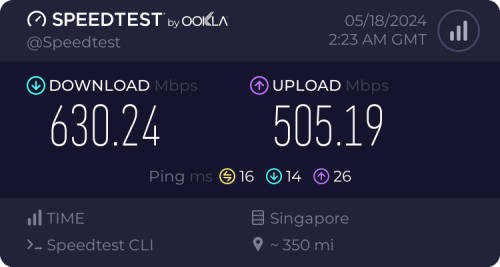
user posted image

IP : 161.142.x.x

This post has been edited by jjj2: May 18 2024, 10:32 AM
jjj2
post May 18 2024, 07:52 PM

Look at all my stars!!
*******
Senior Member
3,606 posts

Joined: Feb 2006
QUOTE(Jeremy_John @ May 18 2024, 06:23 PM)
Looks like 161.x.x.x range has no throttling to certain sg routes and it's only 202.x.x.x issue?

How about your EU connections on 161.x.x.x, is it high ping and routing thru japan or any packet loss?
*
user posted image
jjj2
post May 19 2024, 04:03 PM

Look at all my stars!!
*******
Senior Member
3,606 posts

Joined: Feb 2006
QUOTE(leechunghan @ May 19 2024, 12:31 PM)
You guys think this router is enough to cover whole 1001sf condo house or not? 🤔
Yes, provided you place it somewhere in the center of your house & avoiding placing it too close to the wall.

Actually I was using TIME mesh in every bedroom but the speed is just 30-80Mbps in every bedroom , if at living room beside the main router can get full speed 500Mbps
*
jjj2
post May 19 2024, 08:38 PM

Look at all my stars!!
*******
Senior Member
3,606 posts

Joined: Feb 2006
QUOTE(blacktubi @ May 19 2024, 12:58 PM)
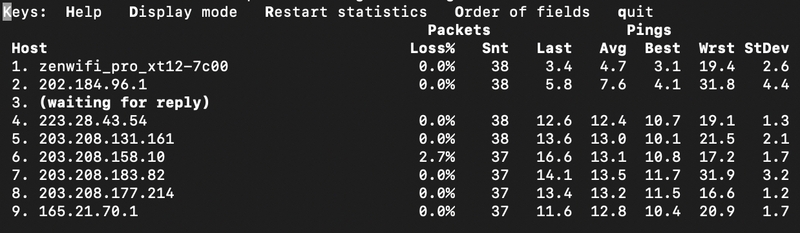
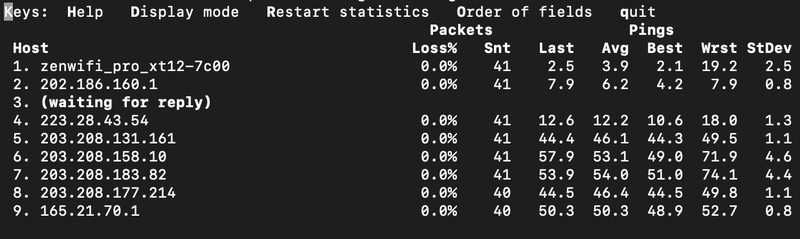
Did some investigation and found that some IP range have better performance to Singtel

202.184.100.xxx
user posted image
MTR Result
» Click to show Spoiler - click again to hide... «

BGP from Singtel looking glass
» Click to show Spoiler - click again to hide... «

202.184.169.xxx
user posted image
MTR Result
» Click to show Spoiler - click again to hide... «

BGP from Singtel looking glass
» Click to show Spoiler - click again to hide... «


Comparing the bgp result from Singtel to the 2 IP range. Kinda explain the performance differences as it is routed through either NTT or TATA instead of a direct route.

Attribute 202.184.96.0/19 Path 1 202.184.96.0/19 Path 2 202.186.0.0/15 Path 1 202.186.0.0/15 Path 2
AS Path 9930 9930 2914 9930 (NTT) 6453 9930 (TATA)
Next-Hop 203.208.131.162 203.208.131.162 203.208.178.229 63.243.188.4
Best Path Yes No No Yes

Just for reference purpose.


*
Thanks Bro for the insight...  thumbup.gif

This post has been edited by jjj2: May 19 2024, 08:39 PM
jjj2
post May 20 2024, 09:41 AM

Look at all my stars!!
*******
Senior Member
3,606 posts

Joined: Feb 2006
Penang Downtime

Affecting approx. 40 buildings, Commercial Sites & Mobile operator backhaul at Air Itam & Farlim area.

This post has been edited by jjj2: May 20 2024, 09:58 AM
jjj2
post May 28 2024, 10:30 AM

Look at all my stars!!
*******
Senior Member
3,606 posts

Joined: Feb 2006
QUOTE(blacktubi @ May 27 2024, 11:24 PM)
Probably my last 1Gbps speedtest on TIME.

Well, it was fun while it lasts. Credits to jjj2 as probably the best TIME agent/installer around.

user posted image
*
Thanks Bro...keep in touch... smile.gif
Thanks for sharing all valuable infos & insights on many gadgets especially routers !
jjj2
post May 28 2024, 04:19 PM

Look at all my stars!!
*******
Senior Member
3,606 posts

Joined: Feb 2006
QUOTE(nixuotan @ May 28 2024, 03:20 PM)
Hi. I have 1gbps time connection with the default routers, huawei x6, two units in mesh. I was wondering can I connect both units with an ethernet cable to get wired backhaul? Is there anyone who has done this before? What is your process and what are your results compared to wireless backhaul?
*
Yes you can... but frankly if you really serious of getting good performance, get your own mesh systems. The given ones are simply craps !
jjj2
post May 29 2024, 04:07 PM

Look at all my stars!!
*******
Senior Member
3,606 posts

Joined: Feb 2006
QUOTE(Davidtcf @ May 29 2024, 04:04 PM)
anyone facing frequent disconnections when connecting to VPN then using SAP? It is driving me crazy when working for home. Seriously regret extending my contract till October just for that 1 unit of free Mesh.

I'm using Zscaler VPN.

Restarting modem + contacting their helpline didn't solve the issue. Might need to keep complain to them before things can improve  doh.gif
*
Same thing happened to couple of big bosses....
jjj2
post May 30 2024, 11:19 PM

Look at all my stars!!
*******
Senior Member
3,606 posts

Joined: Feb 2006
QUOTE(NoobHacker @ May 30 2024, 10:03 PM)
anyone running HG8145X6-10 managed to turn their onu into bridge mode? i requested then the time technician called me, all they do is just turn off wlan  confused.gif

its 10pm already, have to retry tomorrow.
*
Please call CS to request for this.
jjj2
post May 31 2024, 11:55 PM

Look at all my stars!!
*******
Senior Member
3,606 posts

Joined: Feb 2006
QUOTE(ezinger @ May 31 2024, 10:05 PM)
Hey everyone, the first post has been updated with the latest plans including the one true 2Gbps plan smile.gif
*
Thanks Pal... it's great to see you here again rclxms.gif
jjj2
post Jun 4 2024, 10:42 AM

Look at all my stars!!
*******
Senior Member
3,606 posts

Joined: Feb 2006
QUOTE(x-1o8-x @ Jun 4 2024, 02:13 AM)
wow 1gbps upload... I need to force my JMB to allow Maxis d in this case.
*
Yes you should, with healthy competition, it's beneficial to subscribers...
Maxis still need to familiarize with the FTTx topology, deployment, T&C etc... we found out they are still very fresh in this...
jjj2
post Jun 4 2024, 02:30 PM

Look at all my stars!!
*******
Senior Member
3,606 posts

Joined: Feb 2006
QUOTE(Epic_winner091 @ Jun 4 2024, 10:44 AM)
That's interesting. I thought Maxis had deployed their own FTTx for more than a decade already, although with limited coverage.
*
Yes, they have been around for many years but utilizing TM's infra, still relatively new when deploying 100% on their own infra, ODF, FTP,/FTB, Splitter...etc.
jjj2
post Jun 10 2024, 07:29 PM

Look at all my stars!!
*******
Senior Member
3,606 posts

Joined: Feb 2006
QUOTE(westlife @ Jun 10 2024, 01:02 AM)
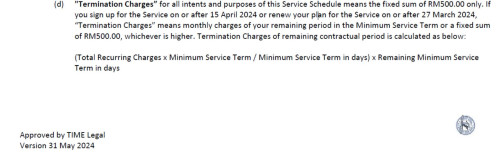
i signed up the 500Mbps plan back on 15 Dec 2023. Now 600Mbps. which that time the promo is rm99 for 1st 6 months with 1 month free by subscribing online.
that time the termination fee is fixed at rm500.

now almost 6 months are going to reach, my subscription monthly is going to be reverted back to rm139/mo....
200Mbps plan at rm99 is more than sufficient for me which i totally do not need 600Mbps plan anymore. just puzzled should i downgrade to 200Mbps by renewing the contract to 24 months again. but if i did so, anytime i need to terminate earlier, i need to pay them all the remaining months of fee..

i am now renting aparment which the contract is 1 year only which starts exactly the same date i signed up the time fibre broadband. i just worried that if i renewed contract on 15 june 2024, by the time my contract ends i still have 18 more months contract. if somehow for whatever reason(s), if i could not continue to stay here, i need to apply for relocation of service, so i need to ensure that the new apartment i rent, must have time infra.

However, if i dun downgrade, i will still have the flexibility to terminate at rm500 fixed cost any time.
but if i dun downgrade, i will pay rm40 per month for nothing which over next 24 months, i will pay rm40 x 24 extra for nothing since i could not utilise 600Mbps plan for the extra rm40 paid monthly.

user posted image
*
this is a common dilemma they have succeeded putting many users into...
jjj2
post Jun 17 2024, 10:47 PM

Look at all my stars!!
*******
Senior Member
3,606 posts

Joined: Feb 2006
QUOTE(contestchris @ Jun 17 2024, 07:27 PM)
I am aware of comments saying that the "free" router that Time provides is not that great.

Nevertheless, how does the new "free" Wifi 6 router compared to the previous Wifi 5 router? Will the penetration through walls be better? Currently, in my 3rd room (furthest from the router), connection is spotty. Can I expect improved connection, however small it may be?

Reason I ask is that I will be coming up to 20 months soon and am deciding if I should renew and replace with the free router.

I was on the 100mbps plan that got auto upgraded to 200mbps a couple of months ago.
*
Get your own router if you really serious about promising performance.

100 Pages « < 88 89 90 91 92 > » Top
 

Change to:
| Lo-Fi Version
0.0417sec    0.46    7 queries    GZIP Disabled
Time is now: 7th December 2025 - 04:47 AM