

QUOTE(blacktubi @ Mar 30 2024, 03:06 PM)
Any goodies for 1Gbps / 2Gbps users soon?

Seems nope...TIME [OFFICIAL] TIME Fibre Broadband™ v4, Experience the ONE TRUE 2Gbps
|
|
 Mar 30 2024, 06:33 PM Mar 30 2024, 06:33 PM
Return to original view | Post
#1741
|
 
Senior Member
3,606 posts Joined: Feb 2006 
|
QUOTE(blacktubi @ Mar 30 2024, 03:06 PM) Any goodies for 1Gbps / 2Gbps users soon? Seems nope... |
|
|
|
|
|
Mar 30 2024, 06:34 PM
Return to original view | Post
#1742
|
|
Senior Member
3,606 posts Joined: Feb 2006
|
QUOTE(ronnie @ Mar 30 2024, 03:39 PM) my contract from April 2023...no speed boost on the self care page... how to check the speedboost activation ? It will be done in stages.... |
|
|
Apr 1 2024, 10:15 PM
Return to original view | Post
#1743
|
|
Senior Member
3,606 posts Joined: Feb 2006
|
QUOTE(GBP56 @ Apr 1 2024, 06:39 PM) Does anyone know if its possible to combine my own existing mesh (wired backhaul) with the FTTR? Hi, yes you can but it will not be full mesh, and you will be no longer utilising the existing modem, do configure your AP in the same subnet as Master FTTR.Most of the rooms in my house is already connected with a LAN cable, except for 2 rooms. So I’m hoping to install FTTR for those 2 rooms. My current set up is like this: Modem > ASUS router (AP mode) > LAN Switch > Mesh node (wired, bridge mode) in each room To add the the FTTR, can I just connect the main node to the LAN switch, then set the child nodes with the same SSID as my existing mesh? Reason why I don’t use additional wireless mesh in those 2 rooms is because the walls are too thick, it can’t keep a stable connection with the other nodes. Thanks. |
|
|
Apr 2 2024, 10:13 PM
Return to original view | Post
#1744
|
|
Senior Member
3,606 posts Joined: Feb 2006
|
QUOTE(GBP56 @ Apr 2 2024, 11:39 AM) Not full mesh meaning my wireless device may not do the handoff nicely between the the FTTR node and my existing mesh? Yes. I see, so the Master FTTR is a modem as well. My ASUS router is just there because I’m used to its settings. If I don’t need it, would the below work? The Master unit is an ONT unit, 1. Master FTTR > child node FTTR This is the default setting, the child node will auto pair with the Master. 2. Master FTTR > LAN Switch > existing mesh node (wired, bridge mode) You cant mesh up different models. |
|
|
Apr 2 2024, 10:26 PM
Return to original view | Post
#1745
|
|
Senior Member
3,606 posts Joined: Feb 2006
|
QUOTE(trix @ Apr 2 2024, 11:49 AM) @jjj2 adding on on GBP56's query, is it possible to use own router for Time's FTTR offering? so the FTTR Master node only acts as AP If I get you correctly, nope, you cant use your own router to replace the given FTTR devices, unless it is designed/modified in such way. Also, is the fiber connector using SC? possible to hire the installer just to lay out the micro optical fiber around the house? Yes SC/APC. I'm not sure whether the installer has the extra cable to lay for you as they are given the cable according to work order. By the way where are you located ? |
|
|
Apr 4 2024, 11:36 AM
Return to original view | Post
#1746
|
|
Senior Member
3,606 posts Joined: Feb 2006
|
QUOTE(GBP56 @ Apr 3 2024, 08:45 PM) Thanks for the clarification. I’m not trying to mesh up different models, I just want to have different access points throughout the house. I guess what I’m trying to ask is if the main node works like a normal router, where I can connect a network switch with an ethernet cable? Yes, you can hook up the LAN port of the Master node (it has 4) to your network switch.I’m fine with FTTR on the rooms without the LAN cables, but I still want to make sure I can use the existing LAN ports in the other rooms. |
|
|
|
|
|
Apr 8 2024, 06:24 PM
Return to original view | Post
#1747
|
|
Senior Member
3,606 posts Joined: Feb 2006
|
QUOTE(GBP56 @ Apr 8 2024, 05:49 PM) What about the FTTR main router, can it also be set to bridge mode? No point set it as bridge mode as so will defeat the entire reason to go for FTTR. |
|
|
Apr 11 2024, 11:05 AM
Return to original view | Post
#1748
|
|
Senior Member
3,606 posts Joined: Feb 2006
|
QUOTE(studentsurvey @ Apr 11 2024, 03:10 AM) Hi All, Get yourself a better & more reliable set of mesh router elsewhere.Random question, is Time internet still the better internet compared to Unifi and also the Umobile fibre (in case anyone has tried it). My friend installed time fibre with the Wifi 6 setup and did not use the modems & Router. Your friend did a brilliant thing. I am planning to subscribe the same package and get the same Wifi 6, does it make sense for me to take his hardware and make it into a repeater for the whole house? |
|
|
Apr 13 2024, 10:24 AM
Return to original view | IPv6 | Post
#1749
|
|
Senior Member
3,606 posts Joined: Feb 2006
|
QUOTE(darren_yuri @ Apr 13 2024, 10:04 AM) Would you suggest to upgrade my router from the Huawei OptiXstar HG8145X6 to TP-Link Archer AX53 V2 (the price isn't bad in eCommerce platforms)? Is it compatible with the existing Huawei WA8021V5 mesh? Not compatible in terms of meshing, in fact you can ditch off the rubbish WA8021V5. Can I also get rid of the Huawei Echolife router too? Thanks. If you are referring to the ONT unit that comes with fiber plugging in to it, you cant totally ditch off this, but what you can is turn it to bridge mode so that your self bought mesh system can take over. darren_yuri liked this post
|
|
|
Apr 13 2024, 11:17 PM
Return to original view | Post
#1750
|
|
Senior Member
3,606 posts Joined: Feb 2006
|
QUOTE(darren_yuri @ Apr 13 2024, 10:33 AM) 1. Sad.... although I found the current WA8021V5 kinda okay covering the coverage of the master bedroom of my 950sqft unit, from the router located in the living room. Hopefully, the TP-Link Archer AX53 can achieve that room (previously the HG8145X6 signal was unable to reach the master bedroom) so Time gave me a few units of WA8021V5. 2. Alright so the ONT cannot be removed, but I can replace that OptiXstar with TP-Link Archer AX53 right? Yes the OptiXstar HG8145X6 can be replaced. So generally this would be good, ONU --> TP-Link AX53 --> Another TP-Link Router that supports EasyMesh. darren_yuri liked this post
|
|
|
Apr 14 2024, 07:13 PM
Return to original view | Post
#1751
|
|
Senior Member
3,606 posts Joined: Feb 2006
|
QUOTE(derthvadar @ Apr 13 2024, 11:33 PM) I'm planning to terminate my fibre account for a cheaper bundle of CelcomDigi 5G Home with postpaid plan. You need to contact the CS for that.No more contract. I don't see the option for termination.  |
|
|
Apr 15 2024, 07:17 PM
Return to original view | IPv6 | Post
#1752
|
|
Senior Member
3,606 posts Joined: Feb 2006
|
Hi guys, switch to Google DNS... PRSXFENG liked this post
|
|
|
Apr 17 2024, 12:10 AM
Return to original view | IPv6 | Post
#1753
|
|
Senior Member
3,606 posts Joined: Feb 2006
|
QUOTE(RedArc @ Apr 16 2024, 12:11 PM) Hi all, wanna get some opinion from you guys. Currently Im staying in 1200sqft condo with using Maxis home fibre. Im intend switch to Time Fibre with 200mbps plan after few months. is it recommend to replace other brands wifi router or stick with the device provide by TIME? Go for your own device, the stock router is a crap ! |
|
|
|
|
|
Apr 17 2024, 07:32 PM
Return to original view | IPv6 | Post
#1754
|
|
Senior Member
3,606 posts Joined: Feb 2006
|
QUOTE(sharkonland @ Apr 17 2024, 12:34 AM) Finally my internet is back after the disruption. Like others, I wanna setup 3rd party DNS on my own router (Mercusys MR80X) to prevent future disruption such as this one again. Up to you Question: Do I need to setup ipv6 as well or IPv4 is sufficient?  |
|
|
Apr 19 2024, 10:35 PM
Return to original view | IPv6 | Post
#1755
|
|
Senior Member
3,606 posts Joined: Feb 2006
|
QUOTE(westlife @ Apr 18 2024, 11:51 PM) not sure if u guys notice this, now all the new subscribers need to pay total sum of the remaining months of the contract subscriptions or rm500 (whichever is higher)... New contract's penalty will be Remaining Months/RM500, whichever is higher.like that it is the same as unifi etc.. already... no more rm500 fixed amount termination fee man... 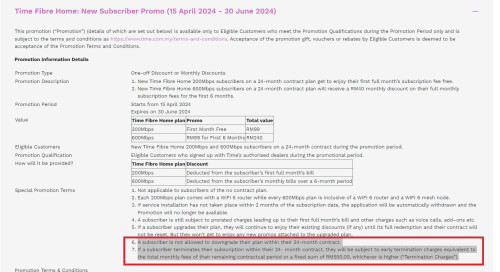 |
|
|
Apr 19 2024, 10:43 PM
Return to original view | IPv6 | Post
#1756
|
|
Senior Member
3,606 posts Joined: Feb 2006
|
QUOTE(westlife @ Apr 18 2024, 11:59 PM) seems to have a lot of changes (not announced) after the free speed boost. New contract signed NO longer allowed to downgrade within the 24-months contract.previously from website UI can do downgrade of plan directly. now need to contact CS via live chat only can... wtf... 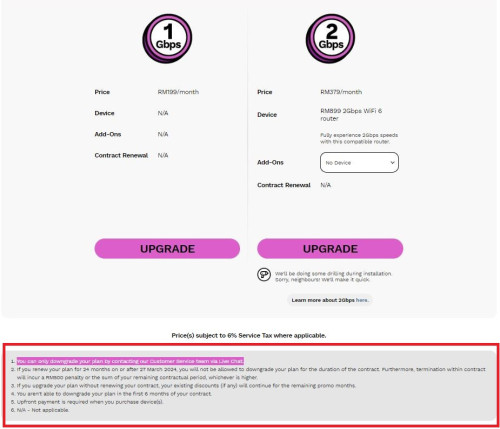 |
|
|
Apr 19 2024, 11:29 PM
Return to original view | IPv6 | Post
#1757
|
|
Senior Member
3,606 posts Joined: Feb 2006
|
QUOTE(westlife @ Apr 19 2024, 11:03 PM) yes... both killing new tnc for new subscribers/recontract...  last time i like about time is that if anything i just pay rm500 penalty max... now it is the same like unifi, as good as no termination if need to pay remaining months in full... Ya agree i am on old contract, i believe i should still be able to downgrade to rm99 200Mbps plan just that i am stuck with 2 years new contract though...  Yes |
|
|
Apr 21 2024, 02:12 PM
Return to original view | IPv6 | Post
#1758
|
|
Senior Member
3,606 posts Joined: Feb 2006
|
For Europe traffic, time relies very much on AAE-1 submarine cable. There was a news in Feb this year mentioning one of the 4 sea sub cables damaged... anyway no solid evidence proofing that to be the AAE-1.
|
|
|
Apr 21 2024, 06:27 PM
Return to original view | IPv6 | Post
#1759
|
|
Senior Member
3,606 posts Joined: Feb 2006
|
QUOTE(rezzorix @ Apr 21 2024, 02:53 PM) Actually the Wikipedia article of AAE-1 under incidents states AAE-1 was damaged in Feb 2024. Links to news sources at bottom of the page: https://en.m.wikipedia.org/wiki/AAE-1 In any case this would be a partial explanation. We could also consider the Israel/Iran situation or the flooding in Dubai. However: The connection quality to Europe was already bad before these incidents. Yes we are aware of such issues, but could not generally come to a conclusion yet. |
|
|
Apr 21 2024, 06:28 PM
Return to original view | IPv6 | Post
#1760
|
|
Senior Member
3,606 posts Joined: Feb 2006
|
QUOTE(ahpaul82 @ Apr 21 2024, 04:42 PM) Possible do it ownself? They have removed such Termination feature via the Selfcare portal, now need to contact CS. |
| Change to: |  0.0342sec 0.0342sec
 0.22 0.22
 7 queries 7 queries
 GZIP Disabled GZIP Disabled
Time is now: 8th December 2025 - 02:44 AM |
 Quote
Quote