Outline ·
[ Standard ] ·
Linear+
TIME [OFFICIAL] TIME Fibre Broadband™ v4, Experience the ONE TRUE 2Gbps
|
jjj2
|
 Jul 3 2023, 01:58 PM Jul 3 2023, 01:58 PM
|

|
QUOTE(ho-ll @ Jul 3 2023, 11:20 AM) Hi sifus, I did a reset on the router yesterday, and unable to connect to the internet anymore  I'm trying to reconfigure the connection, but stuck on the first step of logging to this page:  I called the customer service, and she informed me to refer to the label of the router, but it did not work. Anyone knows what should be the right credentials to use? p/s 1: There is no credential provided on the modem. p/s 2: CS asked me to refer to router label to login the website above which I find it weird. (Thought it supposed to be modem, not router?) For this model, you don't need to set in the settings, it'll b auto provisioned, but you need to key in the OLT authentication password. In short, just call the CS & bear in mind you will be charged for Installer to attend this case. Remark : If you see the PON light green stable, then you can proceed to configure your router & connect it to LAN1 port of this Huawei HG8240H ONU. This post has been edited by jjj2: Jul 3 2023, 10:57 PM |
|
|
|
|
|
jjj2
|
Jul 6 2023, 10:50 PM
|
|
|
QUOTE(KTCY @ Jul 6 2023, 07:45 PM) Anyone flash the HG8145X6 to non time UI? No point doing that, it's a waste of time. |
|
|
|
|
|
jjj2
|
Jul 10 2023, 08:43 PM
|
|
|
QUOTE(eyesee @ Jul 10 2023, 03:32 PM) Hi, Currently still under AstroIPTV with TIME. Have been using Astro PlugNPlay for about a year already. Just received a call from Astro that they will convert TIME to Astro Fiber by end of the year. Need advice how to separate Time broadband from Astro subscription. I would like to keep the Time Broadband instead of using Astro Fiber. Hopefully with no interruption to the internet connection. Thank you Hi, you can apply purely Internet & cut off the previous old Iptv plan. PM me if you need further assistance. |
|
|
|
|
|
jjj2
|
Jul 11 2023, 10:46 PM
|
|
|
QUOTE(sharkonland @ Jul 10 2023, 10:53 PM) Hi all, I've subscribed to TIME Fibre 500 mbps and my router is the standard HG8145X6 given by TIME and I have it for 2 months++ now. Recently I am having frequent disconnect within short period of time and the Internet came back usually within 10 second. This only occurred to devices connected via wifi. I would like to learn from anyone regarding the reason why this is happening and how to resolve this and how to prevent this from happening as well. Thanks in advance. Hi, yes the same problem has been reported. If you have 2 units of this X6, try to test again using only 1 unit. If there is no problem with 1 unit, then on back the 2nd unit, and make sure the 2nd unit is within line of sight and distance approx. 8-10m from each other. |
|
|
|
|
|
jjj2
|
Jul 14 2023, 10:10 PM
|
|
|
QUOTE(c00lbeans @ Jul 14 2023, 09:37 PM) im on Astro IPTV with Time broadband 100mbps. Past few days the connection speed has dropped to 1mpbs and despite on/off modem many times and changing the wifi channels in the modem to few settings, its still the same!! is there something wrong with Time now? called Time support just now and they taichi to Astro, and when i tried Astro, they don't have anyone now to talk to! this is so frustrating! Hi, you need to call Astro IPTV hotline 0395431543 Usually this problem happens when the router auto reset to default pppoe credential. |
|
|
|
|
|
jjj2
|
Jul 15 2023, 11:20 PM
|
|
|
QUOTE(dvinez @ Jul 15 2023, 11:01 PM) So, I just call TIME Request HG8145V5 bridge mode > AX20 internet connection change to PPPOE > Enter ID and password Then it is done right? Nothing to do at HG8145V5. Thank you  YES YESDo you know if HG8145V5 is better or AX20, in term of speed, connecting multiple devices, etc. AX20 is better. 8145V5 is a crap.Random speed comparison AX20 seems better in the beginning but result don't vary much. Thank you |
|
|
|
|
|
jjj2
|
Jul 20 2023, 06:40 PM
|
|
|
QUOTE(RushArt @ Jul 19 2023, 11:03 PM) I just move to a new condo with TIME. The problem is, with Huawei HG8145V5, my bedroom has terrible wifi signal. The rest of the house is fine. If I am going to buy TP Link Archer AX-55, will it improve the wifi signal? And do I need to set my HG8145V5 as bridge mode and AX-55 as WiFi router? For sure if compare to V5, it will be a lot better. Set your V5 to be in ONU mode, then let your Asus router performs the rest. |
|
|
|
|
|
jjj2
|
Jul 21 2023, 06:07 PM
|
|
|
QUOTE(RushArt @ Jul 21 2023, 10:31 AM) Thanks for the reply. How do I set V5 to be ONU? Do I need to call customer service or I can set it in V5 itself? It's better for you to call CS. |
|
|
|
|
|
jjj2
|
Jul 27 2023, 04:08 PM
|
|
|
QUOTE(kennyng77 @ Jul 27 2023, 10:48 AM) I kept the Huawei fibre modem from previous condo, now new condo TIME using HG8145X6. Just to check, can I use back the old huawei fibre modem to enable to use my TP-Link AX73 or really need to call CS to change HG8145X6 as bridge mode? Hi, you cant simply change the ONU as it needs to be authenticated with the OLT. It's better for you to call CS to request them change the X6 to bridge mode, else if you mess up, they will charge you for reconfiguration. |
|
|
|
|
|
jjj2
|
Jul 29 2023, 05:00 PM
|
|
|
QUOTE(petpenyubobo @ Jul 29 2023, 01:00 AM) Yes, but still very limited coverage, u can check out the website. |
|
|
|
|
|
jjj2
|
Jul 29 2023, 05:03 PM
|
|
|
QUOTE(taming sari @ Jul 29 2023, 01:02 AM) Hi all, It’s probably a simple (prolly dumb too) query for you folks but it’s something I’m unsure on how to proceed I’ve a DLink DIR882 in its standard setup and settings unchanged from day one. EVERYTHING (including a ROKU) within range connects and runs seamlessly. Recently, I got myself a FireStick. It connects okay to it wirelessly and the front page loads accordingly. However its content (movies, channels) takes forever to load, to the point that it timed out everytime. The FireStick when connected to UNIFI / MAXIS, operates normally. Is it due to a certain default setting with regards to the TIME router? Thank you in advance for helping out… Can you try to change both Primary & Secondary DNS to Google's or others like Cloudflare. |
|
|
|
|
|
jjj2
|
Jul 29 2023, 05:04 PM
|
|
|
QUOTE(LoNeLyKiRa @ Jul 28 2023, 03:20 PM) hi i plan to upgrade the default time router X6 to archer axe75. is this consider worth the upgrade in terms of 6e and better signal coverage/performance? do recommend me if there is better option out there For sure better than the given X6. |
|
|
|
|
|
jjj2
|
Jul 31 2023, 10:52 PM
|
|
|
QUOTE(ChenKaiWen @ Jul 31 2023, 07:10 PM) Hello, once TIME is done installing the fibre at the drain, I'll be able to set an appointment. In the meantime, does TIME installer offer services to help install/run additional LAN cable for own Access Point? You can liaise with them with a fee but advisable to engage professional network/infra contractor to do that if your requirement is more complex & you expect more professional results. Thanks. |
|
|
|
|
|
jjj2
|
Aug 4 2023, 06:38 PM
|
|
|
The First Month Free promotion for 100Mbps plans applies to your first full month’s broadband fees. The charges you’re seeing in your very first bill may be prorated charges leading up to your first full month or other charges such as voice calls, add-ons etc.
|
|
|
|
|
|
jjj2
|
Aug 16 2023, 05:15 PM
|
|
|
QUOTE(marquis @ Aug 13 2023, 11:24 AM) Hello all! I’ve searched the thread to get some definitive answer but can’t seem to find anything directly related. I am currently using an AX20, and am considering either a 100 or 500 Mbps package. If I go for the 100, I’ll most likely continue to use my router as the bundled one seems meh. However, the 500 package is bundled with the HG8145X6 which to my limited knowledge, seems to be the same as the AX20. Also comes with a wife 6 mesh node (at least that’s what the website indicates). I am considering to get myself a mesh extender to use with the AX20 eventually (a proper one at least. Currently using an RE305). So, the question is, is the huawei bundle (router plus mesh) better than my existing router combo? Coz if it is, it’s a no brainier and I’ll just get the 500 plan since the diff is only about rm 40/month, for a 5x increase in speed. Coz I’m reading some comments on the bundled extender not giving the proper speed (and some saying it’s a WiFi 5 device). Appreciate any and all help! Side note: also tried googling but there doesn’t seem to be a direct comparison between the two. Anyone knows if there’s another name for the huawei? Starting 11 Aug, the crappy HG8145V5 will be replaced by HG8145X6 (in short we call it X6), for 100Mbps. But don't put high expectation on this X6.... It's still advisable for you to get your own proper mesh system which performs far more better. |
|
|
|
|
|
jjj2
|
Aug 16 2023, 05:18 PM
|
|
|
QUOTE(ChenKaiWen @ Aug 16 2023, 03:42 PM) I've already contacted TIME about this. They said they'll look into it. My drain is the only one still without the fibre and FDP installed. Only the clip is mounted. They'll start installing for people starting tomorrow. My appointment is on this Friday. Hopefully this will not cause me to change the appointment. Has this ever happened before? My side of drain: 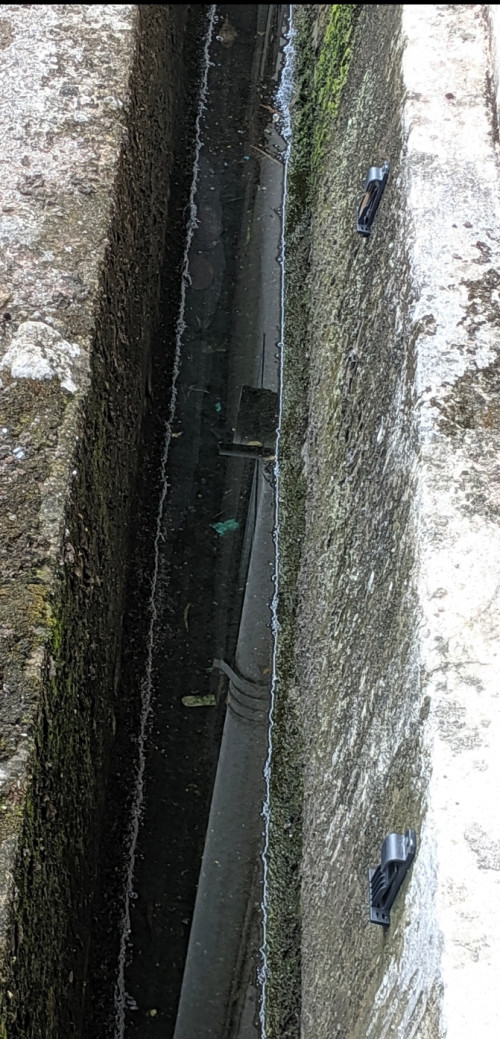 Opposite side: 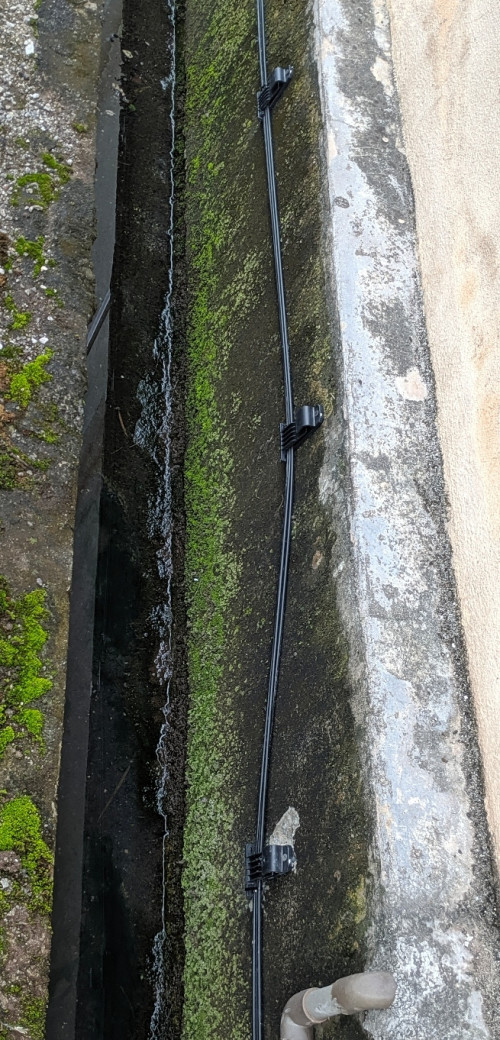 The cable will be pulled & placed into the clips before or on your Installation day. |
|
|
|
|
|
jjj2
|
Aug 19 2023, 07:21 PM
|
|
|
QUOTE(ChenKaiWen @ Aug 19 2023, 04:46 PM) On Thursday, after installed, the fibre reading was -17dbm. Yesterday, it was -18dbm This morning it was -20dbm then -19dbm. Just now it went to -27.7dbm causing the internet to drop for a moment. After that, it starts going back to normal but stabilizes around -22 to -24dbm. I'm guessing this is due to TIME problem. The fiber-over-the-drain deployment method has many issues, you are experiencing one of the very common issue. Be prepared for more issues even though this is fixed. |
|
|
|
|
|
jjj2
|
Aug 19 2023, 08:34 PM
|
|
|
QUOTE(ChenKaiWen @ Aug 19 2023, 07:53 PM) This one seems to be the indoor fibre being broken. I moved it around and the upload and packet loss is fixed but the fibre reading is still quite bad. Try to make sure the fiber is not sharply bent... when you said broken, what do you mean ? can you show with a pic ?If fibre over the drain is that bad, why does TIME still use it? Don't really see people having problem with it on this forum though. What else can I expect in the future? 😔 Cost saving & fast deployment are main reasons, not as many customers have it installed relative to high rise buildings.... good luck  |
|
|
|
|
|
jjj2
|
Aug 20 2023, 11:05 PM
|
|
|
QUOTE(ChenKaiWen @ Aug 20 2023, 08:29 AM) It being broken was my speculation because it gotten significantly better after I moved it around. I woke up to -17.7dbm. Then I decided to cable manage it better and now it's even better than before at -16.95 to -16.99dbm. This is probably due to my error. I didn't think some little twist(like a rope) would affect it. Shouldn't a fibre reading get worse the instant it got bent etc? Because it took quite a while for the reading to get to a bad level. Guess I'll get a FWS and a softer cable because of this stiff cable from TIME. If all is good, how can I cancel the SI appointment to come and check? If you are getting -16.95---16.99dBm, that's pretty good. The reading will not be fixed at a particular value, instead it will be fluctuating within a very small range. Just call up CS to cancel the appointment. |
|
|
|
|
|
jjj2
|
Aug 20 2023, 11:07 PM
|
|
|
QUOTE(leezhijiang @ Aug 20 2023, 06:17 PM) Hi, how do you find out the password to login to this page? Default one will do ? Refer to the bottom of your ONT. |
|
|
|
|



 Quote
Quote

 0.0356sec
 0.46
0.46
 7 queries
 GZIP Disabled