Welcome Guest ( Log In | Register )

100 Pages « < 49 50 51 52 53 > » Bottom

Outline · [ Standard ] · Linear+

TIME [OFFICIAL] TIME Fibre Broadband™ v4, Experience the ONE TRUE 2Gbps

views
     
jjj2
post Mar 11 2021, 09:50 AM

Look at all my stars!!
*******
Senior Member
3,608 posts

Joined: Feb 2006
QUOTE(KingArthurVI @ Mar 9 2021, 11:12 AM)
Thanks for response bro. Might try like you suggest and give stock router a chance first. If turns out I want to use my own router in the end, how hard is it to set it up? I heard people say configure as bridge mode, is that all? Or need to configure PPPoE also?
*
Hi Bro, yes give it a try first on the given stock router. If your usages are quite heavy routing, then I suggest you go for your own router, you can monitor the CPU usage on the Device Information page.
If you have decided to use your own router, during Installation, just request the Installer to call the provisioning team for help. After it's being done, just set in your PPPOE credentials in your router.

Thanks.


jjj2
post Mar 11 2021, 10:25 AM

Look at all my stars!!
*******
Senior Member
3,608 posts

Joined: Feb 2006
QUOTE(apanzhafran @ Mar 10 2021, 12:52 AM)
Hi i attached the box, my package is 500mbps with Huawei ONU & TP Link AC1350 router

How do i check the ethernet port speed? I can access after entering password but not sure where is it under

Thanks [attachmentid=10807103]
*
Hi Bro, thanks for the pics.

With the current set of equipment, there's no need to test on the Eth speed.
I'm not good in PS4 thingie...

But here's what you can try :
1) Connect your laptop to the EC230 Router using a good Cat5e/Cat6 LAN cable, make sure your speed is somewhere 500Mbps. If not, then contact TIME CS @ 1800 18 1818.
2) If Yes, then test it out using the same network cable on your PS4. If the problem persists, try the same router at your friend's PS4.
One thing you need to make sure is your friend is using the same Huawei HG8240H5 ONU as yours. Do note that you cant bring your ONU to his house to test.
3) If the speed is somewhere expected >100Mbps, then you will have to check on your PS4. If the speed is still <100Mbps & his router able to get beyond 100Mbps at the same time, then you can borrow his router to test at your house.

Another thing you could try is to change the DNS on your Router or PS4. As by default the TP-Link EC230 is configured to use TIME's DNS.

Appreciate your feedback smile.gif
Thanks.


jjj2
post Mar 11 2021, 10:34 AM

Look at all my stars!!
*******
Senior Member
3,608 posts

Joined: Feb 2006
QUOTE(ssmart @ Mar 10 2021, 11:31 AM)
Hi boss.

1) How to enter admin panel?
Login via your browser at 192.168.100.1 , User : admin, Password : TIMExxxx (refer to the bottom of the ONU)

2) How to perform this Eth ports speed check after login to admin panel?
Click on the Left Panel, 3rd icon from the top  > Eth Port Information

device: Huawei HG8145V5
*
Thanks.
jjj2
post Mar 14 2021, 01:33 PM

Look at all my stars!!
*******
Senior Member
3,608 posts

Joined: Feb 2006
QUOTE(nasiayam @ Mar 13 2021, 10:56 PM)
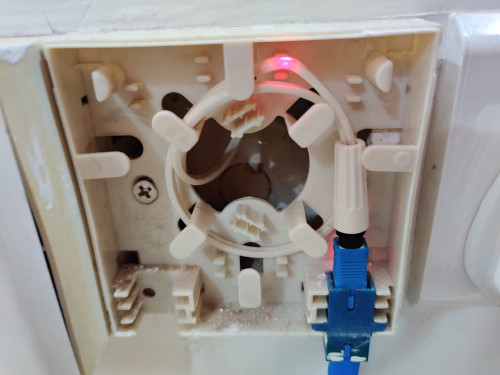
Hi, my time broadband couldn't be installed due to fiber no reading, as mentioned by the time personnel that came to install

he shined laser through the fiber from my unit (refer picture below), then went to the server room but found no light on the other end of the fiber

he advised me to check with developer on the fiber since my condo is still under defect liability period (warranty)

WTA:
1. What could be the issue with the fiber?
The fibre could be broken, or, any splicing point or fast connector in Riser is broken/not done properly.

2. Is this something that TIME can fix on their end? the developer has been very slow in fixing the defect  doh.gif  and i need stable internet connection urgently to work  sad.gif
You will need to check on the warranty period with your management, as they surely know when they took over the building from the developer.
If your building is in Penang, then I can send my team over to help.


Thanks.

» Click to show Spoiler - click again to hide... «

*
This post has been edited by jjj2: Mar 14 2021, 01:34 PM
jjj2
post Mar 14 2021, 01:37 PM

Look at all my stars!!
*******
Senior Member
3,608 posts

Joined: Feb 2006
QUOTE(azerak @ Mar 12 2021, 05:40 PM)
Hi I have just got my Time Fiber today. So they gave me Huawei HG8145V5 as my router. So I want to change the DHCP Server Primary and Secondary DNS but they somehow blocked it.

I have TPlink Deco E4 and TPlink Archer A6 that I use with my Unifi previously. Is there a way for me to use any/both of these two to bypass the Huawei router so my connection would be connected to the DNS that I want?
You have the option to set your own routers as AP or use it as Router by enabling the bridge mode in the Huawei HG8145V5 2-in-1 ONU Router.

I want to use my Getflix SmartDNS, which is the main reason I need to change the Primary and Secondary DNS.
*
jjj2
post Mar 16 2021, 10:37 PM

Look at all my stars!!
*******
Senior Member
3,608 posts

Joined: Feb 2006
QUOTE(four_add @ Mar 16 2021, 04:56 PM)
so TIME technician came today and checked the modem/router. even replace with new one, also have same issue (facebook/whatsapp/youtube content cant load).

have to use my own temporary Tenda router for now. he says this is a new issue involves the new Huawei modem/router.
*
Hi, try perform a test using your Huawei 2-in-1 ONT, temp dismantle your Tenda Router.

Simply set a public DNS such as 8.8.8.8 or 1.1.1.1 on your computer and try to load your FB etc.

Thanks.

jjj2
post Mar 16 2021, 11:42 PM

Look at all my stars!!
*******
Senior Member
3,608 posts

Joined: Feb 2006
QUOTE(apanzhafran @ Mar 16 2021, 10:56 AM)
Hi thank you for that.

I guess the problem is from the Huawei, not the TP Link router. We tried using my TP LINK router as well as the latest ASUS GAMING Router from TIME & yet we still have the problem

LAPTOP
LAN - 400-500mbps
WIFI 5G - 300-400mbps

PS4 PRO & PS5
LAN - Less than 100mbps
WIFI 5G - 300-400mbps

i went to my friend place who is having the same problem yet the result still the same

Now i dont know what to do as even using the PS5 still get less than 100mbps 😅
*
Hi Bro, unlikely to be Huawei ONU, as you are getting 400--500Mbps on your Laptop LAN.

Have you tried altering your PS4 DNS settings ? Or upgrading the PS4 ?

Thanks.


jjj2
post Mar 16 2021, 11:53 PM

Look at all my stars!!
*******
Senior Member
3,608 posts

Joined: Feb 2006
QUOTE(YunFX @ Mar 16 2021, 10:24 PM)
Good day to all.
I have a bit of inquiry regarding this. Today TIME people came to my apartment to install TIME 100mbps.
Upon checking they say the cable fibre and connector is broken and need to be fixed (I have attached picture for reference)
Usually this kind of problem can forward to the apartment management (inside unit) or need to find third party contractor? If third party how much damage need to repair this kind of problem?

Need to solved asap as i need internet for WFH-ing  rclxub.gif
Thank you all

user posted image
*
Hi, yes the cable is broken.

Please check with your management office whether this is still under warranty, if not then you may request them to intro a contractor to rectify it. Alternatively you can request the Installer to fix it if they are confident of doing that.

The repair cost depends, usually ranging from a few ten bucks to hundred plus.

Thanks.


jjj2
post Mar 17 2021, 04:28 PM

Look at all my stars!!
*******
Senior Member
3,608 posts

Joined: Feb 2006
QUOTE(soonwai @ Mar 17 2021, 03:38 PM)
Anyone having probs accessing:
https://ap.www.namecheap.com

I tried Unifi also cannot.
*
Ok here on TIME.
jjj2
post Mar 22 2021, 09:08 PM

Look at all my stars!!
*******
Senior Member
3,608 posts

Joined: Feb 2006
QUOTE(AllnGap @ Mar 21 2021, 09:01 PM)
Hi, wanted to ask I subscribed to TIME package not long ago.
I wanted to shift to landed property from condo so what options do I have ?

1. Ownership transfer
Yes, new owner continue to fulfill your minimum 2 years contract.
2. Cancel and I need to pay full 22months ??
RM500 Penalty

Thank you
*
jjj2
post Mar 22 2021, 09:12 PM

Look at all my stars!!
*******
Senior Member
3,608 posts

Joined: Feb 2006
QUOTE(selinix @ Mar 22 2021, 12:36 AM)
Got my time installed, the installer told me no need to call TIME to change to bridge mode if i want to use my own router, he said just configure my router to become access point mode. Is there any downside on that?
*
Your routing performance definitely different.
That's not right, the proper way is the SI should call the Provisioning Team to have the Bridge Mode profile pushed over to your ONT.
Thanks.
jjj2
post Mar 22 2021, 09:17 PM

Look at all my stars!!
*******
Senior Member
3,608 posts

Joined: Feb 2006
QUOTE(selinix @ Mar 22 2021, 08:55 AM)
A little more context, TIME is giving a 2 in 1 device which at most modern high rise setup, it sits in a box where it is closed up so the WIFI signal won't reach certain rooms for sure, at best it can do is to reach the kitchen/living area.

To solve this I have to pay extra for TIME huawei mesh node or I buy my own device and connect it to the LAN port at the living area so my WIFI signal is good to cover the entire house, so that's where the installer said just configure your device as AP mode and that will solve the issue.

As I am just a simple user and not looking for any advanced router with heaps of features, just want to find out besides enhancing the signal what other benefits i get if i decide to use it as main router instead
*
Hi, for your case where you have a SoHo Box prebuilt by your developer, you should be given the HG8240H5 ONU or you can have the HG8245V5 (New ONU) to be configured as bridge mode, then you may install your own router at the living area.

Thanks.
jjj2
post Mar 22 2021, 09:26 PM

Look at all my stars!!
*******
Senior Member
3,608 posts

Joined: Feb 2006
QUOTE(eugenelam85 @ Mar 22 2021, 12:47 PM)
hi all, my condo unit is dual key (2 separate compartments), both areas got their own fibre socket point,

im not familiar with all these, im thinking if i apply already, can i have 1 router for each compartment? so the usage will not be affected by each other, lets say A turn off the router, B still got access to internet because got own router

or can only have 1 main router?

thank you so much!
*
Hi, I assume you only want to apply a single line, you will need to check the fibre drawings to see how are these 2 fibre cables being deployed in your house.
If it's 2 isolated cables routed to the telephony Riser, then you cannot achieve what you intended to do.

Try to check & feel free to text me, will assist you further smile.gif

Thanks.
jjj2
post Mar 22 2021, 09:28 PM

Look at all my stars!!
*******
Senior Member
3,608 posts

Joined: Feb 2006
QUOTE(IAmLejen @ Mar 22 2021, 03:07 PM)
how do i obtain my pppoe username and pw ya?
*
Please kindly refer to the Installation Docket, or call 1800 18 1818 to request for it.

Thanks.
jjj2
post Mar 23 2021, 01:09 AM

Look at all my stars!!
*******
Senior Member
3,608 posts

Joined: Feb 2006
QUOTE(IAmLejen @ Mar 22 2021, 11:09 PM)
is network id = pppoe id?
*
Yes, in the form of xxxxx@timebb
jjj2
post Mar 24 2021, 09:36 AM

Look at all my stars!!
*******
Senior Member
3,608 posts

Joined: Feb 2006
QUOTE(1133 @ Mar 23 2021, 01:23 PM)
TIME finally come to my residential area after years of appeal, now awaiting installation next month.
Just a question, shall I change the router? or invest a mesh to compliment the FOC router?
I have a budget constraints, please advise something around RM4~500... Thanks
*
Hi, you will need to identify the coverage size & range you intended to cover.

No harm trying the stock router first. Thanks.
jjj2
post Mar 24 2021, 11:00 PM

Look at all my stars!!
*******
Senior Member
3,608 posts

Joined: Feb 2006
QUOTE(1133 @ Mar 24 2021, 03:23 PM)
My house is double storey terrace, area about 20'x40' each floor. Problem is how to make the signal available from one end to the other end at 2nd floor. Old house with very limited power socket, so I'm thinking of a more powerful router. Would Archer AX73 better than the stock one?
*
For sure AX73 is far more better than the stock router.
Playing around your budget, try placing single unit of AX73 in the center of your unit.

Thanks.
jjj2
post Mar 24 2021, 11:04 PM

Look at all my stars!!
*******
Senior Member
3,608 posts

Joined: Feb 2006
QUOTE(mygarage88 @ Mar 24 2021, 02:46 PM)
Hi there, currently im using TIME old router TPLINK Archer C1200. Wonder which router are the best among these 3.

Huawei HG8145V5 or WA8021V5  or TPLINK Archer C1200
*
Real sites tests show Huawei HG8145V5 performs better amongst the three.
If your expectation on wifi is somewhere +-400Mbps , then you will be disappointed.

This post has been edited by jjj2: Mar 24 2021, 11:07 PM
jjj2
post Mar 25 2021, 02:22 AM

Look at all my stars!!
*******
Senior Member
3,608 posts

Joined: Feb 2006
QUOTE(eugenelam85 @ Mar 25 2021, 01:57 AM)
yes i only want to apply a single line, if it's 2 isolated cables, can the installer like tapped both cables into 1 port in the "control room"? so like internet coming out from 1 port can supply to 2 separate fibre socket (like electric cable, electricity from a single cable split into 2 cables), then both areas can have their independent modem and router, not affected by each other.

i am not familiar with all these  sad.gif  sweat.gif

thank you  thumbsup.gif
*
Hi, sorry, technically it can be done unfortunately not allowed to do that due to policy.

Thanks.
jjj2
post Mar 25 2021, 07:26 PM

Look at all my stars!!
*******
Senior Member
3,608 posts

Joined: Feb 2006
QUOTE(1133 @ Mar 25 2021, 12:07 PM)
Thanks, bro @jjj2, so if place in the center, upstairs, or downstairs better?
*
Welcome smile.gif Just put at the floor where you use the most...For landed houses like your case, is your unit prelaid with fiber ? If yes, then you will need to see the location of the last termination, usually in a fibre wall socket or SoHo Box etc.
Moreover from this point to the location where you want to place your router, is is wired with network cable ?

If you can get the telephony diagram & house layout plan for me to see, then I can show you where to put....

Thanks.


100 Pages « < 49 50 51 52 53 > » Top
 

Change to:
| Lo-Fi Version
0.0384sec    0.82    7 queries    GZIP Disabled
Time is now: 17th December 2025 - 01:53 PM