Welcome Guest ( Log In | Register )

302 Pages « < 169 170 171 172 173 > » Bottom

Outline · [ Standard ] · Linear+

Home Networking WiFi Router Discussion Thread, Updated for 2023

views
     
gc68
post Mar 18 2021, 07:33 AM

Getting Started
**
Junior Member
132 posts

Joined: Jan 2011
QUOTE(kk131 @ Mar 18 2021, 06:04 AM)
The WAN port of the router should connect to the ONT. Check how many LAN ports provided on your proposed router, is the switch necessary for your installation, are you planning to add more ethernet connections not shown?
*
Thanks for the advice.

You mean the AX5400 should connect to the ONT ? The AX5400 only has 4 Ethernet ports - do I then connect the switch to the router via the uplink port ? Would the AX5400 be the bottleneck ?

Attached Image
kk131
post Mar 18 2021, 08:01 AM

On my way
****
Junior Member
566 posts

Joined: Jun 2005
From: Somewhere over the rainbow


QUOTE(gc68 @ Mar 18 2021, 07:33 AM)
Thanks for the advice.

You mean the AX5400 should connect to the ONT ? The AX5400 only has 4 Ethernet ports - do I then connect the switch to the router via the uplink port ? Would the AX5400 be the bottleneck ?

Attached Image
*
Yes your new diagram is correct.

According to the dlink website the AX5400 has '4 Gigabit Ethernet LAN ports and 1 Gigabit Ethernet WAN port provide optional wired connectivity'.

The router's primary purpose is to route packets on your network so all data between your LAN and the internet has to go through the the router, it's also providing security (firewall services) to protect your network and network address translation (NAT) for IPV4 (amongst other services). According to the spec it should not be a bottleneck.

I'm wondering if your storeroom is the best place for the router however, if it has brickwork walls the WiFi signal will be drastically attenuated (especially 5Ghz band).

This post has been edited by kk131: Mar 18 2021, 08:04 AM
gc68
post Mar 18 2021, 08:41 AM

Getting Started
**
Junior Member
132 posts

Joined: Jan 2011
QUOTE(kk131 @ Mar 18 2021, 08:01 AM)
Yes your new diagram is correct.

According to the dlink website the AX5400 has '4 Gigabit Ethernet LAN ports and 1 Gigabit Ethernet WAN port provide optional wired connectivity'.

The router's primary purpose is to route packets on your network so all data between your LAN and the internet has to go through the the router, it's also providing security (firewall services) to protect your network and network address translation (NAT) for IPV4 (amongst other services). According to the spec it should not be a bottleneck.

I'm wondering if your storeroom is the best place for the router however, if it has brickwork walls the WiFi signal will be drastically attenuated (especially 5Ghz band).
*
Yes indeed, the store room is certainly not the best place for the router.

The problem is all the LAN cables from around the house terminates at the store room. And the cables are quite short as you can see.

That's why I thought I can have a gigabit switch there to "extended" it and then place the router at the living room, just like in the first network diagram.

Another option is to do a patch panel ? But how to even fit a patch panel is such as small box ? Would patch panels degrade the connection and performance ?

Any way around this problem ?


Attached thumbnail(s)

Attached Image
gc68
post Mar 18 2021, 08:45 AM

Getting Started
**
Junior Member
132 posts

Joined: Jan 2011
QUOTE(kk131 @ Mar 18 2021, 08:01 AM)
Yes your new diagram is correct.

According to the dlink website the AX5400 has '4 Gigabit Ethernet LAN ports and 1 Gigabit Ethernet WAN port provide optional wired connectivity'.

The router's primary purpose is to route packets on your network so all data between your LAN and the internet has to go through the the router, it's also providing security (firewall services) to protect your network and network address translation (NAT) for IPV4 (amongst other services). According to the spec it should not be a bottleneck.

I'm wondering if your storeroom is the best place for the router however, if it has brickwork walls the WiFi signal will be drastically attenuated (especially 5Ghz band).
*
Oh one more thing - I plan to get DLink switch model DGS-1010P-E, which has 8+2 ports. 8 POE ports + 2 uplink ports

The router will connect to to 1 of the uplink ports - which will give better performance right ?


Attached Image
kk131
post Mar 18 2021, 08:54 AM

On my way
****
Junior Member
566 posts

Joined: Jun 2005
From: Somewhere over the rainbow


QUOTE(gc68 @ Mar 18 2021, 08:45 AM)
Oh one more thing - I plan to get DLink switch model DGS-1010P-E, which has 8+2 ports. 8 POE ports + 2 uplink ports

The router will connect to to 1 of the uplink ports - which will give better performance right ?
Attached Image
*
I'm not an expert on switches but I think you're correct. Where is the incoming FTTH located, also in the store room?
gc68
post Mar 18 2021, 09:03 AM

Getting Started
**
Junior Member
132 posts

Joined: Jan 2011
QUOTE(kk131 @ Mar 18 2021, 08:54 AM)
I'm not an expert on switches but I think you're correct. Where is the incoming FTTH located, also in the store room?
*
Yes, the fibre terminates right next to the LAN cable box.

kk131
post Mar 18 2021, 09:32 AM

On my way
****
Junior Member
566 posts

Joined: Jun 2005
From: Somewhere over the rainbow


QUOTE(gc68 @ Mar 18 2021, 09:03 AM)
Yes, the fibre terminates right next to the LAN cable box.
*
You could test coverage with the router inside the storeroom, otherwise I would locate the router in a convenient position outside the room, wall mount the switch in the storeroom adjacent to the box in your photo (not inside the box or it won't be ventilated), route 2 ethernet cables:

- ONT to router
- router to switch

This post has been edited by kk131: Mar 18 2021, 10:40 AM
submergedx
post Mar 18 2021, 02:06 PM

Regular
******
Senior Member
1,134 posts

Joined: Jun 2015
Hello guys

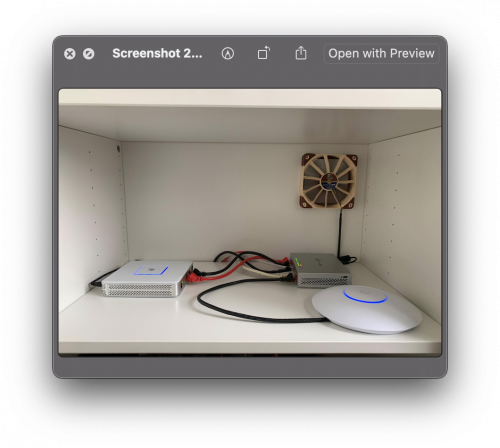
Would like to know the signal of the Wifi Router will go weak or heat if i hide it inside my cabinet in a 2-bedroom condo?

Thanks.

user posted image

This post has been edited by submergedx: Mar 18 2021, 02:10 PM
FusionXY
post Mar 18 2021, 02:22 PM

LAZZIE ON VACATION
*******
Senior Member
3,836 posts

Joined: Aug 2016

QUOTE(submergedx @ Mar 18 2021, 02:06 PM)
Hello guys

Would like to know the signal of the Wifi Router will go weak or heat if i hide it inside my cabinet in a 2-bedroom condo?

Thanks.

user posted image
*
Both. Router signal will be and get overheat due to no ventilation.

If there is a hole then won't heat that much but signal will be
affected.

Thanks
Ichibanichi
post Mar 18 2021, 03:13 PM

Casual
***
Junior Member
327 posts

Joined: Nov 2008


QUOTE(submergedx @ Mar 18 2021, 02:06 PM)
Hello guys

Would like to know the signal of the Wifi Router will go weak or heat if i hide it inside my cabinet in a 2-bedroom condo?

Thanks.

user posted image
*
Can do self testing.
Install any wifi scanner with dbi reading.
Stand beside your wifi router and check its strength (that is your referrence).
Close your cabinet. See how much it drop. If no drop means your cabinet didn't reflect much the signal wave.
Walk around your house and if the reading drop half, it is time to add mesh.
TSblacktubi
post Mar 18 2021, 03:51 PM

-
Group Icon
Elite
8,430 posts

Joined: Jul 2008

QUOTE(submergedx @ Mar 18 2021, 02:06 PM)
Hello guys

Would like to know the signal of the Wifi Router will go weak or heat if i hide it inside my cabinet in a 2-bedroom condo?

Thanks.

user posted image
*
The Ubiquiti AP is designed to be ceiling mounted. Placing it like that will result in poor signal.

Yes, the cabinet will weaken the WiFi signal, not an issue if you have several APs in your condo.

I won't worry too much about the heat since you have a Noctua fan. tongue.gif
filage
post Mar 18 2021, 04:41 PM

Regular
******
Senior Member
1,205 posts

Joined: Aug 2014
if I have a spare router that I used as a repeater (192.168.1.1), connect it via Ethernet cable to the main router (192.168.0.1). In order to access internet via the repeater, I must set my devices as having 192.168.0.x and set gateway as 192.168.0.1. Is there anyway to make Internet available by having the device remain within 192.168.1.x and gateway via 192.168.1.1? My devices are connected to the "repeater".

wirelessbuyer
post Mar 18 2021, 05:35 PM

Casual
***
Junior Member
346 posts

Joined: Jul 2012
QUOTE(filage @ Mar 18 2021, 04:41 PM)
if I have a spare router that I used as a repeater (192.168.1.1), connect it via Ethernet cable to the main router (192.168.0.1).  In order to access internet via the repeater, I must set my devices as having 192.168.0.x and set gateway as 192.168.0.1. Is there anyway to make Internet available by having the device remain within 192.168.1.x and gateway via 192.168.1.1? My devices are connected to the "repeater".
*
I would suggest for you to connect both routers via ethernet and use the secondary router as access point. If your secondary router have dedicated AP mode, just use it in that mode, otherwise just manually set it as access point. This way, you don't need to care about multiple subnet and/or double NAT issues.
ckh83
post Mar 18 2021, 11:36 PM

Getting Started
**
Junior Member
176 posts

Joined: Jan 2003
For mesh wifi tp link m9 plus, x20 or x60.
Is it better to remain the unifi default router, mesh wifi connect to default router.
Or dont use default router, direct use mesh wifi unit as router?
FusionXY
post Mar 19 2021, 12:01 AM

LAZZIE ON VACATION
*******
Senior Member
3,836 posts

Joined: Aug 2016

QUOTE(ckh83 @ Mar 18 2021, 11:36 PM)
For mesh wifi tp link m9 plus, x20 or x60.
Is it better to remain the unifi default router, mesh wifi connect to default router.
Or dont use default router, direct use mesh wifi unit as router?
*
Replace Unifi Default is the best option as it is using different SSID. This will cause WiFi interference.

Thanks.
Punish
post Mar 19 2021, 06:56 AM

Look at all my stars!!
*******
Senior Member
2,023 posts

Joined: Jan 2003
From: Muddy Estuary


Hi guys ive got a tight budget between RM400 to RM600...i wanted to find the best reliability router....i dont need the speed as much as i think im gonna end up using cheapskate 30mbps unifi connection anyway.....but i wanted something reliable...im sick of needing to restart my tplink router everyday just to get a fresh performance out of it...fyi my house just around 3000sqf double story terrace house...

My shortlist is here:
1. Refirbish china Asus AC86u
2. Asus AX3000
3. Dlink ax5460
4. Tp Link AX73 (is hard to trust this brand but the price is tempting)

This post has been edited by Punish: Mar 19 2021, 07:19 AM
ckh83
post Mar 19 2021, 08:02 AM

Getting Started
**
Junior Member
176 posts

Joined: Jan 2003
QUOTE(FusionXY @ Mar 19 2021, 12:01 AM)
Replace Unifi Default is the best option as it is using different SSID. This will cause WiFi interference.

Thanks.
*
So it's direct use mesh wifi main unit as router right?
FusionXY
post Mar 19 2021, 08:02 AM

LAZZIE ON VACATION
*******
Senior Member
3,836 posts

Joined: Aug 2016

QUOTE(Punish @ Mar 19 2021, 06:56 AM)
Hi guys ive got a tight budget between RM400 to RM600...i wanted to find the best reliability router....i dont need the speed as much as i think im gonna end up using cheapskate 30mbps unifi connection anyway.....but i wanted something reliable...im sick of needing to restart my tplink router everyday just to get a fresh performance out of it...fyi my house just around 3000sqf double story terrace house...

My shortlist is here:
1. Refirbish china Asus AC86u
2. Asus AX3000
3. Dlink ax5460
4. Tp Link AX73 (is hard to trust this brand but the price is tempting)
*
What's your stock router model.
Since that you are using 300mbps.
You may consider the Deco M5 Twin Pack as your house is more than 1000sqft.
AX Routers will be an overkill for 30mbps.
Usually higher end routers from TP-LINK are better than lower end.
I'm using Archer C9 and doesn't have any issues.
Archer C9 has already been discontinued and replaced by Archer C80.

Thanks
FusionXY
post Mar 19 2021, 08:04 AM

LAZZIE ON VACATION
*******
Senior Member
3,836 posts

Joined: Aug 2016

QUOTE(ckh83 @ Mar 19 2021, 08:02 AM)
So it's direct use mesh wifi main unit as router right?
*
Yes, correct.

If you use as an AP Mode, the speed might be reduced.
I have a few members here experienced that replace existing router is better than setting as AP mode.

Thanks.
kk131
post Mar 19 2021, 08:45 AM

On my way
****
Junior Member
566 posts

Joined: Jun 2005
From: Somewhere over the rainbow


QUOTE(Punish @ Mar 19 2021, 06:56 AM)
Hi guys ive got a tight budget between RM400 to RM600...i wanted to find the best reliability router....i dont need the speed as much as i think im gonna end up using cheapskate 30mbps unifi connection anyway.....but i wanted something reliable...im sick of needing to restart my tplink router everyday just to get a fresh performance out of it...fyi my house just around 3000sqf double story terrace house...

My shortlist is here:
1. Refirbish china Asus AC86u
2. Asus AX3000
3. Dlink ax5460
4. Tp Link AX73 (is hard to trust this brand but the price is tempting)
*
Iwouldn't recommend the old AC86U router they have known thermal problems that causes cracking of the solder joints.

This post has been edited by kk131: Mar 19 2021, 09:04 AM

302 Pages « < 169 170 171 172 173 > » Top
 

Change to:
| Lo-Fi Version
0.0186sec    0.41    6 queries    GZIP Disabled
Time is now: 24th December 2025 - 09:26 PM