Welcome Guest ( Log In | Register )

302 Pages « < 55 56 57 58 59 > » Bottom

Outline · [ Standard ] · Linear+

Home Networking WiFi Router Discussion Thread, Updated for 2023

views
     
SilentVampire
post Aug 29 2019, 04:51 PM

Networking Enthusiast
*******
Senior Member
5,714 posts

Joined: Mar 2007


QUOTE(blacktubi @ Aug 29 2019, 10:21 AM)
If you have a 2K budget, settle for something like the RT-AC86U twin pack AiMesh.  brows.gif

The only thing capable for 800Mbps mesh WiFi and it is the same size as GT-AC2900.

Unless you are comfortable to top up even further for the RT-AX92U with Wireless AX. This is even smaller than RT-AC86U but comes with Tri-Band.
*
All of that sounds mighty expensive whistling.gif sweat.gif brows.gif
TSblacktubi
post Aug 29 2019, 05:04 PM

-
Group Icon
Elite
8,407 posts

Joined: Jul 2008

QUOTE(SilentVampire @ Aug 29 2019, 04:51 PM)
All of that sounds mighty expensive  whistling.gif  sweat.gif  brows.gif
*
OP is having a budget of 1-2k with Unifi 800Mbps so I am recommending what's within OP's budget.

The Deco M9 Plus is a decent but a RT-AC86U twin pack will blow it out of the water.

I recently tested a RT-AC86U mesh system and it can actually deliver 800Mbps on the mesh node although I didn't write a review for it.

I can't wait to test the AX Deco once it is available next year. biggrin.gif
Eternalgl0ry
post Aug 29 2019, 10:15 PM

Casual
***
Junior Member
463 posts

Joined: Aug 2016
QUOTE(blacktubi @ Aug 29 2019, 10:21 AM)
If you have a 2K budget, settle for something like the RT-AC86U twin pack AiMesh.  brows.gif

The only thing capable for 800Mbps mesh WiFi and it is the same size as GT-AC2900.

Unless you are comfortable to top up even further for the RT-AX92U with Wireless AX. This is even smaller than RT-AC86U but comes with Tri-Band.
*
One question. any difference between rog and non rog asus routers? in terms of game related
Well I am not really into games but i do like the ease of managing ports and stuffs for games in the future
SilentVampire
post Aug 29 2019, 10:32 PM

Networking Enthusiast
*******
Senior Member
5,714 posts

Joined: Mar 2007


QUOTE(blacktubi @ Aug 29 2019, 05:04 PM)
OP is having a budget of 1-2k with Unifi 800Mbps so I am recommending what's within OP's budget.

The Deco M9 Plus is a decent but a RT-AC86U twin pack will blow it out of the water.

I recently tested a RT-AC86U mesh system and it can actually deliver 800Mbps on the mesh node although I didn't write a review for it.

I can't wait to test the AX Deco once it is available next year. biggrin.gif
*
Nice. Thank you for the feedback.
active92
post Aug 30 2019, 09:56 AM

Getting Started
**
Junior Member
85 posts

Joined: Aug 2014


House type: Bungalow
Size of house: 2 Floors, ~5000sqf (Not sure)
Features required: None
Number of devices connected to WiFi: ~20 max
Internet Speed: Unifi 800Mbps
Budget: RM2k
TSblacktubi
post Aug 30 2019, 10:19 AM

-
Group Icon
Elite
8,407 posts

Joined: Jul 2008

QUOTE(active92 @ Aug 30 2019, 09:56 AM)
House type: Bungalow
Size of house: 2 Floors, ~5000sqf (Not sure)
Features required: None
Number of devices connected to WiFi: ~20 max
Internet Speed: Unifi 800Mbps
Budget: RM2k
*
Like I mentioned above. RT-AC86U Twin Pack in AiMesh.
active92
post Aug 30 2019, 10:40 AM

Getting Started
**
Junior Member
85 posts

Joined: Aug 2014


QUOTE(blacktubi @ Aug 30 2019, 10:19 AM)
Like I mentioned above. RT-AC86U Twin Pack in AiMesh.
*
How much difference are there between RT-AX92U with Wireless AX and RT-AC86U Twin Pack in AiMesh in terms of speed and stability?
TSblacktubi
post Aug 30 2019, 11:02 AM

-
Group Icon
Elite
8,407 posts

Joined: Jul 2008

QUOTE(active92 @ Aug 30 2019, 10:40 AM)
How much difference are there between RT-AX92U with Wireless AX and RT-AC86U Twin Pack in AiMesh in terms of speed and stability?
*
RT-AX92U will definitely be faster as it is Tri-Band and it uses Wireless AX as backhaul.

But the price is much higher as well.
Zot
post Aug 30 2019, 11:07 AM

Look at all my stars!!
*******
Senior Member
7,938 posts

Joined: Mar 2014
QUOTE(blacktubi @ Aug 30 2019, 11:02 AM)
RT-AX92U will definitely be faster as it is Tri-Band and it uses Wireless AX as backhaul.

But the price is much higher as well.
*
I think you cannot simply say it is faster just because it is a tri-band. Devices connected to the router most likely connect to either one of the band link, unless your device can bind channel from two or more transmission channel biggrin.gif
TSblacktubi
post Aug 30 2019, 11:21 AM

-
Group Icon
Elite
8,407 posts

Joined: Jul 2008

QUOTE(Zot @ Aug 30 2019, 11:07 AM)
I think you cannot simply say it is faster just because it is a tri-band. Devices connected to the router most likely connect to either one of the band link, unless your device can bind channel from two or more transmission channel  biggrin.gif
*
I am comparing a Tri-Band mesh WiFi against a Dual-Band mesh WiFi. A Tri-Band mesh WiFi system will be faster as the backhaul bandwidth is not shared. Yes, the difference in a router will be negligible but it is rather significant in a mesh WiFi system.

In a dual-band mesh WiFi system, the existing band will be reused resulting in halved the bandwidth.

Eg: Take the TP-Link Deco M5 for example as it is easier to explain. It is AC1300 867Mbps + 400Mbps.
The peak capacity of the second node is left up to 433Mbps due to halved bandwidth as it is shared with the backhaul. After considering interference, it will be around 250Mbps peak. wink.gif

The Deco M9 Plus is AC2200 867Mbps + 867Mbps + 400mbps.
With Tri-Band will always able to deliver 867Mbps peak backhaul capacity as the existing radio is not shared for the backhaul connection. Resulting in 867Mbps peak capacity. After considering interference, it will be around 500Mbps on second node.

Back to the RT-AC86U twin pack. 5Ghz is up to 2167Mbps
On the second node, the peak capacity will be 1083.5Mbps.

On RT-AX92U twin pack. 5Ghz is up to 4804Mbps if you use the full 160Mhz Wireless AX.
On the second node, the peak capacity is 2404Mbps.

While these are just specs, the real world performance can only be displayed in testing and I tested all 4 models I mentioned above. wink.gif

Zot
post Aug 30 2019, 11:33 AM

Look at all my stars!!
*******
Senior Member
7,938 posts

Joined: Mar 2014
QUOTE(blacktubi @ Aug 30 2019, 11:21 AM)
I am comparing a Tri-Band mesh WiFi against a Dual-Band mesh WiFi.  A Tri-Band mesh WiFi system will be faster as the backhaul bandwidth is not shared. Yes, the difference in a router will be negligible but it is rather significant in a mesh WiFi system.

In a dual-band mesh WiFi system, the existing band will be reused resulting in halved the bandwidth.

Eg: Take the TP-Link Deco M5 for example as it is easier to explain. It is AC1300 867Mbps + 400Mbps.
The peak capacity of the second node is left up to 433Mbps due to halved bandwidth as it is shared with the backhaul. After considering interference, it will be around 250Mbps peak. wink.gif

The Deco M9 Plus is AC2200 867Mbps + 867Mbps + 400mbps.
With Tri-Band will always able to deliver 867Mbps peak backhaul capacity as the existing radio is not shared for the backhaul connection. Resulting in 867Mbps peak capacity. After considering interference, it will be around 500Mbps on second node.

Back to the RT-AC86U twin pack. 5Ghz is up to 2167Mbps
On the second node, the peak capacity will be 1083.5Mbps.

On RT-AX92U twin pack. 5Ghz is up to 4804Mbps if you use the full 160Mhz Wireless AX.
On the second node, the peak capacity is 2404Mbps.

While these are just specs, the real world performance can only be displayed in testing and I tested all 4 models I mentioned above. wink.gif
*
Backhauling using wireless looks nice to most people since you do not have to pull cable but the link speed gets smaller as distance go further, just like how fast your connection speed drops between your laptop to wireless AP. So, this is one of the reason the wireless mesh network can be slow. Putting each node closer to each others contradicts to the idea of having wide coverage with mesh. So, probably cable to each node still best choice for me laugh.gif
TSblacktubi
post Aug 30 2019, 11:44 AM

-
Group Icon
Elite
8,407 posts

Joined: Jul 2008

QUOTE(Zot @ Aug 30 2019, 11:33 AM)
Backhauling using wireless looks nice to most people since you do not have to pull cable but the link speed gets smaller as distance go further, just like how fast your connection speed drops between your laptop to wireless AP. So, this is one of the reason the wireless mesh network can be slow. Putting each node closer to each others contradicts to the idea of having wide coverage with mesh. So, probably cable to each node still best choice for me  laugh.gif
*
While Ethernet backhaul is still the best, pulling a cable is not an option for a lot of people. whistling.gif
active92
post Aug 30 2019, 12:22 PM

Getting Started
**
Junior Member
85 posts

Joined: Aug 2014


QUOTE(blacktubi @ Aug 30 2019, 11:44 AM)
While Ethernet backhaul is still the best, pulling a cable is not an option for a lot of people. whistling.gif
*
True about pulling cable. I currently have cables but it's just too ugly.
pl95077
post Aug 30 2019, 05:14 PM

Getting Started
**
Junior Member
245 posts

Joined: Feb 2010
QUOTE(blacktubi @ Aug 30 2019, 12:21 PM)
I am comparing a Tri-Band mesh WiFi against a Dual-Band mesh WiFi.  A Tri-Band mesh WiFi system will be faster as the backhaul bandwidth is not shared. Yes, the difference in a router will be negligible but it is rather significant in a mesh WiFi system.

In a dual-band mesh WiFi system, the existing band will be reused resulting in halved the bandwidth.

Eg: Take the TP-Link Deco M5 for example as it is easier to explain. It is AC1300 867Mbps + 400Mbps.
The peak capacity of the second node is left up to 433Mbps due to halved bandwidth as it is shared with the backhaul. After considering interference, it will be around 250Mbps peak. wink.gif

The Deco M9 Plus is AC2200 867Mbps + 867Mbps + 400mbps.
With Tri-Band will always able to deliver 867Mbps peak backhaul capacity as the existing radio is not shared for the backhaul connection. Resulting in 867Mbps peak capacity. After considering interference, it will be around 500Mbps on second node.

Back to the RT-AC86U twin pack. 5Ghz is up to 2167Mbps
On the second node, the peak capacity will be 1083.5Mbps.

On RT-AX92U twin pack. 5Ghz is up to 4804Mbps if you use the full 160Mhz Wireless AX.
On the second node, the peak capacity is 2404Mbps.

While these are just specs, the real world performance can only be displayed in testing and I tested all 4 models I mentioned above. wink.gif
*
Nice one!!!
Eternalgl0ry
post Aug 31 2019, 12:36 AM

Casual
***
Junior Member
463 posts

Joined: Aug 2016
i saw your written review say RT ax92U 160Mhz not available in Malaysia currently
https://www.blacktubi.com/review/asus-ax610...sh-wifi-system/

Is it still not available ?

This post has been edited by Eternalgl0ry: Aug 31 2019, 12:37 AM
uhlaw
post Sep 1 2019, 11:59 AM

-[L]aw -
*******
Senior Member
2,896 posts

Joined: Nov 2005
From: Criminal Underworld


QUOTE(blacktubi @ Aug 30 2019, 11:44 AM)
*
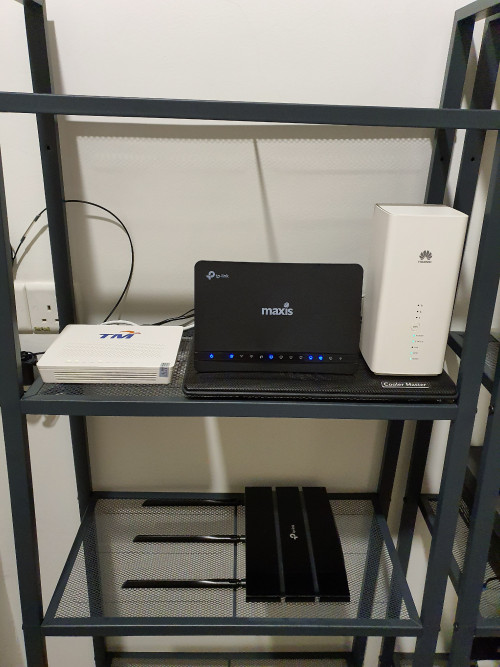
My current setup for maxis fibre 300mbps (2 storey house):

1) 1st floor - TM huawei modem + Maxis tplink c5v (for voip) + huawei b618 (for wireless)
2) Ground floor - tpink c1750 repeater

I have tplink a9 and it originally should be my wireless router (not b618), but my tplink c1750 hardly fetch 5ghz signal from a9.
B618 5ghz signal is much more stronger than a9 (3 bar vs 0~1 bar).

Is my a9 malfunction? or my setup issue?

This post has been edited by uhlaw: Sep 1 2019, 12:11 PM
SilentVampire
post Sep 1 2019, 02:17 PM

Networking Enthusiast
*******
Senior Member
5,714 posts

Joined: Mar 2007


QUOTE(uhlaw @ Sep 1 2019, 11:59 AM)
My current setup for maxis fibre 300mbps (2 storey house):

1) 1st floor - TM huawei modem + Maxis tplink c5v (for voip) + huawei b618 (for wireless)
2) Ground floor - tpink c1750 repeater

I have tplink a9 and it originally should be my wireless router (not b618), but my tplink c1750 hardly fetch 5ghz signal from a9.
B618 5ghz signal is much more stronger than a9 (3 bar vs 0~1 bar).

Is my a9 malfunction? or my setup issue?
*
There is nothing wrong with your A9. 5GHz signal is always worse than 2.4GHz. I recommend you switch to a better router, such as the C2300, or even better, throw your repeater away and get mesh WiFi. Deco M5 should be perfect.
uhlaw
post Sep 1 2019, 03:30 PM

-[L]aw -
*******
Senior Member
2,896 posts

Joined: Nov 2005
From: Criminal Underworld


QUOTE(SilentVampire @ Sep 1 2019, 02:17 PM)
There is nothing wrong with your A9. 5GHz signal is always worse than 2.4GHz. I recommend you switch to a better router, such as the C2300, or even better, throw your repeater away and get mesh WiFi. Deco M5 should be perfect.
*
What surprise me is 5ghz from b618 is much more better than a9😅
TSblacktubi
post Sep 1 2019, 04:37 PM

-
Group Icon
Elite
8,407 posts

Joined: Jul 2008

QUOTE(uhlaw @ Sep 1 2019, 03:30 PM)
What surprise me is 5ghz from b618 is much more better than a9😅
*
I have both B618 for Digi Infinite and Archer A9.

My A9 definitely perform better than the B618 in terms of 5Ghz WiFi coverage and stability.

Maybe you try doing a speedtest and see as sometime although the signal strength indicator is buggy.
uhlaw
post Sep 1 2019, 04:41 PM

-[L]aw -
*******
Senior Member
2,896 posts

Joined: Nov 2005
From: Criminal Underworld


QUOTE(blacktubi @ Sep 1 2019, 04:37 PM)
I have both B618 for Digi Infinite and Archer A9.

My A9 definitely perform better than the B618 in terms of 5Ghz WiFi coverage and stability.

Maybe you try doing a speedtest and see as sometime although the signal strength indicator is buggy.
*
I test through my ac1750 repeater at ground floor.. it can detect 5ghz signal 1st floor from b618 (3 bar) easily, while a9 (0~1 bar). Usually ground floor i cnt detect 5ghz, that is why need that repeater.

My repeater hardly detect 5ghz signal from a9, thus fail to extend 5ghz network. But b618 no problem.
user posted image

This post has been edited by uhlaw: Sep 1 2019, 04:49 PM

302 Pages « < 55 56 57 58 59 > » Top
 

Change to:
| Lo-Fi Version
0.0227sec    0.49    6 queries    GZIP Disabled
Time is now: 5th December 2025 - 03:19 PM