Outline ·
[ Standard ] ·
Linear+
Home Networking WiFi Router Discussion Thread, Updated for 2023
|
edisoner90
|
 Aug 17 2019, 08:48 AM Aug 17 2019, 08:48 AM
|

|
QUOTE(blacktubi @ Aug 14 2019, 09:41 PM) Phone TM to obtain your PPPOE username and password if you cannot copy from the UI. hi black tubi. i just bought a TP link AC2300 router.. when i do speed test inside the router setting page i got 300mbps but when i use external OOKLA speed test at the website i only get 90Mbps.. my current package is 300Mbps Turbo boost.. do you have any idea where the setting gone wrong? i am using CAT 5E cable and my desktop network card is from 2018 motherboard.. can i know what the problem might occur? seem like my speed keep capped below 100Mbps This post has been edited by edisoner90: Aug 17 2019, 09:01 AM |
|
|
|
|
|
TSblacktubi
|
Aug 17 2019, 12:08 PM
|
-

|
QUOTE(edisoner90 @ Aug 17 2019, 08:48 AM) hi black tubi. i just bought a TP link AC2300 router.. when i do speed test inside the router setting page i got 300mbps but when i use external OOKLA speed test at the website i only get 90Mbps.. my current package is 300Mbps Turbo boost.. do you have any idea where the setting gone wrong? i am using CAT 5E cable and my desktop network card is from 2018 motherboard.. can i know what the problem might occur? seem like my speed keep capped below 100Mbps Try a different Speedtest server |
|
|
|
|
|
slaveone
|
Aug 17 2019, 01:12 PM
|
|
|
QUOTE(edisoner90 @ Aug 17 2019, 08:48 AM) hi black tubi. i just bought a TP link AC2300 router.. when i do speed test inside the router setting page i got 300mbps but when i use external OOKLA speed test at the website i only get 90Mbps.. my current package is 300Mbps Turbo boost.. do you have any idea where the setting gone wrong? i am using CAT 5E cable and my desktop network card is from 2018 motherboard.. can i know what the problem might occur? seem like my speed keep capped below 100Mbps maybe can check whether the network card is FE or GE port |
|
|
|
|
|
enteraname1
|
Aug 17 2019, 01:27 PM
|
Getting Started

|
QUOTE(blacktubi @ Aug 10 2019, 09:29 PM) Hi, what if i get this ASUS RT-AC1300UHP rather than m5 deco? Is it any better? Current Router : Default c1200 archer Budget : 500 +/- Building: 2 floored Landed This post has been edited by enteraname1: Aug 17 2019, 01:30 PM |
|
|
|
|
|
TSblacktubi
|
Aug 17 2019, 02:15 PM
|
-
|
QUOTE(enteraname1 @ Aug 17 2019, 01:27 PM) Hi, what if i get this ASUS RT-AC1300UHP rather than m5 deco? Is it any better? Current Router : Default c1200 archer Budget : 500 +/- Building: 2 floored Landed A twin pack Deco M5 will definitely perform better than a single unit ASUS RT-AC1300UHP. ASUS most affordable Aimesh WiFi system will be the RT-AC66U + RP-AC55 combination. |
|
|
|
|
|
edisoner90
|
Aug 17 2019, 03:51 PM
|
|
|
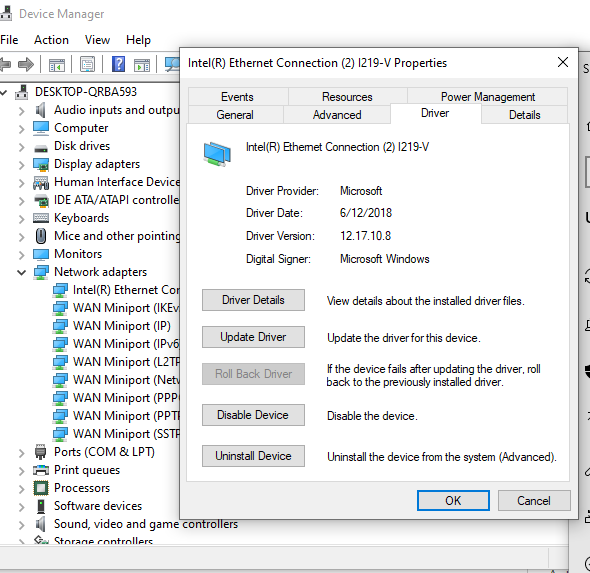
QUOTE(blacktubi @ Aug 17 2019, 12:08 PM) Try a different Speedtest server i try few server the outcome is the same for Lan cable.. for wifi when i test using 5G wifi i got 230Mbps. when i am near to the router.. i check my cable as well it is CAT5E.. QUOTE(slaveone @ Aug 17 2019, 01:12 PM) maybe can check whether the network card is FE or GE port i am using this B150 motherboard https://www.asus.com/Motherboards/B150-PRO-GAMING/Intel® I219V, 1 x Gigabit LAN Controller(s) this is my ethernet card... should be 1Gbps.. any solution for this?? |
|
|
|
|
|
slaveone
|
Aug 17 2019, 03:57 PM
|
|
|
QUOTE(edisoner90 @ Aug 17 2019, 03:51 PM) i try few server the outcome is the same for Lan cable.. for wifi when i test using 5G wifi i got 230Mbps. when i am near to the router.. i check my cable as well it is CAT5E.. i am using this B150 motherboard https://www.asus.com/Motherboards/B150-PRO-GAMING/Intel® I219V, 1 x Gigabit LAN Controller(s) this is my ethernet card... should be 1Gbps.. any solution for this?? have another cable to test..? |
|
|
|
|
|
edisoner90
|
Aug 17 2019, 04:23 PM
|
|
|
QUOTE(slaveone @ Aug 17 2019, 03:57 PM) have another cable to test..? i havent try yet.. i read cat 5E able to deliver speed up to 1000 Mbps without problem.. maybe old CAT 5E only 100 Mbps? |
|
|
|
|
|
enteraname1
|
Aug 17 2019, 04:48 PM
|
Getting Started
|
QUOTE(blacktubi @ Aug 17 2019, 02:15 PM) A twin pack Deco M5 will definitely perform better than a single unit ASUS RT-AC1300UHP. ASUS most affordable Aimesh WiFi system will be the RT-AC66U + RP-AC55 combination. Thank you very much ! Oh just another question, what if i upsize my budget and go Asus RT-AC86U ? Will it better than twin pack Deco M5 in range and stability? |
|
|
|
|
|
TSblacktubi
|
Aug 18 2019, 11:42 AM
|
-
|
QUOTE(edisoner90 @ Aug 17 2019, 04:23 PM) i havent try yet.. i read cat 5E able to deliver speed up to 1000 Mbps without problem.. maybe old CAT 5E only 100 Mbps? Your cable pins have degraded. Try a new cable. QUOTE(enteraname1 @ Aug 17 2019, 04:48 PM) Thank you very much ! Oh just another question, what if i upsize my budget and go Asus RT-AC86U ? Will it better than twin pack Deco M5 in range and stability? Put it this way. RT-AC1300UHP < Deco M5 twin pack < RT-AC86U single pack |
|
|
|
|
|
edisoner90
|
Aug 18 2019, 10:45 PM
|
|
|
QUOTE(blacktubi @ Aug 18 2019, 11:42 AM) Your cable pins have degraded. Try a new cable. Put it this way. Is this even possible??? but impossible it capped at 100Mbps but not 150/200.250 Mbps? RT-AC1300UHP < Deco M5 twin pack < RT-AC86U single pack |
|
|
|
|
|
nabilishes
|
Aug 19 2019, 08:13 AM
|
Getting Started
|
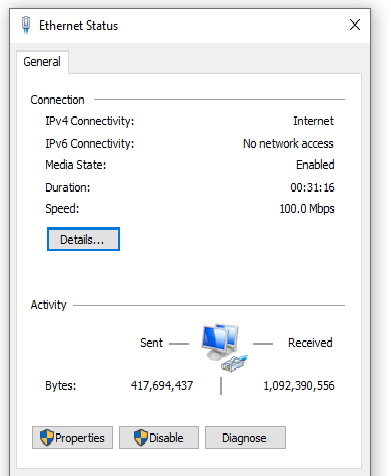
QUOTE(edisoner90 @ Aug 17 2019, 04:23 PM) i havent try yet.. i read cat 5E able to deliver speed up to 1000 Mbps without problem.. maybe old CAT 5E only 100 Mbps? I had the same problem with CAT-5E cable, initially it would show 1gbps. After couple of days when i check the Ethernet status it reverts back to 100mbps. After changing cable to CAT6 everything works well. Try changing the cable first. |
|
|
|
|
|
dnwt
|
Aug 19 2019, 01:48 PM
|
Getting Started
|
Hi all,
Need your suggestions.
I live in a double storey house (abt 22x70) and my C5 router (running on UNIFI 100mbps) is located at ground floor's living room connecting wiredly to an Android TV. The problem is my C5 will reboots once in awhile in middle of the night and it turns on my TV. This is frustrating as the TV is left on in the morning.
So now I am looking into replacing my router with a better router (C2300) or Mesh (D-Link DIR 1360). Which will be a better option?
FYI, I have a Tenda extender upstairs now.
Thanks in advance.
This post has been edited by dnwt: Aug 19 2019, 01:50 PM
|
|
|
|
|
|
edisoner90
|
Aug 21 2019, 11:29 AM
|
|
|
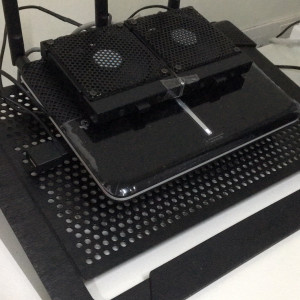
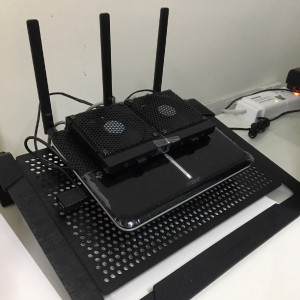
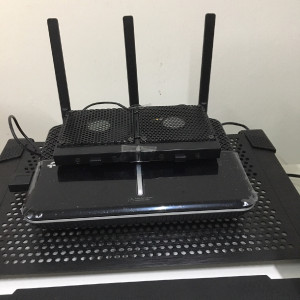
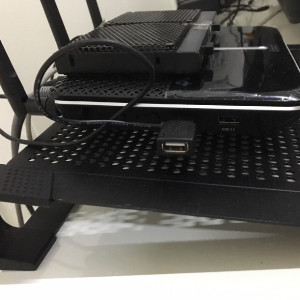
QUOTE(blacktubi @ Aug 18 2019, 11:42 AM) Your cable pins have degraded. Try a new cable. Put it this way. RT-AC1300UHP < Deco M5 twin pack < RT-AC86U single pack Indeed the pin degraded.. i use a new CAT5E and able to get speed above 100Mbps.. the 300Mbps Turbo boost package is so unstable.. not able to get constant speed around 260Mbps still.. damn TM QUOTE(nabilishes @ Aug 19 2019, 08:13 AM) I had the same problem with CAT-5E cable, initially it would show 1gbps. After couple of days when i check the Ethernet status it reverts back to 100mbps. After changing cable to CAT6 everything works well. Try changing the cable first. yea is my cable problem. Anyone know where can i get affordable 5V DC fan cooling for my router? |
|
|
|
|
|
edisoner90
|
Aug 21 2019, 02:01 PM
|
|
|
i saw like the 5V USB power DC fan is like a good business,.. https://www.aliexpress.com/item/33006318308....56d85510moWa0Pthis fan seem to be good for router and 5V USB input. This post has been edited by edisoner90: Aug 21 2019, 02:24 PM |
|
|
|
|
|
edisoner90
|
Aug 21 2019, 03:26 PM
|
|
|
|
|
|
|
|
|
edisoner90
|
Aug 21 2019, 11:07 PM
|
|
|
|
|
|
|
|
|
buffa
|
Aug 24 2019, 09:39 AM
|
|
|
House type: Condo
Size of house: 2500sqf, 1floor
Features required: None
Number of devices connected to WiFi: 10 devices
Internet Speed: TIME 100 mbps
Budget: RM600
Hi, I am using stock TIME router. My problem is when 2 ipad watch youtube together inside the furthest room (my router is at center of my house), both will lag, stream need buffer sometimes. Will changing better router help? What model recommend?
thanks in advance
This post has been edited by buffa: Aug 24 2019, 09:39 AM
|
|
|
|
|
|
FusionXY
|
Aug 24 2019, 10:01 AM
|
|
|
QUOTE(buffa @ Aug 24 2019, 09:39 AM) House type: Condo Size of house: 2500sqf, 1floor Features required: None Number of devices connected to WiFi: 10 devices Internet Speed: TIME 100 mbps Budget: RM600 Hi, I am using stock TIME router. My problem is when 2 ipad watch youtube together inside the furthest room (my router is at center of my house), both will lag, stream need buffer sometimes. Will changing better router help? What model recommend? thanks in advance Hi, I would like to recommend you TP-Link C2300 or D-Link DIR-2660. Thanks. This post has been edited by FusionXY: Aug 24 2019, 10:06 AM |
|
|
|
|



 Quote
Quote




 0.0179sec
 0.21
0.21
 6 queries
 GZIP Disabled